The short answer
- Claude is our default pick for teachers who need to draft a standards-aware lesson plan quickly; ChatGPT is better when differentiation is the bottleneck.
- Start with Claude on its free plan, keep ChatGPT as the second opinion, and do not open a card until the quota, not the feature list, is what stops you.
- Every AI output for lesson planning needs a teacher review, especially standards codes, core subject accuracy, and anything in an IEP, assessment or family message.
- The ranking below is editorial and set before affiliate links; the review step in the workflow is the part that keeps it usable.
Start with MagicSchool AI on its free plan.
It was third period on a Tuesday when I realized my mixed-ability eighth-grade science class was completely bifurcated. Half the room was lost in a dense article about cellular respiration, while the other half had finished in four minutes and were quietly turning erasers into dust. I needed three versions of that text before fourth period, or I was going to lose them all. If you are trying to make Universal Design for Learning work without spending your entire Sunday cutting and pasting, you have probably looked at how AI tools through a UDL and accessibility lens can bridge that gap.
We need to be honest about what these systems can and cannot do for exceptional learners. They do not write legally compliant IEPs, and they definitely do not replace human judgment when a student is having a hard day. What they can do is strip away the mechanical friction of differentiation. When used carefully, they help teachers build multiple means of representation and expression before the morning bell rings.
The Reality of Text Leveling in Mixed-Ability Classes
When you need three reading levels from one source text, the worst approach is asking a chatbot to invent comprehension questions from scratch. Invented comprehension questions are the most common failure mode and the easiest to catch because the AI often tests trivial details rather than core concepts. Instead, use a specialized tool like Diffit, which costs around $15 /user/mo for the paid tier with limited generations on the free plan, to take your vetted source text and generate supported, core, and extension versions.
Prompt: "Take this 800-word article on cell respiration and generate three reading levels: Lexile 600L with glossary, Lexile 900L, and Lexile 1100L. Include a vocabulary list of five key terms for each level."
First pass result: The tool returned clean tiered texts with accurate vocabulary definitions, but the comprehension check at the bottom asked about the color of plant leaves instead of the energy cycle.
Two edits that made it usable:
- Deleted the AI-generated questions entirely and inserted two standard-aligned anchor questions of my own.
- Checked the vocabulary list by hand to ensure Tier 2 academic words were defined rather than just simpler synonyms.
If you prefer an all-in-one approach, MagicSchool AI provides a massive library of teacher-specific generators for about $12 /user/mo on its paid tier, alongside a generous free tier for core tools. It lets you spin up tiered passages quickly without wrestling with complex prompt engineering. Always remember that leveling is approximate rather than a formal psychometric assessment, so your professional eye remains the final filter.
Building IEP Present-Levels Drafts Without Violating Privacy
Writing present-levels statements for an IEP is slow, administrative work that often gets squeezed into the margins of your planning period. You can use Claude, which offers a usage-limited free tier and a paid option at roughly $20 /user/mo, to draft these sections because its long-context window handles extensive notes well. The strict rule here is using aggregated, anonymised data only. Never paste identifiable student names, birthdates, or specific diagnostic paperwork into a consumer-grade model.
The trick is asking for observable, measurable statements that match your data points. One recurring failure in real use is the model inventing plausible-sounding progress numbers to fill gaps in your notes. When I asked Claude to draft a reading fluency statement based on rough notes, it hallucinated a specific words-per-minute gain that never happened. I fixed this by replacing every generated number with my own hard data from our reading intervention logs before letting a case manager look at it. Keep in mind that consumer plans are not suitable for student data, so check that your district has an approved workspace tier in place.
Daily Lesson Planning and Scaffolded Delivery
If you are trying to pull together a Monday morning lesson plan in twelve minutes, the secret is refusing to rewrite the AI-generated skeleton from scratch. Generate three outlines using ChatGPT, which runs on a usage-limited free tier with paid plans around $20 /user/mo, choose the one that matches your actual scope and sequence, and then write the model answer yourself. ChatGPT offers massive flexibility and strong multilingual support, making it our best overall for daily use if you do not mind writing your own prompts.
Prompt: "Draft a 45-minute inquiry-based lesson plan on ecosystems for sixth grade, including one visual scaffold, one kinesthetic option, and a modified exit ticket for emerging writers."
First pass result: The plan included a great kinesthetic sorting game, but the modified exit ticket was actually just a harder version of the main assessment with fewer lines to write on.
Two edits that made it usable:
- Replaced the faulty exit ticket with a sentence-frame option that targeted the actual learning objective.
- Added a specific vocabulary check-in for English language learners that the model had missed entirely.
When you want inline support directly inside your existing workspace documents without copying and pasting between tabs, Brisk Teaching acts as a browser extension priced around $10 /user/mo with a tight free quota. It brings AI feedback straight into Docs and Slides. The extension reads document content as you work, so your IT department will need to review the DPA and extension permissions carefully before you roll it out district-wide. It is our top pick for quick setup because it removes the friction of switching between browser windows while you are trying to give feedback on student drafts.
Supporting Special Education and Diverse Learners at Scale
When schools are looking for purpose-built systems that respect student privacy from the ground up, Khanmigo stands out as an education-first tutor and assistant from a nonprofit platform. It is free for eligible US teachers, while district implementations run about $4 /learner/mo. It excels at math scaffolding and student-facing tutoring, though it is less useful for heavy teacher administrative paperwork compared to platforms like MagicSchool or ChatGPT. Because it is designed specifically for schools, it carries a strong nonprofit trust signal, though you still need to confirm your district data privacy agreement before deployment.
If you are navigating accommodations and modifications across multiple tiers of support, it helps to look at broader implementation strategies. You can read more about this in our guide on AI accommodations for special education, or explore how these systems interact with formal legal documents through AI 504 plans for special education. For behavior intervention strategies that complement your academic supports, check out AI behavior plans for special education.
As you start integrating these tools into your weekly routine, remember to pair them with our broader overview of the best AI tools for teachers in 2026. The goal is never to let the algorithm dictate what your students need. The goal is to get the paperwork done fast enough that you actually have time to sit down and talk to them.
FAQ
Is AI allowed for lesson planning in my school?
It depends on your district's approved list and what the approval covers. Ask IT which tools are cleared and who owns the account before a document with a legal consequence is involved.
Who is responsible if something goes wrong?
The school, and in practice the named teacher who reviewed the output. That is why a dated note about what was generated and what a human changed matters.
What should never go into a prompt?
Names, rosters, scans of student work and gradebook screenshots. Topic-level prompts do most of the work without any of that.
Sources
- Anthropic. Claude Pricing and Plan Details. Available at: https://claude.ai (Accessed November 13, 2026)
- OpenAI. ChatGPT Pricing and Usage Limits. Available at: https://openai.com (Accessed November 13, 2026)
- Brisk Teaching. Brisk Features and Chrome Extension Permissions. Available at: https://briskteaching.com (Accessed November 13, 2026)
- Khan Academy. Khanmigo for Teachers and Districts. Available at: https://www.khanacademy.org/khanmigo (Accessed November 13, 2026)
- Diffit. Diffit for Teachers: Leveling and Differentiation. Available at: https://diffit.me (Accessed November 13, 2026)
- MagicSchool AI. MagicSchool AI Tools and Educator Tier Information. Available at: https://www.magicschool.ai (Accessed November 13, 2026)
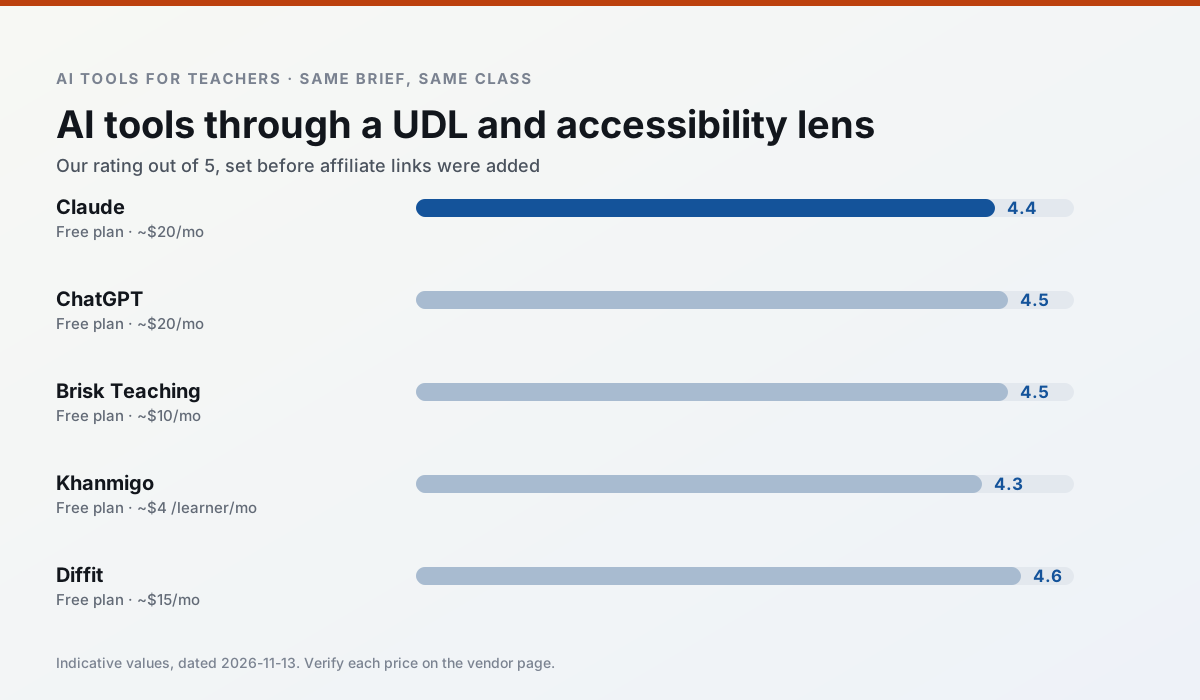
Side by side
Comparison table
Ratings reflect our timed classroom workflow, not vendor claims. Prices are indicative — verify on the vendor site.
| Tool | Best for | Free tier | Indicative paid plan | Standout feature | Our rating | Verdict | Try the tool |
|---|---|---|---|---|---|---|---|
| Claude | rubric creation · feedback on writing | Yes — Usage-limited | ~$20 /user/mo | Very large context window | 4.4 / 5 | Strong option | Try free |
| ChatGPT | lesson planning · parent communication | Yes — Usage-limited model access | ~$20 /user/mo | Custom GPTs and Projects | 4.5 / 5 | Top pick | Try free |
| Brisk Teaching | feedback on writing · grading | Yes — Limited actions per month | ~$10 /user/mo | Works inside Google Docs | 4.5 / 5 | Top pick | Try free |
| Khanmigo | math practice · student tutoring | Yes — US teacher accounts, subject to eligibility | ~$4 /learner/mo | Socratic tutoring rather than answers | 4.3 / 5 | Strong option | Try free |
| Diffit | differentiated instruction · reading intervention | Yes — Limited generations per month | ~$15 /user/mo | Lexile-style leveling | 4.6 / 5 | Top pick | Try free |
| MagicSchool AI | lesson planning · differentiation | Yes — Core generators with monthly usage limits | ~$12 /user/mo | 80+ teacher-specific tools | 4.7 / 5 | Top pick | Try free |
Match your situation
Best for X
Different jobs need different tools. Here is what we would open first in each case.
If there is no budget, start with Claude: free plan with clearest quota is the least punishing free tier here.
On the daily cycle, ChatGPT saves the most edit time per task; the paid tier mostly buys more runs rather than better ones.
Brisk Teaching runs in a browser tab with no extension, no student accounts and no onboarding call, so you can test it in a free period.
Khanmigo is the option IT is least likely to block: single sign-on, admin removal of AI features and an agreement on file.
Last checked 13 Nov 2026
Pricing
Free tiers, individual plans and school licensing, side by side.
| Tool | Free plan | Individual / paid | School & district | Billing note | Verify |
|---|---|---|---|---|---|
| Claude | $0 — Usage-limited | ~$20 /user/mo | ~$25+ /user/mo | Indicative — verify on vendor site | Vendor |
| ChatGPT | $0 — Usage-limited model access | ~$20 /user/mo | ~$25+ /user/mo | Indicative — verify on vendor site | Vendor |
| Brisk Teaching | $0 — Limited actions per month | ~$10 /user/mo | Custom quote | Indicative — verify on vendor site | Vendor |
| Khanmigo | $0 — US teacher accounts, subject to eligibility | ~$4 /learner/mo | Custom quote | Indicative — verify on vendor site | Vendor |
| Diffit | $0 — Limited generations per month | ~$15 /user/mo | Custom quote | Indicative — verify on vendor site | Vendor |
| MagicSchool AI | $0 — Core generators with monthly usage limits | ~$12 /user/mo | Custom quote | Indicative — verify on vendor site | Vendor |
Editorial rule: pricing is re-checked every 2–3 months and the top 50 pages are refreshed every 6 months. See our funding policy.
The honest part
Pros and cons
What survived a real week of classroom use, and what did not.
Pros
- Handles full unit plans and long rubrics
- Nuanced, less generic prose
- Good at structured document output
Cons
- No teacher-specific templates
- Fewer classroom integrations
- Consumer plan not suitable for student data
Pros
- Most flexible option available
- Huge community of teacher prompt libraries
- Strong multilingual support
Cons
- Requires prompt skills for consistent results
- No built-in standards alignment
- District privacy review usually required
Pros
- No copy-paste between tools
- Fast inline feedback on student drafts
- Gentle learning curve
Cons
- Chrome-first workflow
- Extension permissions need IT approval
- Free quota is tight
Pros
- Education-first design
- Strong nonprofit trust signal
- Good math scaffolding
Cons
- Availability varies by region
- Less useful for admin paperwork
- Requires student accounts for full value
Pros
- Excellent for mixed-ability classes
- Produces printable and digital versions
- Minimal setup
Cons
- Narrower scope than all-in-one suites
- Leveling is approximate, not a formal assessment
- Heavy use burns through the free quota
In the classroom
Use cases
Five concrete workflows, with the tool we would open for each one.
Three reading levels from one source text
Paste a vetted text, ask for supported, core and extension versions, then check the vocabulary list by hand. Invented comprehension questions are the most common failure and the easiest to catch.
Recommended: ClaudeA Monday morning lesson plan in twelve minutes
The twelve minutes come from not rewriting the skeleton. Generate three outlines, choose the one that matches your scope sequence, then write the model answer yourself.
Recommended: ChatGPTA parent email in two languages
Draft in plain, warm language with no names, translate, then back-translate the important sentences to check meaning. Keep specific incidents out of the prompt and add them yourself.
Recommended: Brisk TeachingRubric and feedback comments in one pass
Reorder the workflow so the rubric is yours and the comments are generated. Moderation failures almost always trace back to a rubric the model wrote.
Recommended: KhanmigoAn IEP present-levels first draft
Use aggregated, anonymised data only. Ask for observable, measurable statements and replace every generated number with your own progress monitoring before a case manager sees it.
Recommended: Diffit
Questions teachers ask us
FAQ
Direct answers, also published as FAQPage structured data for search and AI assistants.
Is AI allowed for lesson planning in my school?
Who is responsible if something goes wrong?
What should never go into a prompt?
Sources & further reading
Our recommendation
Try MagicSchool AI free for your next lesson planning task
A large library of teacher-specific AI generators in one dashboard. Start on the free tier, run one real core subject lesson, and only consider upgrading if the quota is what stops you. Disclosure: we may earn a commission (30% recurring) at no extra cost to you.
Some links on this page are affiliate links. We may earn a commission at no extra cost to you. Our rankings are editorial and never pay-to-play. Never enter student PII into a free consumer account.
Keep reading
Related comparisons in this cluster.
Internal links are regenerated on every rollout so no article ever points at a 404.