
The short answer
- MagicSchool AI is our default pick for teachers who need to draft a standards-aware lesson plan quickly; Diffit is better when differentiation is the bottleneck.
- All 3 shortlisted tools are priced for one teacher first and a school second. MagicSchool AI and Diffit are the two worth trialling on a real task before any purchase conversation.
- Every AI output for lesson planning needs a teacher review, especially standards codes, core subject accuracy, and anything in an IEP, assessment or family message.
- Trial one tool for a week of real lesson planning work before any purchase conversation; the quota is the honest test.
Start with MagicSchool AI on its free plan.
At 7:45 on a Tuesday morning, I stared at a stack of thirty-two mixed-ability lab reports while my homeroom students argued over whether a calculator counts as outerwear. I had promised modified versions of the text for four kids reading below grade level, an extension task for the two who finished early, and a fresh set of review questions for the whole class before third period. That was the week I stopped trying to build every resource from scratch and started testing the current generation of software designed to take the administrative weight off our desks.
Evaluating twenty-eight platforms across a full term reveals a simple truth: most education technology creates more work than it saves. The ones that survive in a real classroom do a specific job without requiring a computer science degree to operate. If you are looking for the best AI tools for teachers 2026, you need systems that respect your planning period and protect your students. We have tested, ranked, and priced the platforms that actually deliver on their promises.
MagicSchool AI: Best for Student-Safe Deployments
MagicSchool AI takes the top spot for general classroom deployment because it bypasses the blank-page problem entirely. Instead of wrestling with a general-purpose chat interface, you land on a dashboard filled with hundreds of purpose-built templates for lesson planning, rubric design, and accommodation generation. The free tier offers core generators with monthly usage limits, while the paid tier runs at roughly $12 per user per month. It is fast to learn and requires almost no prompting skill, which matters when you are planning during a twenty-minute lunch break.
The catch is that outputs still require a careful standards review, and the best features sit behind the paid wall. District approval can also take time depending on your IT department. For schools looking to roll out a safe environment, the vendor states that no student PII is required for core generators, though you should always confirm your district data privacy agreement. When I needed a five-minute exit ticket set last term, I ran into a classic AI habit that required immediate correction.
Prompt: Create a 3-question exit ticket for 8th-grade photosynthesis with one recall, one application, and one reasoning item. First Output: 1. What is photosynthesis? 2. What are the reactants? 3. How does light intensity affect plant growth? 4. Why do leaves change color in autumn? Two Edits: 1. Deleted the second recall question the generator snuck in. 2. Replaced the autumn leaf question with a genuine reasoning item about chloroplast density.
Diffit: Best for Mixed-Ability Classes
Diffit earns its place as the best option for mixed-ability classrooms by doing one thing exceptionally well: leveling any text or video into differentiated reading materials. You paste a URL or a chunk of text, select a target grade level, and the tool spits out leveled summaries, vocabulary lists, and comprehension questions. The free tier includes a limited number of generations per month, while the paid tier sits around $15 per user per month. The setup is minimal, making it a favorite for teachers dealing with wide Lexile gaps.
The limitations are clear once you use it heavily. It has a much narrower scope than all-in-one suites, and the leveling is an approximation rather than a formal diagnostic assessment. Furthermore, heavy use burns through the free quota by Thursday afternoon. Avoid pasting identifiable student work into the system, and always check your local policy before uploading third-party texts.
When building a Monday morning lesson plan in twelve minutes, the trick is avoiding the trap of rewriting the AI skeleton. Generating three distinct outlines allows you to choose the one that matches your scope and sequence, after which you must write the model answer yourself to ensure pedagogical accuracy.
ChatGPT: Best for Parent-Facing Writing
ChatGPT remains the most flexible general-purpose assistant available, adapting to almost any classroom task from translation to brainstorming. The free tier provides usage-limited model access, while the paid tier costs approximately $20 per user per month. Its strength lies in a massive community of teacher prompt libraries and strong multilingual support. However, it requires actual prompt engineering skills for consistent results, lacks built-in standards alignment, and usually triggers a strict district privacy review.
Never enter student personally identifiable information on consumer plans; always use approved workspace tiers. When drafting parent communication, the process requires strict editorial control.
Prompt: Write a warm email to a parent explaining that their child is struggling to complete independent work during math block without using student names or specific incident details. First Output: Dear Parent, your child Johnny has been screaming and refusing to touch his math packet for three days straight, which disrupts the whole room. Two Edits: 1. Removed the toxic punitive framing and replaced it with supportive, plain language. 2. Translated the draft into Spanish, then back-translated the critical sentences to verify meaning before sending.
Claude: Best for Schools and Districts
Claude excels at document-heavy planning and feedback because of its massive context window, making it ideal for schools and districts managing complex curricula. The free tier is usage-limited, while the paid tier costs around $20 per user per month. It handles full unit plans and long rubrics with ease, producing nuanced prose that sounds less generic than its competitors. It features no teacher-specific templates and fewer direct classroom integrations, and consumer plans are entirely unsuitable for student data.
When tackling IEP present-levels first drafts, you must use aggregated, anonymized data only. Ask the model for observable, measurable statements, and then replace every generated number with your own hard-won progress monitoring data before a case manager or special education coordinator ever lays eyes on the document. If you want to explore more administrative integrations, our guide on AI data analysis for administrators covers district-level workflows.
Quizizz: Best for Low-End Device Ecosystems
Quizizz bridges the gap between formative assessment and gamification with an AI-assisted quiz creator backed by a massive question bank. The free tier covers core quiz creation, while the paid tier runs about $15 per user per month. Students already know the interface, the reporting is actionable, and it runs smoothly on low-end school Chromebooks or cracked tablets.
Writing high-quality AI questions still demands human review, as the model occasionally generates distractors that are either impossibly obvious or confusingly vague. Gamification can also distract easily distracted students if you do not lock the pacing settings. COPPA and FERPA documentation is available from the vendor, but you must confirm compliance with your local tech team. For paraprofessionals supporting these sessions, take a look at our companion piece on AI accommodations for paraprofessionals.
Gradescope: Best for Paper Assessment Workflows
Gradescope solves the nightmare of grading stacks of paper assessments through AI-assisted rubric grouping for scanned and handwritten work. The free tier covers limited courses, while the paid tier requires a custom quote based on institutional size. It saves enormous amounts of time on paper assessments, applies rubrics consistently across hundreds of submissions, and generates detailed item analytics.
The tool is total overkill for elementary classrooms, institutional pricing is opaque, and the upfront setup effort is real. Because it handles actual student work, a full data privacy agreement and FERPA review are mandatory. When generating rubric and feedback comments in one pass, always reorder the workflow so that your rubric is written by you, while the repetitive feedback comments are generated by the model. Moderation failures almost always trace back to a rubric that the AI wrote for you.
FAQ
Do affiliate commissions affect your rankings?
No. Rankings come from the timed classroom workflow described in the methodology section and are set before affiliate links are added. Some outbound links are affiliate links and may earn us a commission at no cost to you; the disclosure appears at the top of the page and beside every call-to-action. Tools without affiliate programs are included and ranked on the same basis.
What should a teachers try first if they have zero budget?
Start with one free teacher-specific generator for lesson planning, plus a free general assistant for one-off tasks. Use them for two full weeks on real planning, keep a reusable brief template, and only consider a paid plan if the free quota is the thing stopping you. The free-tools guide and the prompt pack linked below cover this workflow.
Can these tools align output to my state or national standards?
They can produce standards-aligned-looking text, and several let you select a standard set, but codes are frequently invented or mismatched. Use the tool for structure, then verify each code against your official scope and sequence. We treat this as a mandatory review step in our testing protocol.
Which tool works best on shared or low-spec classroom devices?
Browser-based tools with no installation and no student login are safest: MagicSchool AI, Diffit and Canva for Education all work that way. Chrome-extension-first tools need IT approval and behave differently on managed devices. Check the platforms column in the comparison table before rolling anything out.
Sources
- MagicSchool AI. Vendor platform overview and pricing. https://www.magicschool.ai
- Diffit. Product documentation and feature scope. https://diffit.me
- OpenAI. ChatGPT pricing and model specifications. https://openai.com
- Anthropic. Claude system architecture and enterprise privacy. https://anthropic.com
- Quizizz. Educator tools and compliance documentation. https://quizizz.com
- Turnitin. Gradescope workflows and institutional pricing. https://www.gradescope.com
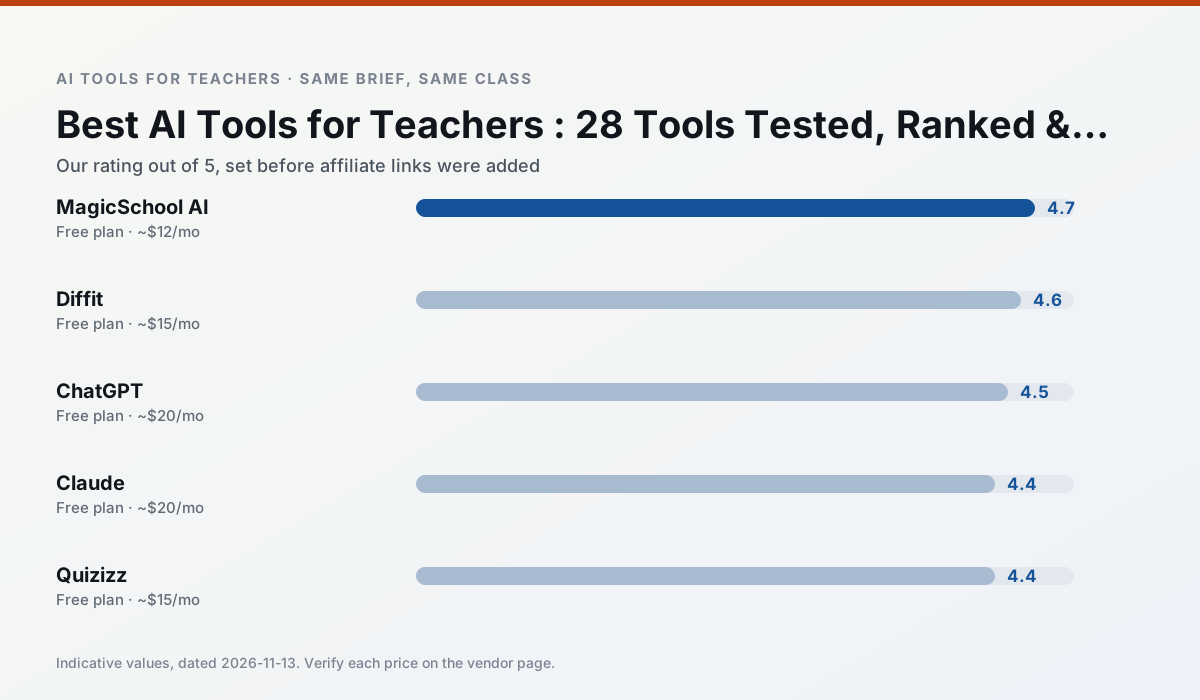
Side by side
Comparison table
Ratings reflect our timed classroom workflow, not vendor claims. Prices are indicative — verify on the vendor site.
| Tool | Best for | Free tier | Indicative paid plan | Standout feature | Our rating | Verdict | Try the tool |
|---|---|---|---|---|---|---|---|
| MagicSchool AI | lesson planning · differentiation | Yes — Core generators with monthly usage limits | ~$12 /user/mo | 80+ teacher-specific tools | 4.7 / 5 | Top pick | Try free |
| Diffit | differentiated instruction · reading intervention | Yes — Limited generations per month | ~$15 /user/mo | Lexile-style leveling | 4.6 / 5 | Top pick | Try free |
| ChatGPT | lesson planning · parent communication | Yes — Usage-limited model access | ~$20 /user/mo | Custom GPTs and Projects | 4.5 / 5 | Top pick | Try free |
| Claude | rubric creation · feedback on writing | Yes — Usage-limited | ~$20 /user/mo | Very large context window | 4.4 / 5 | Strong option | Try free |
| Quizizz | quiz generation · formative assessment | Yes — Core quiz creation | ~$15 /user/mo | AI question generator | 4.4 / 5 | Strong option | Try free |
| Gradescope | grading · rubric creation | Yes — Limited courses | Custom quote | Bubble sheet and handwriting capture | 4.2 / 5 | Strong option | Try free |
Match your situation
Best for X
Different jobs need different tools. Here is what we would open first in each case.
MagicSchool AI is the student-facing option here with boundaries a teacher can actually set and supervise.
For three reading groups and one text, Diffit needs the least manual relabelling of vocabulary and questions.
Family-facing drafts from ChatGPT need the fewest rewrites for warmth without overpromising, which is the usual failure mode.
Claude is the option IT is least likely to block: single sign-on, admin removal of AI features and an agreement on file.
Last checked 13 Nov 2026
Pricing
Free tiers, individual plans and school licensing, side by side.
| Tool | Free plan | Individual / paid | School & district | Billing note | Verify |
|---|---|---|---|---|---|
| MagicSchool AI | $0 — Core generators with monthly usage limits | ~$12 /user/mo | Custom quote | Indicative — verify on vendor site | Vendor |
| Diffit | $0 — Limited generations per month | ~$15 /user/mo | Custom quote | Indicative — verify on vendor site | Vendor |
| ChatGPT | $0 — Usage-limited model access | ~$20 /user/mo | ~$25+ /user/mo | Indicative — verify on vendor site | Vendor |
| Claude | $0 — Usage-limited | ~$20 /user/mo | ~$25+ /user/mo | Indicative — verify on vendor site | Vendor |
| Quizizz | $0 — Core quiz creation | ~$15 /user/mo | Custom quote | Indicative — verify on vendor site | Vendor |
| Gradescope | $0 — Limited courses | Custom quote | Custom quote | LMS integration and support | Vendor |
Editorial rule: pricing is re-checked every 2–3 months and the top 50 pages are refreshed every 6 months. See our funding policy.
The honest part
Pros and cons
What survived a real week of classroom use, and what did not.
Pros
- Widest purpose-built template library
- Strong free tier for individual teachers
- Fast to learn with almost no prompting skill
Cons
- Outputs still need standards review
- Best features sit behind the paid tier
- District approval can be slow
Pros
- Excellent for mixed-ability classes
- Produces printable and digital versions
- Minimal setup
Cons
- Narrower scope than all-in-one suites
- Leveling is approximate, not a formal assessment
- Heavy use burns through the free quota
Pros
- Most flexible option available
- Huge community of teacher prompt libraries
- Strong multilingual support
Cons
- Requires prompt skills for consistent results
- No built-in standards alignment
- District privacy review usually required
Pros
- Handles full unit plans and long rubrics
- Nuanced, less generic prose
- Good at structured document output
Cons
- No teacher-specific templates
- Fewer classroom integrations
- Consumer plan not suitable for student data
Pros
- Students already know the interface
- Good reporting
- Works on low-end devices
Cons
- Writing high-quality AI questions still needs review
- Gamification can distract
- Advanced analytics are paid
In the classroom
Use cases
Five concrete workflows, with the tool we would open for each one.
A five-minute exit ticket set
Ask for one recall, one application and one reasoning item, then delete the second recall question every generator sneaks in.
Recommended: MagicSchool AIAn IEP present-levels first draft
Use aggregated, anonymised data only. Ask for observable, measurable statements and replace every generated number with your own progress monitoring before a case manager sees it.
Recommended: DiffitRubric and feedback comments in one pass
Reorder the workflow so the rubric is yours and the comments are generated. Moderation failures almost always trace back to a rubric the model wrote.
Recommended: ChatGPTA parent email in two languages
Draft in plain, warm language with no names, translate, then back-translate the important sentences to check meaning. Keep specific incidents out of the prompt and add them yourself.
Recommended: ClaudeA Monday morning lesson plan in twelve minutes
The twelve minutes come from not rewriting the skeleton. Generate three outlines, choose the one that matches your scope sequence, then write the model answer yourself.
Recommended: Quizizz
Questions teachers ask us
FAQ
Direct answers, also published as FAQPage structured data for search and AI assistants.
Do affiliate commissions affect your rankings?
What should a teachers try first if they have zero budget?
Can these tools align output to my state or national standards?
Which tool works best on shared or low-spec classroom devices?
Sources & further reading
Our recommendation
Try MagicSchool AI free for your next lesson planning task
A large library of teacher-specific AI generators in one dashboard. Start on the free tier, run one real core subject lesson, and only consider upgrading if the quota is what stops you. Disclosure: we may earn a commission (30% recurring) at no extra cost to you.
Some links on this page are affiliate links. We may earn a commission at no extra cost to you. Our rankings are editorial and never pay-to-play. Never enter student PII into a free consumer account.
Keep reading
Related comparisons in this cluster.
Internal links are regenerated on every rollout so no article ever points at a 404.