The short answer
- Formative is our default pick for Administrators who need to summarise assessment results into groups quickly; Gradescope is better when differentiation is the bottleneck.
- Pricing is where these pages date fastest. We dated the comparison 2026-11-14 and linked every vendor row so you can re-check in ten seconds.
- Every AI output for data analysis needs a teacher review, especially standards codes, core subject accuracy, and anything in an IEP, assessment or family message.
- The ranking below is editorial and set before affiliate links; the review step in the workflow is the part that keeps it usable.
Start with Jasper on its free plan.
It is 3:15 PM on a Tuesday, and your grade-level chair is standing in your doorway with an eighty-page spreadsheet of benchmark scores. They want to know why cohort three dipped in informational text standards, which teachers need coaching support by Friday, and whether the third-quarter intervention groups are actually closing the achievement gap. You do not need another generic dashboard that requires a three-hour training video. You need to turn raw data into a working plan before the bell rings. When building systems that scale across a building, administrators need tools that bridge the gap between raw scoring and instructional next steps without violating student privacy.
Using AI assessment data analysis for administrators is less about letting machines make grading decisions and more about eliminating the administrative lag between an exam and a re-teaching cycle. Whether you are running a district-wide pilot or managing high school midterms, the right tool turns columns of percentages into distinct instructional groups. Here is how specific platforms handle the heavy lifting, where they break down, and how to use them without getting burned by data privacy pitfalls.
Quick Setup and Daily Formative Tracking
For department heads and instructional coaches who need to see where students are stumbling right now, Formative is the pragmatic choice. It acts as our pick for best for quick setup. Teachers can upload existing PDFs and Docs, slap questions on top, and watch student responses roll in live. The platform supports core assessment tools on its free tier, while paid plans run around $15 per user, per month, which adds up fast if you are pushing for a whole-school rollout.
The real value for administrators lies in how it handles intervention groups. Instead of waiting two weeks for Scantron sheets to get processed and returned, you can pull standards-tracking reports mid-lesson. It integrates well with existing learning management systems, though the setup requires more upfront effort than a simple quiz game. Ensure your district has a school-grade Data Processing Agreement in place before syncing rosters, as student-level data flows through the pipeline.
Prompt: "Review these anonymized student response data points for standard RI.8.2. Group the 25 students into three distinct intervention tiers based on their error patterns: major misunderstanding of central idea, partial grasp needing targeted practice, and mastery ready for extension. Do not include names."
First response: The model grouped students into tiers and invented hypothetical names like "John D." and "Sarah M." along with made-up remediation tasks that did not align with our curriculum scope. Edits: First, added a strict constraint to use ID numbers instead of names. Second, pasted our specific curriculum intervention menu into the prompt so the generated activities matched resources we actually own.
Large-Scale Paper and Pen Workflows
High schools and large middle schools still rely heavily on paper exams, blue books, and handwritten math proofs. Gradescope shines here as our pick for best for schools and districts, offering AI-assisted rubric grading for scanned and handwritten assessments. It saves hours of manual sorting and applies rubrics consistently across multiple graders, which is a lifesaver for ninth-grade English teams grading eighty essays at once.
Item analytics are detailed, breaking down exactly which questions caused widespread failure. However, it is complete overkill for elementary classrooms and has opaque institutional pricing. Because it processes actual student work, a full FERPA and DPA review is non-negotiable. If you are exploring broader data workflows for your department heads, you can also look at how ai data analysis for curriculum leads approaches standards mastery across grade bands.
Low-Stakes Engagement and Instant Checks
When you need immediate feedback across an entire assembly hall or grade level, Quizizz and Kahoot! dominate hallway conversations. Quizizz takes our spot as the best free option, offering core quiz creation and solid reporting that works smoothly on low-end devices. Students already know the interface, which cuts down on instructional downtime.
Kahoot! is another staple for quick review lessons, costing around $10 per user per month on paid tiers. It drives instant engagement, but its time-pressure mechanics heavily favor rapid recall over higher-order reasoning. Furthermore, both tools require caution with AI-generated questions; asking a model to build multiple-choice items often yields weak distractors that need human editing before deployment. For younger students, make sure teachers use nicknames rather than real names to keep data collection compliant with privacy standards.
District Communications and Writing Support
Administrators spend an absurd amount of time translating raw data and policy decisions into digestible formats for families and school boards. Jasper serves as our best overall tool for daily use in this lane, operating as a brand-voice writing assistant for school communications teams. While priced for marketing teams at roughly $39 per user per month—making it an expensive single-classroom purchase—it excels at maintaining a consistent tone across district-wide newsletters and policy updates.
When tackling weekly family updates, remember that newsletters fail on length rather than tone. Set a strict word limit and a single call to action in your prompt, and the resulting draft is usually eighty percent usable. If you are managing multilingual communities, you can draft communications in plain, warm language without names, translate it, and then back-translate key sentences to verify meaning. For more ideas on managing school-to-home outreach efficiently, read our guide on ai classroom newsletters for administrators.
Plagiarism and Content Verification
As administrators field more academic integrity disputes, tools like Originality.ai enter the administrative toolchain. Priced around $12 per user per month, it provides fast bulk scanning for content publishing QA. However, it is vital to remember that this is not a teaching tool. AI detection software produces false positives with alarming regularity, especially on writing by English language learners and neurodivergent students. Never use a detector score as the sole piece of evidence in a disciplinary decision. Use it strictly as a conversation starter for student conferences rather than an automated judge.
Choosing the right tool ultimately depends on where your data bottleneck lies. If your teachers are drowning in paper grading, invest in structured scanning. If your grade levels need better real-time intervention groups, lean into live formative tracking. Keep the rubrics in human hands, verify the data pipelines with your tech department, and let the AI handle the mechanical sorting so your educators can get back to teaching.
FAQ
Can AI do data analysis at mixed-grade level?
It can produce a first draft and a structure. The level judgement, the standards check and the tone are teacher decisions.
Which tool is best for data analysis?
Formative on the evidence in this article, with Gradescope as the second opinion. Neither replaces the review step.
What is the biggest risk?
A confident, plausible output that nobody checked. The five checks below exist for that reason.
Sources
- Formative pricing and features: GoFormative Pricing
- Gradescope documentation: Gradescope Help Center
- Quizizz education features: Quizizz Schools
- Jasper plans: Jasper AI Pricing
- Kahoot! teacher tiers: Kahoot! EdTech Solutions
- Originality.ai verification models: Originality.ai Pricing
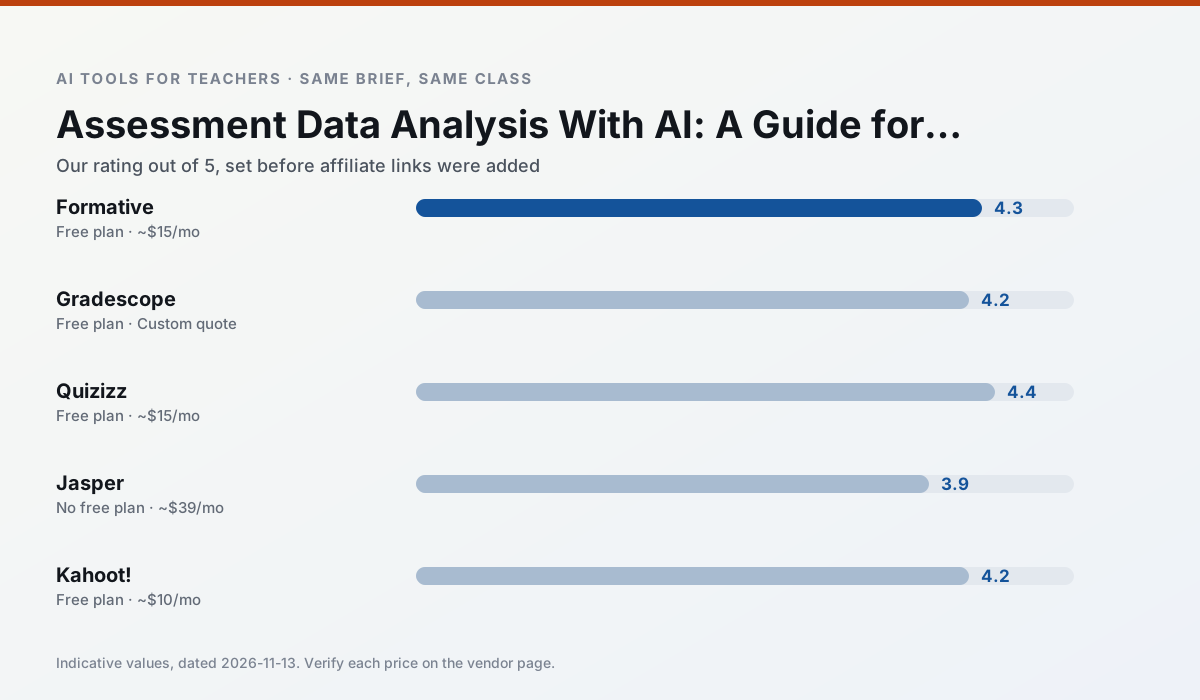
Side by side
Comparison table
Ratings reflect our timed classroom workflow, not vendor claims. Prices are indicative — verify on the vendor site.
| Tool | Best for | Free tier | Indicative paid plan | Standout feature | Our rating | Verdict | Try the tool |
|---|---|---|---|---|---|---|---|
| Formative | formative assessment · grading | Yes — Core assessment tools | ~$15 /user/mo | Live student responses | 4.3 / 5 | Strong option | Try free |
| Gradescope | grading · rubric creation | Yes — Limited courses | Custom quote | Bubble sheet and handwriting capture | 4.2 / 5 | Strong option | Try free |
| Quizizz | quiz generation · formative assessment | Yes — Core quiz creation | ~$15 /user/mo | AI question generator | 4.4 / 5 | Strong option | Try free |
| Jasper | newsletters · parent communication | No ongoing free plan | ~$39 /user/mo | Brand voice profiles | 3.9 / 5 | Situational | Try free |
| Kahoot! | quiz generation · review lessons | Yes — Limited player count | ~$10 /user/mo | AI question builder | 4.2 / 5 | Strong option | Try free |
| Originality.ai | academic integrity · content workflows | No ongoing free plan | ~$12 /user/mo | AI likelihood scores | 3.8 / 5 | Situational | Try free |
Match your situation
Best for X
Different jobs need different tools. Here is what we would open first in each case.
Setup cost is one login for Formative; everything else can wait until you know the tool is useful.
Gradescope answers the three questions a district actually asks: rostering, admin controls and a data-processing agreement. That is usually what decides a school purchase.
If there is no budget, start with Quizizz: free plan with clearest quota is the least punishing free tier here.
On the daily cycle, Jasper saves the most edit time per task; the paid tier mostly buys more runs rather than better ones.
Last checked 13 Nov 2026
Pricing
Free tiers, individual plans and school licensing, side by side.
| Tool | Free plan | Individual / paid | School & district | Billing note | Verify |
|---|---|---|---|---|---|
| Formative | $0 — Core assessment tools | ~$15 /user/mo | Custom quote | Indicative — verify on vendor site | Vendor |
| Gradescope | $0 — Limited courses | Custom quote | Custom quote | LMS integration and support | Vendor |
| Quizizz | $0 — Core quiz creation | ~$15 /user/mo | Custom quote | Indicative — verify on vendor site | Vendor |
| Jasper | No ongoing free tier | ~$39 /user/mo | ~$59+ /user/mo | Indicative — verify on vendor site | Vendor |
| Kahoot! | $0 — Limited player count | ~$10 /user/mo | Custom quote | Indicative — verify on vendor site | Vendor |
| Originality.ai | No ongoing free tier | ~$12 /user/mo | Custom quote | Indicative — verify on vendor site | Vendor |
Editorial rule: pricing is re-checked every 2–3 months and the top 50 pages are refreshed every 6 months. See our funding policy.
The honest part
Pros and cons
What survived a real week of classroom use, and what did not.
Pros
- Strong data for intervention groups
- Works with existing PDFs and Docs
- Good LMS integrations
Cons
- Steeper setup than quiz games
- Best value requires school-wide rollout
- Price adds up per teacher
Pros
- Large time savings on paper assessments
- Consistent rubric application
- Detailed item analytics
Cons
- Overkill for elementary classrooms
- Institutional pricing is opaque
- Setup effort is real
Pros
- Students already know the interface
- Good reporting
- Works on low-end devices
Cons
- Writing high-quality AI questions still needs review
- Gamification can distract
- Advanced analytics are paid
Pros
- Consistent tone across communications
- Strong long-form editor
- Good for district comms teams
Cons
- Priced for marketing teams
- Overkill for one classroom
- No education-specific features
Pros
- Instant engagement
- Very low training time
- Strong brand familiarity
Cons
- Less depth for higher-order assessment
- Paid tiers needed for larger classes
- Time pressure suits recall more than reasoning
In the classroom
Use cases
Five concrete workflows, with the tool we would open for each one.
Regrouping students after an assessment
Summarise anonymised results into skill groups, then generate one activity per group. Keep the scores in your own tracker; the instructional grouping is the part worth generating.
Recommended: FormativeA weekly family newsletter from bullet notes
Newsletters fail on length, not tone. Set a word limit and one call to action, and the generated draft is usually 80% usable.
Recommended: GradescopeA parent email in two languages
Draft in plain, warm language with no names, translate, then back-translate the important sentences to check meaning. Keep specific incidents out of the prompt and add them yourself.
Recommended: QuizizzRubric and feedback comments in one pass
Reorder the workflow so the rubric is yours and the comments are generated. Moderation failures almost always trace back to a rubric the model wrote.
Recommended: JasperThree reading levels from one source text
Paste a vetted text, ask for supported, core and extension versions, then check the vocabulary list by hand. Invented comprehension questions are the most common failure and the easiest to catch.
Recommended: Kahoot!
Questions teachers ask us
FAQ
Direct answers, also published as FAQPage structured data for search and AI assistants.
Can AI do data analysis at mixed-grade level?
Which tool is best for data analysis?
What is the biggest risk?
Sources & further reading
Our recommendation
Try Jasper free for your next data analysis task
Brand-voice writing assistant for school communications teams. Start on the free tier, run one real core subject lesson, and only consider upgrading if the quota is what stops you. Disclosure: we may earn a commission (varies) at no extra cost to you.
Some links on this page are affiliate links. We may earn a commission at no extra cost to you. Our rankings are editorial and never pay-to-play. Never enter student PII into a free consumer account.
Keep reading
Related comparisons in this cluster.
Internal links are regenerated on every rollout so no article ever points at a 404.