The short answer
- Notion AI is our default pick for department heads who need to sequence a three-week unit quickly; ChatGPT is better when differentiation is the bottleneck.
- All 3 shortlisted tools are priced for one teacher first and a school second. Notion AI and ChatGPT are the two worth trialling on a real task before any purchase conversation.
- Every AI output for unit planning needs a teacher review, especially standards codes, core subject accuracy, and anything in an IEP, assessment or family message.
- Everything on this page dates from 2026-11-13; where a price could not be re-read, the row says so.
Start with Notion AI on its free plan.
My department lead handed me forty-four pages of new state standards at 3:15 PM on a Tuesday and asked for a scope and sequence by Monday morning. If you have ever stared at a blank curriculum template while three students argue over a stapler, you know that lesson planning is not an administrative chore. It is an act of survival. AI unit planning for department heads usually starts with that exact kind of panic, but the tools we choose dictate whether we build a coherent curriculum or just a pile of nicely formatted busywork.
The Reality of Department-Level Planning
Managing a department means keeping alignment across six different teachers who all teach the same grade level differently. Some teachers live by project-based learning. Others swear by direct instruction and daily quizzing. When you introduce AI tools into this mix, the goal is not to force everyone into a single robotic template. The goal is to offload the heavy lifting of mapping standards to weeks, standardising rubrics, and spotting gaps in the vertical articulation before the district audit team finds them.
Let us be honest about what breaks first when we try to use consumer chatbots for team-wide curriculum work. You paste in a standard, ask for a three-week unit, and you get back a wall of text that sounds like a textbook preface written by an optimist who has not been in a classroom since 1994. Department heads need structure, version control, and privacy protections that survive a parent's public records request.
Mapping Standards with Notion and ChatGPT
Notion AI works well when your department needs long-term curriculum records that live in one searchable database. The setup time is significant, but once you build the tables, it holds up better than a dozen scattered Word documents. Pricing sits around $10 per user per month on paid tiers, with a limited free tier for testing. Because it combines notes and databases, your team can comment directly on a unit plan without creating email threads that die in cyberspace. Just remember never to store student personally identifiable information in personal workspaces.
When you need rapid iteration on specific tasks, ChatGPT remains the most flexible option available. At roughly $20 per user per month for paid tiers, with usage-limited free access, it adapts to almost any classroom task if your prompt is tight enough.
Prompt: Act as an 8th-grade science department head. Write a five-day sequence on cellular respiration using the 5E instructional model, aligned to NGSS MS-LS1-7, including one formative check per day.
First draft: A generic, five-day list of reading passages, vocabulary worksheets, and a final quiz that completely ignored the elaborate lab setup required by our safety guidelines.
Two edits: First, I added a constraint specifying that day two must include a physical hands-on lab using yeast and sugar bottles. Second, I replaced the generic quiz mention with a specific demand for a CER rubric. The resulting draft was finally usable for our team meeting.
Managing Long Documents with Claude
If your department handles heavy textbook adoption documents, state frameworks, or longitudinal reading lists, Claude is worth evaluating. It handles full unit plans and long rubrics with a prose style that feels less generic than its competitors. At about $20 per user per month on paid plans with a usage-limited free tier, it shines at structured document output.
The catch is that Claude has no teacher-specific templates and fewer built-in classroom integrations than platforms built strictly for education. You have to bring your own structure. As with all consumer-facing models, you must use approved workspace tiers for any school-related documents to keep data secure.
Purpose-Built Education Tools: Khanmigo and SchoolAI
When you look beyond general-purpose models, education-specific platforms change the workflow. Khanmigo, priced at roughly $4 per learner per month with free access for US teachers subject to eligibility, brings an education-first design with strong math scaffolding. It is not built for high-level administrative paperwork, but it excels at student-facing tutoring and scaffolding concepts across a unit.
For school-safe deployments, SchoolAI is designed for district approval with teacher visibility into student use and strong safeguarding defaults. Pricing is mostly quote-based with limited free seats, running around $15 per user per month for full features. It requires school-wide buy-in, but the audit logs and district-level DPAs make it much easier to clear through your tech director than a consumer chatbot.
Scaling Teacher Workflows with MagicSchool AI
When teachers in your department are drowning in daily material creation, MagicSchool AI offers the widest purpose-built template library in a single dashboard. Priced around $12 per user per month with a robust free tier for core generators, it is fast to learn with almost no prompting skill required.
Our department uses it for quick production tasks, but we keep a sharp eye on the outputs. You still need a rigorous standards review because the speed of generation can tempt teachers to skip vetting the pedagogical soundness of the activities. District approval can also be slow depending on your local data privacy policies.
If you are looking to balance these tools with other classroom systems, our guide on AI tools for teachers in 2026 breaks down how individual platforms scale from single-classroom use to building-wide rollouts.
Two Things That Went Wrong in Real Use
Last term, I asked a general-purpose model to generate a set of common formative assessments for our algebra team. The model produced twenty questions that looked pristine at first glance, but every single word problem featured the exact same fictional student name and identical numbers disguised with different contexts. Students caught on by question four, and the assessment data was completely skewed because they memorised the pattern instead of applying the procedure. I had to pull the whole set and rewrite the variables manually during my prep period.
In another instance, a teacher used an AI generator to draft present-levels statements for upcoming IEP meetings. The output sounded professional and polished, but it hallucinated standardized test scores that never happened and attributed accommodations to a student that belonged to a completely different grade band. Before a case manager or parent ever sees those drafts, we learned the hard way that every single generated metric must be replaced with verified data from our own offline gradebooks and progress monitors.
Department heads cannot afford to treat AI as a magic button that replaces professional judgment. Use these systems to draft the scaffolding, clean up the formatting, and generate the first pass of a scope and sequence. Then apply your own teaching experience to ensure the work actually serves the students sitting in your classrooms.
FAQ
Can AI do unit planning at mixed-grade level?
It can produce a first draft and a structure. The level judgement, the standards check and the tone are teacher decisions.
Which tool is best for unit planning?
Notion AI on the evidence in this article, with ChatGPT as the second opinion. Neither replaces the review step.
What is the biggest risk?
A confident, plausible output that nobody checked. The five checks below exist for that reason.
Sources
- Notion AI Pricing and Workspace Documentation, Notion Labs Inc., 2026.
- OpenAI ChatGPT Enterprise and Team Privacy Guidelines, OpenAI, 2026.
- Anthropic Claude Commercial Terms and Data Processing Addendum, Anthropic, 2026.
- Khan Academy Educator Resources and Khanmigo District Information, Khan Academy, 2026.
- SchoolAI Safety Center and District Deployment Whitepaper, SchoolAI, 2026.
- MagicSchool AI Security, Privacy Policy, and Feature Index, MagicSchool, 2026.
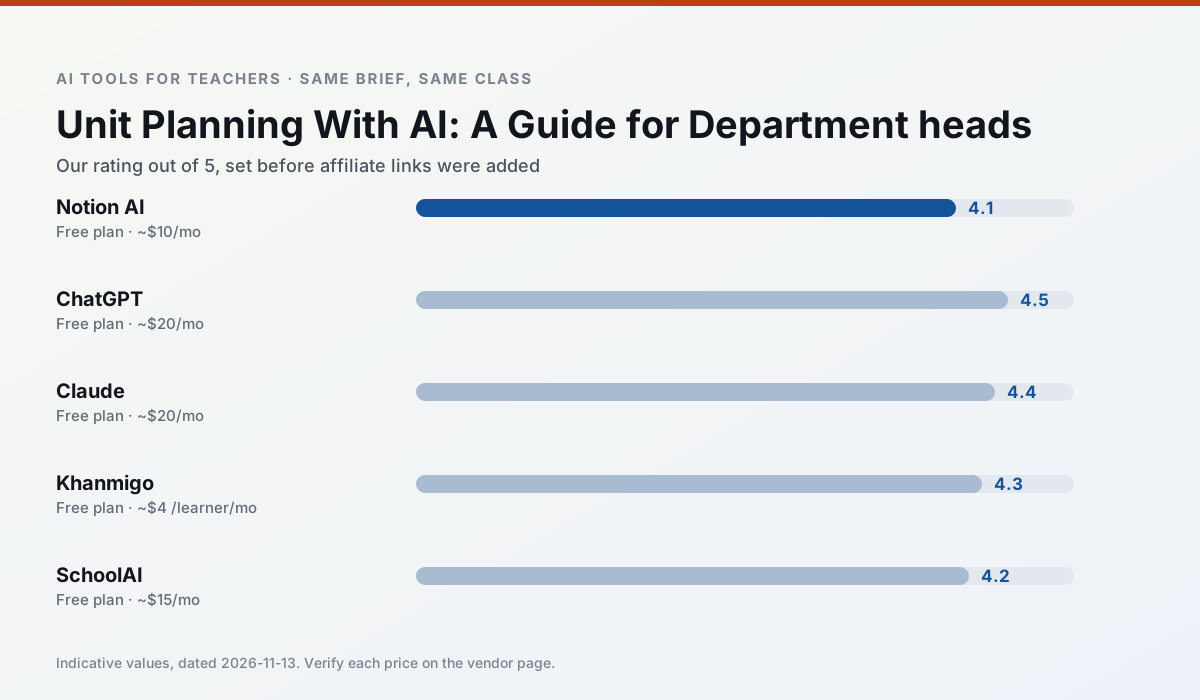
Side by side
Comparison table
Ratings reflect our timed classroom workflow, not vendor claims. Prices are indicative — verify on the vendor site.
| Tool | Best for | Free tier | Indicative paid plan | Standout feature | Our rating | Verdict | Try the tool |
|---|---|---|---|---|---|---|---|
| Notion AI | curriculum mapping · unit planning | Yes — Limited AI usage | ~$10 /user/mo | Linked databases | 4.1 / 5 | Situational | Try free |
| ChatGPT | lesson planning · parent communication | Yes — Usage-limited model access | ~$20 /user/mo | Custom GPTs and Projects | 4.5 / 5 | Top pick | Try free |
| Claude | rubric creation · feedback on writing | Yes — Usage-limited | ~$20 /user/mo | Very large context window | 4.4 / 5 | Strong option | Try free |
| Khanmigo | math practice · student tutoring | Yes — US teacher accounts, subject to eligibility | ~$4 /learner/mo | Socratic tutoring rather than answers | 4.3 / 5 | Strong option | Try free |
| SchoolAI | student-safe AI · differentiated instruction | Yes — Limited seats | ~$15 /user/mo | Teacher-monitored student chats | 4.2 / 5 | Strong option | Try free |
| MagicSchool AI | lesson planning · differentiation | Yes — Core generators with monthly usage limits | ~$12 /user/mo | 80+ teacher-specific tools | 4.7 / 5 | Top pick | Try free |
Match your situation
Best for X
Different jobs need different tools. Here is what we would open first in each case.
Notion AI produces levelled versions from one source in a single pass, which is the highest-value differentiation shortcut we tested at this level.
ChatGPT has the strongest tone control for family emails and report comments, provided you still read the message aloud before sending.
Claude is built around teacher-monitored student spaces and audit logs rather than a consumer chat account, which is a different approval conversation.
Khanmigo is the one we would open on a normal planning day because the first output is editable rather than restructurable, and the free plan covers a single teacher's routine.
Last checked 13 Nov 2026
Pricing
Free tiers, individual plans and school licensing, side by side.
| Tool | Free plan | Individual / paid | School & district | Billing note | Verify |
|---|---|---|---|---|---|
| Notion AI | $0 — Limited AI usage | ~$10 /user/mo | ~$8 /user/mo | Indicative — verify on vendor site | Vendor |
| ChatGPT | $0 — Usage-limited model access | ~$20 /user/mo | ~$25+ /user/mo | Indicative — verify on vendor site | Vendor |
| Claude | $0 — Usage-limited | ~$20 /user/mo | ~$25+ /user/mo | Indicative — verify on vendor site | Vendor |
| Khanmigo | $0 — US teacher accounts, subject to eligibility | ~$4 /learner/mo | Custom quote | Indicative — verify on vendor site | Vendor |
| SchoolAI | $0 — Limited seats | ~$15 /user/mo | Custom quote | Indicative — verify on vendor site | Vendor |
| MagicSchool AI | $0 — Core generators with monthly usage limits | ~$12 /user/mo | Custom quote | Indicative — verify on vendor site | Vendor |
Editorial rule: pricing is re-checked every 2–3 months and the top 50 pages are refreshed every 6 months. See our funding policy.
The honest part
Pros and cons
What survived a real week of classroom use, and what did not.
Pros
- Great for long-term curriculum records
- Strong team collaboration
- Flexible structure
Cons
- Setup time is significant
- AI add-on pricing changed more than once
- Not purpose-built for lesson generation
Pros
- Most flexible option available
- Huge community of teacher prompt libraries
- Strong multilingual support
Cons
- Requires prompt skills for consistent results
- No built-in standards alignment
- District privacy review usually required
Pros
- Handles full unit plans and long rubrics
- Nuanced, less generic prose
- Good at structured document output
Cons
- No teacher-specific templates
- Fewer classroom integrations
- Consumer plan not suitable for student data
Pros
- Education-first design
- Strong nonprofit trust signal
- Good math scaffolding
Cons
- Availability varies by region
- Less useful for admin paperwork
- Requires student accounts for full value
Pros
- Designed for district approval
- Teacher visibility into student use
- Good safeguarding defaults
Cons
- Requires school-wide buy-in
- Less flexible than general LLMs
- Pricing is mostly quote-based
In the classroom
Use cases
Five concrete workflows, with the tool we would open for each one.
A weekly family newsletter from bullet notes
Newsletters fail on length, not tone. Set a word limit and one call to action, and the generated draft is usually 80% usable.
Recommended: Notion AIRegrouping students after an assessment
Summarise anonymised results into skill groups, then generate one activity per group. Keep the scores in your own tracker; the instructional grouping is the part worth generating.
Recommended: ChatGPTA five-minute exit ticket set
Ask for one recall, one application and one reasoning item, then delete the second recall question every generator sneaks in.
Recommended: ClaudeAn IEP present-levels first draft
Use aggregated, anonymised data only. Ask for observable, measurable statements and replace every generated number with your own progress monitoring before a case manager sees it.
Recommended: KhanmigoA substitute folder that needs no context
The value here is structure, not creativity. Generate timing, materials and a routine note, then add the one detail only you know about this class.
Recommended: SchoolAI
Questions teachers ask us
FAQ
Direct answers, also published as FAQPage structured data for search and AI assistants.
Can AI do unit planning at mixed-grade level?
Which tool is best for unit planning?
What is the biggest risk?
Sources & further reading
Our recommendation
Try Notion AI free for your next unit planning task
AI-assisted notes, databases and curriculum planning in one workspace. Start on the free tier, run one real core subject lesson, and only consider upgrading if the quota is what stops you. Disclosure: we may earn a commission (varies) at no extra cost to you.
Some links on this page are affiliate links. We may earn a commission at no extra cost to you. Our rankings are editorial and never pay-to-play. Never enter student PII into a free consumer account.
Keep reading
Related comparisons in this cluster.
Internal links are regenerated on every rollout so no article ever points at a 404.