The short answer
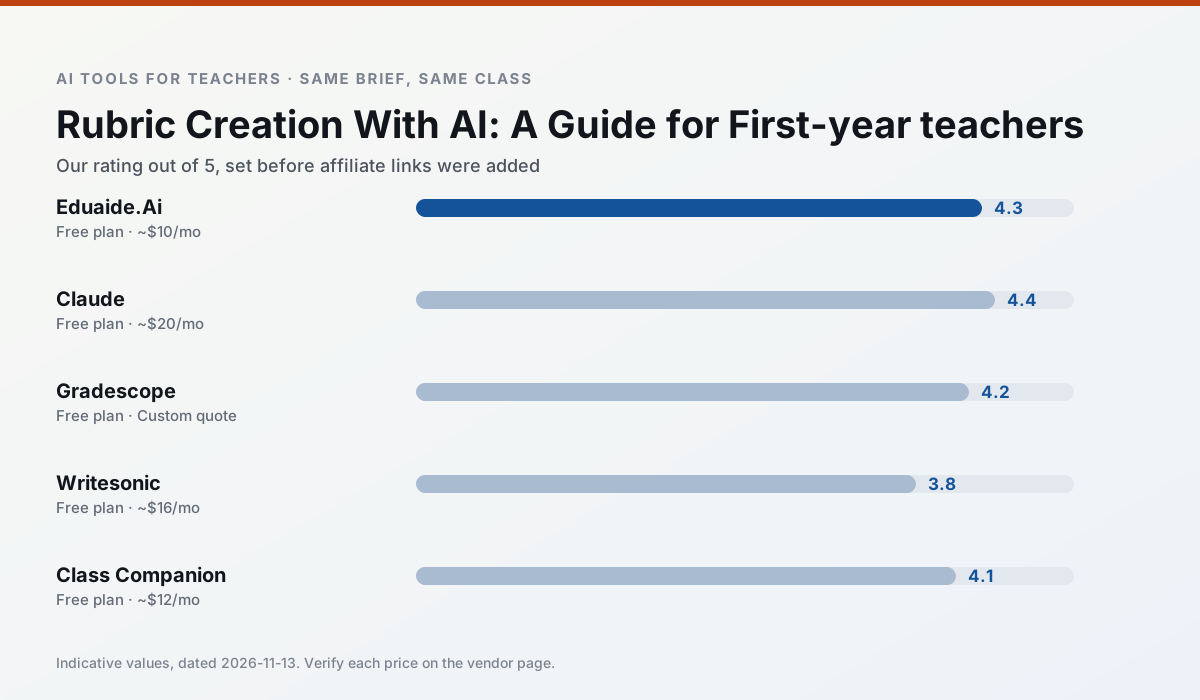
- Eduaide.Ai is our default pick for first-year teachers who need to write criterion-referenced rubrics quickly; Claude is better when differentiation is the bottleneck.
- Pricing is where these pages date fastest. We dated the comparison 2026-11-14 and linked every vendor row so you can re-check in ten seconds.
- Every AI output for rubric creation needs a teacher review, especially standards codes, core subject accuracy, and anything in an IEP, assessment or family message.
- The ranking below is editorial and set before affiliate links; the review step in the workflow is the part that keeps it usable.
Start with Writesonic on its free plan.
At 9:45 PM on a Tuesday in October, I sat on my living room floor with thirty-four argumentative essays about the American Revolution. Next to me was a blank Word document and a half-eaten sleeve of crackers. I had spent two hours grading the first five papers, and my rubric had expanded from four columns into a sprawling, multi-page monstrosity because I kept inventing new point deductions for errors I hadn't anticipated. My grading criteria were a moving target, and my students were going to suffer for it. That was the night I realized I needed AI rubric creation for first-year teachers to keep me from drowning in my own grading criteria.
When you are starting your first year in the classroom, writing a rubric from scratch is a quiet kind of torture. You try to define what "proficient" looks like before you even know what your students can do. Generic rubrics found on the internet are usually too broad to help anyone, and building a granular matrix for every single assignment eats up precious planning periods. This is where AI tools can step in to lift the heavy cognitive load, provided you know which buttons to push and which outputs to ignore.
Eduaide.Ai for Student-Safe Deployments
For teachers who are paranoid about data privacy—and you should be, as a first-year teacher trying to stay compliant with local policies—Eduaide.Ai is usually the safest landing spot. It sits at around $10 per user per month on its paid tier, though there is a free tier capped by daily generations. The platform offers a clean, uncluttered user interface that will not make your eyes bleed after a long day of teaching.
[Prompt typed into Eduaide.Ai]
Generate a 4-level analytic rubric for an 8th-grade argumentative paragraph about industrialization. Levels: Beginning, Developing, Proficient, Advanced. Criteria: Claim, Evidence, Reasoning, Conventions. Keep descriptions under 25 words per box.

[First draft returned by Eduaide.Ai]
Claim:
- Advanced: Clear, sophisticated claim that directly addresses the prompt and takes a distinct stance.
- Proficient: Clear claim that addresses the prompt.
- Developing: Vague claim that somewhat addresses the prompt.
- Beginning: Missing or unclear claim.

[Teacher Edit 1]
Changed the "Developing" descriptor to specify what is missing: "States a topic instead of an arguable claim."

[Teacher Edit 2]
Trimmed the "Advanced" descriptor to remove fluff: "Takes a sharp, contestable stance that previews the body of the paragraph."
Eduaide shines because its worksheet and rubric output is remarkably direct. It does not try to write a novel in every grid cell. The main limitation is that its template set is smaller than some competitors, and its export options are bare-bones. Still, for a quick, student-safe rubric generated during your prep period, it gets the job done without fuss. Always confirm your district's data retention settings before putting any sensitive material into any tool, but Eduaide is built with classroom compliance much closer to the surface than standard consumer chatbots.
Claude for Parent-Facing Writing and Long-Form Planning
If your rubric needs to double as an explanation for parents who might not understand educational jargon, Claude is the strongest option. Running at roughly $20 per user per month for the consumer tier, it handles long-context inputs brilliantly. You can feed it an entire three-page assignment sheet, your state standards, and last year's anchor papers, and it will spit out a coherent, nuanced rubric that actually reads like it was written by a human educator.
The prose it generates is less robotic than what you get from budget-focused alternatives. It understands the difference between a student who didn't try and a student who tried hard but misunderstood the prompt. However, you must remember that the consumer plan is not suitable for student data. Never paste real student names, ID numbers, or identifiable work samples into Claude. Use it strictly for the blank administrative scaffolding of your assignments, and check out our guide on AI tools for teachers for broader workflow integration strategies.
Gradescope for Mixed-Ability Classes and Paper Assessments
If your classroom still runs on paper—and in many high school and middle school settings, it stubbornly does—rubric application becomes a nightmare of consistency. Gradescope is designed for AI-assisted rubric grading on scanned and handwritten assessments. It costs a custom quote for institutional pricing, but its impact on grading fatigue is staggering.
The system groups similar student answers together, allowing you to apply a rubric deduction to twenty papers at once rather than writing the same marginal note over and over. It is brilliant for mixed-ability classes because you can add ad-hoc rubric items on the fly as you discover new student misconceptions, and the software updates the score for every subsequent paper.
Two things went wrong when I first tried using it. First, my scanner jammed on crumpled paper, which meant I had to manually smooth out thirty lab reports before I could feed them into the document feeder. Second, I spent an hour trying to map my assignment regions because I didn't realize my margins were half an inch off. I fixed the scanner issue by buying a cheap clipboard station for my students to turn work in flat, and I fixed the mapping issue by using a standardized template for all future quizzes. It is overkill for elementary classrooms, and the setup effort is real, but for middle and high school assessments, the time savings are massive.
Writesonic for Quick Setup and General Content
Writesonic is a budget-friendly option coming in around $16 per user per month, with a limited free trial. Its primary strength lies in having a vast number of writing templates and a very fast generation speed. If you need a rubric outline in under thirty seconds, it can supply one.
The downside is that its output tends to be generic. It lacks deep education context, meaning its rubrics often read like corporate performance reviews rather than classroom assessment tools. Its credit system can also be confusing to navigate when you are in a rush. If you use it, treat the output as a very loose first draft that requires heavy editing to align with actual pedagogical standards. Like most writing assistants, it is not intended for student data, so keep your prompts generalized to grade levels and content standards.
Class Companion and Turnitin for Targeted Feedback
For workflows that involve student uploads, tools like Class Companion, priced around $12 per user per month, offer fast, specific comments on student work, particularly in mathematics. It gives students immediate feedback before they submit final drafts, which cuts down on the number of preventable errors you have to grade. However, scan quality heavily affects its accuracy, and the feedback still requires vigilant teacher review. You cannot simply trust the AI grade; you must audit the reasoning.
On the institutional side, Turnitin Clarity and Feedback Studio handle institutional writing feedback and similarity checking. Individual teachers cannot buy it directly, as it requires heavy administrative setup and custom enterprise quotes. While its revision history tracking is useful, its AI detection features remain widely contested, and you are tied entirely to whatever your school's IT department has configured under standard FERPA agreements.
First-year teaching is an exercise in ruthless triage. You cannot hand-craft every single rubric, lesson plan, and parent email from scratch while also learning how to manage a room of twenty-five restless teenagers. Use AI to handle the blank-page panic, but keep your red pen handy to make sure the final product actually measures what your students learned. For more on supporting diverse learners, read our piece on AI accommodations for paraprofessionals.
FAQ
Can AI do rubric creation at mixed-grade level?
It can produce a first draft and a structure. The level judgement, the standards check and the tone are teacher decisions.
Which tool is best for rubric creation?
Eduaide.Ai on the evidence in this article, with Claude as the second opinion. Neither replaces the review step.
What is the biggest risk?
A confident, plausible output that nobody checked. The five checks below exist for that reason.
Sources
- Eduaide.Ai Feature Overview and Pricing: https://www.eduaide.ai
- Anthropic Claude Usage and Privacy Documentation: https://www.anthropic.com/claude
- Gradescope Assessment and Rubric Workflows: https://www.gradescope.com
- Writesonic Content Generation Limits: https://writesonic.com
- Class Companion AI Feedback Specifications: https://classcompanion.com
- Turnitin Feedback Studio Institutional Integration: https://www.turnitin.com
Side by side
Comparison table
Ratings reflect our timed classroom workflow, not vendor claims. Prices are indicative — verify on the vendor site.
| Tool | Best for | Free tier | Indicative paid plan | Standout feature | Our rating | Verdict | Try the tool |
|---|---|---|---|---|---|---|---|
| Eduaide.Ai | lesson planning · rubric creation | Yes — Daily generation cap | ~$10 /user/mo | Resource library | 4.3 / 5 | Strong option | Try free |
| Claude | rubric creation · feedback on writing | Yes — Usage-limited | ~$20 /user/mo | Very large context window | 4.4 / 5 | Strong option | Try free |
| Gradescope | grading · rubric creation | Yes — Limited courses | Custom quote | Bubble sheet and handwriting capture | 4.2 / 5 | Strong option | Try free |
| Writesonic | newsletters · parent communication | Yes — Limited credits | ~$16 /user/mo | Article and email generators | 3.8 / 5 | Situational | Try free |
| Class Companion | grading · feedback on writing | Yes — Limited assignments | ~$12 /user/mo | Handwriting recognition | 4.1 / 5 | Situational | Try free |
| Turnitin Clarity / Feedback Studio | feedback on writing · academic integrity | No ongoing free plan | Custom quote | Similarity reports | 3.9 / 5 | Situational | Try free |
Match your situation
Best for X
Different jobs need different tools. Here is what we would open first in each case.
For anything students touch directly, Eduaide.Ai offers the supervision controls and logging that IT will ask about first.
Claude is the steadiest of this set at plain, respectful language; names and specific incidents still belong in your draft, not the prompt.
For three reading groups and one text, Gradescope needs the least manual relabelling of vocabulary and questions.
Setup cost is one login for Writesonic; everything else can wait until you know the tool is useful.
Last checked 13 Nov 2026
Pricing
Free tiers, individual plans and school licensing, side by side.
| Tool | Free plan | Individual / paid | School & district | Billing note | Verify |
|---|---|---|---|---|---|
| Eduaide.Ai | $0 — Daily generation cap | ~$10 /user/mo | Custom quote | Indicative — verify on vendor site | Vendor |
| Claude | $0 — Usage-limited | ~$20 /user/mo | ~$25+ /user/mo | Indicative — verify on vendor site | Vendor |
| Gradescope | $0 — Limited courses | Custom quote | Custom quote | LMS integration and support | Vendor |
| Writesonic | $0 — Limited credits | ~$16 /user/mo | ~$49 /user/mo | Indicative — verify on vendor site | Vendor |
| Class Companion | $0 — Limited assignments | ~$12 /user/mo | Custom quote | Indicative — verify on vendor site | Vendor |
| Turnitin Clarity / Feedback Studio | No ongoing free tier | Custom quote | Custom quote | LMS-wide deployment | Vendor |
Editorial rule: pricing is re-checked every 2–3 months and the top 50 pages are refreshed every 6 months. See our funding policy.
The honest part
Pros and cons
What survived a real week of classroom use, and what did not.
Pros
- Very low entry price
- Good worksheet and rubric output
- Clean, uncluttered UI
Cons
- Smaller template set than MagicSchool
- Less polished export options
- Limited integrations
Pros
- Handles full unit plans and long rubrics
- Nuanced, less generic prose
- Good at structured document output
Cons
- No teacher-specific templates
- Fewer classroom integrations
- Consumer plan not suitable for student data
Pros
- Large time savings on paper assessments
- Consistent rubric application
- Detailed item analytics
Cons
- Overkill for elementary classrooms
- Institutional pricing is opaque
- Setup effort is real
Pros
- Cheaper than enterprise writing suites
- Many templates
- Reasonable free trial
Cons
- Generic classroom output
- Credit system is confusing
- Limited education context
Pros
- Useful where work is done on paper
- Fast, specific comments
- Good math support
Cons
- Scan quality affects accuracy
- Narrow use case
- Feedback still needs teacher review
In the classroom
Use cases
Five concrete workflows, with the tool we would open for each one.
Regrouping students after an assessment
Summarise anonymised results into skill groups, then generate one activity per group. Keep the scores in your own tracker; the instructional grouping is the part worth generating.
Recommended: Eduaide.AiA weekly family newsletter from bullet notes
Newsletters fail on length, not tone. Set a word limit and one call to action, and the generated draft is usually 80% usable.
Recommended: ClaudeA question bank from a PDF or article
Feed a non-identifiable source and ask for items tagged by difficulty with the misconception behind each distractor. Spot-check every answer key; numerical items are least reliable.
Recommended: GradescopeA substitute folder that needs no context
The value here is structure, not creativity. Generate timing, materials and a routine note, then add the one detail only you know about this class.
Recommended: WritesonicAn IEP present-levels first draft
Use aggregated, anonymised data only. Ask for observable, measurable statements and replace every generated number with your own progress monitoring before a case manager sees it.
Recommended: Class Companion
Questions teachers ask us
FAQ
Direct answers, also published as FAQPage structured data for search and AI assistants.
Can AI do rubric creation at mixed-grade level?
Which tool is best for rubric creation?
What is the biggest risk?
Sources & further reading
Our recommendation
Try Writesonic free for your next rubric creation task
Budget-friendly AI writing and content generation. Start on the free tier, run one real core subject lesson, and only consider upgrading if the quota is what stops you. Disclosure: we may earn a commission (varies) at no extra cost to you.
Some links on this page are affiliate links. We may earn a commission at no extra cost to you. Our rankings are editorial and never pay-to-play. Never enter student PII into a free consumer account.
Keep reading
Related comparisons in this cluster.
Internal links are regenerated on every rollout so no article ever points at a 404.