The short answer
- Quizizz is our default pick for Paraprofessionals who need to document accessible alternatives quickly; Brisk Teaching is better when differentiation is the bottleneck.
- Free-tier reality for this shortlist: Quizizz: Yes — Core quiz creation; Brisk Teaching: Yes — Limited actions per month; SchoolAI: Yes — Limited seats. Treat every paid figure as indicative until you have read the vendor page; only the free quota is something you can test yourself this week.
- Every AI output for accommodations needs a teacher review, especially standards codes, core subject accuracy, and anything in an IEP, assessment or family message.
- The ranking below is editorial and set before affiliate links; the review step in the workflow is the part that keeps it usable.
Start with MagicSchool AI on its free plan.
It is 8:40 on a Tuesday morning, and you are standing at the photocopier trying to resize a three-page text on ecosystems so an eighth-grader with dyslexia can actually read it before first period ends. You have fourteen minutes, the toner is streaks of grey, and the general education teacher has handed you a modified worksheet that is really just fewer questions about the same impossible vocabulary. Para life is about bridging that gap between what the curriculum demands and what a specific learner can access right now. Most instructional tools assume a solo classroom teacher with an open planning period. This guide looks at how paraprofessionals can use AI accommodations for paraprofessionals to build scaffolds, rewrite texts, and manage differentiation without losing your lunch break.
The Reality of Paraprofessional Support Work
You do not write the IEP, but you are the one who implements it under a timer. When a student needs a text leveled down to a third-grade reading level while keeping the core concept of cellular respiration intact, standard search engines fail you. You end up spending your own time cobbling together resources. AI tools can handle the mechanical labor of leveling, formatting, and generating alternative response formats. The catch is that you have to bring the context. The machine knows what a glossary is, but it does not know that Leo refuses to use pink highlighters or that Sarah needs sentences under ten words to stay engaged.
Using Brisk Teaching for Inline Text Modification
Brisk Teaching runs as a browser extension, which changes how you handle digital modifications. Instead of copying and pasting paragraphs into an external chat window, you can highlight text inside a Google Doc and ask the tool to rewrite it at a specific Lexile level, add a glossary, or generate reading comprehension questions on the fly. This eliminates the friction that usually stops support staff from adapting materials on the spot. It is particularly useful for parent-facing writing and quick adjustments to daily handouts.
Prompt: "Rewrite this three-paragraph text about the water cycle for a 4th-grade reading level. Keep sentences under twelve words. Add a four-word glossary at the bottom for the terms condensation, evaporation, precipitation, and accumulation."
First output: The water cycle is how water moves around the earth. First, the sun heats up rivers. This is called evaporation. Water turns into gas and goes up. Next, it makes clouds. This is condensation. When clouds get heavy, rain falls. This is precipitation. All the water goes back to lakes and oceans. This is accumulation. Glossary: Evaporation: water turning to gas. Condensation: gas making clouds. Precipitation: rain falling down. Accumulation: water gathering in places.
Two edits that made it usable:
- Swapped the glossary definitions for simpler, child-friendly analogies that match our classroom anchor charts.
- Added a bold visual cue for each vocabulary term so the student can scan the text more easily during independent work.
The free tier gives you a limited number of actions per month, while the paid tier sits around $10 per user per month as an indicative price. Because the extension reads document content, your district tech department will need to review the data privacy agreement before you hook it up to student-facing files.
Managing Mixed-Ability Groups with SchoolAI
When you are pulling a small group for intervention, you need a space where students can work at their own pace without feeling singled out by different worksheets. SchoolAI creates safe, teacher-controlled student spaces that act as a middle ground between open-ended chatbots and static worksheets. For mixed-ability classes, it allows you to launch an activity where different students receive different scaffolding on the same core topic.
The platform is designed with school safety and safeguarding defaults built in, which makes district approval much smoother than trying to use consumer chat apps. Teachers and paras maintain full visibility into what students are typing in real time. If a student gets stuck on a prompt about fractions, the AI tutor scaffolds the question down instead of giving away the answer. The main hurdle is that it requires school-wide buy-in and proper account setup, so check with your case manager or media specialist before trying to spin up a room.
Scaffolding Practice and Assessment with Quizizz
Assessment accommodation often means reducing choices or reading questions aloud, but it can also mean changing the format entirely. Quizizz offers AI-assisted quiz creation with a massive question bank that lets you take an existing test and instantly generate modified versions with fewer distractors or picture-supported options. Students already know the interface from regular class, which cuts down on the technical friction of testing accommodations.
+-------------------+------------------------------------------+
| Tool              | Primary Accommodation Use Case           |
+-------------------+------------------------------------------+
| Brisk Teaching    | Inline text leveling and vocabulary      |
| SchoolAI          | Small-group guided digital practice      |
| Quizizz           | Modified low-stakes checks for understanding|
| Khanmigo          | Math and reading tutoring scaffolding    |
+-------------------+------------------------------------------+
The platform works reliably on low-end devices, which matters when your school Chromebook cart is missing half its keys. Free core quiz creation covers most basic needs, while the paid tier runs around $15 per user per month if you want advanced reporting. Always review the AI-generated questions before assigning them. The system occasionally produces distractors that are too obviously wrong, defeating the point of the assessment. For a deeper look at broader deployment strategies, read our guide on AI tools for teachers 2026.
Tutoring Support with Khanmigo
For targeted practice in math and reading, Khanmigo acts as an AI-powered tutor that guides students through problems using the Socratic method rather than just handing them solutions. Built by a trusted nonprofit, its education-first design makes it one of the safer options for direct student interaction. It is particularly strong at math scaffolding, breaking multi-step word problems into single sentences that a struggling reader can digest.
US teacher accounts have access through specific eligibility structures, while student tiers run about $4 per learner per month. Availability can vary by region depending on your district agreements. While it is less useful for general classroom paperwork or making parent newsletters, it takes the pressure off when you are trying to support three different math learners at different grade levels simultaneously. For administrative workflows, you might also consult our overview of AI data analysis for administrators.
Two Things That Went Wrong in Real Use
The first failure happened when using ChatGPT to generate a question bank from a scanned PDF chapter on ecosystems. The AI hallucinated three answer keys for the math-based ecology questions, mixing up energy pyramid calculations entirely. Handing that to a student would have reinforced the wrong process. The fix was establishing a strict rule: never trust an AI-generated numerical answer key without working the problem out on scrap paper first.
The second failure occurred when drafting an IEP present-levels summary. A colleague pasted anonymised student performance data into a consumer LLM to save time on formatting. While no names were used, the prompt included specific disability markers and reading scores, violating basic data hygiene. The fix was deleting the chat history immediately, moving to a district-approved workspace tier, and using only generalized skill descriptors rather than specific data points for drafting.
FAQ
Can AI do accommodations at mixed-grade level?
It can produce a first draft and a structure. The level judgement, the standards check and the tone are teacher decisions.
Which tool is best for accommodations?
Quizizz on the evidence in this article, with Brisk Teaching as the second opinion. Neither replaces the review step.
What is the biggest risk?
A confident, plausible output that nobody checked. The five checks below exist for that reason.
Sources
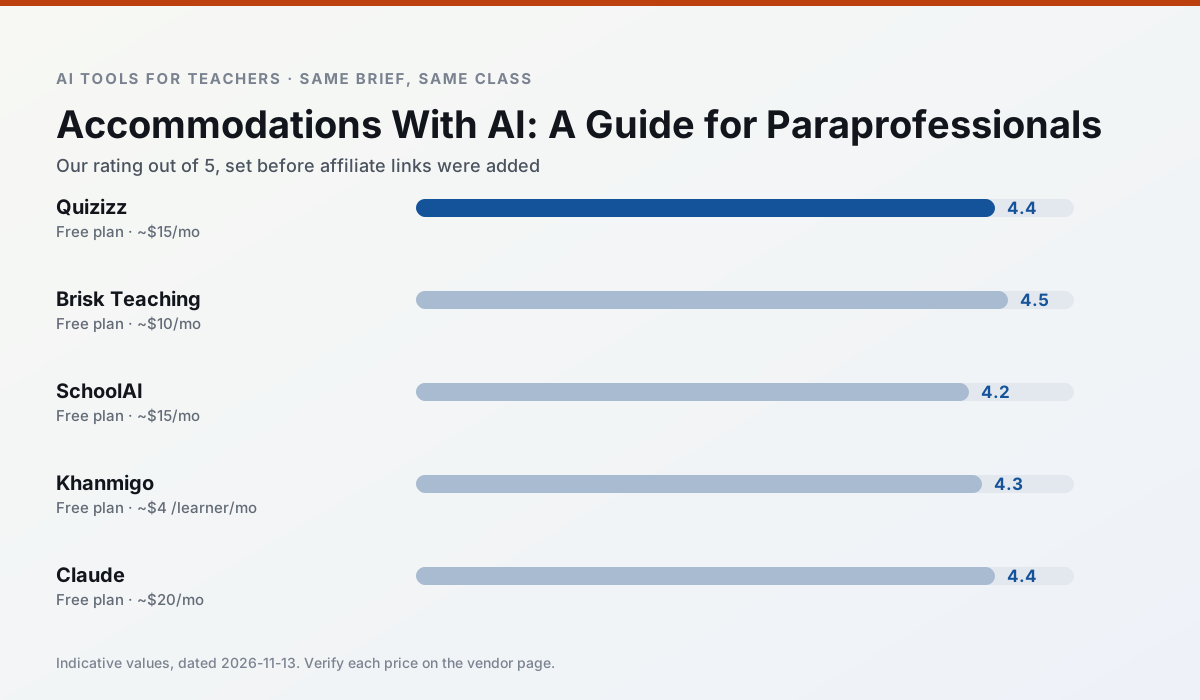
Side by side
Comparison table
Ratings reflect our timed classroom workflow, not vendor claims. Prices are indicative — verify on the vendor site.
| Tool | Best for | Free tier | Indicative paid plan | Standout feature | Our rating | Verdict | Try the tool |
|---|---|---|---|---|---|---|---|
| Quizizz | quiz generation · formative assessment | Yes — Core quiz creation | ~$15 /user/mo | AI question generator | 4.4 / 5 | Strong option | Try free |
| Brisk Teaching | feedback on writing · grading | Yes — Limited actions per month | ~$10 /user/mo | Works inside Google Docs | 4.5 / 5 | Top pick | Try free |
| SchoolAI | student-safe AI · differentiated instruction | Yes — Limited seats | ~$15 /user/mo | Teacher-monitored student chats | 4.2 / 5 | Strong option | Try free |
| Khanmigo | math practice · student tutoring | Yes — US teacher accounts, subject to eligibility | ~$4 /learner/mo | Socratic tutoring rather than answers | 4.3 / 5 | Strong option | Try free |
| Claude | rubric creation · feedback on writing | Yes — Usage-limited | ~$20 /user/mo | Very large context window | 4.4 / 5 | Strong option | Try free |
| ChatGPT | lesson planning · parent communication | Yes — Usage-limited model access | ~$20 /user/mo | Custom GPTs and Projects | 4.5 / 5 | Top pick | Try free |
Match your situation
Best for X
Different jobs need different tools. Here is what we would open first in each case.
Quizizz is built around teacher-monitored student spaces and audit logs rather than a consumer chat account, which is a different approval conversation.
Brisk Teaching has the strongest tone control for family emails and report comments, provided you still read the message aloud before sending.
SchoolAI produces levelled versions from one source in a single pass, which is the highest-value differentiation shortcut we tested at this level.
Khanmigo runs in a browser tab with no extension, no student accounts and no onboarding call, so you can test it in a free period.
Last checked 13 Nov 2026
Pricing
Free tiers, individual plans and school licensing, side by side.
| Tool | Free plan | Individual / paid | School & district | Billing note | Verify |
|---|---|---|---|---|---|
| Quizizz | $0 — Core quiz creation | ~$15 /user/mo | Custom quote | Indicative — verify on vendor site | Vendor |
| Brisk Teaching | $0 — Limited actions per month | ~$10 /user/mo | Custom quote | Indicative — verify on vendor site | Vendor |
| SchoolAI | $0 — Limited seats | ~$15 /user/mo | Custom quote | Indicative — verify on vendor site | Vendor |
| Khanmigo | $0 — US teacher accounts, subject to eligibility | ~$4 /learner/mo | Custom quote | Indicative — verify on vendor site | Vendor |
| Claude | $0 — Usage-limited | ~$20 /user/mo | ~$25+ /user/mo | Indicative — verify on vendor site | Vendor |
| ChatGPT | $0 — Usage-limited model access | ~$20 /user/mo | ~$25+ /user/mo | Indicative — verify on vendor site | Vendor |
Editorial rule: pricing is re-checked every 2–3 months and the top 50 pages are refreshed every 6 months. See our funding policy.
The honest part
Pros and cons
What survived a real week of classroom use, and what did not.
Pros
- Students already know the interface
- Good reporting
- Works on low-end devices
Cons
- Writing high-quality AI questions still needs review
- Gamification can distract
- Advanced analytics are paid
Pros
- No copy-paste between tools
- Fast inline feedback on student drafts
- Gentle learning curve
Cons
- Chrome-first workflow
- Extension permissions need IT approval
- Free quota is tight
Pros
- Designed for district approval
- Teacher visibility into student use
- Good safeguarding defaults
Cons
- Requires school-wide buy-in
- Less flexible than general LLMs
- Pricing is mostly quote-based
Pros
- Education-first design
- Strong nonprofit trust signal
- Good math scaffolding
Cons
- Availability varies by region
- Less useful for admin paperwork
- Requires student accounts for full value
Pros
- Handles full unit plans and long rubrics
- Nuanced, less generic prose
- Good at structured document output
Cons
- No teacher-specific templates
- Fewer classroom integrations
- Consumer plan not suitable for student data
In the classroom
Use cases
Five concrete workflows, with the tool we would open for each one.
Regrouping students after an assessment
Summarise anonymised results into skill groups, then generate one activity per group. Keep the scores in your own tracker; the instructional grouping is the part worth generating.
Recommended: QuizizzA weekly family newsletter from bullet notes
Newsletters fail on length, not tone. Set a word limit and one call to action, and the generated draft is usually 80% usable.
Recommended: Brisk TeachingA question bank from a PDF or article
Feed a non-identifiable source and ask for items tagged by difficulty with the misconception behind each distractor. Spot-check every answer key; numerical items are least reliable.
Recommended: SchoolAIA substitute folder that needs no context
The value here is structure, not creativity. Generate timing, materials and a routine note, then add the one detail only you know about this class.
Recommended: KhanmigoAn IEP present-levels first draft
Use aggregated, anonymised data only. Ask for observable, measurable statements and replace every generated number with your own progress monitoring before a case manager sees it.
Recommended: Claude
Questions teachers ask us
FAQ
Direct answers, also published as FAQPage structured data for search and AI assistants.
Can AI do accommodations at mixed-grade level?
Which tool is best for accommodations?
What is the biggest risk?
Sources & further reading
Our recommendation
Try MagicSchool AI free for your next accommodations task
A large library of teacher-specific AI generators in one dashboard. Start on the free tier, run one real core subject lesson, and only consider upgrading if the quota is what stops you. Disclosure: we may earn a commission (30% recurring) at no extra cost to you.
Some links on this page are affiliate links. We may earn a commission at no extra cost to you. Our rankings are editorial and never pay-to-play. Never enter student PII into a free consumer account.
Keep reading
Related comparisons in this cluster.
Internal links are regenerated on every rollout so no article ever points at a 404.