The short answer
- Formative is our default pick for teachers who need to draft a standards-aware lesson plan quickly; Gradescope is better when differentiation is the bottleneck.
- Free-tier reality for this shortlist: Formative: Yes — Core assessment tools; Gradescope: Yes — Limited courses; Kahoot!: Yes — Limited player count. Treat every paid figure as indicative until you have read the vendor page; only the free quota is something you can test yourself this week.
- Every AI output for Cover lesson needs a teacher review, especially standards codes, core subject accuracy, and anything in an IEP, assessment or family message.
- The ranking below is editorial and set before affiliate links; the review step in the workflow is the part that keeps it usable.
Start with Synthesia on its free plan.
Leaving plans for a substitute teacher is an exercise in optimism. At 6:30 AM with a stomach bug, you are not writing three tiers of differentiated reading questions or curating a thoughtful review game. You need a cover lesson with AI that works on the first try, keeps twenty-eight eighth graders from tearing the drywall off the back of the room, and requires zero setup from a human who has never taught your kids before.
Most educational technology fails the sub plan test because it assumes a functioning classroom, stable internet, and a teacher who has time to configure rostering. When building a reliable system for unexpected absences, you have to separate flashy gimmickry from tools that actually survive an hour with a rotating cast of guest teachers. Let us look at how the software options stack up for this specific fire drill, and why a few specific prompts will save your voice.
The Reality of Sub Plans and Software
If you have ever returned from a day off to find your carefully printed worksheets scattered across the floor while the kids watched a random YouTube documentary, you know why emergency plans need guardrails. The best approach relies on tools that generate low-friction materials before you get sick, or leverage lightweight quizzes that keep kids accountable without requiring an advanced degree in learning management systems.
For quick setup when you wake up sick, Formative is our pick for best for quick setup. It handles live formative assessment with auto-grading and standards tracking, letting you pull in existing PDFs and Docs so the substitute does not have to explain a brand-new interface. The free tier covers core assessment tools, while the paid tier runs around $15 per user per month. It integrates nicely with most LMS platforms, though the setup is steeper than a simple quiz game and pricing adds up if your department wants to buy it individually.
When you need pure engagement that a substitute can launch in thirty seconds, Kahoot! remains the best free option. It runs quiz games and AI-assisted question generation for review lessons, creating instant buy-in with zero training time. The free tier includes a limited player count, while paid plans cost around $10 per user per month. The catch is that time pressure suits recall far better than deep reasoning, and you will need paid tiers for larger classes, but it remains a reliable anchor when you are out.
Generating Materials Before You Need Them
The secret to a stress-free absence is having a bank of pre-approved materials generated during your planning period. This is where QuestionWell shines as our best overall for daily use. It generates standards-aligned question banks from any text or objective, saving you hours of manual typing and offering a clean export workflow. You get a monthly generation limit on the free tier, and paid access runs about $10 per user per month. It is a single-purpose tool, meaning you cannot use it to run the actual classroom session, but it solves the blank-page problem instantly.
Prompt: Act as an 8th-grade science teacher. Create a 10-question multiple-choice quiz based on the provided text about plate tectonics. Include four options per question and ensure the questions test comprehension rather than pure vocabulary recall.
First output: The AI generated ten solid questions with four plausible distractors each, correctly tagged to reading standards, but included two questions that relied on facts not found in the source text.
Edits made:
- Added a strict constraint to the prompt: "Only use facts explicitly stated in the provided text."
- Swapped out one distractor that was culturally ambiguous for our student demographic.
If you are missing multiple days for professional development or recovery, you might consider video-based instruction. Synthesia turns a script into a presenter-led video with AI avatars, eliminating the need for camera work or editing skills. It costs around $29 per user per month with no free ongoing tier, making it hard for an individual teacher to justify out of pocket. Similarly, HeyGen offers AI avatar video and video translation, boasting best-in-class lip-sync translation and generous trial credits before hitting its $29 per user per month price point. Both tools require careful consent considerations around voice and likeness cloning, and frankly, avatar video can feel impersonal when kids are already staring at screens all day.
Two Ways This Workflow Breaks
Even the best cover lessons with AI can go sideways if you do not anticipate classroom friction. The first failure point happens when the AI invents questions that contradict your curriculum. One afternoon, I generated a quick comprehension check using a pasted excerpt, and the automated answer key marked three legitimate interpretations as wrong because the model hallucinated a nuance that wasn't in the paragraph. The fix is simple: always take thirty seconds to review the generated answer key before saving it to your substitute folder.
The second failure involves student logins and access codes. If your sub plan depends on every student logging into a third-party platform with a district password they forgot yesterday, the first twenty minutes of class will descend into chaos. When using tools like Formative or running review games, always prepare a low-tech print option or write out clear fallback instructions on the board. If you want to explore broader workflow efficiencies, check out our guide on best ai tools for teachers for foundational strategies that keep your prep time manageable.
Managing the Aftermath
When you return to school, your desk will be piled with sticky notes from the substitute and half-finished assignments. Instead of grading everything by hand, lean on automated reporting to group students by skill gaps rather than raw scores. If you use paper-heavy assessments that substitutes collected, Gradescope stands out as best for schools and districts, using AI-assisted rubric grading for scanned and handwritten work to save massive amounts of time. It requires institutional pricing and a careful FERPA review since it handles student work, but for large departments, it transforms a weekend of grading into an hour of analysis.
Building a sustainable sub plan system takes time, but pairing reliable generation tools with realistic expectations ensures your classroom keeps running even when you are home in bed. For more ideas on streamlining administrative tasks while you are away, take a look at our resource on AI data analysis for administrators.
FAQ
Can AI do Cover lesson at mixed-grade level?
It can produce a first draft and a structure. The level judgement, the standards check and the tone are teacher decisions.
Which tool is best for Cover lesson?
Formative on the evidence in this article, with Gradescope as the second opinion. Neither replaces the review step.
What is the biggest risk?
A confident, plausible output that nobody checked. The five checks below exist for that reason.
Sources
- Formative Vendor Pricing and Feature Overview. GoFormative.com.
- Gradescope Institutional Features and Data Privacy Documentation. Gradescope.com.
- Kahoot! Educator Plans and Free Tier Limits. Kahoot.com.
- QuestionWell Standards Generation Specifications. QuestionWell.ai.
- Synthesia Pricing and Avatar Capabilities. Synthesia.io.
- HeyGen Video Translation and Credit Structure. HeyGen.com.
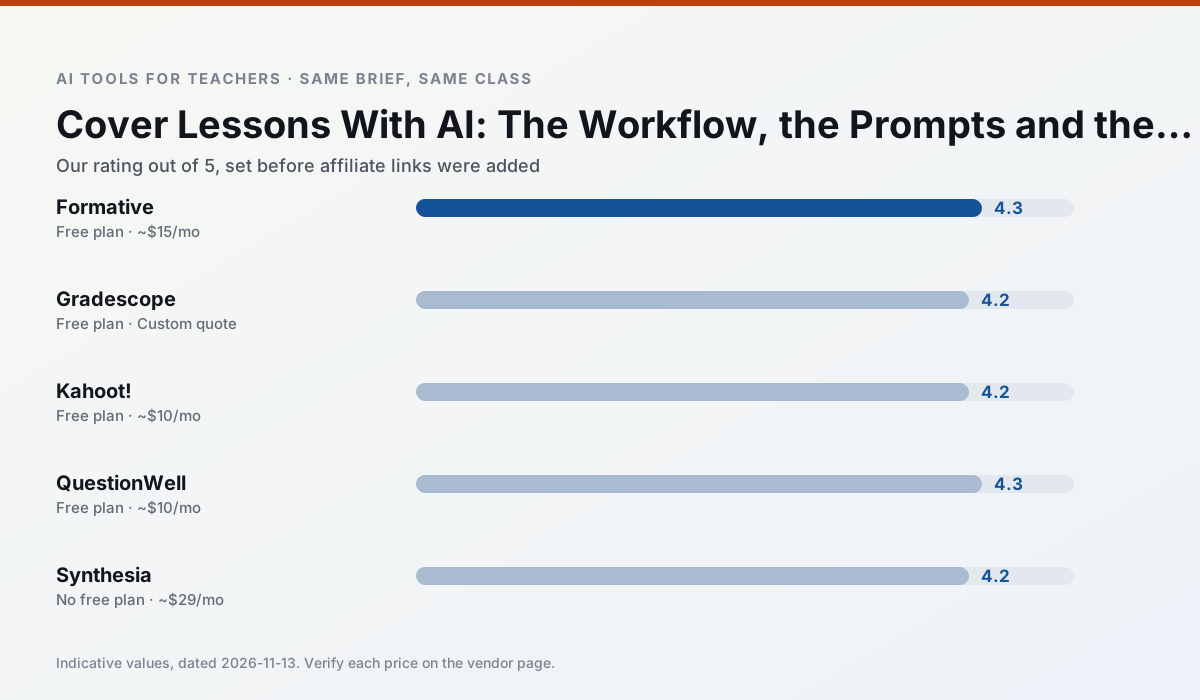
Side by side
Comparison table
Ratings reflect our timed classroom workflow, not vendor claims. Prices are indicative — verify on the vendor site.
| Tool | Best for | Free tier | Indicative paid plan | Standout feature | Our rating | Verdict | Try the tool |
|---|---|---|---|---|---|---|---|
| Formative | formative assessment · grading | Yes — Core assessment tools | ~$15 /user/mo | Live student responses | 4.3 / 5 | Strong option | Try free |
| Gradescope | grading · rubric creation | Yes — Limited courses | Custom quote | Bubble sheet and handwriting capture | 4.2 / 5 | Strong option | Try free |
| Kahoot! | quiz generation · review lessons | Yes — Limited player count | ~$10 /user/mo | AI question builder | 4.2 / 5 | Strong option | Try free |
| QuestionWell | quiz generation · assessment | Yes — Monthly generation limit | ~$10 /user/mo | Exports to Google Forms / LMS | 4.3 / 5 | Strong option | Try free |
| Synthesia | flipped lessons · video lessons | No ongoing free plan | ~$29 /user/mo | 140+ languages | 4.2 / 5 | Strong option | Try free |
| HeyGen | video lessons · translation | Yes — Limited credit plan | ~$29 /user/mo | Video translation | 4.3 / 5 | Strong option | Try free |
Match your situation
Best for X
Different jobs need different tools. Here is what we would open first in each case.
Setup cost is one login for Formative; everything else can wait until you know the tool is useful.
Gradescope answers the three questions a district actually asks: rostering, admin controls and a data-processing agreement. That is usually what decides a school purchase.
If there is no budget, start with Kahoot!: free plan with clearest quota is the least punishing free tier here.
QuestionWell is the one we would open on a normal planning day because the first output is editable rather than restructurable, and the free plan covers a single teacher's routine.
Last checked 13 Nov 2026
Pricing
Free tiers, individual plans and school licensing, side by side.
| Tool | Free plan | Individual / paid | School & district | Billing note | Verify |
|---|---|---|---|---|---|
| Formative | $0 — Core assessment tools | ~$15 /user/mo | Custom quote | Indicative — verify on vendor site | Vendor |
| Gradescope | $0 — Limited courses | Custom quote | Custom quote | LMS integration and support | Vendor |
| Kahoot! | $0 — Limited player count | ~$10 /user/mo | Custom quote | Indicative — verify on vendor site | Vendor |
| QuestionWell | $0 — Monthly generation limit | ~$10 /user/mo | Custom quote | Indicative — verify on vendor site | Vendor |
| Synthesia | No ongoing free tier | ~$29 /user/mo | Custom quote | Indicative — verify on vendor site | Vendor |
| HeyGen | $0 — Limited credit plan | ~$29 /user/mo | Custom quote | Indicative — verify on vendor site | Vendor |
Editorial rule: pricing is re-checked every 2–3 months and the top 50 pages are refreshed every 6 months. See our funding policy.
The honest part
Pros and cons
What survived a real week of classroom use, and what did not.
Pros
- Strong data for intervention groups
- Works with existing PDFs and Docs
- Good LMS integrations
Cons
- Steeper setup than quiz games
- Best value requires school-wide rollout
- Price adds up per teacher
Pros
- Large time savings on paper assessments
- Consistent rubric application
- Detailed item analytics
Cons
- Overkill for elementary classrooms
- Institutional pricing is opaque
- Setup effort is real
Pros
- Instant engagement
- Very low training time
- Strong brand familiarity
Cons
- Less depth for higher-order assessment
- Paid tiers needed for larger classes
- Time pressure suits recall more than reasoning
Pros
- Saves the most time on question writing
- Clean export workflow
- Good objective tagging
Cons
- Single-purpose tool
- Question quality varies by source text
- Limited student-facing features
Pros
- No camera or editing skills required
- Excellent multilingual voice output
- Easy updates to existing videos
Cons
- Cost is hard to justify for a single teacher
- Avatar video can feel impersonal
- No free ongoing tier
In the classroom
Use cases
Five concrete workflows, with the tool we would open for each one.
Regrouping students after an assessment
Summarise anonymised results into skill groups, then generate one activity per group. Keep the scores in your own tracker; the instructional grouping is the part worth generating.
Recommended: FormativeA weekly family newsletter from bullet notes
Newsletters fail on length, not tone. Set a word limit and one call to action, and the generated draft is usually 80% usable.
Recommended: GradescopeA parent email in two languages
Draft in plain, warm language with no names, translate, then back-translate the important sentences to check meaning. Keep specific incidents out of the prompt and add them yourself.
Recommended: Kahoot!Rubric and feedback comments in one pass
Reorder the workflow so the rubric is yours and the comments are generated. Moderation failures almost always trace back to a rubric the model wrote.
Recommended: QuestionWellThree reading levels from one source text
Paste a vetted text, ask for supported, core and extension versions, then check the vocabulary list by hand. Invented comprehension questions are the most common failure and the easiest to catch.
Recommended: Synthesia
Questions teachers ask us
FAQ
Direct answers, also published as FAQPage structured data for search and AI assistants.
Can AI do Cover lesson at mixed-grade level?
Which tool is best for Cover lesson?
What is the biggest risk?
Sources & further reading
Our recommendation
Try Synthesia free for your next Cover lesson task
Turn a script into a presenter-led video with AI avatars. Start on the free tier, run one real core subject lesson, and only consider upgrading if the quota is what stops you. Disclosure: we may earn a commission (25% recurring) at no extra cost to you.
Some links on this page are affiliate links. We may earn a commission at no extra cost to you. Our rankings are editorial and never pay-to-play. Never enter student PII into a free consumer account.
Keep reading
Related comparisons in this cluster.
Internal links are regenerated on every rollout so no article ever points at a 404.