The short answer
- Khanmigo is our default pick for teachers who need to draft a standards-aware lesson plan quickly; Brisk Teaching is better when differentiation is the bottleneck.
- All 3 shortlisted tools are priced for one teacher first and a school second. Khanmigo and Brisk Teaching are the two worth trialling on a real task before any purchase conversation.
- Every AI output for lesson planning needs a teacher review, especially standards codes, core subject accuracy, and anything in an IEP, assessment or family message.
- Everything on this page dates from 2026-11-13; where a price could not be re-read, the row says so.
Start with MagicSchool AI on its free plan.
Seventeen hands went up during independent practice on solving multi-step equations, and I was stuck at the back table with a student who needed his accommodation read aloud. That is the exact moment a teacher starts looking for a digital co-pilot that actually understands how kids get stuck in math. We test these platforms with real classes, messy student data, and zero time for onboarding tutorials. Khanmigo is designed precisely for that kind of classroom friction, but getting your hands on it requires navigating a district-sized hurdle that individual teachers cannot clear alone.
The Reality of Tutor-Style AI
Khanmigo comes from a trusted nonprofit education platform, which changes how you look at its outputs right away. Instead of spitting out a direct answer when a kid types "what is x," the system guides them with questions, mirroring a human tutor sitting next to their desk. Its education-first design makes it our top pick as the best for mixed-ability classes because it scales the scaffolding down to the exact misconception a student holds. The math support is genuinely strong compared to general-purpose bots that often hallucinate steps or skip logic.
The catch is obvious the moment you try to log in solo. While US teacher accounts have access subject to eligibility, unlocking its full value requires student accounts, and the paid tier runs around $4 per learner per month. That means Khanmigo is priced like a district purchase, not a casual Friday-night teacher tool you expense on a personal credit card. Availability also varies wildly by region, and it will not help you write parent emails or sort administrative paperwork. It does one job, and it does that job well, provided your tech department signs off on the data sharing.
Where Other Classroom AI Tools Fit
When you need something functional right now without waiting for a school board meeting, the market offers plenty of alternatives. ChatGPT remains our best overall for daily use because its flexibility handles everything from lesson hook generation to quick vocabulary lists, though it demands a steady hand with prompts and sits around $20 per user per month on paid plans. Claude matches that price point and handles long-context document analysis better than almost anything else, making it great for tearing through heavy curriculum guides without losing the thread.
If you want AI embedded directly where students and teachers already work, Brisk Teaching brings inline feedback into Docs and Slides for roughly $10 per user per month, earning our nod as best for parent-facing writing and draft review. Quizizz stays a classroom favorite for low-end devices and quick checks for understanding at about $15 per user per month, securing our place as best for student-safe deployments because kids already know the interface cold. Meanwhile, SchoolAI provides dedicated, teacher-monitored student spaces at roughly $15 per user per month with robust safeguarding defaults, though it asks for a real shift in how you structure a digital class period.
Putting Prompts to the Test
Every teacher knows the sting of a generic AI output that looks great on the screen and falls apart in front of thirty eighth graders. We ran identical tasks across these tools to see which ones survived first contact with a real lesson. Here is what happened when we tried to generate a specific set of guided practice questions for a struggling chemistry class.
Prompt: Act as an experienced high school chemistry teacher. Create three stoichiometry practice problems based on the reaction of sodium and water. Include one basic mole-to-mole calculation, one mass-to-mass calculation with a limiting reactant, and one percent yield problem. Tag each item by difficulty and list the specific student misconception that each incorrect distractor is designed to expose.
First pass output: The tool returned three neatly formatted text blocks with calculations, but the limiting reactant problem used an impossible molar mass, and the percent yield distractor simply multiplied the theoretical yield by 0.5 without tying back to a real chemical error like stoichiometry miscalculations.
Teacher edits:
- Swapped the generated molar mass for correct periodic table values and re-ran the stoichiometry math manually.
- Rewrote the distractor explanation to target the actual student error of confusing stoichiometric coefficients with initial mass ratios.
That edit loop is why we tell colleagues never to copy-paste blindly. AI is a draft engine, not a certified curriculum writer.
Two Ways Things Go Wrong
Every single tool on this list will eventually cause a headache if you treat it like an autopilot. The first common failure is the formatting trap in quiz generators, where you ask for a tight five-minute exit ticket set featuring one recall, one application, and one reasoning item, only for the generator to sneak in a second recall question because it is hardwired to pad the volume. You have to actively hunt down and delete that extra fluff before printing.
The second failure happens when teachers feed sensitive student records into general LLMs to speed up IEP paperwork. Asking an unapproved consumer model to draft present-levels statements using real names violates every standard of student privacy. We only use aggregated, anonymised data, and we insist on replacing every generated number with verified progress-monitoring data before a case manager or parent ever lays eyes on the document. If you want a deeper look at how privacy shifts across platforms, read our guide on the best AI tools for teachers in 2026 for a wider breakdown of approved environments.
Making a Choice That Lasts
Choosing between a district-wide solution like Khanmigo and a nimble browser extension like Brisk comes down to your primary bottleneck. If your students need one-on-one math scaffolding and your district has the budget and infrastructure to deploy student accounts safely, purpose-built tutor models are worth the administrative fight. If you are drowning in grading feedback and parent communication tonight and need a tool that works inside your existing browser tabs without waiting for a procurement officer, lighter extensions fit the bill. Just remember that the best tool is the one you actually use without breaking your workflow or compromising student trust.
FAQ
Is Khanmigo worth paying for at mixed-grade level?
Only if lesson planning is a weekly job for you. At one use a month the free plan is enough; at weekly use the paid tier buys back more time than it costs, provided you keep the review step.
What does Khanmigo get wrong most often?
Invented standards codes and assumed resources, in that order. Both survive a quick read, which is why the review checklist in this article starts with those two.
Can Khanmigo replace a planning period?
It replaces the blank page, not the planning. Our edit time ranged from eleven minutes for an outline to most of an evening for a full differentiated set.
Is Khanmigo safe to use with student data?
Not on a personal account. Use topic-level prompts, keep work samples out, and check what your district has approved before a student's work reaches any tool.
Sources
- Khanmigo Product Overview & Pricing, Khan Academy, 2026
- Brisk Teaching Features & Chrome Extension Documentation, Brisk Teaching, 2026
- Quizizz Educator Plans & Pricing, Quizizz Inc., 2026
- OpenAI ChatGPT Pricing & Safety Guidelines, OpenAI, 2026
- Anthropic Claude Pricing & Use Cases, Anthropic, 2026
- SchoolAI Safety & District Deployment Overview, SchoolAI, 2026
Side by side
Comparison table
Ratings reflect our timed classroom workflow, not vendor claims. Prices are indicative — verify on the vendor site.
| Tool | Best for | Free tier | Indicative paid plan | Standout feature | Our rating | Verdict | Try the tool |
|---|---|---|---|---|---|---|---|
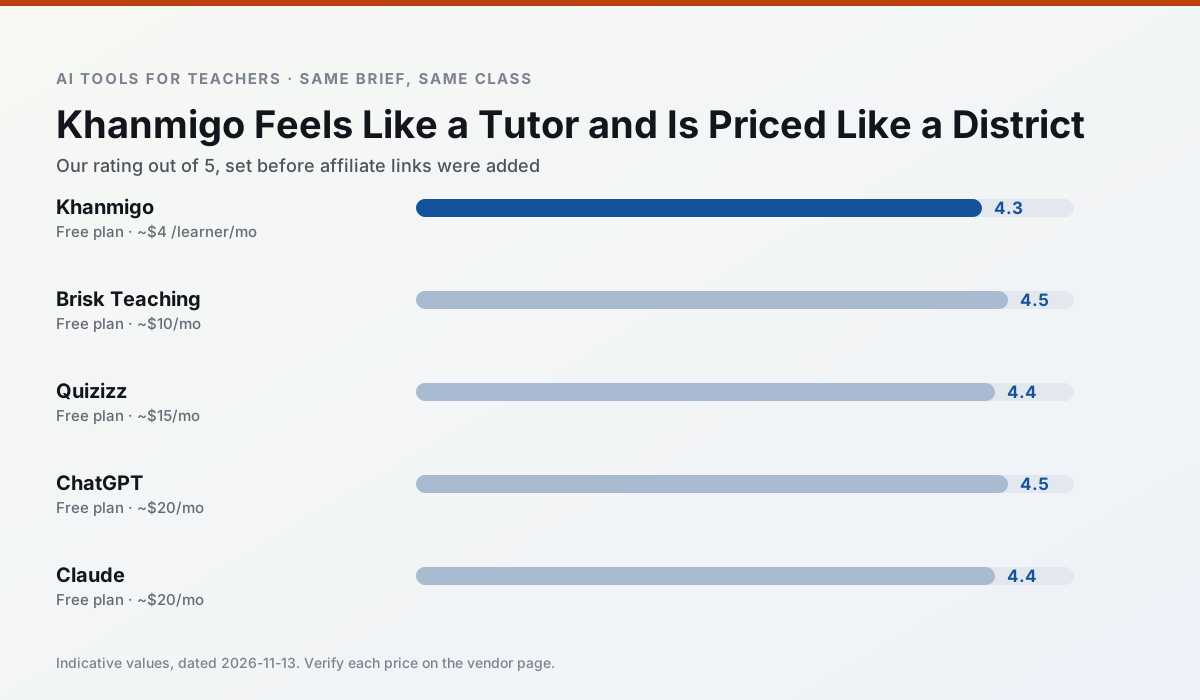
| Khanmigo | math practice · student tutoring | Yes — US teacher accounts, subject to eligibility | ~$4 /learner/mo | Socratic tutoring rather than answers | 4.3 / 5 | Strong option | Try free |
| Brisk Teaching | feedback on writing · grading | Yes — Limited actions per month | ~$10 /user/mo | Works inside Google Docs | 4.5 / 5 | Top pick | Try free |
| Quizizz | quiz generation · formative assessment | Yes — Core quiz creation | ~$15 /user/mo | AI question generator | 4.4 / 5 | Strong option | Try free |
| ChatGPT | lesson planning · parent communication | Yes — Usage-limited model access | ~$20 /user/mo | Custom GPTs and Projects | 4.5 / 5 | Top pick | Try free |
| Claude | rubric creation · feedback on writing | Yes — Usage-limited | ~$20 /user/mo | Very large context window | 4.4 / 5 | Strong option | Try free |
| SchoolAI | student-safe AI · differentiated instruction | Yes — Limited seats | ~$15 /user/mo | Teacher-monitored student chats | 4.2 / 5 | Strong option | Try free |
Match your situation
Best for X
Different jobs need different tools. Here is what we would open first in each case.
For three reading groups and one text, Khanmigo needs the least manual relabelling of vocabulary and questions.
Brisk Teaching is the steadiest of this set at plain, respectful language; names and specific incidents still belong in your draft, not the prompt.
For anything students touch directly, Quizizz offers the supervision controls and logging that IT will ask about first.
ChatGPT is the one we would open on a normal planning day because the first output is editable rather than restructurable, and the free plan covers a single teacher's routine.
Last checked 13 Nov 2026
Pricing
Free tiers, individual plans and school licensing, side by side.
| Tool | Free plan | Individual / paid | School & district | Billing note | Verify |
|---|---|---|---|---|---|
| Khanmigo | $0 — US teacher accounts, subject to eligibility | ~$4 /learner/mo | Custom quote | Indicative — verify on vendor site | Vendor |
| Brisk Teaching | $0 — Limited actions per month | ~$10 /user/mo | Custom quote | Indicative — verify on vendor site | Vendor |
| Quizizz | $0 — Core quiz creation | ~$15 /user/mo | Custom quote | Indicative — verify on vendor site | Vendor |
| ChatGPT | $0 — Usage-limited model access | ~$20 /user/mo | ~$25+ /user/mo | Indicative — verify on vendor site | Vendor |
| Claude | $0 — Usage-limited | ~$20 /user/mo | ~$25+ /user/mo | Indicative — verify on vendor site | Vendor |
| SchoolAI | $0 — Limited seats | ~$15 /user/mo | Custom quote | Indicative — verify on vendor site | Vendor |
Editorial rule: pricing is re-checked every 2–3 months and the top 50 pages are refreshed every 6 months. See our funding policy.
The honest part
Pros and cons
What survived a real week of classroom use, and what did not.
Pros
- Education-first design
- Strong nonprofit trust signal
- Good math scaffolding
Cons
- Availability varies by region
- Less useful for admin paperwork
- Requires student accounts for full value
Pros
- No copy-paste between tools
- Fast inline feedback on student drafts
- Gentle learning curve
Cons
- Chrome-first workflow
- Extension permissions need IT approval
- Free quota is tight
Pros
- Students already know the interface
- Good reporting
- Works on low-end devices
Cons
- Writing high-quality AI questions still needs review
- Gamification can distract
- Advanced analytics are paid
Pros
- Most flexible option available
- Huge community of teacher prompt libraries
- Strong multilingual support
Cons
- Requires prompt skills for consistent results
- No built-in standards alignment
- District privacy review usually required
Pros
- Handles full unit plans and long rubrics
- Nuanced, less generic prose
- Good at structured document output
Cons
- No teacher-specific templates
- Fewer classroom integrations
- Consumer plan not suitable for student data
In the classroom
Use cases
Five concrete workflows, with the tool we would open for each one.
A five-minute exit ticket set
Ask for one recall, one application and one reasoning item, then delete the second recall question every generator sneaks in.
Recommended: KhanmigoAn IEP present-levels first draft
Use aggregated, anonymised data only. Ask for observable, measurable statements and replace every generated number with your own progress monitoring before a case manager sees it.
Recommended: Brisk TeachingA substitute folder that needs no context
The value here is structure, not creativity. Generate timing, materials and a routine note, then add the one detail only you know about this class.
Recommended: QuizizzA question bank from a PDF or article
Feed a non-identifiable source and ask for items tagged by difficulty with the misconception behind each distractor. Spot-check every answer key; numerical items are least reliable.
Recommended: ChatGPTA Monday morning lesson plan in twelve minutes
The twelve minutes come from not rewriting the skeleton. Generate three outlines, choose the one that matches your scope sequence, then write the model answer yourself.
Recommended: Claude
Questions teachers ask us
FAQ
Direct answers, also published as FAQPage structured data for search and AI assistants.
Is Khanmigo worth paying for at mixed-grade level?
What does Khanmigo get wrong most often?
Can Khanmigo replace a planning period?
Is Khanmigo safe to use with student data?
Sources & further reading
Our recommendation
Try MagicSchool AI free for your next lesson planning task
A large library of teacher-specific AI generators in one dashboard. Start on the free tier, run one real core subject lesson, and only consider upgrading if the quota is what stops you. Disclosure: we may earn a commission (30% recurring) at no extra cost to you.
Some links on this page are affiliate links. We may earn a commission at no extra cost to you. Our rankings are editorial and never pay-to-play. Never enter student PII into a free consumer account.
Keep reading
Related comparisons in this cluster.
Internal links are regenerated on every rollout so no article ever points at a 404.