The short answer
- Claude is our default pick for Tutors who need to give actionable draft feedback quickly; Brisk Teaching is better when differentiation is the bottleneck.
- Pricing is where these pages date fastest. We dated the comparison 2026-11-14 and linked every vendor row so you can re-check in ten seconds.
- Every AI output for feedback on student writing needs a teacher review, especially standards codes, core subject accuracy, and anything in an IEP, assessment or family message.
- Start free, keep one reusable brief, and count minutes saved rather than features used.
Start with MagicSchool AI on its free plan.
It is 11:45 on a Tuesday night. I am staring at thirty-four argumentative essays about the New Deal, and my eyes feel like they have been rubbed with sand. My kitchen table is covered in red ink. This is the exact moment every private tutor and classroom educator contemplates a career change. We want to give detailed, actionable AI feedback on student writing for tutors without spending three hours per paper or writing the same marginal comment twenty times.
The problem is that most general-purpose AI tools give terrible feedback. They tell students their essay is "engaging" or "well-structured" without explaining why, or they rewrite the student's voice entirely until the paper sounds like a forty-year-old law clerk wrote it. Finding the right tool for writing feedback means balancing nuance, speed, and student privacy. Let's look at what actually works in practice, drawing on our broader research into the best AI tools for teachers in 2026.
Claude for Parent-Facing Writing and Deep Dives
When you need an assistant that can handle a massive document and maintain a sophisticated voice, Claude is the strongest option on the market. It is priced at around $20 per user per month on the paid tier, with a usage-limited free tier. As our pick for best for parent-facing writing, Claude shines when you need to summarize a messy student writing portfolio into a coherent narrative for a conference.
The primary strength of Claude lies in its long-context window. You can drop in a student's rough draft, the full essay prompt, and a detailed four-page rubric all at once. The prose it generates sounds less robotic than standard template output. However, it lacks teacher-specific templates and browser integrations, meaning you are stuck copying and pasting. If you are handling sensitive student materials, never use the consumer plan; you need an approved workspace tier to keep things compliant.
Brisk Teaching for Inline Draft Feedback
If your tutoring sessions happen inside Google Docs or you teach a mixed-ability class, Brisk Teaching changes your workflow entirely. Priced at around $10 per user per month with a tight free tier of limited actions, this browser extension brings AI directly into Docs, Slides, and web articles. It is our top recommendation for mixed-ability classes because you can adjust the reading level or generate targeted feedback highlights right where the student is typing.
Prompt: "Review this student essay draft in Google Docs. Provide three marginal comments focused solely on thesis strength and evidence integration. Keep the tone encouraging but direct, suitable for an 11th grader."
First output: The AI generated six comments, praised the student excessively, and suggested a completely new thesis statement that wiped out the student's original argument.
Two edits for usability:
- Restricted the prompt to target only paragraph two where the evidence was missing.
- Added the instruction: "Ask a guiding question instead of rewriting the sentence for the student."
The biggest hurdle with Brisk is IT approval. Because it is a Chrome extension that reads document content, your school district will want to inspect the data privacy agreement carefully. Once cleared, it saves hours of copy-pasting between separate windows.
Turnitin Clarity and Feedback Studio for Institutional Safety
Many high schools and university tutoring centers already license Turnitin Clarity or Feedback Studio. While individual teachers cannot purchase it on a whim, it remains the gold standard for institutional writing feedback and similarity checking. Pricing is custom-quoted per institution.
Turnitin is our pick for student-safe deployments because it operates entirely within existing district FERPA and privacy frameworks. The platform gives detailed revision histories, showing you exactly how a draft evolved over time. The downsides are well-documented: AI detection remains a moving target with false positives, and the administrative setup is heavy. It will not help you draft quick encouraging notes, but it keeps institutional compliance airtight.
Class Companion for Paper-Based Assignments
Not all tutoring happens on glowing screens. Many students still draft paragraphs on loose-leaf paper or worksheets, which is where Class Companion earns its keep. It offers a limited free tier and a paid tier at around $12 per user per month. It is our choice for the best free option when you want to test AI feedback without a district purchase.
Class Companion lets you snap a picture of handwritten student work and provides fast, specific comments. It handles math explanations and short-form writing responses surprisingly well. In practice, however, scan quality dictates accuracy. If a student's handwriting resembles ancient runes, the AI will misread words and give bizarre feedback. You still have to review every comment before handing the paper back to a student.
Khanmigo and ChatGPT for Flexible Tutoring Support
Khanmigo, priced at around $4 per learner per month with free US teacher accounts subject to eligibility, takes an education-first approach. Built by a nonprofit, it acts more like a Socratic tutor than an essay grader. It asks guiding questions rather than fixing the grammar outright. It is wonderful for math scaffolding and basic writing brainstorming, though it requires student accounts to unlock its full tutoring value.
On the other end of the spectrum sits ChatGPT. At around $20 per user per month for the paid tier with a usage-limited free model, ChatGPT is the Swiss Army knife of AI tools. It adapts to almost any tutoring task, from generating SAT writing prompts to translating rubrics into Spanish for families.
Prompt: "Analyze this student paragraph for run-on sentences. List each error, explain the grammar rule simply, and provide two ways to fix it without changing the student's tone."
First output: The AI successfully spotted the run-ons but reformatted the entire paragraph into bullet points, stripping away the student's personal voice.
Two edits for usability:
- Instructed the model to preserve the original paragraph structure completely.
- Added a constraint: "Format feedback as a numbered list separate from the student text."
ChatGPT requires serious prompt engineering skills to get consistent results, and it lacks built-in standards alignment. For more ideas on managing workflow automation, take a look at our guide on AI data analysis for administrators to see how districts handle large-scale information processing.
Finding Your Rhythm with Writing Feedback
AI writing feedback is a co-pilot, not an autopilot. Whether you use Claude for deep document reviews or Brisk for live coaching in Google Docs, the goal is to spend less time circling comma splices and more time talking to the student about their ideas. Start with a small batch of essays, test your prompts, and always keep your own red pen handy for the nuances the algorithms miss.
FAQ
Can AI do feedback on student writing at mixed-grade level?
It can produce a first draft and a structure. The level judgement, the standards check and the tone are teacher decisions.
Which tool is best for feedback on student writing?
Claude on the evidence in this article, with Brisk Teaching as the second opinion. Neither replaces the review step.
What is the biggest risk?
A confident, plausible output that nobody checked. The five checks below exist for that reason.
Sources
- Anthropic. "Claude Pricing and Enterprise Privacy." anthropic.com/pricing
- Brisk Teaching. "Brisk Teaching Features and Chrome Extension Scope." briskteaching.com
- Turnitin. "Turnitin Feedback Studio and Clarity Privacy Standards." turnitin.com
- Class Companion. "Class Companion Features for Handwritten Student Work." classcompanion.com
- Khan Academy. "Khanmigo for Teachers and Districts." khanacademy.org/khanmigo
- OpenAI. "ChatGPT Pricing and Workspace Privacy." openai.com/chatgpt/pricing
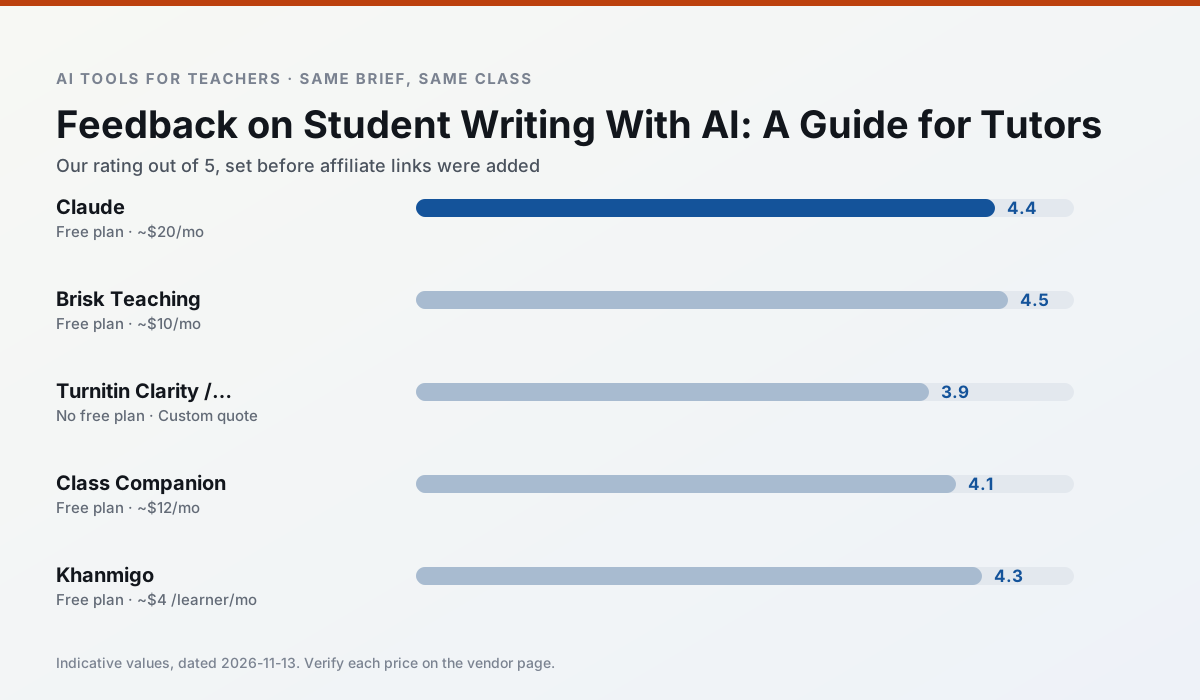
Side by side
Comparison table
Ratings reflect our timed classroom workflow, not vendor claims. Prices are indicative — verify on the vendor site.
| Tool | Best for | Free tier | Indicative paid plan | Standout feature | Our rating | Verdict | Try the tool |
|---|---|---|---|---|---|---|---|
| Claude | rubric creation · feedback on writing | Yes — Usage-limited | ~$20 /user/mo | Very large context window | 4.4 / 5 | Strong option | Try free |
| Brisk Teaching | feedback on writing · grading | Yes — Limited actions per month | ~$10 /user/mo | Works inside Google Docs | 4.5 / 5 | Top pick | Try free |
| Turnitin Clarity / Feedback Studio | feedback on writing · academic integrity | No ongoing free plan | Custom quote | Similarity reports | 3.9 / 5 | Situational | Try free |
| Class Companion | grading · feedback on writing | Yes — Limited assignments | ~$12 /user/mo | Handwriting recognition | 4.1 / 5 | Situational | Try free |
| Khanmigo | math practice · student tutoring | Yes — US teacher accounts, subject to eligibility | ~$4 /learner/mo | Socratic tutoring rather than answers | 4.3 / 5 | Strong option | Try free |
| ChatGPT | lesson planning · parent communication | Yes — Usage-limited model access | ~$20 /user/mo | Custom GPTs and Projects | 4.5 / 5 | Top pick | Try free |
Match your situation
Best for X
Different jobs need different tools. Here is what we would open first in each case.
Family-facing drafts from Claude need the fewest rewrites for warmth without overpromising, which is the usual failure mode.
For three reading groups and one text, Brisk Teaching needs the least manual relabelling of vocabulary and questions.
Turnitin Clarity / Feedback Studio is built around teacher-monitored student spaces and audit logs rather than a consumer chat account, which is a different approval conversation.
Class Companion's free plan is the most usable in this comparison: a quota that survives a normal week. Not enough for a department, enough for one teacher to decide.
Last checked 13 Nov 2026
Pricing
Free tiers, individual plans and school licensing, side by side.
| Tool | Free plan | Individual / paid | School & district | Billing note | Verify |
|---|---|---|---|---|---|
| Claude | $0 — Usage-limited | ~$20 /user/mo | ~$25+ /user/mo | Indicative — verify on vendor site | Vendor |
| Brisk Teaching | $0 — Limited actions per month | ~$10 /user/mo | Custom quote | Indicative — verify on vendor site | Vendor |
| Turnitin Clarity / Feedback Studio | No ongoing free tier | Custom quote | Custom quote | LMS-wide deployment | Vendor |
| Class Companion | $0 — Limited assignments | ~$12 /user/mo | Custom quote | Indicative — verify on vendor site | Vendor |
| Khanmigo | $0 — US teacher accounts, subject to eligibility | ~$4 /learner/mo | Custom quote | Indicative — verify on vendor site | Vendor |
| ChatGPT | $0 — Usage-limited model access | ~$20 /user/mo | ~$25+ /user/mo | Indicative — verify on vendor site | Vendor |
Editorial rule: pricing is re-checked every 2–3 months and the top 50 pages are refreshed every 6 months. See our funding policy.
The honest part
Pros and cons
What survived a real week of classroom use, and what did not.
Pros
- Handles full unit plans and long rubrics
- Nuanced, less generic prose
- Good at structured document output
Cons
- No teacher-specific templates
- Fewer classroom integrations
- Consumer plan not suitable for student data
Pros
- No copy-paste between tools
- Fast inline feedback on student drafts
- Gentle learning curve
Cons
- Chrome-first workflow
- Extension permissions need IT approval
- Free quota is tight
Pros
- Already licensed at many schools
- Consistent institutional workflow
- Detailed revision history
Cons
- Individual teachers cannot buy it
- AI detection remains contested
- Heavy administrative setup
Pros
- Useful where work is done on paper
- Fast, specific comments
- Good math support
Cons
- Scan quality affects accuracy
- Narrow use case
- Feedback still needs teacher review
Pros
- Education-first design
- Strong nonprofit trust signal
- Good math scaffolding
Cons
- Availability varies by region
- Less useful for admin paperwork
- Requires student accounts for full value
In the classroom
Use cases
Five concrete workflows, with the tool we would open for each one.
An IEP present-levels first draft
Use aggregated, anonymised data only. Ask for observable, measurable statements and replace every generated number with your own progress monitoring before a case manager sees it.
Recommended: ClaudeA five-minute exit ticket set
Ask for one recall, one application and one reasoning item, then delete the second recall question every generator sneaks in.
Recommended: Brisk TeachingA question bank from a PDF or article
Feed a non-identifiable source and ask for items tagged by difficulty with the misconception behind each distractor. Spot-check every answer key; numerical items are least reliable.
Recommended: Turnitin Clarity / Feedback StudioA substitute folder that needs no context
The value here is structure, not creativity. Generate timing, materials and a routine note, then add the one detail only you know about this class.
Recommended: Class CompanionThree reading levels from one source text
Paste a vetted text, ask for supported, core and extension versions, then check the vocabulary list by hand. Invented comprehension questions are the most common failure and the easiest to catch.
Recommended: Khanmigo
Questions teachers ask us
FAQ
Direct answers, also published as FAQPage structured data for search and AI assistants.
Can AI do feedback on student writing at mixed-grade level?
Which tool is best for feedback on student writing?
What is the biggest risk?
Sources & further reading
Our recommendation
Try MagicSchool AI free for your next feedback on student writing task
A large library of teacher-specific AI generators in one dashboard. Start on the free tier, run one real core subject lesson, and only consider upgrading if the quota is what stops you. Disclosure: we may earn a commission (30% recurring) at no extra cost to you.
Some links on this page are affiliate links. We may earn a commission at no extra cost to you. Our rankings are editorial and never pay-to-play. Never enter student PII into a free consumer account.
Keep reading
Related comparisons in this cluster.
Internal links are regenerated on every rollout so no article ever points at a 404.