The short answer
- MagicSchool AI is our default pick for first-year teachers who need to draft a standards-aware lesson plan quickly; Eduaide.Ai is better when differentiation is the bottleneck.
- The cheapest honest test is a week of real work on the free plans: MagicSchool AI: Yes — Core generators with monthly usage limits; Eduaide.Ai: Yes — Daily generation cap; ChatGPT: Yes — Usage-limited model access. If a tool is still open on Friday, it has earned a paid conversation.
- Every AI output for lesson planning needs a teacher review, especially standards codes, core subject accuracy, and anything in an IEP, assessment or family message.
- Everything on this page dates from 2026-11-13; where a price could not be re-read, the row says so.
Start with MagicSchool AI on its free plan.
At 4:45 PM on a Tuesday in October, my desk looked like a paper shredder had exploded over it. I had twenty-eight tenth-graders coming in the next morning, half of them reading below grade level, and my mentor teacher was out sick. That was the week I stopped trying to write every lesson plan from scratch and started using AI lesson planning for first-year teachers to keep my head above water. You do not need a philosophy of education at that moment; you need a scaffold that gets you through period two without crying.
Let us be honest about what first-year lesson planning actually feels like. It is a slow bleed of hours spent formatting worksheets, aligning objectives to standards that change every three years, and trying to figure out how to differentiate a text on the Industrial Revolution for students who read at a third-grade level and three others who finished it in five minutes. When you look at tools like MagicSchool AI (around $12 /user/mo indicative, with core generators on a free tier) or Eduaide.Ai (around $10 /user/mo indicative, with a daily generation cap), the pitch is speed. But speed without guardrails just gets you bad lessons faster.
The Monday Morning Outline Routine
The secret to using AI for lesson planning is treating the output as a rough draft written by an overly enthusiastic sub who has never met your kids. The twelve-minute Monday morning routine works because you stop fiddling with the skeleton. You ask for three distinct outlines, pick the one that matches your district scope and sequence, and then write the actual model answer yourself.
Prompt: Generate three distinct 45-minute lesson plan outlines for 9th-grade English on introducing thesis statements. Include a hook, direct instruction, and a guided practice task.
First output: A generic lecture on the parts of a sentence, followed by a worksheet where students underline verbs. No differentiation, and the hook is asking kids if they know what an essay is.
Edit 1: Add a requirement for a low-stakes sorting activity where students categorize strong and weak thesis statements before writing.
Edit 2: Insert a specific check-for-understanding step using whiteboards at minute twenty so I can catch the kids who still think a thesis is just a topic.
If you want the widest template library without needing a degree in prompt engineering, MagicSchool AI is our pick for mixed-ability classes because its generators let you tweak reading levels with a click. If you need clean worksheets and rubrics with a low entry price, Eduaide.Ai handles parent-facing writing well. ChatGPT (around $20 /user/mo indicative, with usage-limited free access) remains the most flexible general-purpose assistant, though it requires precise prompting, which makes it our pick for student-safe deployments when configured correctly.
Building Exit Tickets That Actually Work
Exit tickets are where most teachers waste time because they try to write three new questions every single day. Instead, standardize the format. Use AI to generate a five-minute set that includes one recall item, one application item, and one reasoning item. The catch is that every single AI model will sneak in a second recall question because it loves testing memorization. You have to delete it before you print.
When you need to parse a dense article or PDF into a question bank, feed the non-identifiable source into Writesonic (around $16 /user/mo indicative, with limited free credits) or ChatGPT. Ask for items tagged by difficulty with the specific misconception behind each wrong multiple-choice answer. Writesonic functions well as our best overall for daily use when you need bulk content quickly, though its generic classroom output means you must spot-check every answer key. Numerical items are notoriously unreliable and will often contain math errors that make you look foolish in front of a room of eighth-graders.
Writing IEP Present Levels Without Violating Privacy
The scariest part of first-year paperwork is writing IEP present levels of performance when you barely know what data matters. You can use AI to synthesize notes, but you must use aggregated, anonymized data only. Never paste student names, ID numbers, or specific diagnostic diagnoses into a consumer-tier model.
Ask the AI for observable, measurable statements. When it spits out numbers, replace every single generated statistic with your own hard data from progress monitoring before a case manager or a parent ever sees the document. Tools like ElevenLabs (around $5 /user/mo indicative, with a monthly character quota) can help convert text-based accommodations into natural-sounding audio versions for struggling readers, but remember the privacy rules: do not clone a student's or colleague's voice without explicit written consent. For broader staff training materials or compliance walkthroughs, Colossyan (around $27 /user/mo indicative, with no permanent free plan) builds explainer videos from documents quickly, though it is far too enterprise-focused for everyday K-12 student-facing work.
Two Things That Went Wrong in Real Use
The first month I used these tools, I trusted an AI-generated substitute folder completely. I printed a generic math review and walked out the door. By lunch, the substitute was standing in my doorway looking shell-shocked because the AI had assigned a collaborative group project that required scissors, glue, and unwritten classroom norms that my students simply did not possess. The value of a sub folder is structure, not creativity. Now, my routine note includes the one detail only I know about this class: which kids will try to leave the room together, and where the extra pencils are hidden.
The second disaster happened when I tried to use a free AI writing tool to draft a sensitive email home about a behavioral incident. The tone came back sounding like a corporate liability lawyer drafting a cease-and-desist letter. It was cold, defensive, and immediately put the parent on the warpath. I learned to use AI for structure, but I write my own parent communication from scratch. If you want to explore how these systems fit into a broader workflow, read our guide on best AI tools for teachers in 2026 or look at how support staff use systems in AI accommodations for paraprofessionals.
Do not try to automate your classroom. Automate the blank page. When you sit down at 4:45 PM tomorrow, let the machine build the skeleton, but make sure the heart of the lesson is yours.
FAQ
Can AI do lesson planning at mixed-grade level?
It can produce a first draft and a structure. The level judgement, the standards check and the tone are teacher decisions.
Which tool is best for lesson planning?
MagicSchool AI on the evidence in this article, with Eduaide.Ai as the second opinion. Neither replaces the review step.
What is the biggest risk?
A confident, plausible output that nobody checked. The five checks below exist for that reason.
Sources
- MagicSchool AI Platform Features and Pricing. https://www.magicschool.ai/
- Eduaide.Ai Resource Library Overview. https://www.eduaide.ai/
- OpenAI ChatGPT Pricing and Model Specifications. https://openai.com/chatgpt/
- Writesonic Content Generation Tools. https://writesonic.com/
- ElevenLabs Text-to-Speech Quota Information. https://elevenlabs.io/
- Colossyan Video Generation and Compliance Features. https://www.colossyan.com/
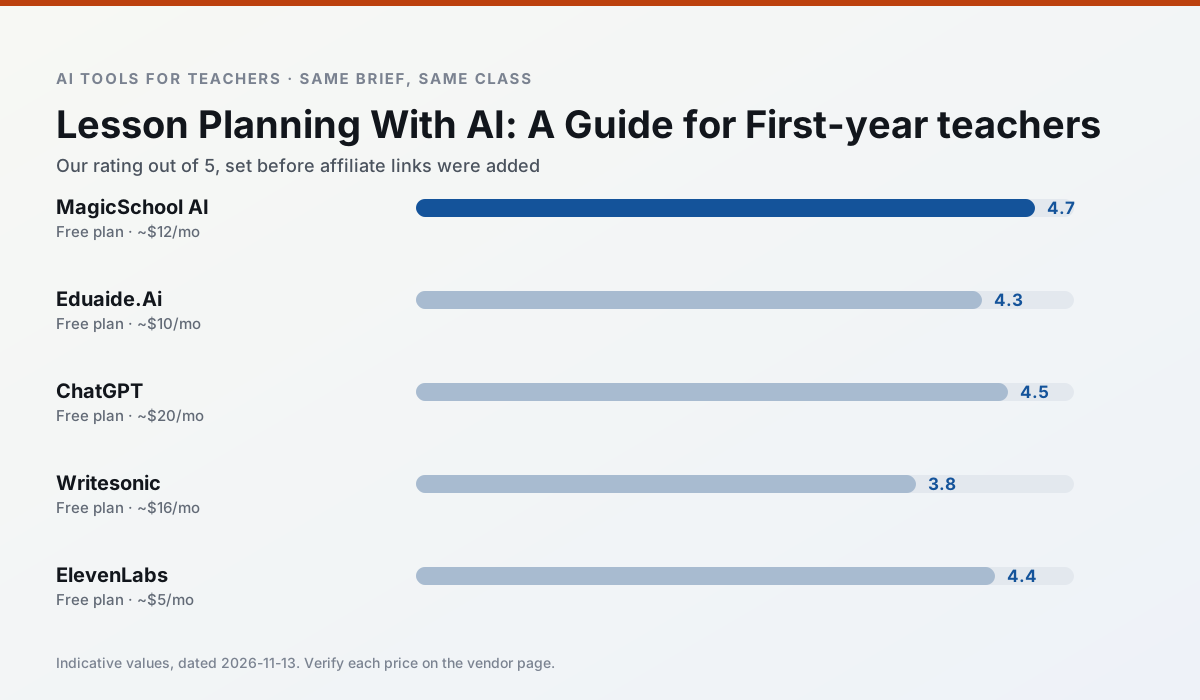
Side by side
Comparison table
Ratings reflect our timed classroom workflow, not vendor claims. Prices are indicative — verify on the vendor site.
| Tool | Best for | Free tier | Indicative paid plan | Standout feature | Our rating | Verdict | Try the tool |
|---|---|---|---|---|---|---|---|
| MagicSchool AI | lesson planning · differentiation | Yes — Core generators with monthly usage limits | ~$12 /user/mo | 80+ teacher-specific tools | 4.7 / 5 | Top pick | Try free |
| Eduaide.Ai | lesson planning · rubric creation | Yes — Daily generation cap | ~$10 /user/mo | Resource library | 4.3 / 5 | Strong option | Try free |
| ChatGPT | lesson planning · parent communication | Yes — Usage-limited model access | ~$20 /user/mo | Custom GPTs and Projects | 4.5 / 5 | Top pick | Try free |
| Writesonic | newsletters · parent communication | Yes — Limited credits | ~$16 /user/mo | Article and email generators | 3.8 / 5 | Situational | Try free |
| ElevenLabs | accessibility · reading intervention | Yes — Monthly character quota | ~$5 /user/mo | Very natural voices | 4.4 / 5 | Strong option | Try free |
| Colossyan | PD materials · video lessons | No ongoing free plan | ~$27 /user/mo | PDF/PPT-to-video | 4.1 / 5 | Situational | Try free |
Match your situation
Best for X
Different jobs need different tools. Here is what we would open first in each case.
MagicSchool AI keeps the same task across levels, which is what makes a differentiated set defensible in moderation.
Family-facing drafts from Eduaide.Ai need the fewest rewrites for warmth without overpromising, which is the usual failure mode.
For anything students touch directly, ChatGPT offers the supervision controls and logging that IT will ask about first.
Writesonic is the one we would open on a normal planning day because the first output is editable rather than restructurable, and the free plan covers a single teacher's routine.
Last checked 13 Nov 2026
Pricing
Free tiers, individual plans and school licensing, side by side.
| Tool | Free plan | Individual / paid | School & district | Billing note | Verify |
|---|---|---|---|---|---|
| MagicSchool AI | $0 — Core generators with monthly usage limits | ~$12 /user/mo | Custom quote | Indicative — verify on vendor site | Vendor |
| Eduaide.Ai | $0 — Daily generation cap | ~$10 /user/mo | Custom quote | Indicative — verify on vendor site | Vendor |
| ChatGPT | $0 — Usage-limited model access | ~$20 /user/mo | ~$25+ /user/mo | Indicative — verify on vendor site | Vendor |
| Writesonic | $0 — Limited credits | ~$16 /user/mo | ~$49 /user/mo | Indicative — verify on vendor site | Vendor |
| ElevenLabs | $0 — Monthly character quota | ~$5 /user/mo | ~$22 /user/mo | Indicative — verify on vendor site | Vendor |
| Colossyan | No ongoing free tier | ~$27 /user/mo | Custom quote | Indicative — verify on vendor site | Vendor |
Editorial rule: pricing is re-checked every 2–3 months and the top 50 pages are refreshed every 6 months. See our funding policy.
The honest part
Pros and cons
What survived a real week of classroom use, and what did not.
Pros
- Widest purpose-built template library
- Strong free tier for individual teachers
- Fast to learn with almost no prompting skill
Cons
- Outputs still need standards review
- Best features sit behind the paid tier
- District approval can be slow
Pros
- Very low entry price
- Good worksheet and rubric output
- Clean, uncluttered UI
Cons
- Smaller template set than MagicSchool
- Less polished export options
- Limited integrations
Pros
- Most flexible option available
- Huge community of teacher prompt libraries
- Strong multilingual support
Cons
- Requires prompt skills for consistent results
- No built-in standards alignment
- District privacy review usually required
Pros
- Cheaper than enterprise writing suites
- Many templates
- Reasonable free trial
Cons
- Generic classroom output
- Credit system is confusing
- Limited education context
Pros
- Excellent for accessible audio versions
- Low entry price
- Fast generation
Cons
- Quota-based billing
- Voice cloning consent considerations
- Not a teaching platform
In the classroom
Use cases
Five concrete workflows, with the tool we would open for each one.
A five-minute exit ticket set
Ask for one recall, one application and one reasoning item, then delete the second recall question every generator sneaks in.
Recommended: MagicSchool AIAn IEP present-levels first draft
Use aggregated, anonymised data only. Ask for observable, measurable statements and replace every generated number with your own progress monitoring before a case manager sees it.
Recommended: Eduaide.AiA substitute folder that needs no context
The value here is structure, not creativity. Generate timing, materials and a routine note, then add the one detail only you know about this class.
Recommended: ChatGPTA question bank from a PDF or article
Feed a non-identifiable source and ask for items tagged by difficulty with the misconception behind each distractor. Spot-check every answer key; numerical items are least reliable.
Recommended: WritesonicA Monday morning lesson plan in twelve minutes
The twelve minutes come from not rewriting the skeleton. Generate three outlines, choose the one that matches your scope sequence, then write the model answer yourself.
Recommended: ElevenLabs
Questions teachers ask us
FAQ
Direct answers, also published as FAQPage structured data for search and AI assistants.
Can AI do lesson planning at mixed-grade level?
Which tool is best for lesson planning?
What is the biggest risk?
Sources & further reading
Our recommendation
Try MagicSchool AI free for your next lesson planning task
A large library of teacher-specific AI generators in one dashboard. Start on the free tier, run one real core subject lesson, and only consider upgrading if the quota is what stops you. Disclosure: we may earn a commission (30% recurring) at no extra cost to you.
Some links on this page are affiliate links. We may earn a commission at no extra cost to you. Our rankings are editorial and never pay-to-play. Never enter student PII into a free consumer account.
Keep reading
Related comparisons in this cluster.
Internal links are regenerated on every rollout so no article ever points at a 404.