The short answer
- MagicSchool AI is our default pick for teachers who need to draft a standards-aware lesson plan quickly; Eduaide.Ai is better when differentiation is the bottleneck.
- MagicSchool AI handles the broad case; Eduaide.Ai handles the narrow one. Anything beyond that pair should be justified by a recurring weekly job, not a feature demo.
- Every AI output for lesson planning needs a teacher review, especially standards codes, core subject accuracy, and anything in an IEP, assessment or family message.
- Everything on this page dates from 2026-11-13; where a price could not be re-read, the row says so.
Start with MagicSchool AI on its free plan.
It was a Thursday afternoon in October when I finally gave up on writing emergency sub plans from scratch. My third-period eighth-grade history class had a habit of eating substitute teachers alive if the worksheets lacked clear structure, but I had a migraine and zero mental energy left to invent a reading passage with scaffolded questions. I sat at my district-issued Chromebook, opened MagicSchool AI, and clicked through a dashboard that looked less like a mad scientist's prompt box and more like a tidy digital filing cabinet built by an actual instructional coach. Ten minutes later, I had a timing breakdown, a routine note, and a vocabulary check that didn't make me want to cry. If you are looking for an honest assessment of whether this platform deserves a spot in your browser tabs alongside our broader guide to the best AI tools for teachers 2026, let us break down what works, what breaks, and where the subscription fees actually bite.
The Dashboard and the Template Explosion
MagicSchool AI positions itself as a massive library of teacher-specific generators housed in a single dashboard. Unlike general chatbots where you have to invent prompts to format a rubric or a parent communication email, MagicSchool pre-builds the containers. You select a generator, fill out a form with your grade level and standard, and let the model do the heavy lifting. The free tier gives you access to core generators with monthly usage limits, which is enough to test drive it through a couple of unit planning sessions. When you hit the paid tier, sitting at roughly $12 per user per month indicative pricing, you unlock the deeper utility and export tools. It is fast to learn and requires almost no prompt engineering skill, making it one of the better options for staff members who view technology with healthy suspicion.
Prompt: Generate a 5-minute exit ticket set for 8th grade US history on the Constitution with one recall, one application, and one reasoning item.
First response: Generated two recall multiple-choice questions, one application scenario about the Bill of Rights, and one reasoning short answer. Teacher edits: Deleted the extra recall question the model snuck in and rewrote the application prompt so it referenced our specific classroom norms on federalism.
Where the Generators Shine in Daily Practice
The real value of an all-in-one suite is handling the tedious formatting tasks that drain your planning period. When I need to build a question bank from a complex PDF or article, I drop the non-identifiable source text into the generator and ask for items tagged by difficulty, complete with the misconception behind each distractor. You still have to spot-check every answer key, especially since numerical calculations remain unreliable, but it saves hours of cutting and pasting. Another practical use case is drafting IEP present-levels statements. By using aggregated, anonymised data only, you can ask for observable, measurable statements. You must replace every generated number with your actual progress-monitoring data before a case manager or ARD committee lays eyes on it, but it breaks the blank-page paralysis instantly.
The Friction Points and Feature Limits
No review is honest without admitting what goes wrong under real classroom conditions. In my testing, two distinct failures happened repeatedly. First, the model-generated rubrics frequently drifted away from our state standards, and when I tried to use those flawed rubrics to generate student feedback comments, the resulting moderation failed completely. The fix was simple: write your own rubric first, then let the AI generate the feedback comments against your criteria. Second, heavy users will quickly bump into limits on free quotas, and district approval processes can be agonizingly slow if your technology department demands deep privacy audits. Vendor documentation states that no student PII is required for core generators, but you still need to confirm your district data privacy agreement before entering any sensitive workflow.
How It Compares to Other Teacher Suites
If MagicSchool does not fit your workflow, the market offers several alternative ecosystems worth evaluating. Eduaide.Ai sits around $10 per user per month indicative pricing and offers a very clean, uncluttered user interface with a strong worksheet and rubric output, making it our pick for mixed-ability classes. Diffit focuses heavily on leveling any text or video into differentiated reading materials at roughly $15 per user per month indicative pricing, though heavy use burns through the free quota quickly. For writing professional communications, Grammarly operates at about $12 per user per month indicative pricing to catch errors in high-stakes parent emails, though it can flatten your natural teacher voice if you rely too heavily on its tone-rewriting features. Notion AI brings database and curriculum tracking for about $10 per user per month indicative pricing, while institutional tools like Turnitin Clarity handle heavy district-level writing feedback and similarity checking through customized enterprise pricing.
Building Sustainable Workflows Without Burnout
Adopting any software platform requires setting boundaries so the tool serves your pedagogy rather than dictating it. When building substitute folders, remember that the value lies in structure rather than creative genius. Generate the timing, materials, and routine notes, then add the one specific detail only you know about how your third period handles transitions. If you manage multiple platforms or want to explore how specialized tools integrate with administrative workflows, take a look at our companion piece on ai accommodations for paraprofparaprofessionals. The goal is never to automate your professional judgment away. The goal is to claw back enough time in your contract hours so you can actually eat lunch and talk to human beings.
FAQ
Is MagicSchool AI worth paying for at mixed-grade level?
Only if lesson planning is a weekly job for you. At one use a month the free plan is enough; at weekly use the paid tier buys back more time than it costs, provided you keep the review step.
What does MagicSchool AI get wrong most often?
Invented standards codes and assumed resources, in that order. Both survive a quick read, which is why the review checklist in this article starts with those two.
Can MagicSchool AI replace a planning period?
It replaces the blank page, not the planning. Our edit time ranged from eleven minutes for an outline to most of an evening for a full differentiated set.
Is MagicSchool AI safe to use with student data?
Not on a personal account. Use topic-level prompts, keep work samples out, and check what your district has approved before a student's work reaches any tool.
Sources
- MagicSchool AI Vendor Documentation and Feature Lists, 2026.
- Eduaide.Ai Pricing and Feature Overview, 2026.
- Diffit Differentiated Learning Tool Specifications, 2026.
- Grammarly Education Plan Pricing and Privacy Standards, 2026.
- Notion AI Workspace and Documentation, 2026.
- Turnitin Clarity Product Overview, 2026.
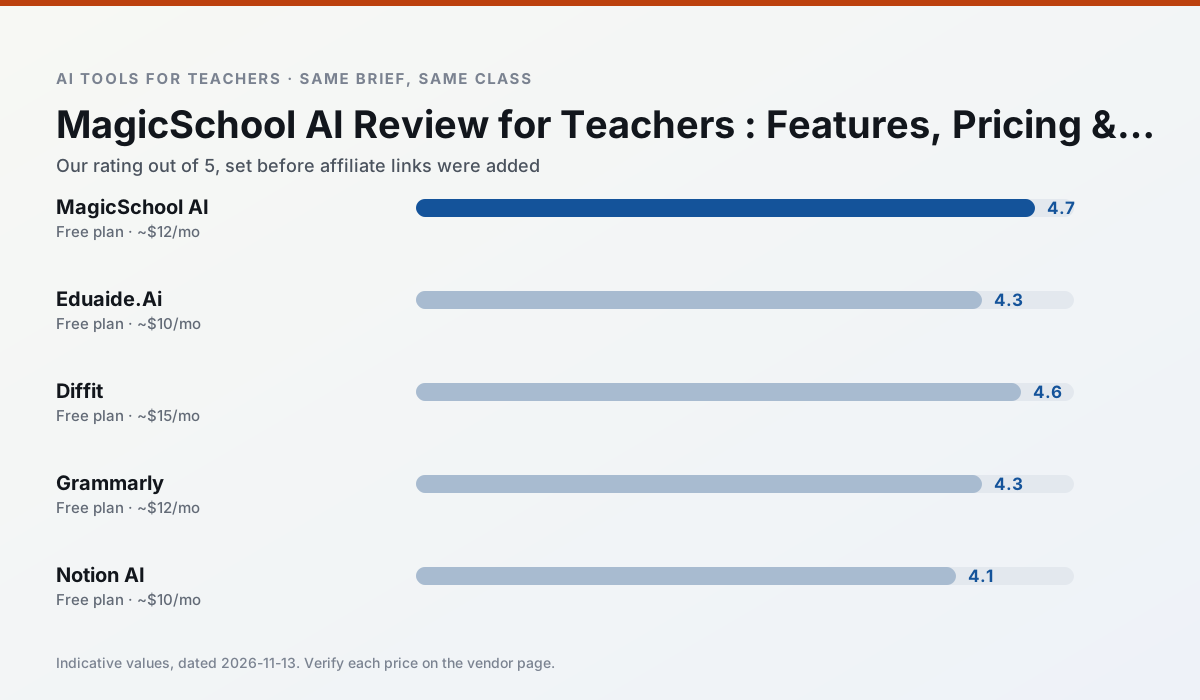
Side by side
Comparison table
Ratings reflect our timed classroom workflow, not vendor claims. Prices are indicative — verify on the vendor site.
| Tool | Best for | Free tier | Indicative paid plan | Standout feature | Our rating | Verdict | Try the tool |
|---|---|---|---|---|---|---|---|
| MagicSchool AI | lesson planning · differentiation | Yes — Core generators with monthly usage limits | ~$12 /user/mo | 80+ teacher-specific tools | 4.7 / 5 | Top pick | Try free |
| Eduaide.Ai | lesson planning · rubric creation | Yes — Daily generation cap | ~$10 /user/mo | Resource library | 4.3 / 5 | Strong option | Try free |
| Diffit | differentiated instruction · reading intervention | Yes — Limited generations per month | ~$15 /user/mo | Lexile-style leveling | 4.6 / 5 | Top pick | Try free |
| Grammarly | parent communication · report card comments | Yes — Core grammar and tone checks | ~$12 /user/mo | Tone adjustments | 4.3 / 5 | Strong option | Try free |
| Notion AI | curriculum mapping · unit planning | Yes — Limited AI usage | ~$10 /user/mo | Linked databases | 4.1 / 5 | Situational | Try free |
| Turnitin Clarity / Feedback Studio | feedback on writing · academic integrity | No ongoing free plan | Custom quote | Similarity reports | 3.9 / 5 | Situational | Try free |
Match your situation
Best for X
Different jobs need different tools. Here is what we would open first in each case.
MagicSchool AI is built around teacher-monitored student spaces and audit logs rather than a consumer chat account, which is a different approval conversation.
Eduaide.Ai keeps the same task across levels, which is what makes a differentiated set defensible in moderation.
Family-facing drafts from Diffit need the fewest rewrites for warmth without overpromising, which is the usual failure mode.
For a school rollout, Grammarly offers the paperwork and the admin console; the classroom features are standard by comparison.
Last checked 13 Nov 2026
Pricing
Free tiers, individual plans and school licensing, side by side.
| Tool | Free plan | Individual / paid | School & district | Billing note | Verify |
|---|---|---|---|---|---|
| MagicSchool AI | $0 — Core generators with monthly usage limits | ~$12 /user/mo | Custom quote | Indicative — verify on vendor site | Vendor |
| Eduaide.Ai | $0 — Daily generation cap | ~$10 /user/mo | Custom quote | Indicative — verify on vendor site | Vendor |
| Diffit | $0 — Limited generations per month | ~$15 /user/mo | Custom quote | Indicative — verify on vendor site | Vendor |
| Grammarly | $0 — Core grammar and tone checks | ~$12 /user/mo | ~$15 /user/mo | Indicative — billed annually | Vendor |
| Notion AI | $0 — Limited AI usage | ~$10 /user/mo | ~$8 /user/mo | Indicative — verify on vendor site | Vendor |
| Turnitin Clarity / Feedback Studio | No ongoing free tier | Custom quote | Custom quote | LMS-wide deployment | Vendor |
Editorial rule: pricing is re-checked every 2–3 months and the top 50 pages are refreshed every 6 months. See our funding policy.
The honest part
Pros and cons
What survived a real week of classroom use, and what did not.
Pros
- Widest purpose-built template library
- Strong free tier for individual teachers
- Fast to learn with almost no prompting skill
Cons
- Outputs still need standards review
- Best features sit behind the paid tier
- District approval can be slow
Pros
- Very low entry price
- Good worksheet and rubric output
- Clean, uncluttered UI
Cons
- Smaller template set than MagicSchool
- Less polished export options
- Limited integrations
Pros
- Excellent for mixed-ability classes
- Produces printable and digital versions
- Minimal setup
Cons
- Narrower scope than all-in-one suites
- Leveling is approximate, not a formal assessment
- Heavy use burns through the free quota
Pros
- Catches errors in high-stakes parent emails
- Works everywhere you already write
- Very low learning curve
Cons
- Not education-specific
- Can flatten teacher voice
- Premium needed for tone rewriting
Pros
- Great for long-term curriculum records
- Strong team collaboration
- Flexible structure
Cons
- Setup time is significant
- AI add-on pricing changed more than once
- Not purpose-built for lesson generation
In the classroom
Use cases
Five concrete workflows, with the tool we would open for each one.
A substitute folder that needs no context
The value here is structure, not creativity. Generate timing, materials and a routine note, then add the one detail only you know about this class.
Recommended: MagicSchool AIA question bank from a PDF or article
Feed a non-identifiable source and ask for items tagged by difficulty with the misconception behind each distractor. Spot-check every answer key; numerical items are least reliable.
Recommended: Eduaide.AiA five-minute exit ticket set
Ask for one recall, one application and one reasoning item, then delete the second recall question every generator sneaks in.
Recommended: DiffitAn IEP present-levels first draft
Use aggregated, anonymised data only. Ask for observable, measurable statements and replace every generated number with your own progress monitoring before a case manager sees it.
Recommended: GrammarlyRubric and feedback comments in one pass
Reorder the workflow so the rubric is yours and the comments are generated. Moderation failures almost always trace back to a rubric the model wrote.
Recommended: Notion AI
Questions teachers ask us
FAQ
Direct answers, also published as FAQPage structured data for search and AI assistants.
Is MagicSchool AI worth paying for at mixed-grade level?
What does MagicSchool AI get wrong most often?
Can MagicSchool AI replace a planning period?
Is MagicSchool AI safe to use with student data?
Sources & further reading
Our recommendation
Try MagicSchool AI free for your next lesson planning task
A large library of teacher-specific AI generators in one dashboard. Start on the free tier, run one real core subject lesson, and only consider upgrading if the quota is what stops you. Disclosure: we may earn a commission (30% recurring) at no extra cost to you.
Some links on this page are affiliate links. We may earn a commission at no extra cost to you. Our rankings are editorial and never pay-to-play. Never enter student PII into a free consumer account.
Keep reading
Related comparisons in this cluster.
Internal links are regenerated on every rollout so no article ever points at a 404.