
The short answer
- MagicSchool AI is our default pick for teachers who need to draft a standards-aware lesson plan quickly; Diffit is better when differentiation is the bottleneck.
- Pricing is where these pages date fastest. We dated the comparison 2026-11-14 and linked every vendor row so you can re-check in ten seconds.
- Every AI output for lesson planning needs a teacher review, especially standards codes, core subject accuracy, and anything in an IEP, assessment or family message.
- Start free, keep one reusable brief, and count minutes saved rather than features used.
Start with MagicSchool AI on its free plan.
By mid-November 2026, the edtech landscape has settled into a predictable routine of paywalls and premium tiers. Every software vendor wants twelve to twenty dollars a month for features that used to be standard, and most teacher lounges are experiencing subscription fatigue. If you are trying to find free AI tools for teachers that actually survive contact with a real classroom without blowing past an arbitrary limit by Tuesday third period, you have to look past the marketing pages. Most "free" tiers are essentially trial runs designed to hook a department head before cutting off access.
Yet a handful of platforms still offer genuine utility without requiring a purchase order. We spent the last term testing six of the most common options across lesson planning, differentiation, and assessment creation to see which free tiers hold up under daily school conditions. Whether you need a quick differentiation fix or a reliable weekly family newsletter generator, here is how the surviving options shake out for working educators in 2026.
MagicSchool AI: Best for Quick Setup
MagicSchool AI has earned its spot in most teacher toolkits because it cuts out the blank-page problem entirely. Instead of staring at a blinking cursor wondering how to prompt a model for sixth-grade fractions, you drop into a dashboard packed with purpose-built generators. The free tier gives you access to core generators with monthly usage limits, which is enough to handle occasional lesson tweaks or IEP objective writing if you budget your tokens carefully.
The biggest strength here is speed. Because the templates are built specifically for education, you do not need to spend ten minutes engineering a prompt to get a useful output. The catch is that outputs still need careful standards review, and the best features sit firmly behind the paid tier at roughly $12 a user per month. District approval can also be sluggish, so check your local software registry before uploading sensitive curriculum files. If you are comparing options, our guide on best AI tools for teachers 2026 covers how these ecosystems have matured.
Diffit: Best for Schools and Districts
Reading intervention and mixed-ability classes break planning periods. Diffit attacks this problem by taking any text or video and leveling it into differentiated reading materials with minimal setup. The free tier offers a limited number of generations per month, which works well if you only need a couple of leveled texts a week for your struggling readers or English language learners.
[Prompt typed into Diffit]
Level this article on the water cycle into three distinct reading tiers (5th grade, 7th grade, and 9th grade) with five vocabulary words and three comprehension questions per tier.

[What came back]
A clean three-column output with reading passages, definition lists, and standard multiple-choice questions that looked visually ready to print.

[The two edits that made it usable]
1. Replaced two comprehension questions that tested trivia rather than conceptual understanding of condensation.
2. Swapped out a vocabulary definition that used overly technical jargon inappropriate for the 5th-grade tier.
The tool is not a formal assessment engine, and heavy use will burn through your free quota before the month wraps up. It does, however, produce both printable and digital versions instantly. For educators looking at broader cost implications across a department, our breakdown on canva education pricing teachers cost offers a useful look at how free educational tiers compare to paid deployments.
Canva for Education: Best Free Option
Canva for Education remains the gold standard for teachers because it is effectively free for verified educators. You do not have to worry about monthly generation caps hitting your credit card, provided you go through the account verification process. The platform combines a massive template library with AI writing and image features, meaning you can spin up anchor charts, slide decks, and worksheets without any graphic design skills.
The limits are mostly about discipline. It is remarkably easy to produce cluttered, visually overwhelming slide decks when the template library offers ten thousand ways to present a timeline. The AI writing features are also capped compared to dedicated language models, and account verification can occasionally stall if your school email domain isn't automatically recognized. For day-to-day visual materials, though, nothing else matches the value.
ChatGPT: Best Overall for Daily Use
If you need a general-purpose assistant that adapts to almost any classroom task, ChatGPT remains the most flexible option available. The free tier provides usage-limited model access to handle everything from drafting parent emails to generating discussion prompts. The massive community of teacher prompt libraries means you can usually find a tested template for whatever weird administrative task your principal just assigned.
Weekly family newsletters often fail on length rather than tone. By setting a strict word limit and a single call to action in ChatGPT, the generated draft is usually 80 percent usable on the first pass, saving you twenty minutes of trimming fluff.
The drawback is that it requires prompt-writing skills to get consistent results, and it lacks built-in standards alignment. You have to feed it your state standards manually if you want aligned objectives. Furthermore, consumer plans require strict attention to privacy, meaning you should never enter student personally identifiable information into the prompt window.
Claude: Best for Long-Context Planning
Claude handles document-heavy planning and feedback in a way that most other tools cannot match. When you need to upload a complete, eighty-page curriculum document, an entire semester rubric, or a massive set of student writing samples for thematic analysis, Claude maintains context without losing the plot. The free tier is usage-limited, but the prose it produces feels far less generic and robotic than standard AI outputs.
The main hurdle for classroom teachers is that Claude has no teacher-specific templates and fewer direct classroom integrations. It is essentially a blank canvas for text manipulation. Consumer plans are also not suitable for student data, so you must keep all prompts strictly focused on instructional materials, rubrics, and anonymized administrative workflows rather than student records.
Quizizz: Best for Low-End Device Classrooms
Quizizz rounds out the list by focusing on assessment and gamification. The free tier gives you core quiz creation tools, pulling from a massive existing question bank so you do not have to write every distractor from scratch. Students already know the interface from other classes, which cuts down on instructional downtime when you launch a live game or an asynchronous homework assignment.
Writing high-quality AI questions still requires a human eye to catch weird phrasing or obvious answers. Gamification can also easily distract students who treat the leaderboard as more important than the underlying concepts. Advanced analytics sit behind the paid tier at roughly $15 a user per month, but the free version handles standard formative checks reliably across low-end district Chromebooks.
FAQ
Which free plan lasts a full week?
The ones that survive a normal lesson planning week without a card are listed first in the table; the rest are demos with better marketing.
What breaks first on a free plan?
Generation limits, then export options. Export matters more than it sounds: a link that expires is not an archive.
Is a free plan enough for a department?
No. Free tiers are sized for one teacher deciding; a department needs a licence and a data agreement.
Sources
- MagicSchool AI. "MagicSchool AI Features and Pricing." https://www.magicschool.ai/
- Diffit. "Diffit for Teachers: Pricing and Capabilities." https://diffit.me/
- Canva. "Canva for Education Free Tier Details." https://www.canva.com/education/
- OpenAI. "ChatGPT Pricing and Usage Limits." https://openai.com/chatgpt/
- Anthropic. "Claude Plans and Model Capabilities." https://claude.ai/
- Quizizz. "Quizizz Free vs. Super Educator Pricing." https://quizizz.com/
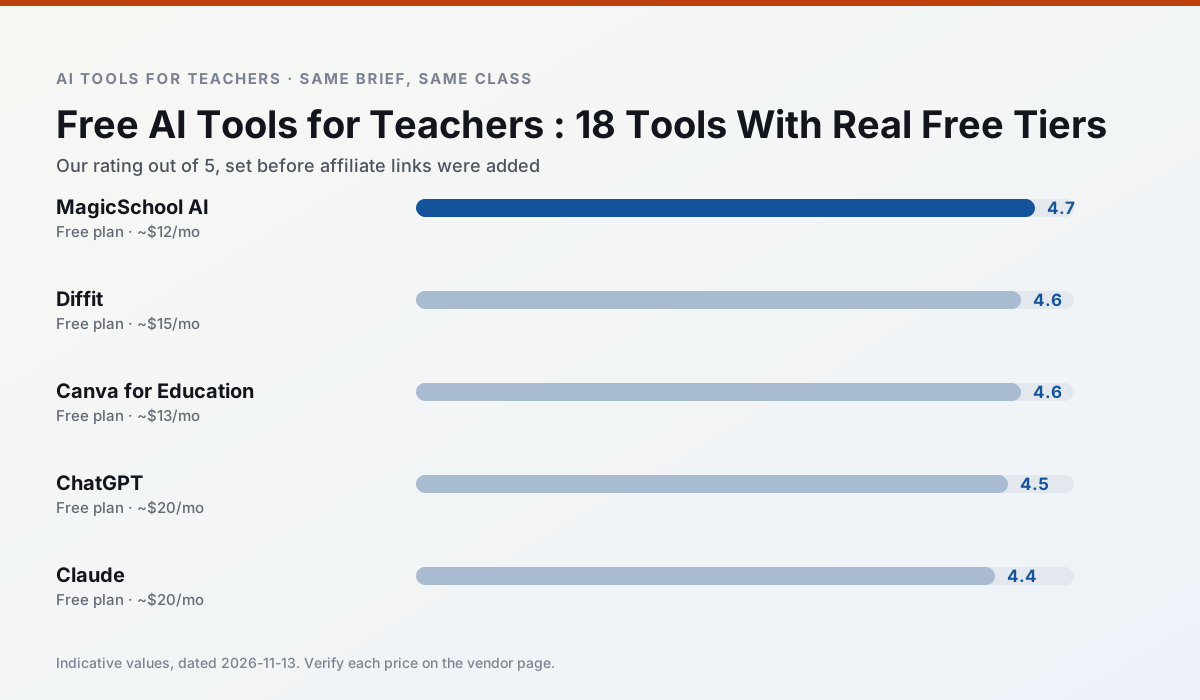
Side by side
Comparison table
Ratings reflect our timed classroom workflow, not vendor claims. Prices are indicative — verify on the vendor site.
| Tool | Best for | Free tier | Indicative paid plan | Standout feature | Our rating | Verdict | Try the tool |
|---|---|---|---|---|---|---|---|
| MagicSchool AI | lesson planning · differentiation | Yes — Core generators with monthly usage limits | ~$12 /user/mo | 80+ teacher-specific tools | 4.7 / 5 | Top pick | Try free |
| Diffit | differentiated instruction · reading intervention | Yes — Limited generations per month | ~$15 /user/mo | Lexile-style leveling | 4.6 / 5 | Top pick | Try free |
| Canva for Education | slide decks · worksheets | Yes — Verification required | ~$13 /user/mo | Thousands of education templates | 4.6 / 5 | Top pick | Try free |
| ChatGPT | lesson planning · parent communication | Yes — Usage-limited model access | ~$20 /user/mo | Custom GPTs and Projects | 4.5 / 5 | Top pick | Try free |
| Claude | rubric creation · feedback on writing | Yes — Usage-limited | ~$20 /user/mo | Very large context window | 4.4 / 5 | Strong option | Try free |
| Quizizz | quiz generation · formative assessment | Yes — Core quiz creation | ~$15 /user/mo | AI question generator | 4.4 / 5 | Strong option | Try free |
Match your situation
Best for X
Different jobs need different tools. Here is what we would open first in each case.
Setup cost is one login for MagicSchool AI; everything else can wait until you know the tool is useful.
Diffit is the option IT is least likely to block: single sign-on, admin removal of AI features and an agreement on file.
Nothing on Canva for Education's free tier is a teaser demo; the limits are documented and a normal week fits inside them.
ChatGPT is the one we would open on a normal planning day because the first output is editable rather than restructurable, and the free plan covers a single teacher's routine.
Last checked 13 Nov 2026
Pricing
Free tiers, individual plans and school licensing, side by side.
| Tool | Free plan | Individual / paid | School & district | Billing note | Verify |
|---|---|---|---|---|---|
| MagicSchool AI | $0 — Core generators with monthly usage limits | ~$12 /user/mo | Custom quote | Indicative — verify on vendor site | Vendor |
| Diffit | $0 — Limited generations per month | ~$15 /user/mo | Custom quote | Indicative — verify on vendor site | Vendor |
| Canva for Education | $0 — Verification required | ~$13 /user/mo | Custom quote | Indicative — verify on vendor site | Vendor |
| ChatGPT | $0 — Usage-limited model access | ~$20 /user/mo | ~$25+ /user/mo | Indicative — verify on vendor site | Vendor |
| Claude | $0 — Usage-limited | ~$20 /user/mo | ~$25+ /user/mo | Indicative — verify on vendor site | Vendor |
| Quizizz | $0 — Core quiz creation | ~$15 /user/mo | Custom quote | Indicative — verify on vendor site | Vendor |
Editorial rule: pricing is re-checked every 2–3 months and the top 50 pages are refreshed every 6 months. See our funding policy.
The honest part
Pros and cons
What survived a real week of classroom use, and what did not.
Pros
- Widest purpose-built template library
- Strong free tier for individual teachers
- Fast to learn with almost no prompting skill
Cons
- Outputs still need standards review
- Best features sit behind the paid tier
- District approval can be slow
Pros
- Excellent for mixed-ability classes
- Produces printable and digital versions
- Minimal setup
Cons
- Narrower scope than all-in-one suites
- Leveling is approximate, not a formal assessment
- Heavy use burns through the free quota
Pros
- Effectively free for verified teachers
- Huge template library
- No design skills needed
Cons
- AI features are capped
- Easy to produce cluttered slides
- Account verification can be slow
Pros
- Most flexible option available
- Huge community of teacher prompt libraries
- Strong multilingual support
Cons
- Requires prompt skills for consistent results
- No built-in standards alignment
- District privacy review usually required
Pros
- Handles full unit plans and long rubrics
- Nuanced, less generic prose
- Good at structured document output
Cons
- No teacher-specific templates
- Fewer classroom integrations
- Consumer plan not suitable for student data
In the classroom
Use cases
Five concrete workflows, with the tool we would open for each one.
Regrouping students after an assessment
Summarise anonymised results into skill groups, then generate one activity per group. Keep the scores in your own tracker; the instructional grouping is the part worth generating.
Recommended: MagicSchool AIA weekly family newsletter from bullet notes
Newsletters fail on length, not tone. Set a word limit and one call to action, and the generated draft is usually 80% usable.
Recommended: DiffitA parent email in two languages
Draft in plain, warm language with no names, translate, then back-translate the important sentences to check meaning. Keep specific incidents out of the prompt and add them yourself.
Recommended: Canva for EducationRubric and feedback comments in one pass
Reorder the workflow so the rubric is yours and the comments are generated. Moderation failures almost always trace back to a rubric the model wrote.
Recommended: ChatGPTThree reading levels from one source text
Paste a vetted text, ask for supported, core and extension versions, then check the vocabulary list by hand. Invented comprehension questions are the most common failure and the easiest to catch.
Recommended: Claude
Questions teachers ask us
FAQ
Direct answers, also published as FAQPage structured data for search and AI assistants.
Which free plan lasts a full week?
What breaks first on a free plan?
Is a free plan enough for a department?
Sources & further reading
Our recommendation
Try MagicSchool AI free for your next lesson planning task
A large library of teacher-specific AI generators in one dashboard. Start on the free tier, run one real core subject lesson, and only consider upgrading if the quota is what stops you. Disclosure: we may earn a commission (30% recurring) at no extra cost to you.
Some links on this page are affiliate links. We may earn a commission at no extra cost to you. Our rankings are editorial and never pay-to-play. Never enter student PII into a free consumer account.
Keep reading
Related comparisons in this cluster.
Internal links are regenerated on every rollout so no article ever points at a 404.