The short answer
- MagicSchool AI is our default pick for teachers who need to write clear, warm parent emails quickly; ChatGPT is better when differentiation is the bottleneck.
- Free-tier reality for this shortlist: MagicSchool AI: Yes — Core generators with monthly usage limits; ChatGPT: Yes — Usage-limited model access; Gamma: Yes — Credit-limited generation. Treat every paid figure as indicative until you have read the vendor page; only the free quota is something you can test yourself this week.
- Every AI output for parent communication needs a teacher review, especially standards codes, core subject accuracy, and anything in an IEP, assessment or family message.
- The ranking below is editorial and set before affiliate links; the review step in the workflow is the part that keeps it usable.
Start with MagicSchool AI on its free plan.
At 4:15 on a Thursday afternoon, my inbox held twenty-two unread messages. Three were from administrators, one was from a colleague sharing a dead link, and eighteen were from parents asking variations of why their child's grade in seventh-grade social studies looked suddenly precarious. My coffee had gone cold around lunch, and my grading cart looked like a paper recycling bin after a windstorm. That is when I decided to test every free AI parent communication tool for teachers I could get my hands on for a full week, tracking which ones survived real classroom fatigue and which ones added to the wreckage.
We have all read the breathless blog posts claiming generative intelligence will wipe out lesson planning and email anxiety in a single stroke. The reality of teaching is messier. You need tools that do not require a computer science degree to operate when your brain is running on fumes. If you want to see how these options fit into a broader workflow, our guide on the best AI tools for teachers 2026 covers the broader landscape. For now, let us look at what actually survives a five-day gauntlet of angry emails, rushed newsletters, and frantic Friday updates.
MagicSchool AI Wins for Quick Setup
MagicSchool AI takes the crown for quick setup because it ditches the blank-box problem that paralyzes most educators. Instead of staring at a blinking cursor trying to figure out how to prompt a bot, you get a dashboard of purpose-built generators designed specifically for schools. The free tier gives you access to core generators with monthly usage limits, which is enough to handle weekly parent update emails without paying out of pocket.
The strength here is speed. You click on a communication generator, fill out a few drop-down menus regarding the tone and the topic, and hit generate. You do not need to know how to prompt an LLM to sound professional. The catch is that district approval can sometimes be slow, and the best features sit firmly behind the paid tier at roughly twelve dollars a month. You still have to review every output for tone and accuracy, as the model occasionally defaults to a corporate cheerfulness that sounds nothing like a real teacher talking to a parent in the hallway.
Prompt: Write a neutral, supportive email to a parent explaining that their child missed three consecutive homework assignments without using student names or specific grade data.
First output: Dear Parent, we are writing to inform you that your student has not been submitting their assignments on time. This pattern of missing work can negatively impact academic progress. Please encourage them to log in to our portal and complete the pending tasks to ensure student success.
Edit 1: Changed "Dear Parent" to the actual name and softened the opening to acknowledge that middle schoolers often forget things.
Edit 2: Removed the corporate buzzphrase "ensure student success" and added a direct invitation to email or call during my planning period.
ChatGPT Is Best for Schools and Districts
ChatGPT remains the heavyweight champion of flexibility. If you need a tool that can adapt to any conceivable classroom task, this is it. The free tier offers usage-limited access to baseline models, while the paid tier sits around twenty dollars a user per month. Teachers love the massive community-driven prompt libraries floating around the internet, and its multilingual capabilities are remarkably strong when you need to reach families who speak Spanish, Vietnamese, or Arabic at home.
The friction point with ChatGPT is the prompt engineering curve. If you type a lazy prompt, you get a lazy, generic email that reads like a robot wrote it. It also lacks built-in standards alignment and requires strict caution regarding student privacy. You must never paste identifiable student information into consumer-tier chats. Many districts mandate specific enterprise workspaces for data protection, so check your local acceptable use policy before pasting anything resembling a student record into the prompt box.
Gamma Steals the Best Free Option Crown
Gamma is technically a presentation and document generator rather than a dedicated email client, but it earns our vote as the best free option for visual communication. The free tier operates on a credit-limited generation model, while paid plans run around ten dollars a month. When you need to whip together an open-house night slide deck or a visual syllabus for parents who skip the text-heavy newsletter, Gamma gets you from a blank screen to a modern-looking layout in under sixty seconds.
The limitation is that design control is restrictive once the layout renders. If you hate where the AI placed a text box, moving it can feel like wrestling an octopus. Furthermore, its credits run out surprisingly fast if you are prone to iteration. Treat Gamma as a layout engine only and keep your actual student data entirely off its servers.
Grammarly Provides the Best Daily Polish
Grammarly is not an education-specific tool, but it earns our nod as the best overall for daily use because it lives directly inside the platforms you already inhabit. Whether you are typing an email in Gmail, a post in Canvas, or a quick note in your school district portal, the free tier handles core grammar and tone checks with zero friction. The paid tier costs about twelve dollars a month and unlocks full tone-rewriting capabilities.
During testing, Grammarly caught several high-stakes email disasters before I hit send, saving me from sounding overly defensive when responding to an aggressive parent inquiry. The downside is that its automated suggestions can flatten your natural teacher voice into a sterile, beige uniformity if you accept every recommendation blindly. Make sure you disable text collection on school devices if your IT department has strict data privacy protocols in place.
Why Jasper and Writesonic Fall Short for Solo Teachers
Jasper and Writesonic are competent content generators, but they are built for entirely different audiences. Jasper carries an indicative price tag of around thirty-nine dollars a month, making it heavily optimized for marketing teams and district communications offices rather than a lone classroom teacher grading papers at the kitchen table. It lacks education-specific features and demands a budget few educators possess.
Writesonic offers a cheaper entry point at roughly sixteen dollars a month with a limited free trial, but its credit system is confusing, and its classroom outputs tend to feel generic. Without native awareness of pedagogical needs, you end up spending more time editing the output than you would have spent writing the email from scratch. For more insights on balancing software costs, look at our breakdown of Brisk Teaching pricing and teacher costs.
Two Failures That Will Derail Your Week
Using AI for parent communication sounds wonderful until it fails publicly. The first major failure I hit involved translating an email about missing behavioral expectations into Spanish. I trusted the model entirely, pasted the text into an email, and sent it home. A bilingual colleague later pointed out that the translation used formal, archaic phrasing that sounded accusatory rather than collaborative. To fix this, I adopted a strict workflow: draft the message in plain, warm English with no names, translate it, and then back-translate key sentences manually to ensure the nuance survived the trip.
The second failure happened when I tried to automate feedback comments on project rubrics in one pass. I let the AI generate both the rubric criteria and the individual student feedback simultaneously. The results were disastrously misaligned with my actual classroom instruction because the model invented grading standards I never taught. I learned to completely decouple the process: my rubric must always be written by me first, and the AI is only allowed to generate supportive, scaffolded comment banks based strictly on my predetermined criteria. AI is a useful assistant for drafting, but keeping humans in the loop is the only way to survive the school year with your professional reputation intact.
FAQ
Which free plan lasts a full week?
The ones that survive a normal parent communication week without a card are listed first in the table; the rest are demos with better marketing.
What breaks first on a free plan?
Generation limits, then export options. Export matters more than it sounds: a link that expires is not an archive.
Is a free plan enough for a department?
No. Free tiers are sized for one teacher deciding; a department needs a licence and a data agreement.
Sources
- MagicSchool AI. MagicSchool AI Platform Features and Pricing. Accessed 2026.
- OpenAI. ChatGPT Free and Paid Tier Specifications. Accessed 2026.
- Gamma. Gamma App Presentation Generator Pricing and Limits. Accessed 2026.
- Grammarly. Grammarly Free and Premium Writing Assistant Data. Accessed 2026.
- Jasper. Jasper AI Enterprise and Marketing Plan Details. Accessed 2026.
- Writesonic. Writesonic Content Generation Pricing and Plans. Accessed 2026.
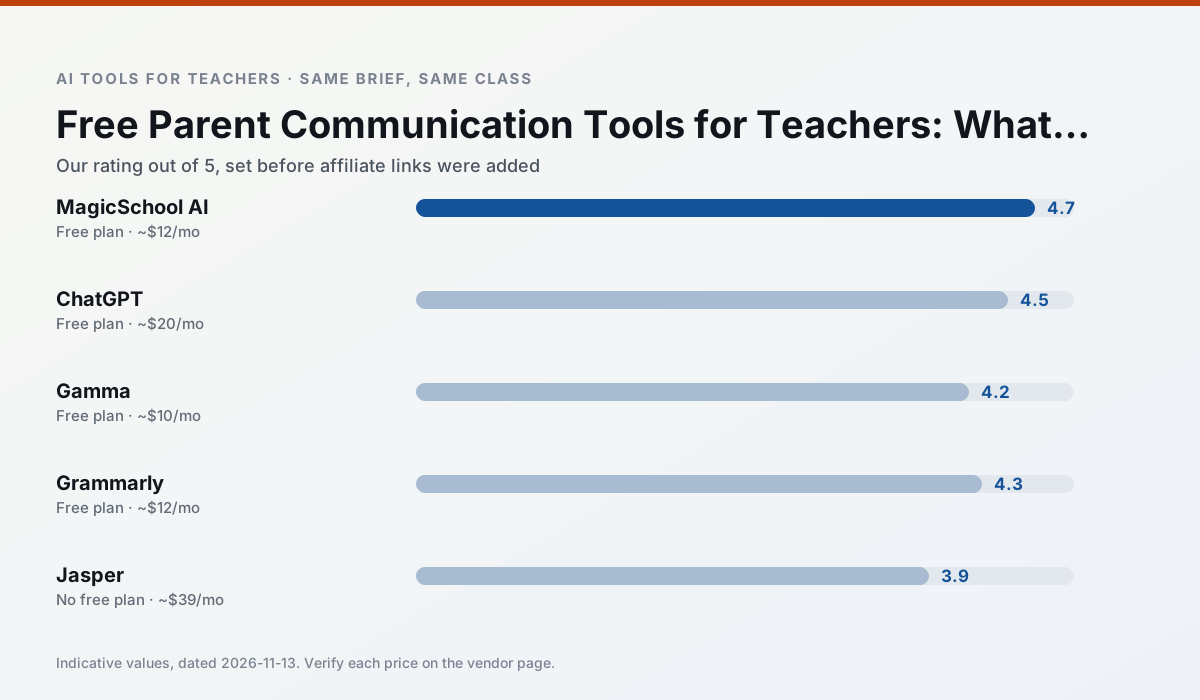
Side by side
Comparison table
Ratings reflect our timed classroom workflow, not vendor claims. Prices are indicative — verify on the vendor site.
| Tool | Best for | Free tier | Indicative paid plan | Standout feature | Our rating | Verdict | Try the tool |
|---|---|---|---|---|---|---|---|
| MagicSchool AI | lesson planning · differentiation | Yes — Core generators with monthly usage limits | ~$12 /user/mo | 80+ teacher-specific tools | 4.7 / 5 | Top pick | Try free |
| ChatGPT | lesson planning · parent communication | Yes — Usage-limited model access | ~$20 /user/mo | Custom GPTs and Projects | 4.5 / 5 | Top pick | Try free |
| Gamma | slide decks · parent communication | Yes — Credit-limited generation | ~$10 /user/mo | Prompt-to-deck | 4.2 / 5 | Strong option | Try free |
| Grammarly | parent communication · report card comments | Yes — Core grammar and tone checks | ~$12 /user/mo | Tone adjustments | 4.3 / 5 | Strong option | Try free |
| Jasper | newsletters · parent communication | No ongoing free plan | ~$39 /user/mo | Brand voice profiles | 3.9 / 5 | Situational | Try free |
| Writesonic | newsletters · parent communication | Yes — Limited credits | ~$16 /user/mo | Article and email generators | 3.8 / 5 | Situational | Try free |
Match your situation
Best for X
Different jobs need different tools. Here is what we would open first in each case.
Setup cost is one login for MagicSchool AI; everything else can wait until you know the tool is useful.
For a school rollout, ChatGPT offers the paperwork and the admin console; the classroom features are standard by comparison.
Nothing on Gamma's free tier is a teaser demo; the limits are documented and a normal week fits inside them.
Grammarly wins on the default path: fewer clicks to a usable draft, and the interface does not get in the way at 7:40am.
Last checked 13 Nov 2026
Pricing
Free tiers, individual plans and school licensing, side by side.
| Tool | Free plan | Individual / paid | School & district | Billing note | Verify |
|---|---|---|---|---|---|
| MagicSchool AI | $0 — Core generators with monthly usage limits | ~$12 /user/mo | Custom quote | Indicative — verify on vendor site | Vendor |
| ChatGPT | $0 — Usage-limited model access | ~$20 /user/mo | ~$25+ /user/mo | Indicative — verify on vendor site | Vendor |
| Gamma | $0 — Credit-limited generation | ~$10 /user/mo | ~$20 /user/mo | Indicative — verify on vendor site | Vendor |
| Grammarly | $0 — Core grammar and tone checks | ~$12 /user/mo | ~$15 /user/mo | Indicative — billed annually | Vendor |
| Jasper | No ongoing free tier | ~$39 /user/mo | ~$59+ /user/mo | Indicative — verify on vendor site | Vendor |
| Writesonic | $0 — Limited credits | ~$16 /user/mo | ~$49 /user/mo | Indicative — verify on vendor site | Vendor |
Editorial rule: pricing is re-checked every 2–3 months and the top 50 pages are refreshed every 6 months. See our funding policy.
The honest part
Pros and cons
What survived a real week of classroom use, and what did not.
Pros
- Widest purpose-built template library
- Strong free tier for individual teachers
- Fast to learn with almost no prompting skill
Cons
- Outputs still need standards review
- Best features sit behind the paid tier
- District approval can be slow
Pros
- Most flexible option available
- Huge community of teacher prompt libraries
- Strong multilingual support
Cons
- Requires prompt skills for consistent results
- No built-in standards alignment
- District privacy review usually required
Pros
- Fastest path from outline to deck
- Modern-looking output by default
- Good export options
Cons
- Design control is limited
- Credits run out quickly
- Not built for student data
Pros
- Catches errors in high-stakes parent emails
- Works everywhere you already write
- Very low learning curve
Cons
- Not education-specific
- Can flatten teacher voice
- Premium needed for tone rewriting
Pros
- Consistent tone across communications
- Strong long-form editor
- Good for district comms teams
Cons
- Priced for marketing teams
- Overkill for one classroom
- No education-specific features
In the classroom
Use cases
Five concrete workflows, with the tool we would open for each one.
A parent email in two languages
Draft in plain, warm language with no names, translate, then back-translate the important sentences to check meaning. Keep specific incidents out of the prompt and add them yourself.
Recommended: MagicSchool AIRubric and feedback comments in one pass
Reorder the workflow so the rubric is yours and the comments are generated. Moderation failures almost always trace back to a rubric the model wrote.
Recommended: ChatGPTThree reading levels from one source text
Paste a vetted text, ask for supported, core and extension versions, then check the vocabulary list by hand. Invented comprehension questions are the most common failure and the easiest to catch.
Recommended: GammaA Monday morning lesson plan in twelve minutes
The twelve minutes come from not rewriting the skeleton. Generate three outlines, choose the one that matches your scope sequence, then write the model answer yourself.
Recommended: GrammarlyA question bank from a PDF or article
Feed a non-identifiable source and ask for items tagged by difficulty with the misconception behind each distractor. Spot-check every answer key; numerical items are least reliable.
Recommended: Jasper
Questions teachers ask us
FAQ
Direct answers, also published as FAQPage structured data for search and AI assistants.
Which free plan lasts a full week?
What breaks first on a free plan?
Is a free plan enough for a department?
Sources & further reading
Our recommendation
Try MagicSchool AI free for your next parent communication task
A large library of teacher-specific AI generators in one dashboard. Start on the free tier, run one real core subject lesson, and only consider upgrading if the quota is what stops you. Disclosure: we may earn a commission (30% recurring) at no extra cost to you.
Some links on this page are affiliate links. We may earn a commission at no extra cost to you. Our rankings are editorial and never pay-to-play. Never enter student PII into a free consumer account.
Keep reading
Related comparisons in this cluster.
Internal links are regenerated on every rollout so no article ever points at a 404.