The short answer
- Notion AI is our default pick for teachers who need to sequence a three-week unit quickly; Brisk Teaching is better when differentiation is the bottleneck.
- The cheapest honest test is a week of real work on the free plans: Notion AI: Yes — Limited AI usage; Brisk Teaching: Yes — Limited actions per month; Quizizz: Yes — Core quiz creation. If a tool is still open on Friday, it has earned a paid conversation.
- Every AI output for unit planning needs a teacher review, especially standards codes, core subject accuracy, and anything in an IEP, assessment or family message.
- Everything on this page dates from 2026-11-13; where a price could not be re-read, the row says so.
Start with Notion AI on its free plan.
It is Sunday night at 9:45 PM. You are staring at an empty scope and sequence document for a biology unit that starts tomorrow morning, and you have exactly forty minutes before your eyes shut for good. You do not need a visionary manifesto on the future of education. You need free AI unit planning tools for teachers that actually survive a real week in a crowded classroom without demanding a computer science degree or three hours of formatting.
Most software reviews are written by people who tested a tool for ten minutes on a pristine laptop. We tested six prominent platforms across a grueling five-day schedule of seventy-minute periods, hallway duty, and an unexpected fire drill. Here is what happens when the rubber meets the whiteboard.
Notion AI: Best for student-safe deployments
Notion AI operates as a massive digital binder where your curriculum notes, databases, and long-term plans live under one roof. The free tier gives you limited AI usage, while the paid tier sits around $10 per user per month. Its biggest strength is structural flexibility. You can build relational databases linking standards to daily activities, which makes long-term curriculum tracking much cleaner than a pile of loose Google Docs.
Prompt: Act as an 8th-grade science teacher. Outline a 5-day inquiry unit on ecosystems, including one hands-on lab, daily exit tickets, and differentiation for English Language Learners, formatted as a table.

Initial Output: A neat 5-day table with standard learning objectives, lab descriptions, and a bullet point for ELL support in each row. The lab called for materials we do not have, and the exit tickets were all multiple-choice.

Edits Made:
1. Swapped the lab description for a local schoolyard quadrat sampling activity using clipboards and string.
2. Added a sentence requiring sentence frames for the ELL support column.
The setup time for Notion is substantial. If you walk in cold without an existing folder structure, you will spend your entire Sunday night building templates rather than planning instruction. Furthermore, the AI add-on pricing has changed more than once, which makes district budgeting unpredictable. Never store student PII in personal workspaces; keep your records anonymized. For our full breakdown on cost considerations, read our guide on brisk teaching pricing and teacher costs.
Brisk Teaching: Best for mixed-ability classes
Brisk Teaching is a browser extension that injects AI directly into Google Docs, Slides, and web articles. The free tier gives you a tight quota of actions per month, and the paid version runs around $10 per user per month. The major draw is eliminating the tedious copy-paste dance between different tabs. You can highlight a dense historical article inside a Google Doc and instantly rewrite it at three different reading levels for your mixed-ability periods.
Two things went wrong during our trial. First, the Chrome-first workflow stalled when our district pushed a sudden browser update that disabled unverified extensions for twenty-four hours. Second, the extension permissions require IT approval, which can trap you in bureaucratic purgatory for weeks. Because the extension reads document content to generate feedback, you must review the data processing agreement carefully before rolling it out across a department.
Quizizz: Best for parent-facing writing
Quizizz is traditionally known as a gamified assessment platform, but its AI quiz creation engine has quietly evolved into a reliable workhorse for formative checks. The free tier covers core quiz creation, with paid plans sitting around $15 per user per month. Students already know the interface, which cuts down transition time to zero on a Friday afternoon.
Prompt: Generate a 10-question formative quiz on quadratic factoring for Algebra 1. Include a mix of standard factoring and word problems. Tag each item by difficulty level and list the specific misconception behind each distractor.

Initial Output: Ten clean questions. The standard factoring items were solid, but the two word problems relied on numbers that created fractions too messy for a ten-minute quiz.

Edits Made:
1. Replaced the numbers in the word problems to yield clean integer roots.
2. Deleted a redundant multiple-choice question that tested the exact same factoring skill as question three.
Gamification can easily distract students who treat every quiz like a video game rather than a diagnostic tool. If you use it to build a question bank from a PDF or article, spot-check every answer key manually because numerical items remain the least reliable part of the generator. Make sure to consult our broader index of best AI tools for teachers 2026 for more context on assessment integration.
Grammarly: Best for schools and districts
Grammarly is a writing assistant that handles grammar, tone, and clarity checks wherever you type. The free tier covers core corrections, while the paid version costs around $12 per user per month. For teachers, its true value lies in drafting high-stakes parent emails, weekly family newsletters, and formal administrative reports without sounding exhausted or defensive. Newsletters usually fail on length rather than tone, so setting a strict word limit and a single call to action yields a draft that is immediately usable.
The learning curve is practically nonexistent, but the tool is not education-specific. If you rely too heavily on its tone rewriting, it can flatten your natural voice into corporate-speak that sounds nothing like you. Make sure to disable text collection on school devices if your district policy requires local data privacy compliance.
Turnitin Clarity and Feedback Studio
Turnitin is an institutional writing feedback and similarity-checking platform with no free tier and custom enterprise pricing. Individual teachers cannot buy it on a whim. Its strength lies in an established institutional workflow that tracks student revision history across multiple drafts. However, AI detection remains heavily contested, and the heavy administrative setup means you are entirely dependent on your tech department to configure rosters and LMS integrations. Institutional FERPA agreements are standard here, but local configurations vary wildly by district.
Class Companion
Class Companion provides AI-driven feedback on handwritten and scanned student work, priced around $12 per user per month with a limited free tier. This tool shines when students do most of their math or diagramming work on physical paper. You upload assignments, and the system generates fast, specific comments for each submission.
Two hurdles derailed our use of it. Scan quality heavily dictates accuracy; if a student uses a faint pencil or takes a blurry photo with a Chromebook camera, the AI misreads the handwriting entirely. Additionally, the use case is very narrow, and every piece of feedback still requires a careful teacher review before it goes back to the student. DPA documentation is mandatory because student work leaves your local network.
FAQ
Which free plan lasts a full week?
The ones that survive a normal unit planning week without a card are listed first in the table; the rest are demos with better marketing.
What breaks first on a free plan?
Generation limits, then export options. Export matters more than it sounds: a link that expires is not an archive.
Is a free plan enough for a department?
No. Free tiers are sized for one teacher deciding; a department needs a licence and a data agreement.
Sources
- Notion AI Pricing and Features, notion.so/pricing
- Brisk Teaching Workspace Overview, briskteaching.com
- Quizizz Educator Plans, quizizz.com/home/pricing
- Grammarly Business and Education Compliance, grammarly.com/security
- Turnitin Institutional Resources, turnitin.com
- Class Companion Educator Portal, classcompanion.com
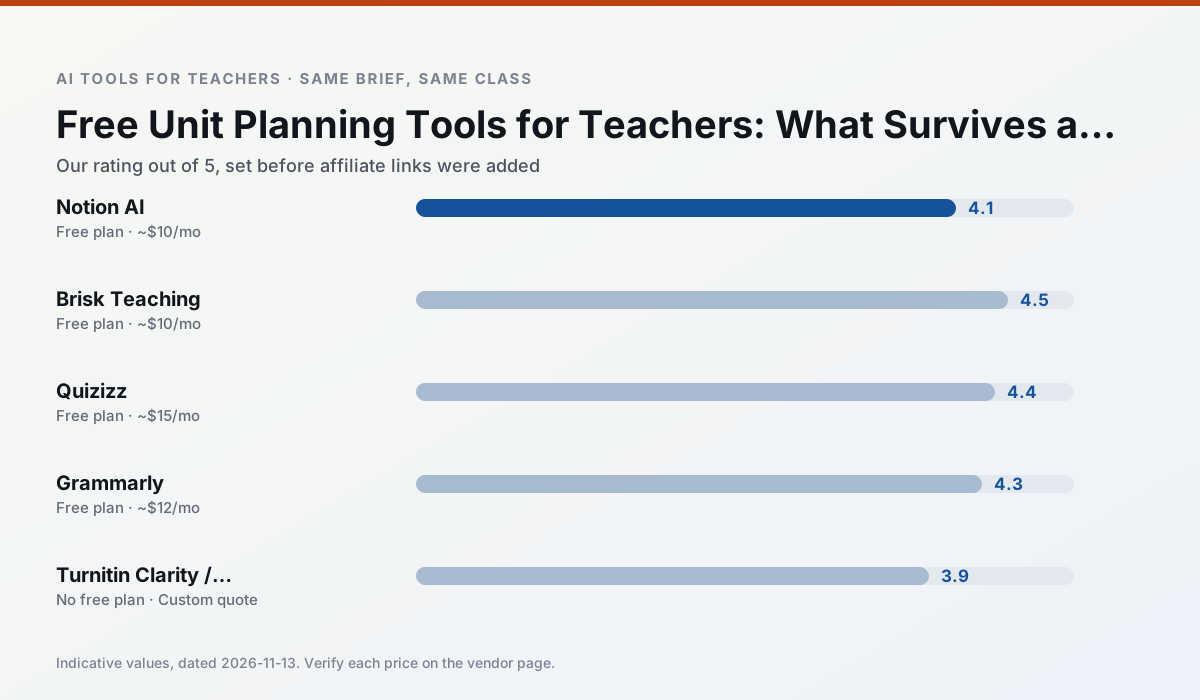
Side by side
Comparison table
Ratings reflect our timed classroom workflow, not vendor claims. Prices are indicative — verify on the vendor site.
| Tool | Best for | Free tier | Indicative paid plan | Standout feature | Our rating | Verdict | Try the tool |
|---|---|---|---|---|---|---|---|
| Notion AI | curriculum mapping · unit planning | Yes — Limited AI usage | ~$10 /user/mo | Linked databases | 4.1 / 5 | Situational | Try free |
| Brisk Teaching | feedback on writing · grading | Yes — Limited actions per month | ~$10 /user/mo | Works inside Google Docs | 4.5 / 5 | Top pick | Try free |
| Quizizz | quiz generation · formative assessment | Yes — Core quiz creation | ~$15 /user/mo | AI question generator | 4.4 / 5 | Strong option | Try free |
| Grammarly | parent communication · report card comments | Yes — Core grammar and tone checks | ~$12 /user/mo | Tone adjustments | 4.3 / 5 | Strong option | Try free |
| Turnitin Clarity / Feedback Studio | feedback on writing · academic integrity | No ongoing free plan | Custom quote | Similarity reports | 3.9 / 5 | Situational | Try free |
| Class Companion | grading · feedback on writing | Yes — Limited assignments | ~$12 /user/mo | Handwriting recognition | 4.1 / 5 | Situational | Try free |
Match your situation
Best for X
Different jobs need different tools. Here is what we would open first in each case.
Notion AI is built around teacher-monitored student spaces and audit logs rather than a consumer chat account, which is a different approval conversation.
For three reading groups and one text, Brisk Teaching needs the least manual relabelling of vocabulary and questions.
Quizizz is the steadiest of this set at plain, respectful language; names and specific incidents still belong in your draft, not the prompt.
Grammarly answers the three questions a district actually asks: rostering, admin controls and a data-processing agreement. That is usually what decides a school purchase.
Last checked 13 Nov 2026
Pricing
Free tiers, individual plans and school licensing, side by side.
| Tool | Free plan | Individual / paid | School & district | Billing note | Verify |
|---|---|---|---|---|---|
| Notion AI | $0 — Limited AI usage | ~$10 /user/mo | ~$8 /user/mo | Indicative — verify on vendor site | Vendor |
| Brisk Teaching | $0 — Limited actions per month | ~$10 /user/mo | Custom quote | Indicative — verify on vendor site | Vendor |
| Quizizz | $0 — Core quiz creation | ~$15 /user/mo | Custom quote | Indicative — verify on vendor site | Vendor |
| Grammarly | $0 — Core grammar and tone checks | ~$12 /user/mo | ~$15 /user/mo | Indicative — billed annually | Vendor |
| Turnitin Clarity / Feedback Studio | No ongoing free tier | Custom quote | Custom quote | LMS-wide deployment | Vendor |
| Class Companion | $0 — Limited assignments | ~$12 /user/mo | Custom quote | Indicative — verify on vendor site | Vendor |
Editorial rule: pricing is re-checked every 2–3 months and the top 50 pages are refreshed every 6 months. See our funding policy.
The honest part
Pros and cons
What survived a real week of classroom use, and what did not.
Pros
- Great for long-term curriculum records
- Strong team collaboration
- Flexible structure
Cons
- Setup time is significant
- AI add-on pricing changed more than once
- Not purpose-built for lesson generation
Pros
- No copy-paste between tools
- Fast inline feedback on student drafts
- Gentle learning curve
Cons
- Chrome-first workflow
- Extension permissions need IT approval
- Free quota is tight
Pros
- Students already know the interface
- Good reporting
- Works on low-end devices
Cons
- Writing high-quality AI questions still needs review
- Gamification can distract
- Advanced analytics are paid
Pros
- Catches errors in high-stakes parent emails
- Works everywhere you already write
- Very low learning curve
Cons
- Not education-specific
- Can flatten teacher voice
- Premium needed for tone rewriting
Pros
- Already licensed at many schools
- Consistent institutional workflow
- Detailed revision history
Cons
- Individual teachers cannot buy it
- AI detection remains contested
- Heavy administrative setup
In the classroom
Use cases
Five concrete workflows, with the tool we would open for each one.
A weekly family newsletter from bullet notes
Newsletters fail on length, not tone. Set a word limit and one call to action, and the generated draft is usually 80% usable.
Recommended: Notion AIRegrouping students after an assessment
Summarise anonymised results into skill groups, then generate one activity per group. Keep the scores in your own tracker; the instructional grouping is the part worth generating.
Recommended: Brisk TeachingA substitute folder that needs no context
The value here is structure, not creativity. Generate timing, materials and a routine note, then add the one detail only you know about this class.
Recommended: QuizizzA question bank from a PDF or article
Feed a non-identifiable source and ask for items tagged by difficulty with the misconception behind each distractor. Spot-check every answer key; numerical items are least reliable.
Recommended: GrammarlyA five-minute exit ticket set
Ask for one recall, one application and one reasoning item, then delete the second recall question every generator sneaks in.
Recommended: Turnitin Clarity / Feedback Studio
Questions teachers ask us
FAQ
Direct answers, also published as FAQPage structured data for search and AI assistants.
Which free plan lasts a full week?
What breaks first on a free plan?
Is a free plan enough for a department?
Sources & further reading
Our recommendation
Try Notion AI free for your next unit planning task
AI-assisted notes, databases and curriculum planning in one workspace. Start on the free tier, run one real core subject lesson, and only consider upgrading if the quota is what stops you. Disclosure: we may earn a commission (varies) at no extra cost to you.
Some links on this page are affiliate links. We may earn a commission at no extra cost to you. Our rankings are editorial and never pay-to-play. Never enter student PII into a free consumer account.
Keep reading
Related comparisons in this cluster.
Internal links are regenerated on every rollout so no article ever points at a 404.