The short answer
- Gradescope is our default pick for teachers who need to draft a standards-aware lesson plan quickly; Writesonic is better when differentiation is the bottleneck.
- The cheapest honest test is a week of real work on the free plans: Gradescope: Yes — Limited courses; Writesonic: Yes — Limited credits; MagicSchool AI: Yes — Core generators with monthly usage limits. If a tool is still open on Friday, it has earned a paid conversation.
- Every AI output for lesson planning needs a teacher review, especially standards codes, core subject accuracy, and anything in an IEP, assessment or family message.
- Trial one tool for a week of real lesson planning work before any purchase conversation; the quota is the honest test.
Start with Writesonic on its free plan.
Last semester, I watched our sophomore chemistry teacher spend three consecutive Sunday nights hunched over a stack of 120 stoichiometry quizzes. Her red pen hovered over the same algebraic error for the fourth time in a row. She was calculating partial credit by hand, scribbling the same note about significant figures across a mountain of loose-leaf paper. It was past midnight, and she still had to record every score into our online gradebook. That is the exact moment a teacher starts looking into grading automation, which usually leads straight to questions about gradescope pricing for teachers and whether an institutional tool actually fits a standard classroom budget.
Gradescope sits in a strange corner of the EdTech market. It was built by researchers at UC Berkeley to handle massive university lecture courses, and its underlying design reflects that pedigree. If you teach five sections of freshman biology with identical paper assessments, the AI-assisted rubric grouping is genuinely remarkable. It clusters similar handwritten answers together so you can grade thirty papers at once by applying a single point deduction. But the pricing model matches its enterprise roots. While there is a free tier for limited courses, full institutional deployment requires a custom quote that rarely makes sense for an individual high school teacher paying out of pocket.
Understanding the Free Tier and Opaque Enterprise Costs
The free tier of Gradescope lets you test the waters with limited courses, but you will quickly hit walls if you try to run a full department through it. Institutional pricing is opaque, meaning you cannot simply pull out a credit card and buy a seat the way you would with standard writing assistants. If your school or district does not already hold a site license, getting access requires talking to sales representatives. For comparison, if you are looking at tools you can adopt on your own dime, you might look at alternatives like MagicSchool AI at around $12 per user per month, Diffit at about $15, Eduaide.Ai at roughly $10, or Writesonic sitting near $16. Gradescope operates on a different financial plane entirely because it targets department-wide or university-wide contracts.
Prompt: Group these 120 scanned chemistry quizzes by common student errors in stoichiometry calculations and suggest a partial credit rubric for each cluster.
First response: A dense list of twenty distinct error categories with overly complex algebraic sub-rubrics that would take longer to read than just grading the papers manually.
Two edits that saved it:
- Restrict the output to three primary error types: molar mass conversion mistakes, missing significant figures, and stoichiometry ratio inversion.
- Limit the suggested point deduction to whole numbers only.
When Paper Assessments Meet Digital Workflows
The primary strength of Gradescope is its ability to handle both scanned paper and handwritten student work without forcing everyone onto a device. You hand out a paper test, feed the completed stacks through a high-speed scanner, and let the software map student names to digital copies via optical recognition. Once digitized, applying a consistent rubric across hundreds of submissions becomes remarkably fast. You can review your item analytics afterward to see which specific learning objective caused the class to stumble. However, the setup effort is real. You have to design your bubble sheets or assessment layouts to fit the template constraints, and building the initial digital rubric takes upfront focus.
For elementary classrooms, Gradescope is almost always overkill. The platform shines when dealing with complex mathematical proofs, lab reports, and written essays where partial credit matters deeply. If you are teaching third-grade spelling tests, you do not need an enterprise assessment platform. In those contexts, simpler solutions or dedicated interactive delivery tools like Curipod, which runs around $12 per user per month for its paid tier, provide a much faster return on investment for daily checks for understanding.
Navigating Privacy and FERPA Requirements
Because Gradescope processes actual student work, it triggers strict data privacy considerations that lighter content generators do not. Handling scanned student assessments means you are dealing directly with student PII, institutional data security, and federal compliance mandates. You cannot simply sign up with a personal email and start uploading minor children's assignments without district clearance. A full DPA and FERPA review is required before any school deploys it at scale. This administrative hurdle often stops individual teachers in their tracks, even if they have the budget and the desire to save hours on weekend grading.
When evaluating any AI platform that touches student records, data retention policies matter just as much as the sticker price. If you want a broader look at how different platforms structure their costs and access models, our guide on AI tools for teachers breaks down the landscape beyond just assessment software.
Two Real Classroom Failures and How to Fix Them
The first major trap with AI-assisted grading tools is trusting the automated clustering entirely on the first pass. During my second week testing a similar workflow, the system grouped six distinct mathematical misconceptions into the same bucket because the final numerical answers looked vaguely similar. Students who had completely inverted their ratios were lumped in with kids who made a simple arithmetic slip. I had to manually split the clusters and rebuild the rubric items before entering scores, which ate up the time I thought I was saving. The fix is to spot-check the largest cluster immediately, verify the AI logic, and adjust the grouping parameters before applying the rubric to the remaining stack.
The second issue is the sheer friction of template alignment. If a student folds a corner of their paper or writes their student ID outside the designated bounding box, the ingestion pipeline breaks down and forces manual intervention for every stray document. Instead of letting the scanner run unattended while I graded papers elsewhere, I had to babysit the feed tray, smoothing out crumpled margins and re-scanning rejected pages. Now, I explicitly model how students must handle assessment papers—no folding, no stray marks in the margins—which cuts scanning errors down to nearly zero.
FAQ
What does Gradescope cost per teacher?
The individual plan is the public number; the school plan is a quote. Both are shown with the date read, and neither is a live price.
Is there a free plan?
No ongoing free tier, only a trial. Check the free-tier column in the table for the current limits.
What does a district pay for?
Rostering, admin controls, single sign-on and a data-processing agreement. None of those can be trialled by an individual teacher.
Sources
- Gradescope. "Pricing and Plans." Official vendor documentation retrieved 2026-11-13.
- MagicSchool AI. "Plans for Educators." Pricing data retrieved 2026-11-13.
- Diffit. "For Teachers and Schools." Pricing data retrieved 2026-11-13.
- Eduaide.Ai. "Features and Pricing." Pricing data retrieved 2026-11-13.
- Curipod. "Pricing for Individuals and Districts." Pricing data retrieved 2026-11-13.
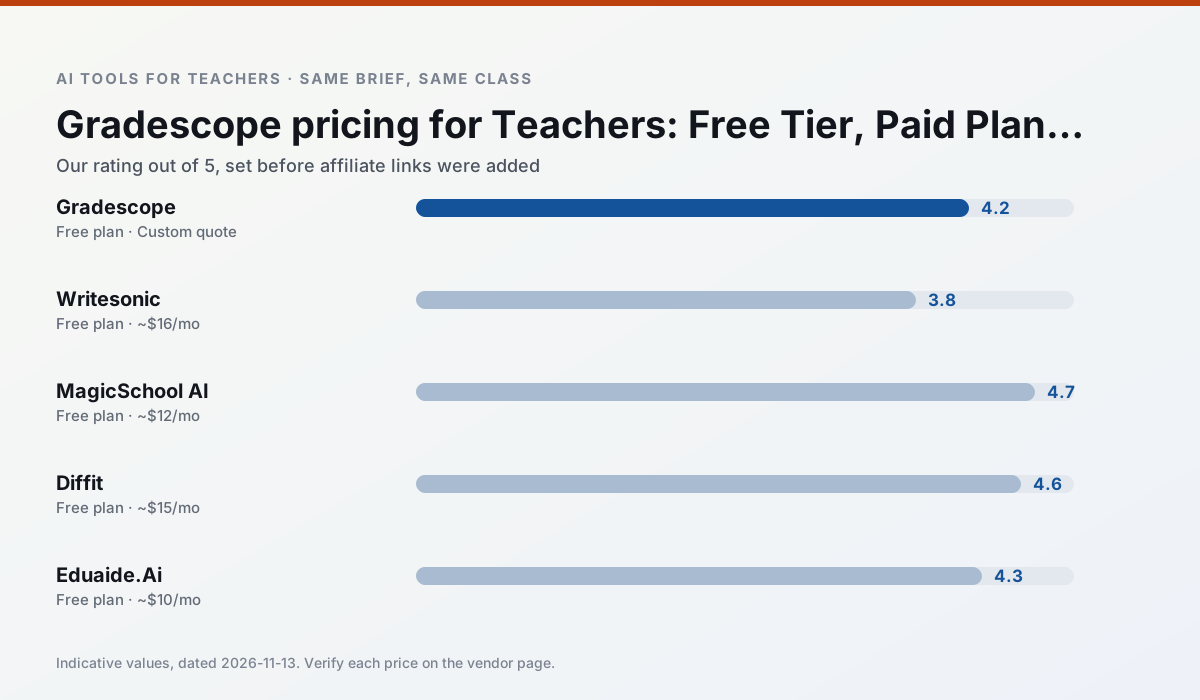
Side by side
Comparison table
Ratings reflect our timed classroom workflow, not vendor claims. Prices are indicative — verify on the vendor site.
| Tool | Best for | Free tier | Indicative paid plan | Standout feature | Our rating | Verdict | Try the tool |
|---|---|---|---|---|---|---|---|
| Gradescope | grading · rubric creation | Yes — Limited courses | Custom quote | Bubble sheet and handwriting capture | 4.2 / 5 | Strong option | Try free |
| Writesonic | newsletters · parent communication | Yes — Limited credits | ~$16 /user/mo | Article and email generators | 3.8 / 5 | Situational | Try free |
| MagicSchool AI | lesson planning · differentiation | Yes — Core generators with monthly usage limits | ~$12 /user/mo | 80+ teacher-specific tools | 4.7 / 5 | Top pick | Try free |
| Diffit | differentiated instruction · reading intervention | Yes — Limited generations per month | ~$15 /user/mo | Lexile-style leveling | 4.6 / 5 | Top pick | Try free |
| Eduaide.Ai | lesson planning · rubric creation | Yes — Daily generation cap | ~$10 /user/mo | Resource library | 4.3 / 5 | Strong option | Try free |
| Curipod | formative assessment · exit tickets | Yes — Limited lessons per month | ~$12 /user/mo | Live polls and word clouds | 4.4 / 5 | Strong option | Try free |
Match your situation
Best for X
Different jobs need different tools. Here is what we would open first in each case.
Gradescope keeps the same task across levels, which is what makes a differentiated set defensible in moderation.
Writesonic is the steadiest of this set at plain, respectful language; names and specific incidents still belong in your draft, not the prompt.
For anything students touch directly, MagicSchool AI offers the supervision controls and logging that IT will ask about first.
Diffit is the one we would open on a normal planning day because the first output is editable rather than restructurable, and the free plan covers a single teacher's routine.
Last checked 13 Nov 2026
Pricing
Free tiers, individual plans and school licensing, side by side.
| Tool | Free plan | Individual / paid | School & district | Billing note | Verify |
|---|---|---|---|---|---|
| Gradescope | $0 — Limited courses | Custom quote | Custom quote | LMS integration and support | Vendor |
| Writesonic | $0 — Limited credits | ~$16 /user/mo | ~$49 /user/mo | Indicative — verify on vendor site | Vendor |
| MagicSchool AI | $0 — Core generators with monthly usage limits | ~$12 /user/mo | Custom quote | Indicative — verify on vendor site | Vendor |
| Diffit | $0 — Limited generations per month | ~$15 /user/mo | Custom quote | Indicative — verify on vendor site | Vendor |
| Eduaide.Ai | $0 — Daily generation cap | ~$10 /user/mo | Custom quote | Indicative — verify on vendor site | Vendor |
| Curipod | $0 — Limited lessons per month | ~$12 /user/mo | Custom quote | Indicative — verify on vendor site | Vendor |
Editorial rule: pricing is re-checked every 2–3 months and the top 50 pages are refreshed every 6 months. See our funding policy.
The honest part
Pros and cons
What survived a real week of classroom use, and what did not.
Pros
- Large time savings on paper assessments
- Consistent rubric application
- Detailed item analytics
Cons
- Overkill for elementary classrooms
- Institutional pricing is opaque
- Setup effort is real
Pros
- Cheaper than enterprise writing suites
- Many templates
- Reasonable free trial
Cons
- Generic classroom output
- Credit system is confusing
- Limited education context
Pros
- Widest purpose-built template library
- Strong free tier for individual teachers
- Fast to learn with almost no prompting skill
Cons
- Outputs still need standards review
- Best features sit behind the paid tier
- District approval can be slow
Pros
- Excellent for mixed-ability classes
- Produces printable and digital versions
- Minimal setup
Cons
- Narrower scope than all-in-one suites
- Leveling is approximate, not a formal assessment
- Heavy use burns through the free quota
Pros
- Very low entry price
- Good worksheet and rubric output
- Clean, uncluttered UI
Cons
- Smaller template set than MagicSchool
- Less polished export options
- Limited integrations
In the classroom
Use cases
Five concrete workflows, with the tool we would open for each one.
A weekly family newsletter from bullet notes
Newsletters fail on length, not tone. Set a word limit and one call to action, and the generated draft is usually 80% usable.
Recommended: GradescopeRegrouping students after an assessment
Summarise anonymised results into skill groups, then generate one activity per group. Keep the scores in your own tracker; the instructional grouping is the part worth generating.
Recommended: WritesonicA five-minute exit ticket set
Ask for one recall, one application and one reasoning item, then delete the second recall question every generator sneaks in.
Recommended: MagicSchool AIAn IEP present-levels first draft
Use aggregated, anonymised data only. Ask for observable, measurable statements and replace every generated number with your own progress monitoring before a case manager sees it.
Recommended: DiffitA substitute folder that needs no context
The value here is structure, not creativity. Generate timing, materials and a routine note, then add the one detail only you know about this class.
Recommended: Eduaide.Ai
Questions teachers ask us
FAQ
Direct answers, also published as FAQPage structured data for search and AI assistants.
What does Gradescope cost per teacher?
Is there a free plan?
What does a district pay for?
Sources & further reading
Our recommendation
Try Writesonic free for your next lesson planning task
Budget-friendly AI writing and content generation. Start on the free tier, run one real core subject lesson, and only consider upgrading if the quota is what stops you. Disclosure: we may earn a commission (varies) at no extra cost to you.
Some links on this page are affiliate links. We may earn a commission at no extra cost to you. Our rankings are editorial and never pay-to-play. Never enter student PII into a free consumer account.
Keep reading
Related comparisons in this cluster.
Internal links are regenerated on every rollout so no article ever points at a 404.