The short answer
- Quizizz is our default pick for teachers who need to draft a standards-aware lesson plan quickly; Kahoot! is better when differentiation is the bottleneck.
- Quizizz handles the broad case; Kahoot! handles the narrow one. Anything beyond that pair should be justified by a recurring weekly job, not a feature demo.
- Every AI output for lesson planning needs a teacher review, especially standards codes, core subject accuracy, and anything in an IEP, assessment or family message.
- Everything on this page dates from 2026-11-13; where a price could not be re-read, the row says so.
Start with MagicSchool AI on its free plan.
It is forty-five minutes before the morning bell, and three different parents have already emailed about the spelling list. You need to sort forty-two diagnostic tests into intervention groups, draft a newsletter, and somehow put together a Monday morning lesson plan that matches the district pacing guide. If you add fifty student account registrations, password resets, and COPPA consent forms to that pile, the first period starts before you even reach the login screen. That is why AI tools teachers can use without student accounts have become the only tier of educational technology worth keeping on a bookmarked tab this term.
Why keeping students logged out protects your planning time
Most classroom tech platforms assume a world where every twelve-year-old has a district-managed email, a managed Chromebook, and thirty uninterrupted seconds to remember a password. The reality in a typical middle school or high school is that half the class forgot their credentials, the wifi dropped in the annex, and the district firewall just flagged an unfamiliar sign-in page. Using AI exclusively on the teacher end bypasses every single one of those friction points. You generate the materials, you print the worksheets or project them on the board, and the students interact with pencil and paper or existing classroom routines. It keeps the cognitive load on instruction rather than IT troubleshooting.
When you evaluate these platforms, the distinction between teacher-facing tools and student-facing products matters for data privacy. Consumer plans like standard ChatGPT or Claude require you to keep student names and identifiable scores entirely off the platform. By feeding anonymized performance data or raw curriculum standards into the interface, you get the analytical lift without exposing children's PII to third-party servers. If you want a broader view of how these pricing structures break down across different districts, check our guide on AI tools for teachers 2026.
Quizizz as the best overall for daily use
Quizizz earns its spot as the best overall for daily use because your students already know the interface and it refuses to break on low-end school devices. You can use core quiz creation on the free tier, while paid plans run around $15 per user per month (indicative). The platform shines through its massive question bank and live game features that keep energy high during review cycles.
Writing high-quality AI questions still requires a careful human review pass before you project them on the whiteboard. Gamification can occasionally distract students who treat the leaderboard as a competitive sport rather than a formative check. Advanced analytics sit behind the paid wall, but the basic reporting gives you enough data to spot whole-class misconceptions before you move to the next unit. COPPA and FERPA documentation is available from the vendor, though you should always confirm details with your district technology coordinator.
Prompt: "Create a 10-question multiple-choice quiz on cellular respiration for 9th-grade biology. Align the questions to standard high school curriculum and include one distractor per question that targets common misconceptions about ATP."
First pass result: The model generated ten questions, but two of them used college-level terminology regarding the Krebs cycle that our freshman curriculum does not cover, and the distractors were too obviously incorrect.
Two edits that made it usable:
- Added a constraint specifying simple vocabulary limits based on our district lexile band.
- Rewrote the misconceptions to focus specifically on the difference between plant and animal cellular respiration rather than chemical equations.
Kahoot! for instant engagement and zero setup
Kahoot! remains the best free option when you need instant engagement and zero training time for a review lesson. The free tier limits player counts, and paid upgrades cost around $10 per user per month (indicative). Brand familiarity is unbeatable here; students can log in with a simple game PIN and a nickname in under twenty seconds.
The primary limitation is depth, as the fast-paced time pressure suits rapid recall far better than higher-order analytical reasoning. For younger students, the platform recommends using nicknames rather than real names to keep privacy profiles clean. It is a fantastic Friday afternoon tool, but you will not use it for complex argumentative writing prompts.
ChatGPT for district flexibility and broad tasks
ChatGPT functions as a general-purpose assistant that adapts to almost any classroom task, making it our pick for the best for schools and districts. Usage-limited model access is available on the free tier, while paid tiers run around $20 per user per month (indicative). A massive community of teacher prompt libraries exists online, and the multilingual support is exceptionally strong for ELL classrooms.
The platform requires solid prompt engineering skills to get consistent results across multiple sections. There is no built-in standards alignment, meaning you must paste your state objectives into the chat manually. More importantly, district privacy reviews are usually required before school-wide deployment, and you must never enter student personally identifiable information on consumer plans. For a deeper look at cost implications, read our breakdown on ChatGPT pricing for teachers.
Claude for quick setup and long-form planning
Claude acts as a long-context assistant suited to document-heavy planning and feedback, earning our designation as best for quick setup. The free tier is usage-limited, with paid options around $20 per user per month (indicative). It handles full unit plans and long rubrics with ease, producing nuanced prose that sounds far less generic than competing models.
You will not find teacher-specific templates or native classroom integrations here. It requires you to know what you want to build before you start typing. As with other consumer models, the standard tier is not suitable for handling student data, so keep all inputs focused on curriculum documents and blank assignment sheets.
Khanmigo and Brisk Teaching for specialised workflows
Khanmigo brings a tutor-style AI from a nonprofit education platform with dedicated teacher tools. It offers free access for US teachers subject to eligibility, with paid learner tiers around $4 per learner per month (indicative). Its education-first design carries a strong nonprofit trust signal and provides genuinely good math scaffolding. Availability varies by region, and it is less useful for general admin paperwork since it focuses heavily on direct instruction.
Brisk Teaching operates as a browser extension that brings AI feedback directly into Docs, Slides, and web articles. The free tier limits actions per month, while paid plans run around $10 per user per month (indicative). It eliminates the tedious copy-paste cycle between tabs, offering fast inline feedback on student drafts with a very gentle learning curve. Because it runs as a Chrome extension, your IT department will need to review its permissions and document-reading scope carefully.
Two real classroom failures and how to fix them
When generating a weekly family newsletter from bullet notes, the draft will almost always fail on length rather than tone. If you do not set strict boundaries, the AI will write a novella that parents will skim in three seconds. The fix is to demand a specific word limit and one single call to action, which usually yields a draft that is eighty percent usable on the first try.
Another common failure happens when regrouping students after an assessment. If you ask an AI to analyse raw student scores without anonymising the data first, you violate privacy norms. Instead, summarise anonymised results into broad skill groups, then instruct the AI to generate one targeted activity per group. Keep the actual scores in your own gradebook, and let the model handle the instructional grouping.
FAQ
Is AI allowed for lesson planning in my school?
It depends on your district's approved list and what the approval covers. Ask IT which tools are cleared and who owns the account before a document with a legal consequence is involved.
Who is responsible if something goes wrong?
The school, and in practice the named teacher who reviewed the output. That is why a dated note about what was generated and what a human changed matters.
What should never go into a prompt?
Names, rosters, scans of student work and gradebook screenshots. Topic-level prompts do most of the work without any of that.
Sources
- Quizizz Vendor Pricing and Features: https://quizizz.com/
- Kahoot! Educator Plans and Limits: https://kahoot.com/
- OpenAI ChatGPT Business and Education Guidelines: https://openai.com/
- Anthropic Claude Pricing and Documentation: https://claude.ai/
- Khan Academy Khanmigo Educator Portal: https://www.khanacademy.org/
- Brisk Teaching Extension Overview: https://briskteaching.com/
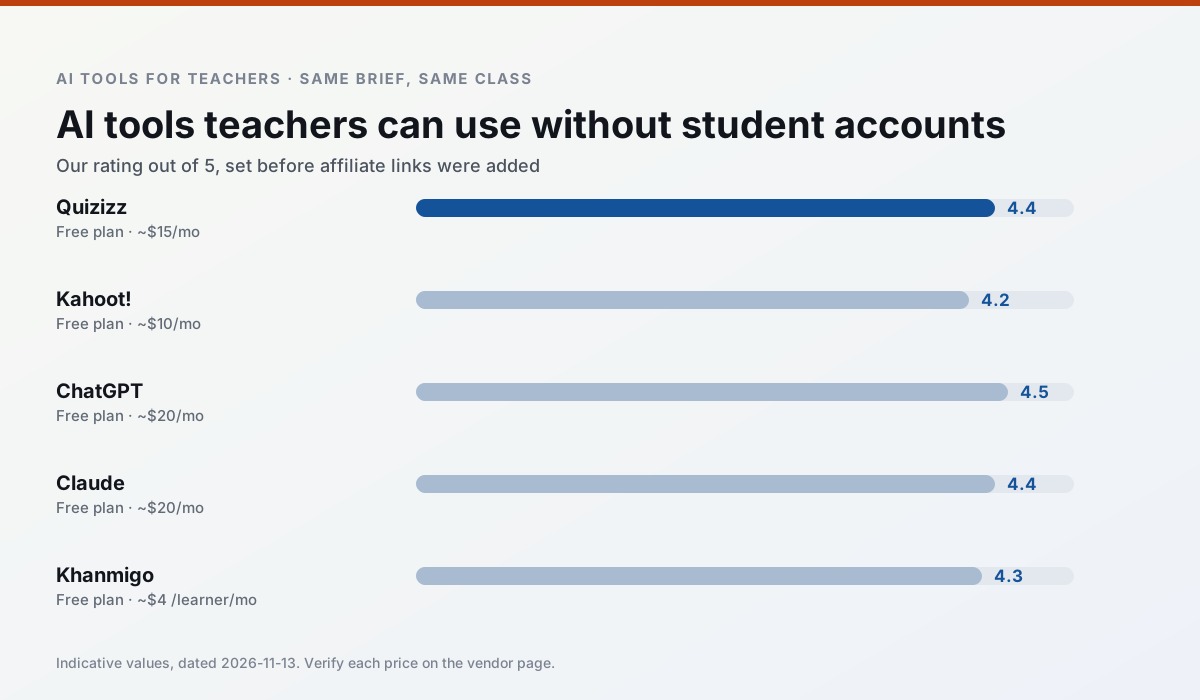
Side by side
Comparison table
Ratings reflect our timed classroom workflow, not vendor claims. Prices are indicative — verify on the vendor site.
| Tool | Best for | Free tier | Indicative paid plan | Standout feature | Our rating | Verdict | Try the tool |
|---|---|---|---|---|---|---|---|
| Quizizz | quiz generation · formative assessment | Yes — Core quiz creation | ~$15 /user/mo | AI question generator | 4.4 / 5 | Strong option | Try free |
| Kahoot! | quiz generation · review lessons | Yes — Limited player count | ~$10 /user/mo | AI question builder | 4.2 / 5 | Strong option | Try free |
| ChatGPT | lesson planning · parent communication | Yes — Usage-limited model access | ~$20 /user/mo | Custom GPTs and Projects | 4.5 / 5 | Top pick | Try free |
| Claude | rubric creation · feedback on writing | Yes — Usage-limited | ~$20 /user/mo | Very large context window | 4.4 / 5 | Strong option | Try free |
| Khanmigo | math practice · student tutoring | Yes — US teacher accounts, subject to eligibility | ~$4 /learner/mo | Socratic tutoring rather than answers | 4.3 / 5 | Strong option | Try free |
| Brisk Teaching | feedback on writing · grading | Yes — Limited actions per month | ~$10 /user/mo | Works inside Google Docs | 4.5 / 5 | Top pick | Try free |
Match your situation
Best for X
Different jobs need different tools. Here is what we would open first in each case.
Quizizz wins on the default path: fewer clicks to a usable draft, and the interface does not get in the way at 7:40am.
Nothing on Kahoot!'s free tier is a teaser demo; the limits are documented and a normal week fits inside them.
ChatGPT answers the three questions a district actually asks: rostering, admin controls and a data-processing agreement. That is usually what decides a school purchase.
Claude runs in a browser tab with no extension, no student accounts and no onboarding call, so you can test it in a free period.
Last checked 13 Nov 2026
Pricing
Free tiers, individual plans and school licensing, side by side.
| Tool | Free plan | Individual / paid | School & district | Billing note | Verify |
|---|---|---|---|---|---|
| Quizizz | $0 — Core quiz creation | ~$15 /user/mo | Custom quote | Indicative — verify on vendor site | Vendor |
| Kahoot! | $0 — Limited player count | ~$10 /user/mo | Custom quote | Indicative — verify on vendor site | Vendor |
| ChatGPT | $0 — Usage-limited model access | ~$20 /user/mo | ~$25+ /user/mo | Indicative — verify on vendor site | Vendor |
| Claude | $0 — Usage-limited | ~$20 /user/mo | ~$25+ /user/mo | Indicative — verify on vendor site | Vendor |
| Khanmigo | $0 — US teacher accounts, subject to eligibility | ~$4 /learner/mo | Custom quote | Indicative — verify on vendor site | Vendor |
| Brisk Teaching | $0 — Limited actions per month | ~$10 /user/mo | Custom quote | Indicative — verify on vendor site | Vendor |
Editorial rule: pricing is re-checked every 2–3 months and the top 50 pages are refreshed every 6 months. See our funding policy.
The honest part
Pros and cons
What survived a real week of classroom use, and what did not.
Pros
- Students already know the interface
- Good reporting
- Works on low-end devices
Cons
- Writing high-quality AI questions still needs review
- Gamification can distract
- Advanced analytics are paid
Pros
- Instant engagement
- Very low training time
- Strong brand familiarity
Cons
- Less depth for higher-order assessment
- Paid tiers needed for larger classes
- Time pressure suits recall more than reasoning
Pros
- Most flexible option available
- Huge community of teacher prompt libraries
- Strong multilingual support
Cons
- Requires prompt skills for consistent results
- No built-in standards alignment
- District privacy review usually required
Pros
- Handles full unit plans and long rubrics
- Nuanced, less generic prose
- Good at structured document output
Cons
- No teacher-specific templates
- Fewer classroom integrations
- Consumer plan not suitable for student data
Pros
- Education-first design
- Strong nonprofit trust signal
- Good math scaffolding
Cons
- Availability varies by region
- Less useful for admin paperwork
- Requires student accounts for full value
In the classroom
Use cases
Five concrete workflows, with the tool we would open for each one.
A weekly family newsletter from bullet notes
Newsletters fail on length, not tone. Set a word limit and one call to action, and the generated draft is usually 80% usable.
Recommended: QuizizzRegrouping students after an assessment
Summarise anonymised results into skill groups, then generate one activity per group. Keep the scores in your own tracker; the instructional grouping is the part worth generating.
Recommended: Kahoot!A Monday morning lesson plan in twelve minutes
The twelve minutes come from not rewriting the skeleton. Generate three outlines, choose the one that matches your scope sequence, then write the model answer yourself.
Recommended: ChatGPTThree reading levels from one source text
Paste a vetted text, ask for supported, core and extension versions, then check the vocabulary list by hand. Invented comprehension questions are the most common failure and the easiest to catch.
Recommended: ClaudeRubric and feedback comments in one pass
Reorder the workflow so the rubric is yours and the comments are generated. Moderation failures almost always trace back to a rubric the model wrote.
Recommended: Khanmigo
Questions teachers ask us
FAQ
Direct answers, also published as FAQPage structured data for search and AI assistants.
Is AI allowed for lesson planning in my school?
Who is responsible if something goes wrong?
What should never go into a prompt?
Sources & further reading
Our recommendation
Try MagicSchool AI free for your next lesson planning task
A large library of teacher-specific AI generators in one dashboard. Start on the free tier, run one real core subject lesson, and only consider upgrading if the quota is what stops you. Disclosure: we may earn a commission (30% recurring) at no extra cost to you.
Some links on this page are affiliate links. We may earn a commission at no extra cost to you. Our rankings are editorial and never pay-to-play. Never enter student PII into a free consumer account.
Keep reading
Related comparisons in this cluster.
Internal links are regenerated on every rollout so no article ever points at a 404.