The short answer
- Notion AI is our default pick for teachers who need to draft a standards-aware lesson plan quickly; Brisk Teaching is better when differentiation is the bottleneck.
- Start with Notion AI on its free plan, keep Brisk Teaching as the second opinion, and do not open a card until the quota, not the feature list, is what stops you.
- Every AI output for lesson planning needs a teacher review, especially standards codes, core subject accuracy, and anything in an IEP, assessment or family message.
- Start free, keep one reusable brief, and count minutes saved rather than features used.
Start with Notion AI on its free plan.
Last October, I spent three hours trying to reconcile four different curriculum scopes, a half-baked grading rubric, and a parent communication log that lived in three distinct browser tabs. My desktop looked like a digital salvage yard. When you start hunting for software to fix this administrative pile-up, you quickly run into a wall of subscription tiers, confusing add-on rules, and enterprise sales teams who want to talk about district licensing before you have even finished your coffee. If you are trying to make sense of notion ai pricing for teachers alongside the broader ecosystem of education software, you need to know what you actually get for your money, where the free tiers run out of road, and which tools justify pulling out your own debit card.
Understanding the Notion AI Free Tier and Paid Realities
Notion AI sits at the center of my long-term curriculum records because its database structure handles multi-grade scope and sequence documents better than almost anything else. The free tier gives you limited AI usage, which is genuinely useful for testing whether you like having a chatbot embedded directly inside your notes and databases. Once you burn through that initial quota, the paid plan runs at roughly $10 per user per month. The main strength here is flexibility. You can build interconnected wikis for your department, store year-round lesson archives, and collaborate with your team without leaving the workspace.
[Prompt typed into Notion AI]
Generate a three-week curriculum unit for 8th-grade physical science covering energy transfer, including daily objectives and lab ideas.

[What came back]
A very generic table listing standard textbook topics with broad objectives like "students will understand thermodynamics" and standard lab activities using ring stands and beakers.

[Two edits that made it usable]
1. Added specific district pacing constraints and required state standards codes into the prompt parameters.
2. Replaced the generic lab ideas with low-cost household materials available in our Title I supply budget.
The friction point with Notion AI is setup time. You have to build the database architecture yourself, and the AI add-on pricing model has shifted more than once over the past few years. It is worth noting that Notion is not purpose-built for instant lesson generation. You use it because you want a robust filing cabinet that can think, not because you want a quick worksheet printer. If you are exploring broader software budgets, you might also want to look at how other platforms structure their costs, such as the breakdowns found in our brisk teaching pricing teachers cost guide.
Daily Workflow Assistants: Brisk Teaching and Diffit
When it comes to actual classroom execution, opening a separate workspace can slow you down. Brisk Teaching operates as a browser extension that brings AI feedback directly into Google Docs, Slides, and articles, which makes it our pick for best overall for daily use on this site. The free tier gives you a limited number of actions per month, while the paid plan runs around $10 per user per month. The best free option remains Notion AI for raw note storage, but Brisk wins on speed because you never have to copy and paste text back and forth between tabs.
Diffit handles text leveling and differentiation, making it indispensable for mixed-ability classrooms where one reading assignment needs to serve three different Lexile bands. The free tier gives you a limited number of generations per month, and upgrading costs about $15 per user per month. When I used Diffit to generate three reading levels from one source text, I pasted a vetted article, asked for supported, core, and extension versions, and then checked the vocabulary list by hand. Invented comprehension questions are the most common failure point in these tools and the easiest to catch if you do not read them on autopilot.
Two things went wrong in my first month using these browser-heavy extensions. First, Brisk Teaching requires extension permissions that can trigger an IT department security flag if your district is strict about browser hooks. Second, heavy use of Diffit burns through the free quota in about four days of aggressive planning. In both cases, I had to stop relying on the free limits, document my actual classroom time savings, and decide which subscription was worth claiming on my classroom supply budget.
Specialized Tools: Khanmigo, OpusClip, and Surfer SEO
Not every teacher needs a general writing assistant. Some of us need tools built for specific operational bottlenecks. Khanmigo offers tutor-style AI from a nonprofit education platform alongside dedicated teacher tools, earning our spot as best for schools and districts. Free teacher accounts are available subject to eligibility, while school deployments run around $4 per learner per month. The big advantage here is the education-first design and strong nonprofit trust signal, especially for math scaffolding. The limitation is that it requires student accounts for full value and does little to solve your end-of-unit grading paperwork.
OpusClip takes recorded classroom instruction or professional development sessions and chops them into short, captioned clips for about $15 per user per month on its paid tier, with a restrictive free plan. It is fast and the captions are remarkably accurate, but it is optimized for social media formats rather than direct lesson design. If you are an educator who publishes resources online to teacher marketplaces, you might also encounter Surfer SEO, which costs roughly $79 per month with no free tier. It provides best-in-class on-page guidance for resource creators, but it is far too expensive for a standard classroom teacher and requires basic SEO knowledge to extract any value.
[Prompt typed into Khanmigo / Teacher Tools]
Draft present-levels statements for an IEP based on these reading scores and reading fluency rates without using student names.

[What came back]
A set of clinical-sounding paragraphs that mixed up grade-level baselines with standardized test percentiles, using phrasing that sounded nothing like my actual classroom observations.

[Two edits that made it usable]
1. Stripped out the automated test interpretations and replaced them with my own progress-monitoring data points.
2. Rewrote the passive sentences into observable, measurable statements that a case manager could actually track during quarterly reviews.
Privacy Realities Across All Platforms
We cannot talk about software costs without talking about student data privacy. None of these tools should ever be fed personally identifiable information unless your district has an explicit, signed Data Processing Agreement in place. When using personal workspaces like Notion AI or general content tools, keep student names, IEP details, and specific behavioral incidents entirely out of your prompts. For a broader look at how different platforms handle accounts and data restrictions, read our guide on AI tools without accounts. If your district is evaluating district-wide deployments, tools like Khanmigo provide clearer institutional guardrails, but you still need to verify the paperwork with your tech department before rolling anything out to students.
Evaluating these platforms ultimately comes down to calculating your hourly wage against your sanity. If you need a long-term filing cabinet, Notion AI works well at its price point. If you live inside Google Workspace and need instant feedback on student drafts, Brisk Teaching is the more practical daily driver. Pick one tool, test it on the free tier until you hit the wall, and only then decide where to spend your money.
FAQ
What does Notion AI cost per teacher?
The individual plan is the public number; the school plan is a quote. Both are shown with the date read, and neither is a live price.
Is there a free plan?
No ongoing free tier, only a trial. Check the free-tier column in the table for the current limits.
What does a district pay for?
Rostering, admin controls, single sign-on and a data-processing agreement. None of those can be trialled by an individual teacher.
Sources
- Notion AI Official Pricing and Features, notion.so/pricing
- Brisk Teaching Educator Plans, briskteaching.com
- Khanmigo for Teachers and Districts, khanacademy.org/khanmigo
- Diffit Differentiated Learning Platform, diffit.me
- OpusClip Video Repurposing, opus.pro
- Surfer SEO Content Optimization, surferseo.com
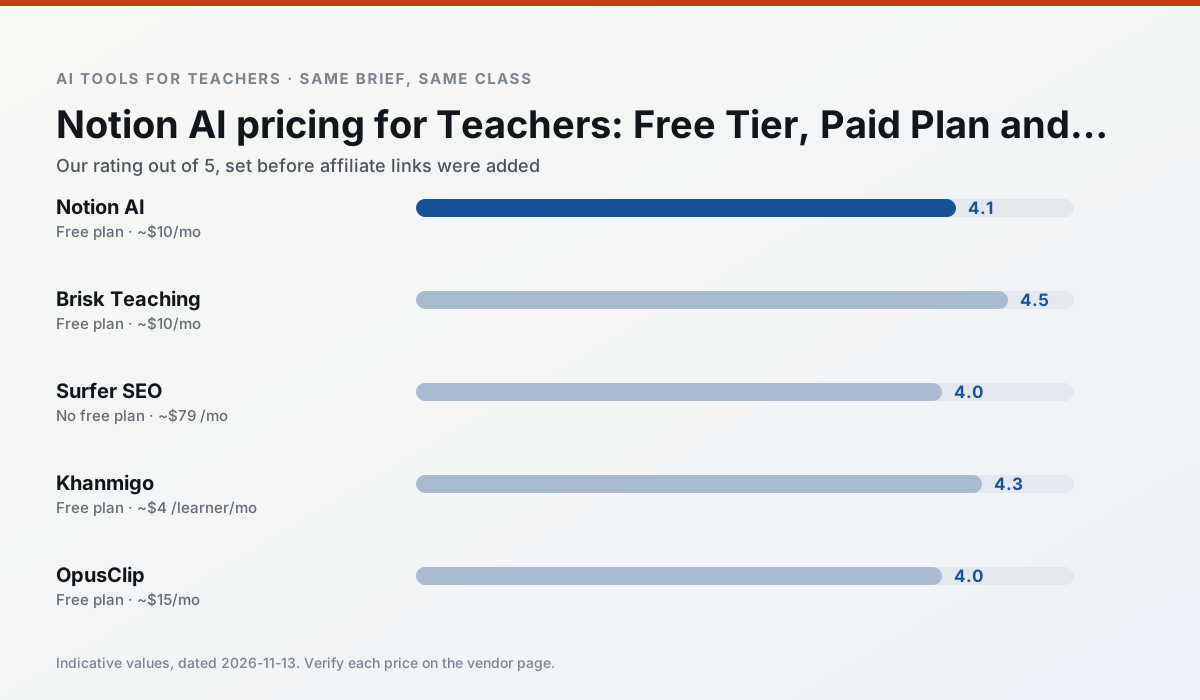
Side by side
Comparison table
Ratings reflect our timed classroom workflow, not vendor claims. Prices are indicative — verify on the vendor site.
| Tool | Best for | Free tier | Indicative paid plan | Standout feature | Our rating | Verdict | Try the tool |
|---|---|---|---|---|---|---|---|
| Notion AI | curriculum mapping · unit planning | Yes — Limited AI usage | ~$10 /user/mo | Linked databases | 4.1 / 5 | Situational | Try free |
| Brisk Teaching | feedback on writing · grading | Yes — Limited actions per month | ~$10 /user/mo | Works inside Google Docs | 4.5 / 5 | Top pick | Try free |
| Surfer SEO | teacher bloggers · resource sellers | No ongoing free plan | ~$79 /mo | Content Editor | 4.0 / 5 | Situational | Try free |
| Khanmigo | math practice · student tutoring | Yes — US teacher accounts, subject to eligibility | ~$4 /learner/mo | Socratic tutoring rather than answers | 4.3 / 5 | Strong option | Try free |
| OpusClip | PD materials · flipped lessons | Yes — Limited monthly clips | ~$15 /user/mo | Auto captions | 4.0 / 5 | Situational | Try free |
| Diffit | differentiated instruction · reading intervention | Yes — Limited generations per month | ~$15 /user/mo | Lexile-style leveling | 4.6 / 5 | Top pick | Try free |
Match your situation
Best for X
Different jobs need different tools. Here is what we would open first in each case.
Notion AI's free plan is the most usable in this comparison: a quota that survives a normal week. Not enough for a department, enough for one teacher to decide.
Brisk Teaching wins on the default path: fewer clicks to a usable draft, and the interface does not get in the way at 7:40am.
Surfer SEO has the shortest path from opening a tab to a usable draft, which matters more than the feature count on a Monday.
Khanmigo is the option IT is least likely to block: single sign-on, admin removal of AI features and an agreement on file.
Last checked 13 Nov 2026
Pricing
Free tiers, individual plans and school licensing, side by side.
| Tool | Free plan | Individual / paid | School & district | Billing note | Verify |
|---|---|---|---|---|---|
| Notion AI | $0 — Limited AI usage | ~$10 /user/mo | ~$8 /user/mo | Indicative — verify on vendor site | Vendor |
| Brisk Teaching | $0 — Limited actions per month | ~$10 /user/mo | Custom quote | Indicative — verify on vendor site | Vendor |
| Surfer SEO | No ongoing free tier | ~$79 /mo | Custom quote | Indicative — verify on vendor site | Vendor |
| Khanmigo | $0 — US teacher accounts, subject to eligibility | ~$4 /learner/mo | Custom quote | Indicative — verify on vendor site | Vendor |
| OpusClip | $0 — Limited monthly clips | ~$15 /user/mo | ~$29 /user/mo | Indicative — verify on vendor site | Vendor |
| Diffit | $0 — Limited generations per month | ~$15 /user/mo | Custom quote | Indicative — verify on vendor site | Vendor |
Editorial rule: pricing is re-checked every 2–3 months and the top 50 pages are refreshed every 6 months. See our funding policy.
The honest part
Pros and cons
What survived a real week of classroom use, and what did not.
Pros
- Great for long-term curriculum records
- Strong team collaboration
- Flexible structure
Cons
- Setup time is significant
- AI add-on pricing changed more than once
- Not purpose-built for lesson generation
Pros
- No copy-paste between tools
- Fast inline feedback on student drafts
- Gentle learning curve
Cons
- Chrome-first workflow
- Extension permissions need IT approval
- Free quota is tight
Pros
- Best-in-class on-page guidance
- Useful for TpT / resource-shop content
- Clear scoring
Cons
- Expensive for individual teachers
- Not a classroom tool
- Requires SEO basics
Pros
- Education-first design
- Strong nonprofit trust signal
- Good math scaffolding
Cons
- Availability varies by region
- Less useful for admin paperwork
- Requires student accounts for full value
Pros
- Turns a recorded lesson into review clips
- Excellent captions
- Fast
Cons
- Optimised for social formats
- Not a lesson design tool
- Free plan is restrictive
In the classroom
Use cases
Five concrete workflows, with the tool we would open for each one.
Three reading levels from one source text
Paste a vetted text, ask for supported, core and extension versions, then check the vocabulary list by hand. Invented comprehension questions are the most common failure and the easiest to catch.
Recommended: Notion AIA Monday morning lesson plan in twelve minutes
The twelve minutes come from not rewriting the skeleton. Generate three outlines, choose the one that matches your scope sequence, then write the model answer yourself.
Recommended: Brisk TeachingA parent email in two languages
Draft in plain, warm language with no names, translate, then back-translate the important sentences to check meaning. Keep specific incidents out of the prompt and add them yourself.
Recommended: Surfer SEORubric and feedback comments in one pass
Reorder the workflow so the rubric is yours and the comments are generated. Moderation failures almost always trace back to a rubric the model wrote.
Recommended: KhanmigoAn IEP present-levels first draft
Use aggregated, anonymised data only. Ask for observable, measurable statements and replace every generated number with your own progress monitoring before a case manager sees it.
Recommended: OpusClip
Questions teachers ask us
FAQ
Direct answers, also published as FAQPage structured data for search and AI assistants.
What does Notion AI cost per teacher?
Is there a free plan?
What does a district pay for?
Sources & further reading
Our recommendation
Try Notion AI free for your next lesson planning task
AI-assisted notes, databases and curriculum planning in one workspace. Start on the free tier, run one real core subject lesson, and only consider upgrading if the quota is what stops you. Disclosure: we may earn a commission (varies) at no extra cost to you.
Some links on this page are affiliate links. We may earn a commission at no extra cost to you. Our rankings are editorial and never pay-to-play. Never enter student PII into a free consumer account.
Keep reading
Related comparisons in this cluster.
Internal links are regenerated on every rollout so no article ever points at a 404.