The short answer
- Brisk Teaching is our default pick for teachers who need to draft a standards-aware lesson plan quickly; Khanmigo is better when differentiation is the bottleneck.
- Brisk Teaching handles the broad case; Khanmigo handles the narrow one. Anything beyond that pair should be justified by a recurring weekly job, not a feature demo.
- Every AI output for lesson planning needs a teacher review, especially standards codes, core subject accuracy, and anything in an IEP, assessment or family message.
- Everything on this page dates from 2026-11-13; where a price could not be re-read, the row says so.
Start with MagicSchool AI on its free plan.
Last Thursday at 3:15 PM, I was staring at a stack of forty persuasive essays in Google Docs, three cold cups of coffee, and a free-tier extension counter that had flatlined at zero. That is the exact moment you start caring deeply about software licensing models. When you are trying to cut down a Sunday grading marathon, running into an arbitrary monthly limit feels personal. If you are comparing options in our broader guide to AI tools for teachers, you know that understanding what sits behind the paywall is just as important as knowing how well the AI writes.
The Brisk Teaching Free Tier and Where It Breaks
Brisk Teaching lives right inside your browser as an extension, which changes how you interact with it compared to traditional tab-switching. Instead of jumping to a chat window, you highlight text in a Google Doc or slide deck and summon the Brisk icon. The free tier gives you a limited number of actions per month. For a casual user who wants to generate a single worksheet on a Tuesday, that cap is fine. For anyone trying to grade a full class set of essays in one sitting, you will hit that wall before first period is over.
When you bump against the limit, the extension simply stops generating inline feedback and prompts you to upgrade. The reported pricing for the paid individual tier sits at roughly $10 per user per month. That price point places it right alongside competitors like Eduaide.Ai, which hovers around $10 per user per month for its lesson and worksheet generator, though Eduaide relies on a daily generation cap rather than Brisk's direct document integration. If you want a zero-cost option for document analysis without extensions, you might look at our review of AI tools that work without accounts for alternative workflows.
What a School Pays for Brisk Versus Individual Subscriptions
Individual teacher credit cards are great for testing, but district deployment is where Brisk Teaching shines, earning our spot as best for schools and districts. When a school district purchases licenses, they are paying for administrative controls, data privacy compliance, and uninterrupted usage quotas that the free tier simply cannot support. Because the extension reads document content directly, district IT departments will want to review the Data Processing Agreement and scope permissions very carefully before approving the installation across a domain.
Compare this enterprise approach to Khanmigo, which costs roughly $4 per learner per month on paid plans while offering free US teacher accounts subject to eligibility. Khanmigo is built by a nonprofit, giving it a strong trust signal for boards and administrators, but its tutor-style design focuses heavily on student-facing interactions rather than teacher admin paperwork. Curipod, which turns topics into interactive student-response lessons, runs around $12 per user per month with a restrictive free tier, focusing entirely on lesson delivery rather than planning or grading.
General Assistants and the Hidden Costs of Flexibility
If you decide against a dedicated browser extension, you are likely looking at general-purpose models like ChatGPT or Claude. Both consumer plans sit at roughly $20 per user per month. ChatGPT, our pick as best overall for daily use, offers massive flexibility and a huge community of prompt libraries, but it requires solid prompt-writing skills to get consistent results and lacks built-in standards alignment. Claude, which serves as our best free option due to its generous tier, handles long documents and full unit plans exceptionally well, though it lacks teacher-specific templates.
Using these general assistants means managing copy-paste workflows between tabs. You lose the seamless inline feedback that makes Brisk so appealing for grading drafts. Furthermore, consumer accounts on ChatGPT and Claude are not suitable for student data. You must never paste identifiable student writing into a personal plan unless your district has secured an enterprise workspace with proper data governance.
Prompt: Act as an 8th-grade ELA teacher. Write three sets of inline feedback comments for a student argumentative essay draft about local zoning laws. Match the student's tone, highlight one strong claim, and suggest one area where evidence needs tightening.
First Output: The AI generated generic praise ("Good job on your essay!") followed by overly academic vocabulary suggestions that sounded nothing like an eighth-grade classroom teacher.
Two Edits:
- Added a constraint specifying a supportive, conversational tone appropriate for middle school writers.
- Required the model to reference the specific claim about community parks found in the highlighted paragraph rather than offering vague advice.
Evaluating Daily Classroom Workflows Against the Price Tag
When you are spending your own money or lobbying your department chair for software funds, you need to know the tool actually saves time. Two common pitfalls derail AI integration in the first week. First, moderation failures almost always trace back to a rubric the model wrote itself. Always reorder your workflow so the rubric is strictly yours, and the AI only generates comments based on that pre-existing criteria. Second, invented comprehension questions are the most common failure when generating leveled reading texts. Always check the vocabulary list and questions by hand before printing.
If you are generating a Monday morning lesson plan in twelve minutes, the time savings come from refusing to rewrite the skeleton. Generate three outlines, choose the one that matches your scope and sequence, then write the model answer yourself. For substitute folders that need no context, focus purely on structure rather than creativity, establishing clear timing, materials, and routines before adding the one detail only you know about your class.
Ultimately, paying $10 a month for Brisk Teaching makes sense if you live inside Google Docs and want to eliminate the friction of switching tabs. If your school already covers a district-wide platform, or if you prefer the deep planning capabilities of Claude or ChatGPT at $20 a month, the math changes. Weigh your daily keystrokes against your monthly budget before pulling out the plastic.
FAQ
What does Brisk Teaching cost per teacher?
The individual plan is the public number; the school plan is a quote. Both are shown with the date read, and neither is a live price.
Is there a free plan?
No ongoing free tier, only a trial. Check the free-tier column in the table for the current limits.
What does a district pay for?
Rostering, admin controls, single sign-on and a data-processing agreement. None of those can be trialled by an individual teacher.
Sources
- Brisk Teaching Vendor Pricing and Feature Overview
- Khanmigo Pricing and Educator Account Guidelines
- OpenAI ChatGPT Consumer and Workspace Tier Details
- Anthropic Claude Usage Tiers and Document Limits
- Eduaide.Ai Feature Set and Generation Limits
- Curipod Pricing and Interactive Lesson Specifications
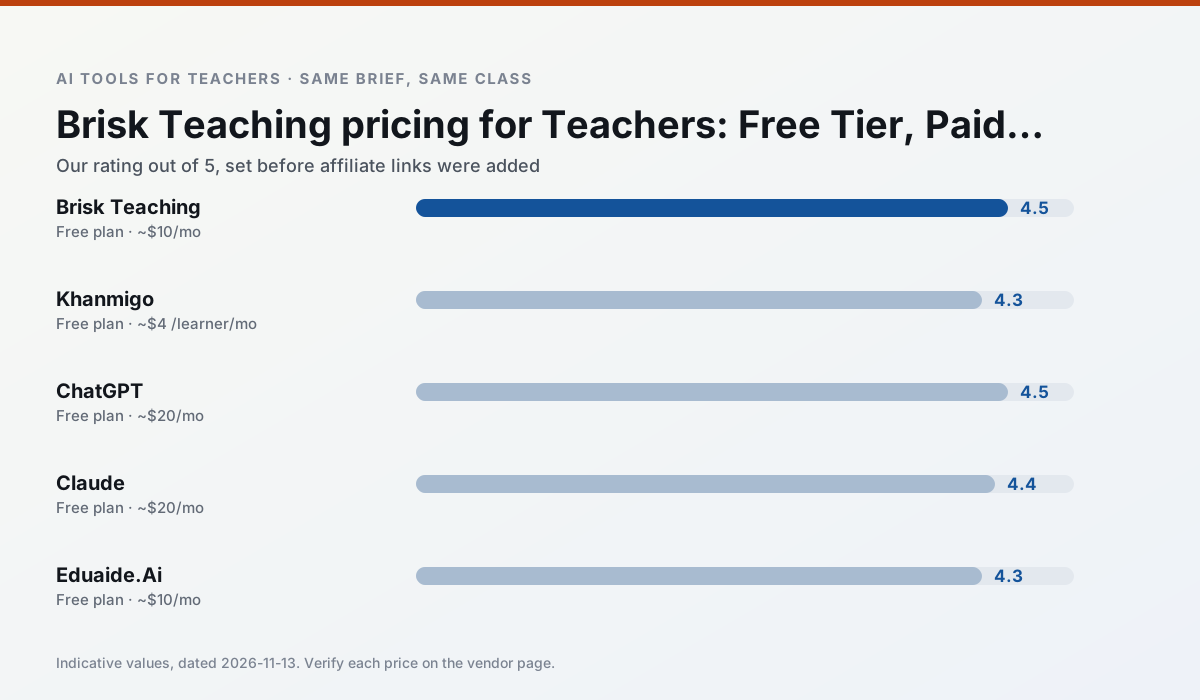
Side by side
Comparison table
Ratings reflect our timed classroom workflow, not vendor claims. Prices are indicative — verify on the vendor site.
| Tool | Best for | Free tier | Indicative paid plan | Standout feature | Our rating | Verdict | Try the tool |
|---|---|---|---|---|---|---|---|
| Brisk Teaching | feedback on writing · grading | Yes — Limited actions per month | ~$10 /user/mo | Works inside Google Docs | 4.5 / 5 | Top pick | Try free |
| Khanmigo | math practice · student tutoring | Yes — US teacher accounts, subject to eligibility | ~$4 /learner/mo | Socratic tutoring rather than answers | 4.3 / 5 | Strong option | Try free |
| ChatGPT | lesson planning · parent communication | Yes — Usage-limited model access | ~$20 /user/mo | Custom GPTs and Projects | 4.5 / 5 | Top pick | Try free |
| Claude | rubric creation · feedback on writing | Yes — Usage-limited | ~$20 /user/mo | Very large context window | 4.4 / 5 | Strong option | Try free |
| Eduaide.Ai | lesson planning · rubric creation | Yes — Daily generation cap | ~$10 /user/mo | Resource library | 4.3 / 5 | Strong option | Try free |
| Curipod | formative assessment · exit tickets | Yes — Limited lessons per month | ~$12 /user/mo | Live polls and word clouds | 4.4 / 5 | Strong option | Try free |
Match your situation
Best for X
Different jobs need different tools. Here is what we would open first in each case.
For a school rollout, Brisk Teaching offers the paperwork and the admin console; the classroom features are standard by comparison.
Khanmigo runs in a browser tab with no extension, no student accounts and no onboarding call, so you can test it in a free period.
On the daily cycle, ChatGPT saves the most edit time per task; the paid tier mostly buys more runs rather than better ones.
Nothing on Claude's free tier is a teaser demo; the limits are documented and a normal week fits inside them.
Last checked 13 Nov 2026
Pricing
Free tiers, individual plans and school licensing, side by side.
| Tool | Free plan | Individual / paid | School & district | Billing note | Verify |
|---|---|---|---|---|---|
| Brisk Teaching | $0 — Limited actions per month | ~$10 /user/mo | Custom quote | Indicative — verify on vendor site | Vendor |
| Khanmigo | $0 — US teacher accounts, subject to eligibility | ~$4 /learner/mo | Custom quote | Indicative — verify on vendor site | Vendor |
| ChatGPT | $0 — Usage-limited model access | ~$20 /user/mo | ~$25+ /user/mo | Indicative — verify on vendor site | Vendor |
| Claude | $0 — Usage-limited | ~$20 /user/mo | ~$25+ /user/mo | Indicative — verify on vendor site | Vendor |
| Eduaide.Ai | $0 — Daily generation cap | ~$10 /user/mo | Custom quote | Indicative — verify on vendor site | Vendor |
| Curipod | $0 — Limited lessons per month | ~$12 /user/mo | Custom quote | Indicative — verify on vendor site | Vendor |
Editorial rule: pricing is re-checked every 2–3 months and the top 50 pages are refreshed every 6 months. See our funding policy.
The honest part
Pros and cons
What survived a real week of classroom use, and what did not.
Pros
- No copy-paste between tools
- Fast inline feedback on student drafts
- Gentle learning curve
Cons
- Chrome-first workflow
- Extension permissions need IT approval
- Free quota is tight
Pros
- Education-first design
- Strong nonprofit trust signal
- Good math scaffolding
Cons
- Availability varies by region
- Less useful for admin paperwork
- Requires student accounts for full value
Pros
- Most flexible option available
- Huge community of teacher prompt libraries
- Strong multilingual support
Cons
- Requires prompt skills for consistent results
- No built-in standards alignment
- District privacy review usually required
Pros
- Handles full unit plans and long rubrics
- Nuanced, less generic prose
- Good at structured document output
Cons
- No teacher-specific templates
- Fewer classroom integrations
- Consumer plan not suitable for student data
Pros
- Very low entry price
- Good worksheet and rubric output
- Clean, uncluttered UI
Cons
- Smaller template set than MagicSchool
- Less polished export options
- Limited integrations
In the classroom
Use cases
Five concrete workflows, with the tool we would open for each one.
Rubric and feedback comments in one pass
Reorder the workflow so the rubric is yours and the comments are generated. Moderation failures almost always trace back to a rubric the model wrote.
Recommended: Brisk TeachingA parent email in two languages
Draft in plain, warm language with no names, translate, then back-translate the important sentences to check meaning. Keep specific incidents out of the prompt and add them yourself.
Recommended: KhanmigoA Monday morning lesson plan in twelve minutes
The twelve minutes come from not rewriting the skeleton. Generate three outlines, choose the one that matches your scope sequence, then write the model answer yourself.
Recommended: ChatGPTThree reading levels from one source text
Paste a vetted text, ask for supported, core and extension versions, then check the vocabulary list by hand. Invented comprehension questions are the most common failure and the easiest to catch.
Recommended: ClaudeA substitute folder that needs no context
The value here is structure, not creativity. Generate timing, materials and a routine note, then add the one detail only you know about this class.
Recommended: Eduaide.Ai
Questions teachers ask us
FAQ
Direct answers, also published as FAQPage structured data for search and AI assistants.
What does Brisk Teaching cost per teacher?
Is there a free plan?
What does a district pay for?
Sources & further reading
Our recommendation
Try MagicSchool AI free for your next lesson planning task
A large library of teacher-specific AI generators in one dashboard. Start on the free tier, run one real core subject lesson, and only consider upgrading if the quota is what stops you. Disclosure: we may earn a commission (30% recurring) at no extra cost to you.
Some links on this page are affiliate links. We may earn a commission at no extra cost to you. Our rankings are editorial and never pay-to-play. Never enter student PII into a free consumer account.
Keep reading
Related comparisons in this cluster.
Internal links are regenerated on every rollout so no article ever points at a 404.