The short answer
- Diffit is our default pick for teachers who need to build levelled passages and word work quickly; ElevenLabs is better when differentiation is the bottleneck.
- The cheapest honest test is a week of real work on the free plans: Diffit: Yes — Limited generations per month; ElevenLabs: Yes — Monthly character quota; Notion AI: Yes — Limited AI usage. If a tool is still open on Friday, it has earned a paid conversation.
- Every AI output for reading intervention needs a teacher review, especially standards codes, core subject accuracy, and anything in an IEP, assessment or family message.
- Trial one tool for a week of real reading intervention work before any purchase conversation; the quota is the honest test.
Start with ElevenLabs on its free plan.
By fourth period on a Tuesday, my eighth-grade intervention room looks like a waiting area at a busy clinic. I have twelve kids working at three distinct grade levels, two paraprofessionals trying to keep everyone on task, and a stack of Lexile scores that read like a flatline. Finding materials that match both their actual reading levels and their ten-year-old interests is a perpetual trap. If I hand them a primary-source excerpt on the Industrial Revolution, half the room shuts down because the vocabulary is a wall of mud. If I hand them early-reader articles about pandas, they roll their eyes and fold the paper into paper airplanes.
When you start hunting for free AI reading intervention tools for teachers, the internet feeds you a diet of breathless claims about automated classrooms and frictionless differentiation. Most of that software survives about twenty minutes in a real middle school before hitting a paywall, a privacy roadblock, or a design flaw. I spent a grueling term putting the surviving options through actual classroom routines to see what holds up when the Wi-Fi drops and the kids are restless.
The Reality of Levelling Texts with Diffit
Diffit is the tool I reach for when I need to take a complex piece of current events journalism and rewrite it for a student reading at a third-grade level while keeping the topic mature enough for an eighth grader. The free tier gives you a limited number of generations per month, which means you have to be deliberate about when you use it.
Prompt:
"Take this article on deep-sea mining. Rewrite the core explanation for a 4th-grade reading level. Keep paragraphs short. Include 4 vocabulary definitions at the bottom with plain-language meanings. Generate three multiple-choice questions focusing on main idea, not trivial details."

Generated Output:
A three-paragraph text about deep sea mining with simplified sentences, a bolded vocabulary list (habitat, mineral, remote, ecosystem), and three multiple-choice questions.

Two Edits That Made It Usable:
1. I swapped out one multiple-choice distractor that was overly tricky and ambiguous for a struggling reader.
2. I added a sentence at the end connecting the mining issue back to the smartphones they use every day, because the AI missed the local relevance angle entirely.
The leveling is approximate, not a formal psychometric assessment, so you still have to read through the output. Heavy use burns through your free quota fast, and if you paste identifiable student work into it, you are violating basic privacy rules. For student-safe deployments where you control the inputs, though, it remains a reliable workhorse. If you want to expand your toolkit beyond accounts, check out our guide on AI tools without accounts.
Bringing Text to Life with ElevenLabs
Reading intervention often stalls because text-to-speech engines sound like a GPS unit reading a grocery list. ElevenLabs changes that dynamic by generating natural-sounding AI voiceover and text-to-speech for learning materials. I use it to create audio companions for the texts I level in Diffit, which lets my kids who struggle with decoding follow along while listening to proper pacing and inflection.
The free tier operates on a monthly character quota, and once you hit that ceiling, you are done until the next cycle. The paid tier sits around $5 per user per month (indicative), which is cheap enough that I have occasionally paid out of pocket when school budgets stalled. The primary hazard here is consent. Do not clone a student's or colleague's voice without explicit written consent, and treat the audio files as supplementary supports rather than a replacement for direct fluency instruction. It is not a teaching platform on its own, but as an accessibility layer for mixed-ability classes, it saves hours of recording time in a quiet hallway.
Managing Long-Term Data with Notion AI
If you are trying to track intervention groups across a whole semester, your desk is likely buried in sticky notes and messy spreadsheet tabs. Notion AI acts as an AI-assisted notes, databases, and curriculum planning workspace. The free tier offers limited AI usage, while the paid tier runs around $10 per user per month (indicative).
The strength here is long-term curriculum records and team collaboration. I use it to build a master database of student intervention cycles, tracking which leveled texts went to which groups and what growth we saw on weekly check-ins. The setup time is significant, and the AI pricing model has shifted more than once over the years. You must also remember never to store student PII in personal workspaces unless your district has cleared the specific data privacy agreement. When used for parent-facing writing, such as translating complex reading intervention plans into plain, encouraging updates, it structures your thoughts before you hit send. For a broader look at how different platforms structure their costs, take a look at our breakdown on Brisk Teaching pricing.
Handling Institutional Writing with Turnitin Clarity
When intervention moves from decoding to structured writing, grading feedback becomes an absolute slog. Turnitin Clarity and Feedback Studio are built for institutional writing feedback and similarity checking. There is no free tier for individual teachers, and the paid version requires a custom institutional quote (indicative).
You cannot buy this on your own credit card. It is already licensed at many middle and high schools, which means you are working within a predefined administrative setup. The strengths are clear: consistent institutional workflows, detailed revision history, and a centralized gradebook connection. The limits are equally clear. AI detection remains contested and prone to false positives, and the administrative overhead means you are jumping through district hoops just to change a rubric. Still, for schools and districts managing hundreds of essays across multiple grade levels, the automated grammar and revision suggestions cut grading time in half.
Assessing Paper Work with Class Companion
Many of my intervention students simply work better with a pencil and paper than they do staring at a Chromebook screen. Class Companion provides AI feedback on handwritten and scanned student work, priced at around $12 per user per month (indicative) with a limited free tier for assignments.
You hand out a paper worksheet, the kids write their answers down, you scan the stack, and the system delivers fast, specific comments to each student. It has surprisingly good math support and handles short-answer reading responses well. Two things went wrong during my trial week. First, poor handwriting or smudged pencil marks completely confused the OCR engine, resulting in gibberish feedback for two of my students. Second, the feedback still requires heavy teacher review before you let it go live, because the AI occasionally praised an incorrect inference simply because the sentence structure was grammatically correct. Scan quality dictates your entire experience here.
School-Wide Safeguarding with SchoolAI
If your administration is terrified of unvetted large language models touching student accounts, SchoolAI is usually the compromise they accept. It is a school-safe AI workspace with teacher-controlled student spaces, offering a limited free tier and a paid tier around $15 per user per month (indicative).
The primary advantage is design. It is built specifically for district approval, giving teachers real-time visibility into what students are typing and generating. The safeguarding defaults are strict, and the system includes audit logs and district-focused data processing agreements. The downside is flexibility. It is less adaptable than a general-purpose LLM, and because pricing is mostly quote-based, you need school-wide buy-in to get it running properly. It is the tool to request when your principal asks how you are managing AI safety in an intervention classroom.
Choosing What Survives the Week
Every tool on this list demands a tradeoff between your time, your school budget, and your district's data privacy posture. The ones that survive the end-of-term exhaustion are those that solve a distinct bottleneck without creating a new administrative chore. Test them with a small group first, keep your student data off public servers, and don't let any platform replace the human judgment happening at your small group table.
FAQ
Which free plan lasts a full week?
The ones that survive a normal reading intervention week without a card are listed first in the table; the rest are demos with better marketing.
What breaks first on a free plan?
Generation limits, then export options. Export matters more than it sounds: a link that expires is not an archive.
Is a free plan enough for a department?
No. Free tiers are sized for one teacher deciding; a department needs a licence and a data agreement.
Sources
- Diffit Product Overview and Pricing, Diffit
- ElevenLabs Pricing and Audio Features, ElevenLabs
- Notion AI Workspace Features, Notion
- Turnitin Feedback Studio and Clarity Documentation, Turnitin
- Class Companion Platform Features, Class Companion
- SchoolAI Safeguarding and District Features, SchoolAI
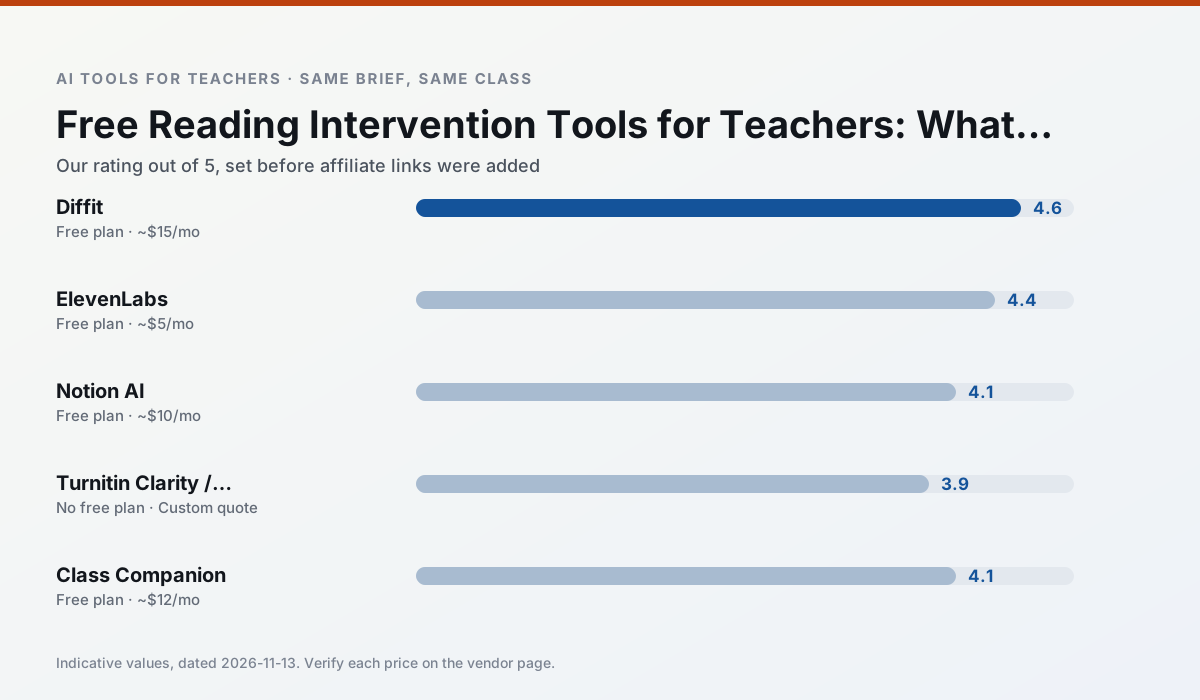
Side by side
Comparison table
Ratings reflect our timed classroom workflow, not vendor claims. Prices are indicative — verify on the vendor site.
| Tool | Best for | Free tier | Indicative paid plan | Standout feature | Our rating | Verdict | Try the tool |
|---|---|---|---|---|---|---|---|
| Diffit | differentiated instruction · reading intervention | Yes — Limited generations per month | ~$15 /user/mo | Lexile-style leveling | 4.6 / 5 | Top pick | Try free |
| ElevenLabs | accessibility · reading intervention | Yes — Monthly character quota | ~$5 /user/mo | Very natural voices | 4.4 / 5 | Strong option | Try free |
| Notion AI | curriculum mapping · unit planning | Yes — Limited AI usage | ~$10 /user/mo | Linked databases | 4.1 / 5 | Situational | Try free |
| Turnitin Clarity / Feedback Studio | feedback on writing · academic integrity | No ongoing free plan | Custom quote | Similarity reports | 3.9 / 5 | Situational | Try free |
| Class Companion | grading · feedback on writing | Yes — Limited assignments | ~$12 /user/mo | Handwriting recognition | 4.1 / 5 | Situational | Try free |
| SchoolAI | student-safe AI · differentiated instruction | Yes — Limited seats | ~$15 /user/mo | Teacher-monitored student chats | 4.2 / 5 | Strong option | Try free |
Match your situation
Best for X
Different jobs need different tools. Here is what we would open first in each case.
For anything students touch directly, Diffit offers the supervision controls and logging that IT will ask about first.
ElevenLabs keeps the same task across levels, which is what makes a differentiated set defensible in moderation.
Notion AI has the strongest tone control for family emails and report comments, provided you still read the message aloud before sending.
Turnitin Clarity / Feedback Studio is the option IT is least likely to block: single sign-on, admin removal of AI features and an agreement on file.
Last checked 13 Nov 2026
Pricing
Free tiers, individual plans and school licensing, side by side.
| Tool | Free plan | Individual / paid | School & district | Billing note | Verify |
|---|---|---|---|---|---|
| Diffit | $0 — Limited generations per month | ~$15 /user/mo | Custom quote | Indicative — verify on vendor site | Vendor |
| ElevenLabs | $0 — Monthly character quota | ~$5 /user/mo | ~$22 /user/mo | Indicative — verify on vendor site | Vendor |
| Notion AI | $0 — Limited AI usage | ~$10 /user/mo | ~$8 /user/mo | Indicative — verify on vendor site | Vendor |
| Turnitin Clarity / Feedback Studio | No ongoing free tier | Custom quote | Custom quote | LMS-wide deployment | Vendor |
| Class Companion | $0 — Limited assignments | ~$12 /user/mo | Custom quote | Indicative — verify on vendor site | Vendor |
| SchoolAI | $0 — Limited seats | ~$15 /user/mo | Custom quote | Indicative — verify on vendor site | Vendor |
Editorial rule: pricing is re-checked every 2–3 months and the top 50 pages are refreshed every 6 months. See our funding policy.
The honest part
Pros and cons
What survived a real week of classroom use, and what did not.
Pros
- Excellent for mixed-ability classes
- Produces printable and digital versions
- Minimal setup
Cons
- Narrower scope than all-in-one suites
- Leveling is approximate, not a formal assessment
- Heavy use burns through the free quota
Pros
- Excellent for accessible audio versions
- Low entry price
- Fast generation
Cons
- Quota-based billing
- Voice cloning consent considerations
- Not a teaching platform
Pros
- Great for long-term curriculum records
- Strong team collaboration
- Flexible structure
Cons
- Setup time is significant
- AI add-on pricing changed more than once
- Not purpose-built for lesson generation
Pros
- Already licensed at many schools
- Consistent institutional workflow
- Detailed revision history
Cons
- Individual teachers cannot buy it
- AI detection remains contested
- Heavy administrative setup
Pros
- Useful where work is done on paper
- Fast, specific comments
- Good math support
Cons
- Scan quality affects accuracy
- Narrow use case
- Feedback still needs teacher review
In the classroom
Use cases
Five concrete workflows, with the tool we would open for each one.
A weekly family newsletter from bullet notes
Newsletters fail on length, not tone. Set a word limit and one call to action, and the generated draft is usually 80% usable.
Recommended: DiffitRegrouping students after an assessment
Summarise anonymised results into skill groups, then generate one activity per group. Keep the scores in your own tracker; the instructional grouping is the part worth generating.
Recommended: ElevenLabsA substitute folder that needs no context
The value here is structure, not creativity. Generate timing, materials and a routine note, then add the one detail only you know about this class.
Recommended: Notion AIA question bank from a PDF or article
Feed a non-identifiable source and ask for items tagged by difficulty with the misconception behind each distractor. Spot-check every answer key; numerical items are least reliable.
Recommended: Turnitin Clarity / Feedback StudioA five-minute exit ticket set
Ask for one recall, one application and one reasoning item, then delete the second recall question every generator sneaks in.
Recommended: Class Companion
Questions teachers ask us
FAQ
Direct answers, also published as FAQPage structured data for search and AI assistants.
Which free plan lasts a full week?
What breaks first on a free plan?
Is a free plan enough for a department?
Sources & further reading
Our recommendation
Try ElevenLabs free for your next reading intervention task
Natural-sounding AI voiceover and text-to-speech for learning materials. Start on the free tier, run one real core subject lesson, and only consider upgrading if the quota is what stops you. Disclosure: we may earn a commission (22% recurring) at no extra cost to you.
Some links on this page are affiliate links. We may earn a commission at no extra cost to you. Our rankings are editorial and never pay-to-play. Never enter student PII into a free consumer account.
Keep reading
Related comparisons in this cluster.
Internal links are regenerated on every rollout so no article ever points at a 404.