The short answer
- Curipod is our default pick for teachers who need to write five-minute wrap-up prompts quickly; Quizizz is better when differentiation is the bottleneck.
- The cheapest honest test is a week of real work on the free plans: Curipod: Yes — Limited lessons per month; Quizizz: Yes — Core quiz creation; Brisk Teaching: Yes — Limited actions per month. If a tool is still open on Friday, it has earned a paid conversation.
- Every AI output for exit tickets needs a teacher review, especially standards codes, core subject accuracy, and anything in an IEP, assessment or family message.
- Everything on this page dates from 2026-11-13; where a price could not be re-read, the row says so.
Start with MagicSchool AI on its free plan.
At three minutes before the bell, twenty-eight eighth graders are packing bags that sound like dragging gravel across concrete, and I am staring at a blank whiteboard trying to remember what a formative assessment is supposed to look like. The old routine of making them write three takeaways on a scrap of paper resulted in twenty scrap papers that read "nothing" or "idk" before vanishing into the abyss of a backpack. When you look at free AI exit tickets tools for teachers, you are not looking for a pedagogical revolution. You are looking for something that generates a three-question check for understanding before the custodian turns the lights out.
Most software demos make these tools look like magic. They show pristine classrooms where students type thoughtful paragraphs into sleek dashboards while ambient piano music plays. Reality is messier. Free tiers run out by Thursday, student accounts fail because someone forgot a password, and the Wi-Fi drops halfway through period four. We put six common platforms through a full week of actual use across middle and high school classes to see which ones survive the final ten minutes of the period.
If you want the full picture of how these platforms stack up against paid models, take a look at our guide on best AI tools for teachers 2026. For now, let us look at what happens when the rubber meets the road on a Tuesday afternoon.
Curipod: Best Overall for Daily Use
Curipod turns a standard topic into an interactive lesson in minutes, making it our pick for best overall for daily use. On paper, it handles exit tickets by generating polls, word clouds, and open-ended questions that students access instantly. No student accounts are required for basic use, which is a lifesaver when you have four minutes left and half the class cannot log into their school-issued profiles.
In practice, the free tier is restrictive and limits how many lessons you can build per month. If you try to run one every day, you will hit the paywall by Wednesday of week two. The paid tier sits at roughly $12 /user/mo, but the real strength here is engagement. Students who normally slump in their seats will actually type an answer when it pops up anonymously on the big screen. Just remember that Curipod is focused entirely on delivery rather than long-term planning, so you still need your own scope and sequence.
Quizizz: Best Free Option
Quizizz remains the workhorse for teachers who need reliable gamification without hunting for a budget. It takes the crown as the best free option because its core quiz creation tool does not lock you out after three tries. Students already know the interface from elementary school onward, which cuts down instructional downtime to zero. You type in a standard, let the AI generate a question bank, and curate the best items into a live game or homework assignment.
Prompt typed into Quizizz AI:
"Create 5 multiple choice questions on finding the slope from two points for 8th grade math, keeping vocabulary accessible."

What came back:
Five questions with standard calculations, but two of them used identical numbers, and the distractor answers were obviously random rather than targeting common sign errors.

Two edits that made it usable:
1. Replaced the second distractor to intentionally target students who subtract y-coordinates in the wrong order.
2. Swapped the numbers in question four to avoid whole-number cancellation that bypassed the actual formula.
The reporting is clean enough to sort students into intervention groups immediately. The downside is that AI-generated questions still need a human pass to avoid logic gaps, and heavy gamification can sometimes distract students who treat guessing as a sport rather than a reflection of learning. If you want to dig deeper into keeping access simple, you might also appreciate our thoughts on AI tools without accounts.
Brisk Teaching: Best for Schools and Districts
Brisk Teaching operates as a browser extension that brings AI feedback and assessment generation directly into Google Docs, Slides, and web articles. It is our top pick for schools and districts because it eliminates the tedious copy-pasting between separate windows. If you are grading student drafts, Brisk can insert inline comments and generate a quick exit ticket based on the exact text your class just read.
The learning curve is gentle, but the limitations are real. It is a Chrome-first workflow, meaning any school district running strict extension permissions will require IT approval before you can even install it. The free quota is tight, and the extension needs to read document content to function, which means your district data privacy officer will want to review the Data Processing Agreement carefully before widespread deployment.
Kahoot!: Best for Quick Setup
Kahoot! is built for speed. It wins for quick setup because almost every teacher on the planet can spin up a review game in under two minutes using its AI question generation feature. Brand familiarity is immense, and students respond to the iconic lobby music and countdown timers instantly.
Prompt typed into Kahoot! generator:
"Generate a 10-question rapid review on photosynthesis for a high school biology class."

What came back:
Ten snappy recall questions about light-dependent reactions, though half of them tested vocabulary definitions rather than conceptual understanding.

Two edits that made it usable:
1. Deleted four vocabulary recall items and replaced them with application scenarios about chloroplast placement.
2. Extended the timer from twenty seconds to thirty seconds to give students time to read the longer scenario stems.
The main trap with Kahoot! is that time pressure suits recall far better than reasoning. It is wonderful for checking vocabulary or basic formulas at the end of a unit, but it falls short when you need students to explain why an answer is correct. Furthermore, paid tiers are required once you exceed standard player counts for larger classes, and younger students should use nicknames rather than real names to protect privacy.
Eduaide.Ai and ChatGPT: The General Purpose Alternatives
Eduaide.Ai offers a clean, uncluttered interface for generating worksheets, rubrics, and lesson components. Its entry price sits around $10 /user/mo if you outgrow the daily generation cap on the free tier. While its template set is smaller than some competitors, its rubric and worksheet output is remarkably straightforward. You can easily prompt it to build a three-question exit ticket mapped to a specific standard, though export options lack polish.
ChatGPT remains the ultimate Swiss Army knife. At roughly $20 /user/mo for the paid model with a usage-limited free tier, it adapts to almost any classroom task from drafting newsletters to restructuring assessment data. The catch is that ChatGPT requires actual prompt engineering skill to get consistent results, and it lacks built-in standards alignment unless you feed the benchmarks into your prompt yourself. Never input student personally identifiable information into consumer AI tiers, and always check your local district guidelines.
At the end of a brutal week, no software will grade papers while you sleep or teach the concepts for you. But a free exit ticket tool that shaves ten minutes off your prep time and actually gives you actionable data by Friday afternoon is worth keeping in your browser bar. Pick one, test it on a Thursday when stakes are low, and save yourself the headache of reading forty blank scraps of paper.
FAQ
Which free plan lasts a full week?
The ones that survive a normal exit tickets week without a card are listed first in the table; the rest are demos with better marketing.
What breaks first on a free plan?
Generation limits, then export options. Export matters more than it sounds: a link that expires is not an archive.
Is a free plan enough for a department?
No. Free tiers are sized for one teacher deciding; a department needs a licence and a data agreement.
Sources
- Curipod Pricing and Features Overview (vendor documentation, 2026)
- Quizizz Educator Plans and COPPA/FERPA Compliance Notes (vendor documentation, 2026)
- Brisk Teaching Chrome Extension Security and Pricing Specs (vendor documentation, 2026)
- Kahoot! Educator Tiers and Player Limits (vendor documentation, 2026)
- Eduaide.Ai Resource Library and Generation Limits (vendor documentation, 2026)
- OpenAI ChatGPT Consumer and Workspace Privacy Guidelines (vendor documentation, 2026)
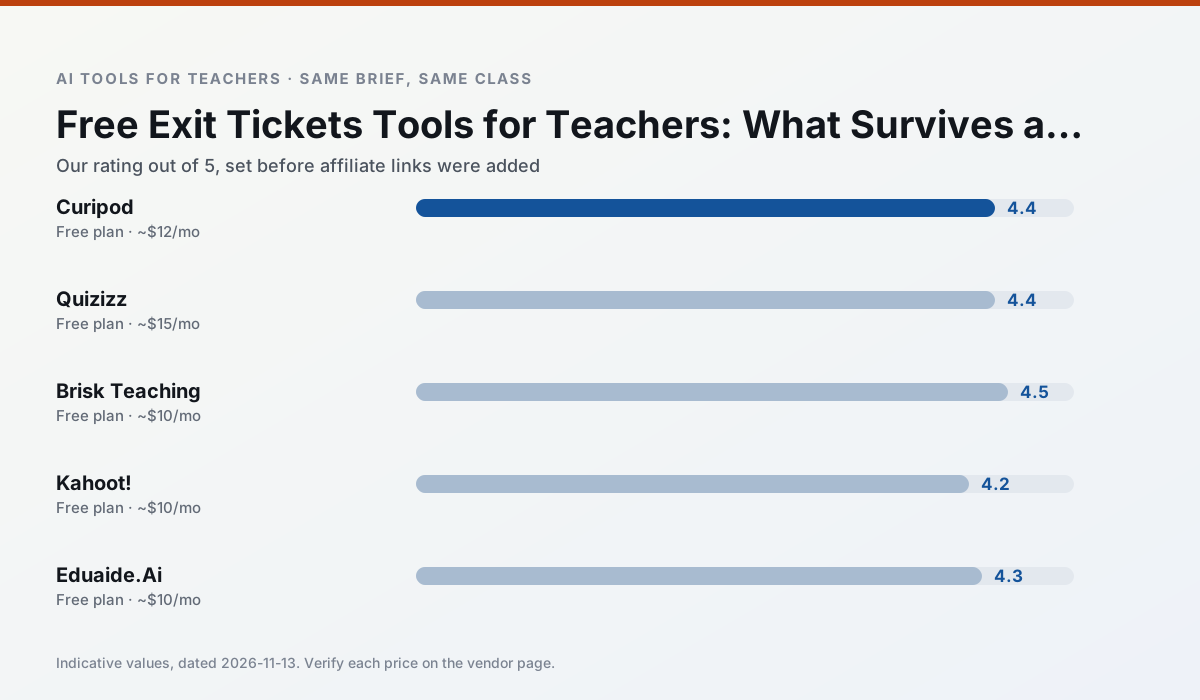
Side by side
Comparison table
Ratings reflect our timed classroom workflow, not vendor claims. Prices are indicative — verify on the vendor site.
| Tool | Best for | Free tier | Indicative paid plan | Standout feature | Our rating | Verdict | Try the tool |
|---|---|---|---|---|---|---|---|
| Curipod | formative assessment · exit tickets | Yes — Limited lessons per month | ~$12 /user/mo | Live polls and word clouds | 4.4 / 5 | Strong option | Try free |
| Quizizz | quiz generation · formative assessment | Yes — Core quiz creation | ~$15 /user/mo | AI question generator | 4.4 / 5 | Strong option | Try free |
| Brisk Teaching | feedback on writing · grading | Yes — Limited actions per month | ~$10 /user/mo | Works inside Google Docs | 4.5 / 5 | Top pick | Try free |
| Kahoot! | quiz generation · review lessons | Yes — Limited player count | ~$10 /user/mo | AI question builder | 4.2 / 5 | Strong option | Try free |
| Eduaide.Ai | lesson planning · rubric creation | Yes — Daily generation cap | ~$10 /user/mo | Resource library | 4.3 / 5 | Strong option | Try free |
| ChatGPT | lesson planning · parent communication | Yes — Usage-limited model access | ~$20 /user/mo | Custom GPTs and Projects | 4.5 / 5 | Top pick | Try free |
Match your situation
Best for X
Different jobs need different tools. Here is what we would open first in each case.
On the daily cycle, Curipod saves the most edit time per task; the paid tier mostly buys more runs rather than better ones.
Quizizz's free plan is the most usable in this comparison: a quota that survives a normal week. Not enough for a department, enough for one teacher to decide.
Brisk Teaching is the option IT is least likely to block: single sign-on, admin removal of AI features and an agreement on file.
Kahoot! runs in a browser tab with no extension, no student accounts and no onboarding call, so you can test it in a free period.
Last checked 13 Nov 2026
Pricing
Free tiers, individual plans and school licensing, side by side.
| Tool | Free plan | Individual / paid | School & district | Billing note | Verify |
|---|---|---|---|---|---|
| Curipod | $0 — Limited lessons per month | ~$12 /user/mo | Custom quote | Indicative — verify on vendor site | Vendor |
| Quizizz | $0 — Core quiz creation | ~$15 /user/mo | Custom quote | Indicative — verify on vendor site | Vendor |
| Brisk Teaching | $0 — Limited actions per month | ~$10 /user/mo | Custom quote | Indicative — verify on vendor site | Vendor |
| Kahoot! | $0 — Limited player count | ~$10 /user/mo | Custom quote | Indicative — verify on vendor site | Vendor |
| Eduaide.Ai | $0 — Daily generation cap | ~$10 /user/mo | Custom quote | Indicative — verify on vendor site | Vendor |
| ChatGPT | $0 — Usage-limited model access | ~$20 /user/mo | ~$25+ /user/mo | Indicative — verify on vendor site | Vendor |
Editorial rule: pricing is re-checked every 2–3 months and the top 50 pages are refreshed every 6 months. See our funding policy.
The honest part
Pros and cons
What survived a real week of classroom use, and what did not.
Pros
- High student engagement out of the box
- Great for quick checks for understanding
- No student accounts required for basic use
Cons
- Focused on delivery, not planning
- Requires reliable classroom devices
- Free tier is restrictive
Pros
- Students already know the interface
- Good reporting
- Works on low-end devices
Cons
- Writing high-quality AI questions still needs review
- Gamification can distract
- Advanced analytics are paid
Pros
- No copy-paste between tools
- Fast inline feedback on student drafts
- Gentle learning curve
Cons
- Chrome-first workflow
- Extension permissions need IT approval
- Free quota is tight
Pros
- Instant engagement
- Very low training time
- Strong brand familiarity
Cons
- Less depth for higher-order assessment
- Paid tiers needed for larger classes
- Time pressure suits recall more than reasoning
Pros
- Very low entry price
- Good worksheet and rubric output
- Clean, uncluttered UI
Cons
- Smaller template set than MagicSchool
- Less polished export options
- Limited integrations
In the classroom
Use cases
Five concrete workflows, with the tool we would open for each one.
A weekly family newsletter from bullet notes
Newsletters fail on length, not tone. Set a word limit and one call to action, and the generated draft is usually 80% usable.
Recommended: CuripodRegrouping students after an assessment
Summarise anonymised results into skill groups, then generate one activity per group. Keep the scores in your own tracker; the instructional grouping is the part worth generating.
Recommended: QuizizzA Monday morning lesson plan in twelve minutes
The twelve minutes come from not rewriting the skeleton. Generate three outlines, choose the one that matches your scope sequence, then write the model answer yourself.
Recommended: Brisk TeachingThree reading levels from one source text
Paste a vetted text, ask for supported, core and extension versions, then check the vocabulary list by hand. Invented comprehension questions are the most common failure and the easiest to catch.
Recommended: Kahoot!Rubric and feedback comments in one pass
Reorder the workflow so the rubric is yours and the comments are generated. Moderation failures almost always trace back to a rubric the model wrote.
Recommended: Eduaide.Ai
Questions teachers ask us
FAQ
Direct answers, also published as FAQPage structured data for search and AI assistants.
Which free plan lasts a full week?
What breaks first on a free plan?
Is a free plan enough for a department?
Sources & further reading
Our recommendation
Try MagicSchool AI free for your next exit tickets task
A large library of teacher-specific AI generators in one dashboard. Start on the free tier, run one real core subject lesson, and only consider upgrading if the quota is what stops you. Disclosure: we may earn a commission (30% recurring) at no extra cost to you.
Some links on this page are affiliate links. We may earn a commission at no extra cost to you. Our rankings are editorial and never pay-to-play. Never enter student PII into a free consumer account.
Keep reading
Related comparisons in this cluster.
Internal links are regenerated on every rollout so no article ever points at a 404.