The short answer
- Notion AI is our default pick for teachers who need to generate practice sets with answer keys quickly; Turnitin Clarity / Feedback Studio is better when differentiation is the bottleneck.
- All 3 shortlisted tools are priced for one teacher first and a school second. Notion AI and Turnitin Clarity / Feedback Studio are the two worth trialling on a real task before any purchase conversation.
- Every AI output for worksheet creation needs a teacher review, especially standards codes, core subject accuracy, and anything in an IEP, assessment or family message.
- Trial one tool for a week of real worksheet creation work before any purchase conversation; the quota is the honest test.
Start with Notion AI on its free plan.
At 7:45 on a Tuesday morning, I stared at a photocopier jam while holding forty pages of dense social studies text that needed to become a differentiated reading packet by first period. The machine smelled faintly of hot plastic and defeat. Teachers waste hours every week wrestling with formatting, cutting apart articles, and trying to invent three tiers of questions for kids who read at different levels. When looking for free AI worksheet creation tools for teachers, the promise is always a magical one-click printout. The reality is messier.
Most software claiming to build worksheets is just a wrapper around a basic language model, loaded with aggressive upgrade prompts and paywalls that hit right when you need a custom rubric. I spent a term testing options across my curriculum, separating the genuinely useful utilities from the flash-in-the-pan novelties that break down under real classroom conditions. If you want to see how other zero-dollar options compare, check out our guide on AI tools without accounts.
The Weekly Newsletter Reality Check
Every Friday afternoon, I used to stare at a blank Google Doc trying to summarize five days of messy classroom chaos into something parents would actually read. Newsletters fail on length, not tone. If you ramble on for four paragraphs about lab safety procedures, nobody scrolls to the bottom. I started dropping my messy bullet notes into Notion AI, using its free tier's limited AI usage to whip the draft into shape. Set a strict word limit and one call to action in your prompt, and the generated output is usually eighty percent usable right out of the gate.
Prompt: "Draft a 150-word weekly classroom update for parents based on these bullet points: finished fractions unit, test on Thursday, field trip permission slips due next Wednesday. Tone: warm, direct. One call to action: sign the slip."
First response: A long, overly enthusiastic letter with three different paragraphs about fractions and an awkward joke about math anxiety.
Edit 1: Trimmed the fluff about math anxiety and condensed the fraction paragraph into a single sentence.
Edit 2: Bouldered the permission slip deadline so it stands out on mobile screens.
Building Question Banks Without Losing Your Mind
Turning a dry PDF article into a functional question bank used to eat an entire planning period. Now, feeding a non-identifiable source into a generator saves that time, provided you keep a suspicious eye on the output. You have to ask for items tagged by difficulty, and specifically demand the misconception behind each distractor. Spot-check every single answer key because numerical items and complex logic puzzles are notoriously unreliable. For broader curriculum planning and long-term notes, Notion AI remains a strong flexible structure, though setup time is significant and you must never store student PII in personal workspaces. If you are comparing platform costs, our deep dive into Brisk Teaching pricing offers a helpful look at subscription tiers.
When you need to handle student work done on actual paper, Class Companion fills a specific gap by giving AI feedback on handwritten and scanned submissions. It works well for math support and provides fast, specific comments, but scan quality heavily affects accuracy, and the feedback still needs teacher review before it goes near a gradebook. Because student work is uploaded directly, you need to verify your district has a proper data privacy agreement in place.
Regrouping After an Assessment
Data analysis after an exam usually means staring at a spreadsheet until your eyes cross. The trick is to summarise anonymised results into skill groups, then generate one targeted activity per group. Keep the raw scores in your own gradebook; the instructional grouping is the only part worth letting the algorithm handle. For schools looking for a unified approach, SchoolAI provides a school-safe workspace with teacher-controlled student spaces. It is designed for district approval and features good safeguarding defaults, making it our pick for best for student-safe deployments when you need robust audit logs and institutional buy-in.
Two things went wrong constantly during my trial weeks. First, generative text tools routinely sneaked in duplicate recall questions no matter how carefully I drafted the prompt. I had to adopt a strict rule: ask for a five-minute exit ticket set with one recall, one application, and one reasoning item, then immediately delete the second recall question the software added on its own. Second, audio and video generation tools like Fliki and Murf AI proved frustratingly narrow for standard worksheet tasks. While Fliki offers text-to-video with stock media and Murf AI provides studio-quality voiceover for presentations, their minute-based limits, commercial licensing rules, and pricing jumps make them poor fits for simple print-and-go lesson materials.
The Substitute Folder That Never Fails
A solid emergency sub folder needs zero context to survive a hostile takeover by an unfamiliar adult. The value here is structure, not creative writing flare. Using AI to generate timing, materials, and a routine note gives you a clean skeleton, to which you must add the one specific detail only you know about how your class behaves during transitions. Turnitin Clarity and Feedback Studio handle institutional writing feedback and similarity checking with unmatched consistency, though individual teachers cannot buy it directly and administrative setup is heavy. Similarly, Class Companion works best when you want parent-facing writing support without losing hours to manual margin notes.
Worksheets are never going to teach the class for us, but offloading the initial formatting and distractor generation buys back sanity. Pick the tool that matches your actual workflow, protect student privacy fiercely, and always check the answer key before you walk to the copier.
FAQ
Which free plan lasts a full week?
The ones that survive a normal worksheet creation week without a card are listed first in the table; the rest are demos with better marketing.
What breaks first on a free plan?
Generation limits, then export options. Export matters more than it sounds: a link that expires is not an archive.
Is a free plan enough for a department?
No. Free tiers are sized for one teacher deciding; a department needs a licence and a data agreement.
Sources
- Notion AI Pricing & Features (Vendor Documentation, 2026)
- Turnitin Clarity Product Overview (Institutional Guidelines, 2026)
- Class Companion Platform Specifications (Vendor Documentation, 2026)
- SchoolAI Safety and DPA Framework (District Compliance Portal, 2026)
- Fliki Pricing & Audio-Visual Limits (Vendor Page, 2026)
- Murf AI Voice Generation Terms (Vendor Documentation, 2026)
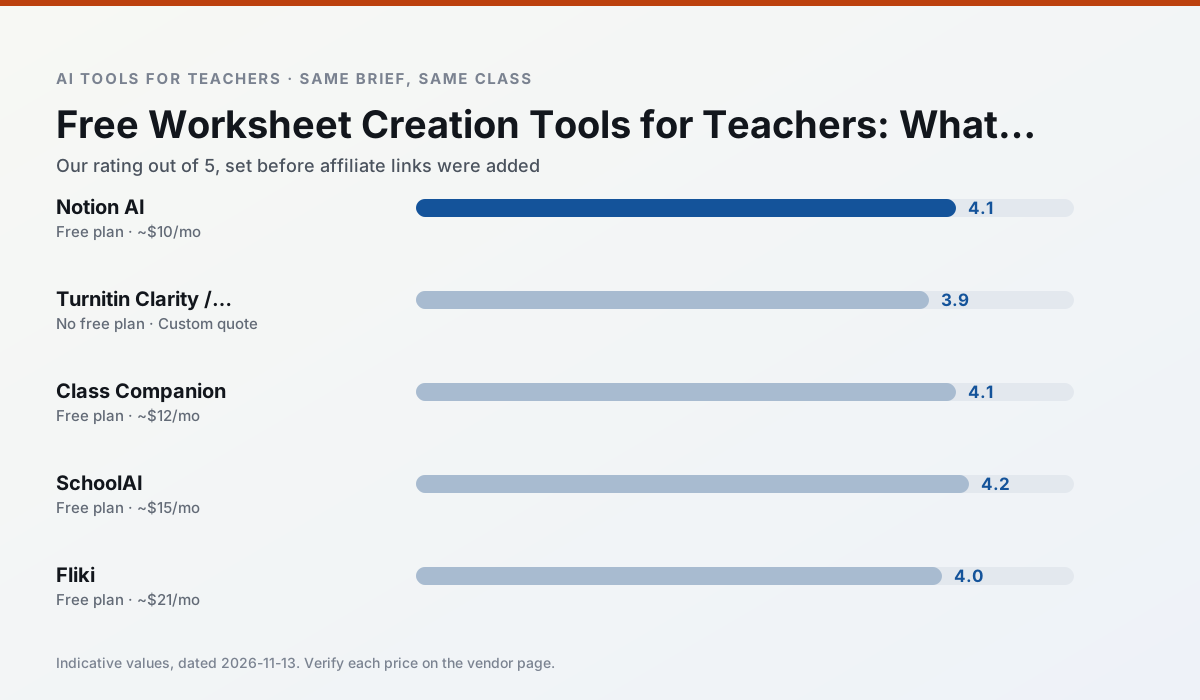
Side by side
Comparison table
Ratings reflect our timed classroom workflow, not vendor claims. Prices are indicative — verify on the vendor site.
| Tool | Best for | Free tier | Indicative paid plan | Standout feature | Our rating | Verdict | Try the tool |
|---|---|---|---|---|---|---|---|
| Notion AI | curriculum mapping · unit planning | Yes — Limited AI usage | ~$10 /user/mo | Linked databases | 4.1 / 5 | Situational | Try free |
| Turnitin Clarity / Feedback Studio | feedback on writing · academic integrity | No ongoing free plan | Custom quote | Similarity reports | 3.9 / 5 | Situational | Try free |
| Class Companion | grading · feedback on writing | Yes — Limited assignments | ~$12 /user/mo | Handwriting recognition | 4.1 / 5 | Situational | Try free |
| SchoolAI | student-safe AI · differentiated instruction | Yes — Limited seats | ~$15 /user/mo | Teacher-monitored student chats | 4.2 / 5 | Strong option | Try free |
| Fliki | video lessons · audio lessons | Yes — Watermarked, limited minutes | ~$21 /user/mo | Blog/text to video | 4.0 / 5 | Situational | Try free |
| Murf AI | audio lessons · accessibility | Yes — Trial-only output | ~$19 /user/mo | Voice fine-tuning | 4.1 / 5 | Situational | Try free |
Match your situation
Best for X
Different jobs need different tools. Here is what we would open first in each case.
Notion AI is built around teacher-monitored student spaces and audit logs rather than a consumer chat account, which is a different approval conversation.
Turnitin Clarity / Feedback Studio keeps the same task across levels, which is what makes a differentiated set defensible in moderation.
Class Companion is the steadiest of this set at plain, respectful language; names and specific incidents still belong in your draft, not the prompt.
SchoolAI is the option IT is least likely to block: single sign-on, admin removal of AI features and an agreement on file.
Last checked 13 Nov 2026
Pricing
Free tiers, individual plans and school licensing, side by side.
| Tool | Free plan | Individual / paid | School & district | Billing note | Verify |
|---|---|---|---|---|---|
| Notion AI | $0 — Limited AI usage | ~$10 /user/mo | ~$8 /user/mo | Indicative — verify on vendor site | Vendor |
| Turnitin Clarity / Feedback Studio | No ongoing free tier | Custom quote | Custom quote | LMS-wide deployment | Vendor |
| Class Companion | $0 — Limited assignments | ~$12 /user/mo | Custom quote | Indicative — verify on vendor site | Vendor |
| SchoolAI | $0 — Limited seats | ~$15 /user/mo | Custom quote | Indicative — verify on vendor site | Vendor |
| Fliki | $0 — Watermarked, limited minutes | ~$21 /user/mo | ~$66 /user/mo | Indicative — verify on vendor site | Vendor |
| Murf AI | $0 — Trial-only output | ~$19 /user/mo | ~$39 /user/mo | Indicative — verify on vendor site | Vendor |
Editorial rule: pricing is re-checked every 2–3 months and the top 50 pages are refreshed every 6 months. See our funding policy.
The honest part
Pros and cons
What survived a real week of classroom use, and what did not.
Pros
- Great for long-term curriculum records
- Strong team collaboration
- Flexible structure
Cons
- Setup time is significant
- AI add-on pricing changed more than once
- Not purpose-built for lesson generation
Pros
- Already licensed at many schools
- Consistent institutional workflow
- Detailed revision history
Cons
- Individual teachers cannot buy it
- AI detection remains contested
- Heavy administrative setup
Pros
- Useful where work is done on paper
- Fast, specific comments
- Good math support
Cons
- Scan quality affects accuracy
- Narrow use case
- Feedback still needs teacher review
Pros
- Designed for district approval
- Teacher visibility into student use
- Good safeguarding defaults
Cons
- Requires school-wide buy-in
- Less flexible than general LLMs
- Pricing is mostly quote-based
Pros
- No avatar needed
- Good for explainer visuals
- Simple editor
Cons
- Minute-based limits
- Output can look generic
- Price jumps between tiers
In the classroom
Use cases
Five concrete workflows, with the tool we would open for each one.
A weekly family newsletter from bullet notes
Newsletters fail on length, not tone. Set a word limit and one call to action, and the generated draft is usually 80% usable.
Recommended: Notion AIRegrouping students after an assessment
Summarise anonymised results into skill groups, then generate one activity per group. Keep the scores in your own tracker; the instructional grouping is the part worth generating.
Recommended: Turnitin Clarity / Feedback StudioA substitute folder that needs no context
The value here is structure, not creativity. Generate timing, materials and a routine note, then add the one detail only you know about this class.
Recommended: Class CompanionA question bank from a PDF or article
Feed a non-identifiable source and ask for items tagged by difficulty with the misconception behind each distractor. Spot-check every answer key; numerical items are least reliable.
Recommended: SchoolAIA five-minute exit ticket set
Ask for one recall, one application and one reasoning item, then delete the second recall question every generator sneaks in.
Recommended: Fliki
Questions teachers ask us
FAQ
Direct answers, also published as FAQPage structured data for search and AI assistants.
Which free plan lasts a full week?
What breaks first on a free plan?
Is a free plan enough for a department?
Sources & further reading
Our recommendation
Try Notion AI free for your next worksheet creation task
AI-assisted notes, databases and curriculum planning in one workspace. Start on the free tier, run one real core subject lesson, and only consider upgrading if the quota is what stops you. Disclosure: we may earn a commission (varies) at no extra cost to you.
Some links on this page are affiliate links. We may earn a commission at no extra cost to you. Our rankings are editorial and never pay-to-play. Never enter student PII into a free consumer account.
Keep reading
Related comparisons in this cluster.
Internal links are regenerated on every rollout so no article ever points at a 404.