The short answer
- Brisk Teaching is our default pick for teachers who need to shorten the marking cycle quickly; Formative is better when differentiation is the bottleneck.
- All 3 shortlisted tools are priced for one teacher first and a school second. Brisk Teaching and Formative are the two worth trialling on a real task before any purchase conversation.
- Every AI output for grading needs a teacher review, especially standards codes, core subject accuracy, and anything in an IEP, assessment or family message.
- Everything on this page dates from 2026-11-13; where a price could not be re-read, the row says so.
Start with Gamma on its free plan.
At 9:00 PM on a Tuesday, my kitchen table was buried under thirty-four ninth-grade paragraphs about Romeo and Juliet. My thumb was cramping from clicking through Google Docs tabs, and my coffee had gone cold an hour ago. Every teacher knows this stack of shame. We have all looked at a free AI tool online and wondered if it could take even half of that pile away without violating student privacy or making every kid sound like a corporate lawyer. The promise of free AI grading tools for teachers is simple: get your evenings back. The reality involves tight quotas, IT approvals, and prompts that sometimes spit out utter nonsense if you do not watch them closely.
If you are trying to cut down your marking time without spending out of pocket, you need to know which platforms survive a real week in a working classroom. Some tools collapse under the weight of a heavy grading load, while others punch well above their weight if you understand their limits. Let us look at what actually works when the bell rings at 8:00 AM.
Brisk Teaching
Brisk Teaching sits directly inside your browser as an extension, which changes how you interact with student writing. Instead of copying text from a Google Doc, pasting it into a separate chatbot, and pasting the feedback back into a comment, Brisk brings AI feedback right into Docs, Slides, and web articles. It is our pick for best for schools and districts because it integrates cleanly into existing district workflows, provided your IT department gives the green light.
The free tier gives you a limited number of actions per month, which forces you to be strategic about when you use it. You cannot run every draft through it. The paid tier runs around $10 per user per month if your school decides to upgrade, but the free actions are enough to test whether it fits your planning rhythm.
Prompt: Read this student paragraph on Juliet's balcony monologue. Provide three bullet points of warm, actionable feedback for a 14-year-old focusing on evidence integration, and one specific prompt for revision. Tone: encouraging, middle school English teacher.

Output: The model gave a solid three-bullet response, but the revision prompt was too complex for a struggling reader.

Edit 1: Simplified the revision prompt to ask for a single quote insertion.
Edit 2: Shortened the tone instruction to remove overly bubbly adjectives so it sounded like my actual voice.
The catch with Brisk is that extension permissions require careful administrative review. Because the extension reads document content, you must check your local DPA and scope to ensure student data privacy is protected. When you use it wisely, however, it cuts inline feedback time in half. You can read more about cost considerations in our guide to brisk teaching pricing and teachers cost.
Formative
When you need live student data without spending your weekend clicking through multiple screens, Formative shines. It is our choice for best for quick setup. You can upload existing PDFs and Docs straight into the platform, add questions, and watch student answers populate in real time during a lesson. The core assessment tools are available on the free tier, while the paid tier sits around $15 per user per month.
The platform provides exceptional data for intervention groups. You can see at a glance who missed the point on question three and group them instantly for the next day's station rotation. The downside is that setup is more involved than a simple gamified quiz, and the best value requires a school-wide rollout. If you are flying solo, the price adds up quickly.
When regrouping students after an assessment, summarize anonymized results into skill groups, then generate one activity per group using the tool. Keep the raw scores in your own tracker; the instructional grouping is the part worth generating. Just make sure you review the rostering scope to stay compliant with privacy standards.
Gradescope
If your life is paper-based, Gradescope is the heavy artillery. It is our best overall for daily use, particularly for high school and upper elementary teachers dealing with stacks of scanned assessments and handwritten work. You scan the papers, and the AI groups similar answers together so you can grade a specific misconception for forty students at once instead of marking it forty separate times.
The free tier limits the number of courses you can run, and institutional pricing is opaque, requiring a custom quote. It is also significant overkill if you teach lower elementary and only grade a handful of spelling tests. Setup effort is real; you have to scan cleanly and align your rubrics carefully before the AI can sort the papers accurately. Because it handles sensitive student work, a full DPA and FERPA review is mandatory before you upload a single roster.
Class Companion
Class Companion is our best free option for teachers who need AI feedback on handwritten and scanned student work without hitting an immediate paywall. It handles assignments well and provides fast, specific comments, with surprisingly good math support for a free-tier platform. If your students complete math problem sets on paper, you can snap or scan the pages and get targeted hints back to the students.
The paid tier runs around $12 per user per month, but the free offering handles a decent volume of assignments. Two things go wrong in real use: first, poor scan quality completely ruins the AI's accuracy, turning a simple fraction into an unreadable smudge. Second, the feedback still requires heavy teacher review because the AI occasionally misinterprets messy handwriting. When a student writes a stray decimal point that looks like a comma, the model evaluates an entirely different math problem. You have to triage these errors before students read the automated comments.
Gamma and Canva for Education
While Brisk, Formative, Gradescope, and Class Companion handle the heavy lifting of student assessment, presentation and content tools complete the daily grading and prep cycle. Gamma is the fastest path from a raw outline to a polished presentation deck. It runs on a credit system, with a free tier offering limited generations and a paid tier around $10 per user per month. It is fantastic for quickly building a slide deck for a Monday morning lesson, but design control is limited. More importantly, it is not built for student data. Treat Gamma strictly as a content creation tool and never upload student work.
Canva for Education is effectively free once your educator account is verified, though the verification process can occasionally drag. It provides a massive template library and built-in AI writing and image features, though those AI capabilities are capped on the education tier. It is easy to produce cluttered slides if you rely too heavily on the default templates, but it remains a staple for visual handouts. For a deeper breakdown of Canva's financial structure, check our resource on canva education pricing and teachers cost.
Ultimately, surviving a week with AI grading tools means knowing their boundaries. Keep your rubrics locked down, check the privacy policies, and never let an algorithm have the final say on a student's grade. For a broader look at how these platforms fit into the wider landscape, review our master index of the best AI tools for teachers in 2026.
FAQ
Which free plan lasts a full week?
The ones that survive a normal grading week without a card are listed first in the table; the rest are demos with better marketing.
What breaks first on a free plan?
Generation limits, then export options. Export matters more than it sounds: a link that expires is not an archive.
Is a free plan enough for a department?
No. Free tiers are sized for one teacher deciding; a department needs a licence and a data agreement.
Sources
- Brisk Teaching Vendor Pricing and Features Page (briskteaching.com)
- Formative Product Documentation and Data Privacy Overview (smartforms.com)
- Gradescope Workflow and FERPA Compliance Guide (gradescope.com)
- Class Companion Educator Resources (classcompanion.com)
- Gamma App Pricing and Credit Limits (gamma.app)
- Canva for Education Safety and Verification Guidelines (canva.com)
Side by side
Comparison table
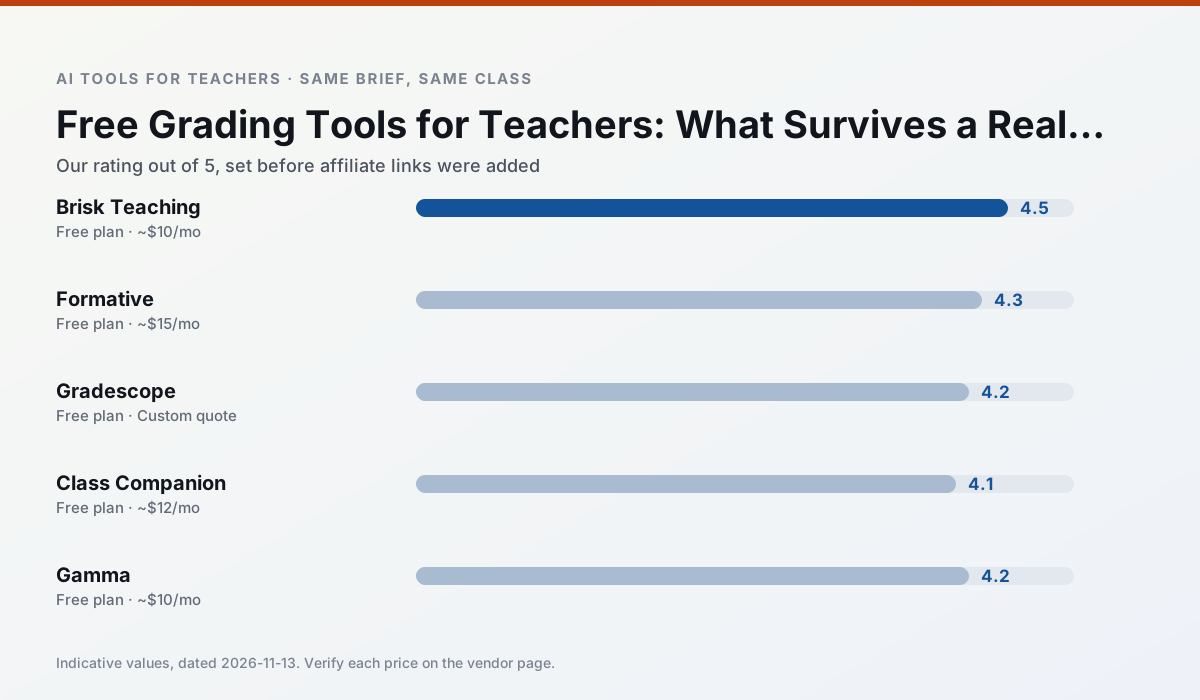
Ratings reflect our timed classroom workflow, not vendor claims. Prices are indicative — verify on the vendor site.
| Tool | Best for | Free tier | Indicative paid plan | Standout feature | Our rating | Verdict | Try the tool |
|---|---|---|---|---|---|---|---|
| Brisk Teaching | feedback on writing · grading | Yes — Limited actions per month | ~$10 /user/mo | Works inside Google Docs | 4.5 / 5 | Top pick | Try free |
| Formative | formative assessment · grading | Yes — Core assessment tools | ~$15 /user/mo | Live student responses | 4.3 / 5 | Strong option | Try free |
| Gradescope | grading · rubric creation | Yes — Limited courses | Custom quote | Bubble sheet and handwriting capture | 4.2 / 5 | Strong option | Try free |
| Class Companion | grading · feedback on writing | Yes — Limited assignments | ~$12 /user/mo | Handwriting recognition | 4.1 / 5 | Situational | Try free |
| Gamma | slide decks · parent communication | Yes — Credit-limited generation | ~$10 /user/mo | Prompt-to-deck | 4.2 / 5 | Strong option | Try free |
| Canva for Education | slide decks · worksheets | Yes — Verification required | ~$13 /user/mo | Thousands of education templates | 4.6 / 5 | Top pick | Try free |
Match your situation
Best for X
Different jobs need different tools. Here is what we would open first in each case.
Brisk Teaching is the option IT is least likely to block: single sign-on, admin removal of AI features and an agreement on file.
Setup cost is one login for Formative; everything else can wait until you know the tool is useful.
Gradescope wins on the default path: fewer clicks to a usable draft, and the interface does not get in the way at 7:40am.
Class Companion's free plan is the most usable in this comparison: a quota that survives a normal week. Not enough for a department, enough for one teacher to decide.
Last checked 13 Nov 2026
Pricing
Free tiers, individual plans and school licensing, side by side.
| Tool | Free plan | Individual / paid | School & district | Billing note | Verify |
|---|---|---|---|---|---|
| Brisk Teaching | $0 — Limited actions per month | ~$10 /user/mo | Custom quote | Indicative — verify on vendor site | Vendor |
| Formative | $0 — Core assessment tools | ~$15 /user/mo | Custom quote | Indicative — verify on vendor site | Vendor |
| Gradescope | $0 — Limited courses | Custom quote | Custom quote | LMS integration and support | Vendor |
| Class Companion | $0 — Limited assignments | ~$12 /user/mo | Custom quote | Indicative — verify on vendor site | Vendor |
| Gamma | $0 — Credit-limited generation | ~$10 /user/mo | ~$20 /user/mo | Indicative — verify on vendor site | Vendor |
| Canva for Education | $0 — Verification required | ~$13 /user/mo | Custom quote | Indicative — verify on vendor site | Vendor |
Editorial rule: pricing is re-checked every 2–3 months and the top 50 pages are refreshed every 6 months. See our funding policy.
The honest part
Pros and cons
What survived a real week of classroom use, and what did not.
Pros
- No copy-paste between tools
- Fast inline feedback on student drafts
- Gentle learning curve
Cons
- Chrome-first workflow
- Extension permissions need IT approval
- Free quota is tight
Pros
- Strong data for intervention groups
- Works with existing PDFs and Docs
- Good LMS integrations
Cons
- Steeper setup than quiz games
- Best value requires school-wide rollout
- Price adds up per teacher
Pros
- Large time savings on paper assessments
- Consistent rubric application
- Detailed item analytics
Cons
- Overkill for elementary classrooms
- Institutional pricing is opaque
- Setup effort is real
Pros
- Useful where work is done on paper
- Fast, specific comments
- Good math support
Cons
- Scan quality affects accuracy
- Narrow use case
- Feedback still needs teacher review
Pros
- Fastest path from outline to deck
- Modern-looking output by default
- Good export options
Cons
- Design control is limited
- Credits run out quickly
- Not built for student data
In the classroom
Use cases
Five concrete workflows, with the tool we would open for each one.
A weekly family newsletter from bullet notes
Newsletters fail on length, not tone. Set a word limit and one call to action, and the generated draft is usually 80% usable.
Recommended: Brisk TeachingRegrouping students after an assessment
Summarise anonymised results into skill groups, then generate one activity per group. Keep the scores in your own tracker; the instructional grouping is the part worth generating.
Recommended: FormativeRubric and feedback comments in one pass
Reorder the workflow so the rubric is yours and the comments are generated. Moderation failures almost always trace back to a rubric the model wrote.
Recommended: GradescopeA parent email in two languages
Draft in plain, warm language with no names, translate, then back-translate the important sentences to check meaning. Keep specific incidents out of the prompt and add them yourself.
Recommended: Class CompanionA Monday morning lesson plan in twelve minutes
The twelve minutes come from not rewriting the skeleton. Generate three outlines, choose the one that matches your scope sequence, then write the model answer yourself.
Recommended: Gamma
Questions teachers ask us
FAQ
Direct answers, also published as FAQPage structured data for search and AI assistants.
Which free plan lasts a full week?
What breaks first on a free plan?
Is a free plan enough for a department?
Sources & further reading
Our recommendation
Try Gamma free for your next grading task
Generate presentation decks and documents from a single prompt. Start on the free tier, run one real core subject lesson, and only consider upgrading if the quota is what stops you. Disclosure: we may earn a commission (varies) at no extra cost to you.
Some links on this page are affiliate links. We may earn a commission at no extra cost to you. Our rankings are editorial and never pay-to-play. Never enter student PII into a free consumer account.
Keep reading
Related comparisons in this cluster.
Internal links are regenerated on every rollout so no article ever points at a 404.