The short answer
- Claude is our default pick for teachers who need to give actionable draft feedback quickly; Brisk Teaching is better when differentiation is the bottleneck.
- Claude handles the broad case; Brisk Teaching handles the narrow one. Anything beyond that pair should be justified by a recurring weekly job, not a feature demo.
- Every AI output for feedback on student writing needs a teacher review, especially standards codes, core subject accuracy, and anything in an IEP, assessment or family message.
- Trial one tool for a week of real feedback on student writing work before any purchase conversation; the quota is the honest test.
Start with MagicSchool AI on its free plan.
Thirty-four seventh-grade argumentative paragraphs sat in my digital drop-box on a Tuesday night. My coffee had gone cold, my eyes were burning, and I knew from experience that writing margin notes on all of them would take at least three hours. I needed free AI feedback on student writing tools for teachers that could survive a real week of grading without making me want to throw my laptop out the window. Most writing assistants fall apart the moment they hit real student prose, which is messy, misspelled, and rarely matches the tidy examples in software demos.
When testing these options, I looked for tools that actually save time on weekend grading piles while keeping data safe. Some platforms require district-level purchasing, while others offer limited free tiers that run out right before midterms. If you want a broader look at how different platforms stack up this year, check out our guide on the best AI tools for teachers 2026. Let's look at what survived seven days of real classroom use.
Best Overall for Daily Use: Claude
Claude earned our top spot for daily use because its long-context window handles full student writing portfolios and detailed rubrics without losing the thread. Unlike tools that choke on lengthy texts, this assistant reads an entire multi-page essay alongside your grading criteria and returns structured, specific commentary. The prose sounds remarkably human, avoiding the robotic cheerfulness that makes students roll their eyes.
The catch is that the free tier is usage-limited, and the consumer plan is not suitable for student data. You must use an approved workspace tier for any school-related documents to maintain FERPA compliance. It also lacks native classroom integrations, meaning you will be doing some manual copying and pasting. Even with those friction points, it remains the most reliable engine for heavy lifting when you need thoughtful feedback on longer student drafts.
Best Free Option: Brisk Teaching
If you refuse to leave your browser tab, Brisk Teaching is the best free option for inline writing feedback. It operates as a browser extension that brings AI directly into Google Docs, Slides, and web articles. You do not need to copy and paste text between different windows, which cuts grading time down significantly during a frantic prep period.
Prompt: Act as an 8th-grade ELA teacher. Review this student paragraph against a rubric requiring a clear claim, two pieces of evidence, and a concluding sentence. Provide two strengths and one actionable next step for revision.
First output: The student has a good claim about poetry, but the evidence is a bit weak. They should add more quotes and fix their punctuation in the second sentence.
Two edits made:
- Instructed the tool to reference specific line numbers from the student text instead of speaking in generalities.
- Added a constraint that the tone must match a supportive conference rather than a red-pen grader.
The limitations are real, though. The extension is Chrome-first, and your school's IT department will need to approve the permissions before you can install it on district devices. The free quota is also tight, offering a limited number of actions per month before pushing you toward the paid tier at roughly $10 per user per month.
Best for Schools and Districts: Turnitin Clarity / Feedback Studio
Turnitin Clarity and Feedback Studio represent the heavy artillery of institutional writing feedback. Individual teachers cannot buy this software on a whim; it requires a school or district contract and a custom quote. Once installed, it integrates into your existing learning management system to provide consistent institutional workflows, detailed revision histories, and similarity checking.
The platform's main strength is its established place in secondary and higher education. Teachers can track student revisions over time to see if a draft actually improved after teacher intervention. However, AI detection features remain heavily contested by educators and researchers, and the administrative setup is notoriously heavy. If your district already licenses it, the FERPA agreements are standard, but solo teachers looking for a quick fix will need to look elsewhere.
Best for Quick Setup: Class Companion
Class Companion takes the crown for quick setup, especially if your students still do a lot of their writing and problem-solving on paper. This tool provides fast, specific comments on scanned student work and offers surprisingly robust math support. When you have a stack of handwritten paragraphs or worksheets, you can scan them in and get targeted feedback without forcing students to type everything out first.
## Sample Teacher Workflow: Five-Minute Exit Tickets
1. Prompt the generator for one recall item, one application item, and one reasoning item.
2. Delete the second recall question that every generator inevitably sneaks in.
3. Export directly to your LMS or print for paper-based classrooms.
The tool is not without flaws. Scan quality directly affects accuracy, so a student with messy handwriting or a blurry phone photo will confuse the parser. It also occupies a relatively narrow use case, and the generated feedback always needs a careful teacher review before it goes back to the kid. Pricing sits at roughly $12 per user per month after you exhaust the limited free assignments.
ChatGPT and Khanmigo in the Classroom
ChatGPT remains the most flexible general-purpose assistant available, adapting to almost any classroom task from lesson planning to parent emails. It boasts a huge community of teacher prompt libraries and strong multilingual support. The free tier offers usage-limited model access, while the paid tier runs about $20 per user per month. You must remember never to enter student PII on consumer plans, and district privacy reviews are usually required before school-wide adoption. For a look at how other platforms handle restrictions, read our breakdown on AI tools without accounts.
Khanmigo takes a different path as an education-first design from a nonprofit platform. It features strong tutor-style AI designed to guide students rather than just give them the answers, alongside dedicated teacher tools. US teacher accounts have access subject to eligibility, while the student side runs about $4 per learner per month. It is purpose-built for schools with strong nonprofit trust signals, though availability varies by region and it is less useful for general administrative paperwork.
What Went Wrong During the Test Week
Running these tools through a real teaching week exposed two major failure points that software demos never mention. First, I tried using a generic free generator to build reading comprehension questions for a short story. The model invented comprehension questions about plot points that never happened in the text, proving that automated output requires aggressive human proofreading before it ever touches a student's desk.
Second, when I let an unprompted model write a grading rubric from scratch, my moderation checks went haywire because the AI hallucinated grade-level standards that contradicted our state framework. I fixed both issues by locking down my workflow: I always supply my own rubric and vetted texts first, treating the AI purely as a feedback sounding board rather than an autonomous instructional designer. If you keep the human in the driver's seat, these tools will survive your grading pile.
FAQ
Which free plan lasts a full week?
The ones that survive a normal feedback on student writing week without a card are listed first in the table; the rest are demos with better marketing.
What breaks first on a free plan?
Generation limits, then export options. Export matters more than it sounds: a link that expires is not an archive.
Is a free plan enough for a department?
No. Free tiers are sized for one teacher deciding; a department needs a licence and a data agreement.
Sources
- OpenAI. ChatGPT Pricing and Model Specifications. openai.com
- Anthropic. Claude Documentation and Privacy Policies. anthropic.com
- Brisk Teaching. Extension Features and Free Tier Limits. briskteaching.com
- Turnitin. Feedback Studio and Clarity Institutional Information. turnitin.com
- Class Companion. Features, Scanning Specs, and Pricing. classcompanion.com
- Khan Academy. Khanmigo Teacher and Student Pricing. khanacademy.org
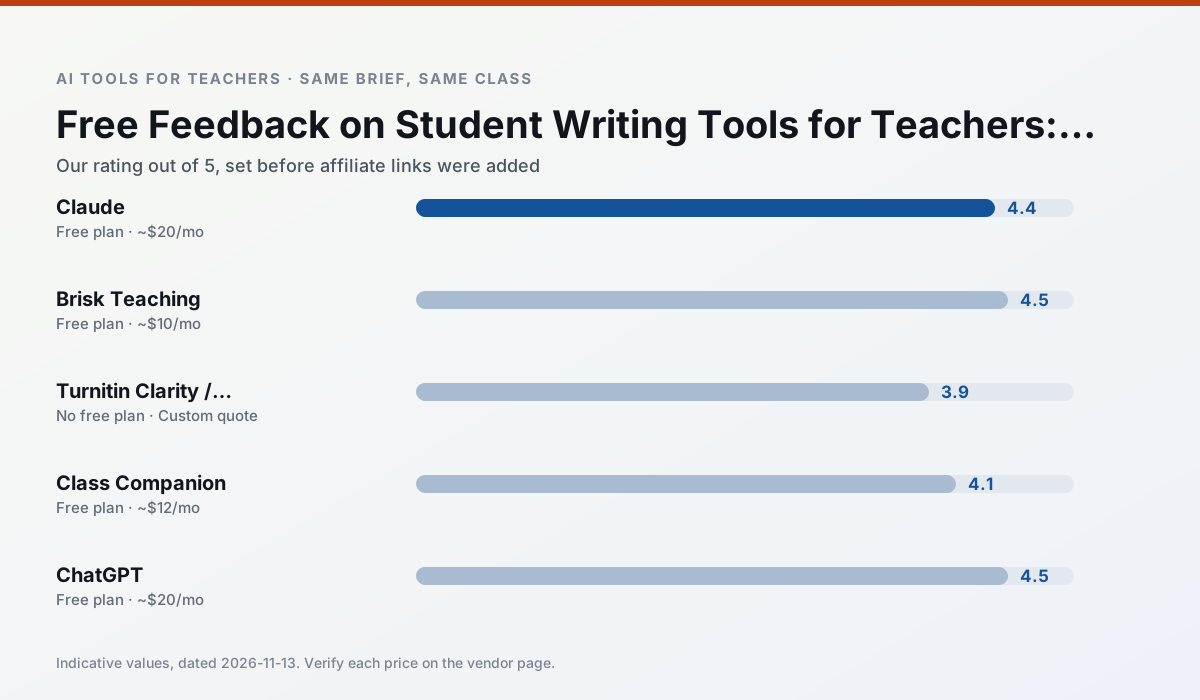
Side by side
Comparison table
Ratings reflect our timed classroom workflow, not vendor claims. Prices are indicative — verify on the vendor site.
| Tool | Best for | Free tier | Indicative paid plan | Standout feature | Our rating | Verdict | Try the tool |
|---|---|---|---|---|---|---|---|
| Claude | rubric creation · feedback on writing | Yes — Usage-limited | ~$20 /user/mo | Very large context window | 4.4 / 5 | Strong option | Try free |
| Brisk Teaching | feedback on writing · grading | Yes — Limited actions per month | ~$10 /user/mo | Works inside Google Docs | 4.5 / 5 | Top pick | Try free |
| Turnitin Clarity / Feedback Studio | feedback on writing · academic integrity | No ongoing free plan | Custom quote | Similarity reports | 3.9 / 5 | Situational | Try free |
| Class Companion | grading · feedback on writing | Yes — Limited assignments | ~$12 /user/mo | Handwriting recognition | 4.1 / 5 | Situational | Try free |
| ChatGPT | lesson planning · parent communication | Yes — Usage-limited model access | ~$20 /user/mo | Custom GPTs and Projects | 4.5 / 5 | Top pick | Try free |
| Khanmigo | math practice · student tutoring | Yes — US teacher accounts, subject to eligibility | ~$4 /learner/mo | Socratic tutoring rather than answers | 4.3 / 5 | Strong option | Try free |
Match your situation
Best for X
Different jobs need different tools. Here is what we would open first in each case.
Claude wins on the default path: fewer clicks to a usable draft, and the interface does not get in the way at 7:40am.
If there is no budget, start with Brisk Teaching: free plan with clearest quota is the least punishing free tier here.
Turnitin Clarity / Feedback Studio is the option IT is least likely to block: single sign-on, admin removal of AI features and an agreement on file.
Class Companion runs in a browser tab with no extension, no student accounts and no onboarding call, so you can test it in a free period.
Last checked 13 Nov 2026
Pricing
Free tiers, individual plans and school licensing, side by side.
| Tool | Free plan | Individual / paid | School & district | Billing note | Verify |
|---|---|---|---|---|---|
| Claude | $0 — Usage-limited | ~$20 /user/mo | ~$25+ /user/mo | Indicative — verify on vendor site | Vendor |
| Brisk Teaching | $0 — Limited actions per month | ~$10 /user/mo | Custom quote | Indicative — verify on vendor site | Vendor |
| Turnitin Clarity / Feedback Studio | No ongoing free tier | Custom quote | Custom quote | LMS-wide deployment | Vendor |
| Class Companion | $0 — Limited assignments | ~$12 /user/mo | Custom quote | Indicative — verify on vendor site | Vendor |
| ChatGPT | $0 — Usage-limited model access | ~$20 /user/mo | ~$25+ /user/mo | Indicative — verify on vendor site | Vendor |
| Khanmigo | $0 — US teacher accounts, subject to eligibility | ~$4 /learner/mo | Custom quote | Indicative — verify on vendor site | Vendor |
Editorial rule: pricing is re-checked every 2–3 months and the top 50 pages are refreshed every 6 months. See our funding policy.
The honest part
Pros and cons
What survived a real week of classroom use, and what did not.
Pros
- Handles full unit plans and long rubrics
- Nuanced, less generic prose
- Good at structured document output
Cons
- No teacher-specific templates
- Fewer classroom integrations
- Consumer plan not suitable for student data
Pros
- No copy-paste between tools
- Fast inline feedback on student drafts
- Gentle learning curve
Cons
- Chrome-first workflow
- Extension permissions need IT approval
- Free quota is tight
Pros
- Already licensed at many schools
- Consistent institutional workflow
- Detailed revision history
Cons
- Individual teachers cannot buy it
- AI detection remains contested
- Heavy administrative setup
Pros
- Useful where work is done on paper
- Fast, specific comments
- Good math support
Cons
- Scan quality affects accuracy
- Narrow use case
- Feedback still needs teacher review
Pros
- Most flexible option available
- Huge community of teacher prompt libraries
- Strong multilingual support
Cons
- Requires prompt skills for consistent results
- No built-in standards alignment
- District privacy review usually required
In the classroom
Use cases
Five concrete workflows, with the tool we would open for each one.
A Monday morning lesson plan in twelve minutes
The twelve minutes come from not rewriting the skeleton. Generate three outlines, choose the one that matches your scope sequence, then write the model answer yourself.
Recommended: ClaudeThree reading levels from one source text
Paste a vetted text, ask for supported, core and extension versions, then check the vocabulary list by hand. Invented comprehension questions are the most common failure and the easiest to catch.
Recommended: Brisk TeachingRubric and feedback comments in one pass
Reorder the workflow so the rubric is yours and the comments are generated. Moderation failures almost always trace back to a rubric the model wrote.
Recommended: Turnitin Clarity / Feedback StudioA parent email in two languages
Draft in plain, warm language with no names, translate, then back-translate the important sentences to check meaning. Keep specific incidents out of the prompt and add them yourself.
Recommended: Class CompanionA five-minute exit ticket set
Ask for one recall, one application and one reasoning item, then delete the second recall question every generator sneaks in.
Recommended: ChatGPT
Questions teachers ask us
FAQ
Direct answers, also published as FAQPage structured data for search and AI assistants.
Which free plan lasts a full week?
What breaks first on a free plan?
Is a free plan enough for a department?
Sources & further reading
Our recommendation
Try MagicSchool AI free for your next feedback on student writing task
A large library of teacher-specific AI generators in one dashboard. Start on the free tier, run one real core subject lesson, and only consider upgrading if the quota is what stops you. Disclosure: we may earn a commission (30% recurring) at no extra cost to you.
Some links on this page are affiliate links. We may earn a commission at no extra cost to you. Our rankings are editorial and never pay-to-play. Never enter student PII into a free consumer account.
Keep reading
Related comparisons in this cluster.
Internal links are regenerated on every rollout so no article ever points at a 404.