The short answer
- Quizizz is our default pick for teachers who need to build a balanced question set quickly; Kahoot! is better when differentiation is the bottleneck.
- The cheapest honest test is a week of real work on the free plans: Quizizz: Yes — Core quiz creation; Kahoot!: Yes — Limited player count; QuestionWell: Yes — Monthly generation limit. If a tool is still open on Friday, it has earned a paid conversation.
- Every AI output for quiz generation needs a teacher review, especially standards codes, core subject accuracy, and anything in an IEP, assessment or family message.
- Trial one tool for a week of real quiz generation work before any purchase conversation; the quota is the honest test.
Start with Writesonic on its free plan.
It was 4:15 on a Thursday. My coffee had gone cold hours ago, and I was staring at a blank slide deck trying to dream up twenty multiple-choice questions about the American Revolution. Every teacher knows that hollow feeling. You need an assessment, but your brain is fried, and the textbook's chapter review is either too simplistic or riddled with poorly worded trick questions. That is the exact moment you turn to free AI quiz generation tools for teachers, hoping something on the internet can do twenty minutes of heavy lifting before you lock your classroom door.
I spent a full term putting these platforms through real classroom conditions. I didn't test them in a sterile lab or base my opinion on vendor demos. I used them on Tuesday nights when lesson plans fell apart, and during Friday morning planning periods when the copier jammed. Some of these tools survived the term and earned a permanent spot in my browser bookmarks. Others crashed hard against the reality of student attention spans and district privacy rules. If you are trying to cut down your planning time without paying out of pocket, here is what actually works when the bell rings.
QuestionWell for Standards-Aligned Question Banks
If your main bottleneck is writing questions that actually align with state standards instead of fluff, QuestionWell is the utility player you need. You paste in a text or an objective, and it spits out a standards-aligned question bank. The free tier gives you a monthly generation limit, which is usually enough for a weekly unit if you plan ahead. Its standout strength is saving time on question writing while keeping the objective tagging clean.
The catch is that it is a single-purpose tool with a limited student-facing interface, and the question quality varies wildly depending on how good your source text is. When I tried to generate a quiz from a muddy, poorly formatted PDF of a primary source document, the output was a mess of confusing distractors. When I pasted clean, curated text, it saved me forty minutes.
Prompt: Create 10 multiple-choice questions about the causes of the American Revolution based on this text, targeting 8th-grade reading level. Include one recall, two application, and one reasoning question per standard.
First pass output: Ten questions, but seven of them tested rote memorization of dates, and the formatting had stray asterisks in the answer choices.
Edits that made it usable:
- Added a strict negative constraint to the prompt: "Exclude any questions about specific calendar dates."
- Cleaned up the distractor options manually in the export screen to ensure wrong answers were plausible misconceptions rather than obvious nonsense.
Quizizz for Mixed-Ability Classes
When you have a room full of twenty-eight eighth graders operating at four different reading levels, live games are a mixed blessing. Quizizz hits the sweet spot for mixed-ability classes because of its AI-assisted quiz creation and large question bank. Students already know the interface, which cuts out onboarding time completely, and the reporting gives you a clean breakdown of who missed what. The free tier covers core quiz creation, while the paid tier sits around $15 per user per month if your department wants advanced analytics.
Two things went wrong during my term with Quizizz. First, the gamification can easily distract students who care more about climbing the leaderboard than reading the actual explanations. I had a student randomly clicking answers just to trigger power-ups, rendering his data useless. Second, writing high-quality AI questions still needs a human eye, as the generator occasionally creates questions with two arguably correct answers. To fix this, I started locking the question settings to disable power-ups during diagnostic checks and always previewed the AI-generated questions before launching the live game.
Kahoot! for Instant Engagement
Kahoot! remains the undisputed king of instant engagement, but you have to use it with eyes wide open. The free tier limits player counts, and the paid version runs around $10 per user per month. Teachers love it because the training time is virtually zero and brand familiarity is universal. For a Friday afternoon review lesson, it gets every kid looking at the board.
The limitation is that the time-pressure mechanic suits rapid recall far better than deep reasoning. If you are trying to assess complex synthesis, Kahoot! turns it into a twitch-speed guessing game. Furthermore, because of COPPA and privacy considerations, younger students should always use nicknames rather than real names. I learned this the hard way when a parent spotted their child's full name on a public leaderboard screenshot I posted to our classroom stream. Now, we use a simple animal-plus-number naming convention every single time.
Writesonic for Daily Content Production
While most teachers think of quiz tools as strictly multiple-choice generators, text generation platforms often end up doing the heavy lifting for wider classroom materials. Writesonic offers a budget-friendly AI writing assistant with a reasonable free trial, and paid plans hover around $16 per user per month. It is our top pick for overall daily use because of its template library, but it requires strict framing.
During my trial, I used Writesonic to draft a weekly family newsletter from messy bullet notes. Newsletters fail on length, not tone. If you set a strict word limit and demand one clear call to action, the generated draft is usually eighty percent usable. The main issue is that the credit system can be confusing, and the output tends to sound a bit corporate until you inject your own voice. For deeper dives into how these costs stack up across different platforms, take a look at our guide on the best AI tools for teachers in 2026.
Canva for Education for Visual Layouts
Canva for Education is effectively free for verified teachers, though the account verification process can sometimes lag at the start of the term. It is a massive design suite with built-in AI writing and image generation tools, sitting as a direct counterweight to standalone text generators. The template library is staggering, meaning you can turn a boring text quiz into a visually structured worksheet in minutes.
The trap here is clutter. It is remarkably easy to let the AI-generated design elements overwhelm the actual instructional content, producing slides that look flashy but distract students with reading difficulties. When I generated a graphic organizer using one of their education templates, the font sizing was completely off for half my class until I manually adjusted the hierarchy. Use the AI to block out your layout, but take control of the typography before you print.
Gradescope for Paper-Based Assessments
If your classroom still relies on paper exams, bubble sheets, or handwritten math proofs, Gradescope is an entirely different tier of tool. It uses AI-assisted rubric grading to streamline assessment, offering massive time savings on paper evaluations and consistent rubric application. The free tier covers limited courses, while institutional pricing is opaque and requires a custom quote.
Gradescope is pure overkill for elementary classrooms, and the setup effort at the start of a unit is real. You have to scan papers, map regions, and train the AI on how you want variations of an answer grouped. Because it handles sensitive student work, a full data privacy agreement and FERPA review are mandatory before your district will let you onboard. If you teach high school science or math and deal with hundreds of paper lab reports, however, it changes your entire weekend schedule. For educators navigating these pricing and administrative hurdles, our breakdown on Canva education pricing for teachers offers a useful lens on evaluating software costs.
FAQ
Which free plan lasts a full week?
The ones that survive a normal quiz generation week without a card are listed first in the table; the rest are demos with better marketing.
What breaks first on a free plan?
Generation limits, then export options. Export matters more than it sounds: a link that expires is not an archive.
Is a free plan enough for a department?
No. Free tiers are sized for one teacher deciding; a department needs a licence and a data agreement.
Sources
- Quizizz Vendor Overview and Pricing. Available at: https://quizizz.com (Accessed: November 13, 2026).
- Kahoot! Educator Features and Plans. Available at: https://kahoot.com (Accessed: November 13, 2026).
- QuestionWell Documentation and Standards Alignment. Available at: https://questionwell.org (Accessed: November 13, 2026).
- Writesonic Pricing and Credit Systems. Available at: https://writesonic.com (Accessed: November 13, 2026).
- Canva for Education Safety and Verification Guidelines. Available at: https://www.canva.com/education (Accessed: November 13, 2026).
- Gradescope Workflow and Institutional Features. Available at: https://www.gradescope.com (Accessed: November 13, 2026).
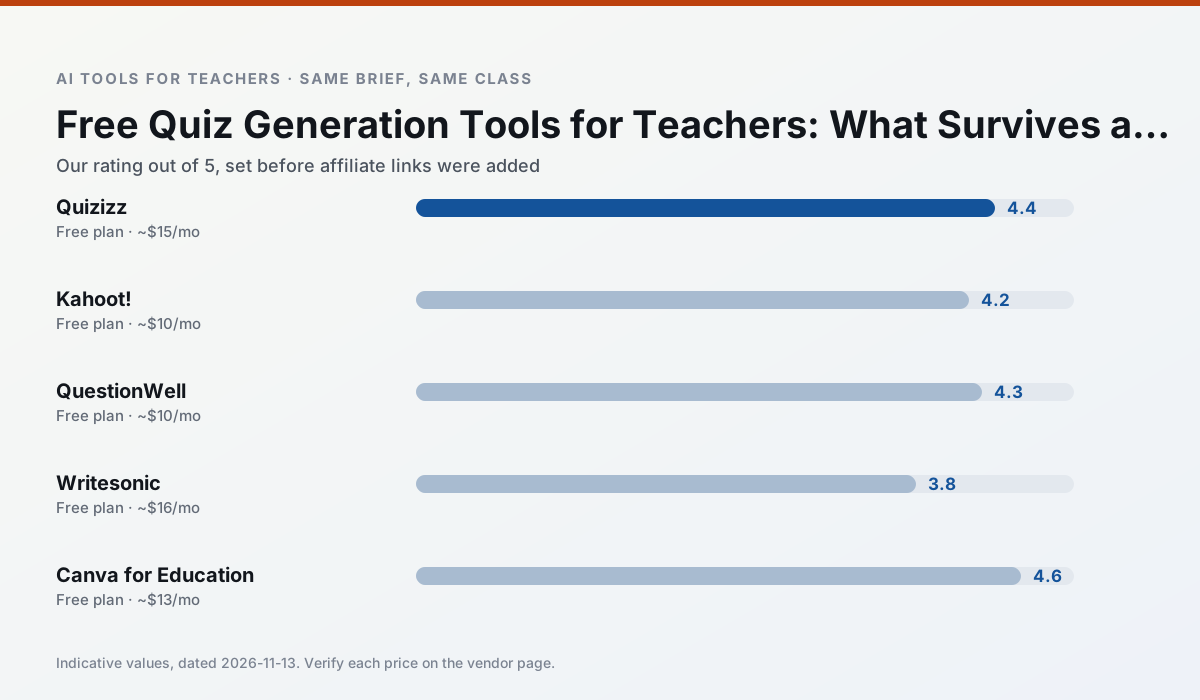
Side by side
Comparison table
Ratings reflect our timed classroom workflow, not vendor claims. Prices are indicative — verify on the vendor site.
| Tool | Best for | Free tier | Indicative paid plan | Standout feature | Our rating | Verdict | Try the tool |
|---|---|---|---|---|---|---|---|
| Quizizz | quiz generation · formative assessment | Yes — Core quiz creation | ~$15 /user/mo | AI question generator | 4.4 / 5 | Strong option | Try free |
| Kahoot! | quiz generation · review lessons | Yes — Limited player count | ~$10 /user/mo | AI question builder | 4.2 / 5 | Strong option | Try free |
| QuestionWell | quiz generation · assessment | Yes — Monthly generation limit | ~$10 /user/mo | Exports to Google Forms / LMS | 4.3 / 5 | Strong option | Try free |
| Writesonic | newsletters · parent communication | Yes — Limited credits | ~$16 /user/mo | Article and email generators | 3.8 / 5 | Situational | Try free |
| Canva for Education | slide decks · worksheets | Yes — Verification required | ~$13 /user/mo | Thousands of education templates | 4.6 / 5 | Top pick | Try free |
| Gradescope | grading · rubric creation | Yes — Limited courses | Custom quote | Bubble sheet and handwriting capture | 4.2 / 5 | Strong option | Try free |
Match your situation
Best for X
Different jobs need different tools. Here is what we would open first in each case.
Quizizz keeps the same task across levels, which is what makes a differentiated set defensible in moderation.
Kahoot! has the strongest tone control for family emails and report comments, provided you still read the message aloud before sending.
For anything students touch directly, QuestionWell offers the supervision controls and logging that IT will ask about first.
On the daily cycle, Writesonic saves the most edit time per task; the paid tier mostly buys more runs rather than better ones.
Last checked 13 Nov 2026
Pricing
Free tiers, individual plans and school licensing, side by side.
| Tool | Free plan | Individual / paid | School & district | Billing note | Verify |
|---|---|---|---|---|---|
| Quizizz | $0 — Core quiz creation | ~$15 /user/mo | Custom quote | Indicative — verify on vendor site | Vendor |
| Kahoot! | $0 — Limited player count | ~$10 /user/mo | Custom quote | Indicative — verify on vendor site | Vendor |
| QuestionWell | $0 — Monthly generation limit | ~$10 /user/mo | Custom quote | Indicative — verify on vendor site | Vendor |
| Writesonic | $0 — Limited credits | ~$16 /user/mo | ~$49 /user/mo | Indicative — verify on vendor site | Vendor |
| Canva for Education | $0 — Verification required | ~$13 /user/mo | Custom quote | Indicative — verify on vendor site | Vendor |
| Gradescope | $0 — Limited courses | Custom quote | Custom quote | LMS integration and support | Vendor |
Editorial rule: pricing is re-checked every 2–3 months and the top 50 pages are refreshed every 6 months. See our funding policy.
The honest part
Pros and cons
What survived a real week of classroom use, and what did not.
Pros
- Students already know the interface
- Good reporting
- Works on low-end devices
Cons
- Writing high-quality AI questions still needs review
- Gamification can distract
- Advanced analytics are paid
Pros
- Instant engagement
- Very low training time
- Strong brand familiarity
Cons
- Less depth for higher-order assessment
- Paid tiers needed for larger classes
- Time pressure suits recall more than reasoning
Pros
- Saves the most time on question writing
- Clean export workflow
- Good objective tagging
Cons
- Single-purpose tool
- Question quality varies by source text
- Limited student-facing features
Pros
- Cheaper than enterprise writing suites
- Many templates
- Reasonable free trial
Cons
- Generic classroom output
- Credit system is confusing
- Limited education context
Pros
- Effectively free for verified teachers
- Huge template library
- No design skills needed
Cons
- AI features are capped
- Easy to produce cluttered slides
- Account verification can be slow
In the classroom
Use cases
Five concrete workflows, with the tool we would open for each one.
A weekly family newsletter from bullet notes
Newsletters fail on length, not tone. Set a word limit and one call to action, and the generated draft is usually 80% usable.
Recommended: QuizizzRegrouping students after an assessment
Summarise anonymised results into skill groups, then generate one activity per group. Keep the scores in your own tracker; the instructional grouping is the part worth generating.
Recommended: Kahoot!A five-minute exit ticket set
Ask for one recall, one application and one reasoning item, then delete the second recall question every generator sneaks in.
Recommended: QuestionWellAn IEP present-levels first draft
Use aggregated, anonymised data only. Ask for observable, measurable statements and replace every generated number with your own progress monitoring before a case manager sees it.
Recommended: WritesonicA substitute folder that needs no context
The value here is structure, not creativity. Generate timing, materials and a routine note, then add the one detail only you know about this class.
Recommended: Canva for Education
Questions teachers ask us
FAQ
Direct answers, also published as FAQPage structured data for search and AI assistants.
Which free plan lasts a full week?
What breaks first on a free plan?
Is a free plan enough for a department?
Sources & further reading
Our recommendation
Try Writesonic free for your next quiz generation task
Budget-friendly AI writing and content generation. Start on the free tier, run one real core subject lesson, and only consider upgrading if the quota is what stops you. Disclosure: we may earn a commission (varies) at no extra cost to you.
Some links on this page are affiliate links. We may earn a commission at no extra cost to you. Our rankings are editorial and never pay-to-play. Never enter student PII into a free consumer account.
Keep reading
Related comparisons in this cluster.
Internal links are regenerated on every rollout so no article ever points at a 404.