The short answer
- HeyGen is our default pick for teachers who need to send family messages in home languages quickly; Formative is better when differentiation is the bottleneck.
- Start with HeyGen on its free plan, keep Formative as the second opinion, and do not open a card until the quota, not the feature list, is what stops you.
- Every AI output for translation needs a teacher review, especially standards codes, core subject accuracy, and anything in an IEP, assessment or family message.
- Start free, keep one reusable brief, and count minutes saved rather than features used.
Start with HeyGen on its free plan.
It is 3:45 PM on a Tuesday, and I am staring at a translation request for a Friday field trip permission slip from a parent who reads Portuguese, while my co-teacher is trying to figure out how to send home our weekly update in Spanish and Vietnamese. Google Translate gives us sentences that sound like they were written by a Victorian tax collector, and our district translation department has a three-day turnaround. We needed free AI family translation tools for teachers that actually survive a real week of public school communication without costing us a dime or breaking data privacy rules.
Most tech roundups list every shiny app under the sun, pretending that teachers have budget to burn or hours to spend learning complex software. We tested six popular platforms under real classroom pressure to see which ones hold up when you are exhausted and need a message sent home before the bell rings. You can check our broader methodology in our guide to the best AI tools for teachers 2026, but here is what actually happens when you put these specific systems to the test.
A Parent Email in Two Languages Without the Corporate Translation Tone
Translating emails for multilingual families is high stakes. If the tone comes out too stiff, parents think their child is in serious trouble; if it comes out too loose, important logistical details get lost. When using AI for this job, you must keep specific student incidents out of the prompt entirely and add them yourself later to protect privacy. Draft your message in plain, warm language with no names, translate it, and then back-translate the critical sentences to check the meaning.
Prompt: "Translate the following teacher update into clear, warm Spanish for a middle school parent. Keep the tone supportive and conversational, not overly formal. Text: 'Next week is our science museum field trip. Please send a packed lunch and have students at school by 7:45 AM.'"
First pass: The translation was grammatically correct, but it used regional vocabulary that felt unnatural for our local community.
Two edits that made it usable: First, I specified the target regional dialect in the prompt. Second, I swapped out a clunky phrase for a more common local term for a sack lunch.
When you need video communication for families who prefer spoken translation, HeyGen stands out as best for quick setup. Its lip-sync translation is genuinely remarkable, and the generous trial credits let you test it out. However, the credit-based pricing is confusing, and using voice cloning raises serious consent questions that require documented permission before you ever upload a clip of a colleague or yourself. Synthesia offers similar video generation muscle starting at roughly $29 per user per month on an indicative paid tier, but with no free ongoing tier, it is tough to justify for an individual teacher working on a public school salary.
Assessment Data and District Rollouts
If your translation needs extend to student-facing materials or tracking how multilingual learners perform across units, you run into different software categories altogether. Formative is built for live formative assessment with auto-grading and standards tracking, coming in at roughly $15 per user per month on an indicative paid plan. It handles existing PDFs and docs smoothly and gives you strong data for intervention groups. But it has a steeper setup than simple quiz games, and the best value requires a school-wide rollout. It is best for schools and districts that want a unified dashboard.
When you need to grade stacks of paper assessments without losing your entire Sunday, Gradescope is the heavy lifter. Its AI-assisted rubric grading for scanned and handwritten work saves massive amounts of time on paper assessments. It offers a limited courses free tier, but institutional pricing is opaque. Because it handles actual student work, a full DPA and FERPA review is mandatory. It is best as a free option if your department is willing to handle the upfront configuration, though it is complete overkill for elementary classrooms.
Quick Review Games and Question Banks
For everyday review lessons where engagement is low and students need a spark, Kahoot! remains the reliable standby at roughly $10 per user per month for paid tiers, alongside a free tier with a limited player count. It is best overall for daily use because of instant engagement, very low training time, and high brand familiarity. The time pressure suits quick recall better than deep reasoning, and for younger students, you should always use nicknames rather than real names to keep data secure.
When you are drowning in curriculum writing and need standards-aligned question banks from a chunk of text, QuestionWell is a massive time saver. It runs about $10 per user per month on its paid tier, alongside a monthly generation limit on its free tier. It generates clean exports and good objective tagging, though the question quality varies depending on how clean your source text is. For more pricing breakdowns on related planning software, take a look at our analysis of Brisk Teaching pricing for teachers. Just remember to only paste non-identifiable source text into the prompt box.
The Reality Check on Family Communication Tools
No single platform solves every communication hurdle in a diverse classroom. The free tier limitations on video tools like HeyGen mean you have to pick your battles carefully, saving avatar translation for major back-to-school events rather than weekly homework reminders. Keep your text translations grounded in simple English before you run them through any tool, and always lean on bilingual colleagues or district translators for the most sensitive family conferences. AI is a useful draft partner, but the final handshake belongs to the teacher.
FAQ
Which free plan lasts a full week?
The ones that survive a normal translation week without a card are listed first in the table; the rest are demos with better marketing.
What breaks first on a free plan?
Generation limits, then export options. Export matters more than it sounds: a link that expires is not an archive.
Is a free plan enough for a department?
No. Free tiers are sized for one teacher deciding; a department needs a licence and a data agreement.
Sources
- HeyGen Pricing and Features: https://www.heygen.com/pricing
- Formative Educator Plans: https://www.formative.com/pricing
- Gradescope Overview: https://www.gradescope.com/
- Kahoot! Educator Tiers: https://kahoot.com/pricing/
- QuestionWell Features: https://www.questionwell.ai/
- Synthesia Plans: https://www.synthesia.io/pricing
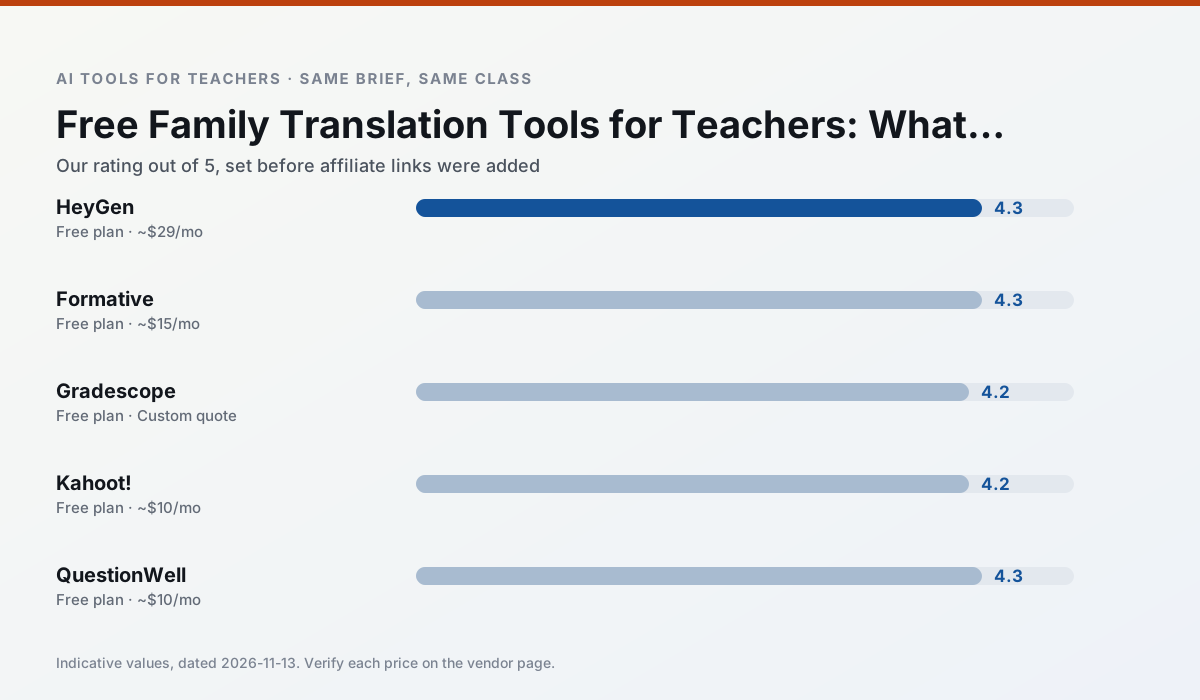
Side by side
Comparison table
Ratings reflect our timed classroom workflow, not vendor claims. Prices are indicative — verify on the vendor site.
| Tool | Best for | Free tier | Indicative paid plan | Standout feature | Our rating | Verdict | Try the tool |
|---|---|---|---|---|---|---|---|
| HeyGen | video lessons · translation | Yes — Limited credit plan | ~$29 /user/mo | Video translation | 4.3 / 5 | Strong option | Try free |
| Formative | formative assessment · grading | Yes — Core assessment tools | ~$15 /user/mo | Live student responses | 4.3 / 5 | Strong option | Try free |
| Gradescope | grading · rubric creation | Yes — Limited courses | Custom quote | Bubble sheet and handwriting capture | 4.2 / 5 | Strong option | Try free |
| Kahoot! | quiz generation · review lessons | Yes — Limited player count | ~$10 /user/mo | AI question builder | 4.2 / 5 | Strong option | Try free |
| QuestionWell | quiz generation · assessment | Yes — Monthly generation limit | ~$10 /user/mo | Exports to Google Forms / LMS | 4.3 / 5 | Strong option | Try free |
| Synthesia | flipped lessons · video lessons | No ongoing free plan | ~$29 /user/mo | 140+ languages | 4.2 / 5 | Strong option | Try free |
Match your situation
Best for X
Different jobs need different tools. Here is what we would open first in each case.
HeyGen has the shortest path from opening a tab to a usable draft, which matters more than the feature count on a Monday.
Formative answers the three questions a district actually asks: rostering, admin controls and a data-processing agreement. That is usually what decides a school purchase.
Nothing on Gradescope's free tier is a teaser demo; the limits are documented and a normal week fits inside them.
Kahoot! is the one we would open on a normal planning day because the first output is editable rather than restructurable, and the free plan covers a single teacher's routine.
Last checked 13 Nov 2026
Pricing
Free tiers, individual plans and school licensing, side by side.
| Tool | Free plan | Individual / paid | School & district | Billing note | Verify |
|---|---|---|---|---|---|
| HeyGen | $0 — Limited credit plan | ~$29 /user/mo | Custom quote | Indicative — verify on vendor site | Vendor |
| Formative | $0 — Core assessment tools | ~$15 /user/mo | Custom quote | Indicative — verify on vendor site | Vendor |
| Gradescope | $0 — Limited courses | Custom quote | Custom quote | LMS integration and support | Vendor |
| Kahoot! | $0 — Limited player count | ~$10 /user/mo | Custom quote | Indicative — verify on vendor site | Vendor |
| QuestionWell | $0 — Monthly generation limit | ~$10 /user/mo | Custom quote | Indicative — verify on vendor site | Vendor |
| Synthesia | No ongoing free tier | ~$29 /user/mo | Custom quote | Indicative — verify on vendor site | Vendor |
Editorial rule: pricing is re-checked every 2–3 months and the top 50 pages are refreshed every 6 months. See our funding policy.
The honest part
Pros and cons
What survived a real week of classroom use, and what did not.
Pros
- Best-in-class lip-sync translation
- Useful for multilingual families
- Generous trial credits
Cons
- Credit-based pricing is confusing
- Voice cloning raises consent questions
- Overkill for everyday lessons
Pros
- Strong data for intervention groups
- Works with existing PDFs and Docs
- Good LMS integrations
Cons
- Steeper setup than quiz games
- Best value requires school-wide rollout
- Price adds up per teacher
Pros
- Large time savings on paper assessments
- Consistent rubric application
- Detailed item analytics
Cons
- Overkill for elementary classrooms
- Institutional pricing is opaque
- Setup effort is real
Pros
- Instant engagement
- Very low training time
- Strong brand familiarity
Cons
- Less depth for higher-order assessment
- Paid tiers needed for larger classes
- Time pressure suits recall more than reasoning
Pros
- Saves the most time on question writing
- Clean export workflow
- Good objective tagging
Cons
- Single-purpose tool
- Question quality varies by source text
- Limited student-facing features
In the classroom
Use cases
Five concrete workflows, with the tool we would open for each one.
Regrouping students after an assessment
Summarise anonymised results into skill groups, then generate one activity per group. Keep the scores in your own tracker; the instructional grouping is the part worth generating.
Recommended: HeyGenA weekly family newsletter from bullet notes
Newsletters fail on length, not tone. Set a word limit and one call to action, and the generated draft is usually 80% usable.
Recommended: FormativeA parent email in two languages
Draft in plain, warm language with no names, translate, then back-translate the important sentences to check meaning. Keep specific incidents out of the prompt and add them yourself.
Recommended: GradescopeRubric and feedback comments in one pass
Reorder the workflow so the rubric is yours and the comments are generated. Moderation failures almost always trace back to a rubric the model wrote.
Recommended: Kahoot!Three reading levels from one source text
Paste a vetted text, ask for supported, core and extension versions, then check the vocabulary list by hand. Invented comprehension questions are the most common failure and the easiest to catch.
Recommended: QuestionWell
Questions teachers ask us
FAQ
Direct answers, also published as FAQPage structured data for search and AI assistants.
Which free plan lasts a full week?
What breaks first on a free plan?
Is a free plan enough for a department?
Sources & further reading
Our recommendation
Try HeyGen free for your next translation task
AI avatar video and video translation for instructional content. Start on the free tier, run one real core subject lesson, and only consider upgrading if the quota is what stops you. Disclosure: we may earn a commission (35% recurring) at no extra cost to you.
Some links on this page are affiliate links. We may earn a commission at no extra cost to you. Our rankings are editorial and never pay-to-play. Never enter student PII into a free consumer account.
Keep reading
Related comparisons in this cluster.
Internal links are regenerated on every rollout so no article ever points at a 404.