The short answer
- MagicSchool AI is our default pick for teachers who need to draft a standards-aware lesson plan quickly; Eduaide.Ai is better when differentiation is the bottleneck.
- The cheapest honest test is a week of real work on the free plans: MagicSchool AI: Yes — Core generators with monthly usage limits; Eduaide.Ai: Yes — Daily generation cap; ChatGPT: Yes — Usage-limited model access. If a tool is still open on Friday, it has earned a paid conversation.
- Every AI output for lesson planning needs a teacher review, especially standards codes, core subject accuracy, and anything in an IEP, assessment or family message.
- Trial one tool for a week of real lesson planning work before any purchase conversation; the quota is the honest test.
Start with MagicSchool AI on its free plan.
By Friday afternoon, my desk usually looks like a paper shredder exploded. I had forty ungraded lab reports, three parent emails to answer about missing homework, and zero lesson plans for Monday morning. That is the exact moment when free AI lesson planning tools for teachers stop being a tech-conference talking point and start being a survival strategy.
Most teachers do not want an AI assistant that writes whole curriculum units from scratch. We want something that takes the friction out of the 85 percent of our job that is administrative scaffolding. The problem is wading through the hype to find out which platforms actually survive a real Tuesday with twenty-eight ninth graders.
The Monday Morning Splan in Twelve Minutes
Let us start with the worst part of the weekend: building a lesson plan when you have no fuel left. The twelve-minute plan comes from refusing to rewrite the AI skeleton from zero. You log into MagicSchool AI, which remains our best overall for daily use because its template library is built specifically for how teachers actually think, and run three separate outlines for the same standard.
You pick the one that matches your actual scope and sequence, then throw away its suggested assessment. MagicSchool AI offers core generators with monthly usage limits on its free tier, which is usually enough for a teacher testing the waters before asking a department head about the roughly $12 per user per month paid tier. The biggest trap here is trusting the standards alignment blindly. Always cross-check the output against your state documents because the model does not know your district pacing guide.
Three Reading Levels Without Losing Your Mind
Every middle school teacher knows the pain of differentiation. You have a fantastic article on plate tectonics, but your room spans a third-grade reading level to an eleventh-grade honours level. Using Eduaide.Ai, which is our pick for the best free option, you paste the vetted text and ask for supported, core, and extension versions. Eduaide.Ai operates on a daily generation cap for its free tier, with a paid upgrade sitting around $10 per user per month.
The interface is clean and uncluttered, which matters when you are rushing during a planning period. But do not trust the comprehension questions it spits out at the end of those reading levels. Invented questions are the most common failure point for reading-level generators. The AI will write a question about a detail it hallucinated in the text, so you have to review the vocabulary list and quiz prompts by hand before making copies.
Newsletters That Parents Might Actually Read
Writing a weekly family newsletter always fails on length, not tone. You start typing about the upcoming science fair, and suddenly you have written a three-page manifesto that nobody reads on their phone. Using ChatGPT, which ranks as our best for schools and districts despite requiring prompt skills for consistent results, you dump your raw bullet points into the chat window.
Prompt: Write a 150-word weekly classroom update for parents based on these raw notes: Friday is the permission slip deadline, we are starting fractions in math, and soccer club is cancelled Thursday. Tone should be warm and direct.
First pass: The AI wrote a lovely, overly enthusiastic paragraph that forgot to mention the actual date of the permission slip deadline and added a generic motivational quote about math that made me cringe.
First edit: I added a strict constraint: "Format the deadline in bold and remove the quote."
Second edit: I swapped out the generic greeting for our actual classroom name. The final draft took two minutes instead of twenty and parents actually replied to it.
Remember that ChatGPT has a free tier with usage-limited model access, while its paid tier runs about $20 per user per month. Never enter student PII on consumer plans. If your district has not approved a workspace tier, keep all student names out of the prompt entirely.
Quick Setup When the Sub Plan Falls Through
Sometimes you just need something generated right now because a class was dumped on your roster at 7:30 AM. Writesonic is our choice for the best for quick setup, offering a reasonable free trial and many templates, though its credit system can be confusing and costs roughly $16 per user per month on paid plans.
Writesonic functions as a budget-friendly AI writing tool, but it suffers from generic classroom output. Because it is built for general marketing and copywriting as much as education, you have to push hard against its tendency to use corporate jargon. If you ask it for a bellringer, you might get something that sounds like an onboarding seminar for middle management. You have to strip away the fluff to make it usable for teenagers.
Regrouping After an Assessment
Data analysis eats entire planning periods. When you want to group students after a mid-unit quiz, you can anonymise your scores and feed them into a tool to generate targeted stations. If you are exploring broader options without creating accounts across twenty different sites, take a look at resources like our guide on AI tools without accounts to keep your workflow simple.
Tools like Class Companion and SchoolAI handle different ends of this workflow. Class Companion provides AI feedback on handwritten and scanned student work, priced around $12 per user per month with a limited assignment free tier. It is brilliant when work is done on paper, though scan quality heavily affects accuracy. Meanwhile, SchoolAI acts as a school-safe AI workspace with teacher-controlled student spaces, offering a limited seats free tier and paid options around $15 per user per month. It requires school-wide buy-in, but its safeguarding defaults make it easier to clear through district privacy reviews than a consumer LLM. For a broader look at how pricing structures shake out across different platforms, consult our breakdown on the best AI tools for teachers in 2026.
Rubrics and Feedback in One Pass
Do not let an AI write your rubric. That is the number one moderation failure I see teachers make. If the model writes the rubric, the generated feedback comments will evaluate students against criteria you do not actually care about. Reorder the workflow: write your own rubric first, paste it into your tool of choice, and then generate the feedback comments against your standard.
When you test these free tools, keep your expectations modest. They will not teach the class for you, and they will not grade your essays with human nuance. But they will give you back your Sunday afternoons, and for a teacher drowning in paperwork, that is more than enough to justify keeping them in the browser tab.
FAQ
Which free plan lasts a full week?
The ones that survive a normal lesson planning week without a card are listed first in the table; the rest are demos with better marketing.
What breaks first on a free plan?
Generation limits, then export options. Export matters more than it sounds: a link that expires is not an archive.
Is a free plan enough for a department?
No. Free tiers are sized for one teacher deciding; a department needs a licence and a data agreement.
Sources
- MagicSchool AI. Vendor platform overview and feature documentation. https://www.magicschool.ai/
- Eduaide.Ai. Platform features, toolsets, and pricing tiers. https://www.eduaide.ai/
- OpenAI. ChatGPT model specifications, privacy policies, and subscription details. https://openai.com/chatgpt/
- Writesonic. Content generation templates and credit structures. https://writesonic.com/
- Class Companion. AI feedback systems for student work. https://classcompanion.com/
- SchoolAI. School-safe AI workspace architecture and safeguarding features. https://schoolai.com/
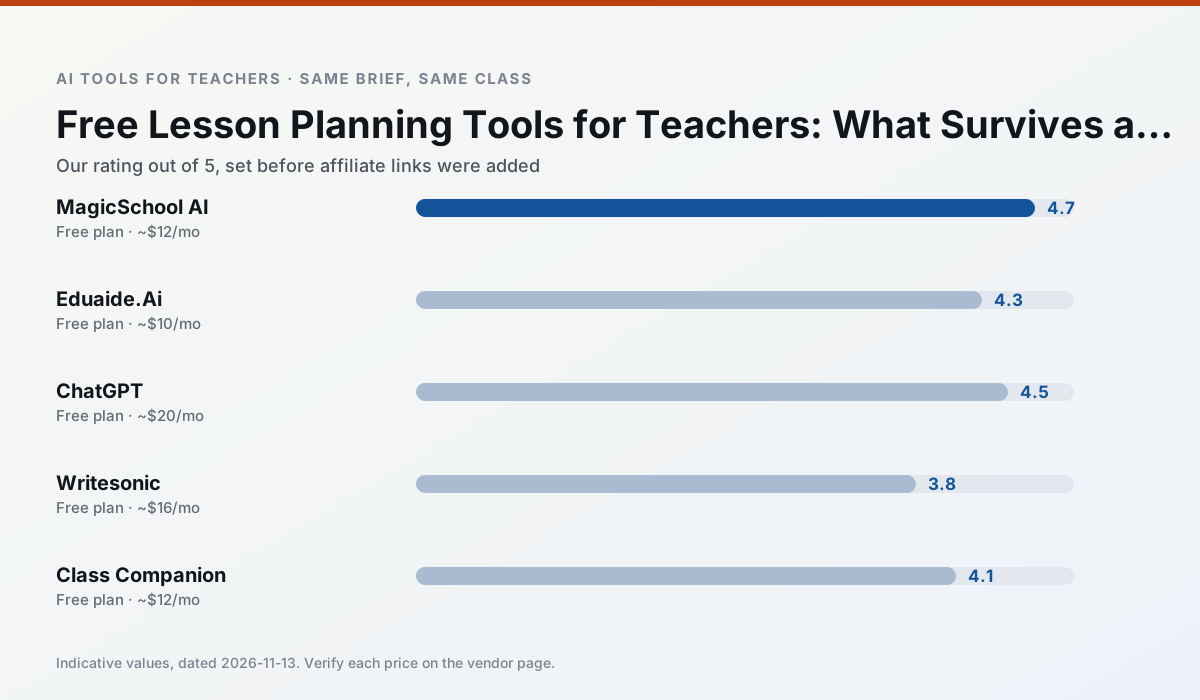
Side by side
Comparison table
Ratings reflect our timed classroom workflow, not vendor claims. Prices are indicative — verify on the vendor site.
| Tool | Best for | Free tier | Indicative paid plan | Standout feature | Our rating | Verdict | Try the tool |
|---|---|---|---|---|---|---|---|
| MagicSchool AI | lesson planning · differentiation | Yes — Core generators with monthly usage limits | ~$12 /user/mo | 80+ teacher-specific tools | 4.7 / 5 | Top pick | Try free |
| Eduaide.Ai | lesson planning · rubric creation | Yes — Daily generation cap | ~$10 /user/mo | Resource library | 4.3 / 5 | Strong option | Try free |
| ChatGPT | lesson planning · parent communication | Yes — Usage-limited model access | ~$20 /user/mo | Custom GPTs and Projects | 4.5 / 5 | Top pick | Try free |
| Writesonic | newsletters · parent communication | Yes — Limited credits | ~$16 /user/mo | Article and email generators | 3.8 / 5 | Situational | Try free |
| Class Companion | grading · feedback on writing | Yes — Limited assignments | ~$12 /user/mo | Handwriting recognition | 4.1 / 5 | Situational | Try free |
| SchoolAI | student-safe AI · differentiated instruction | Yes — Limited seats | ~$15 /user/mo | Teacher-monitored student chats | 4.2 / 5 | Strong option | Try free |
Match your situation
Best for X
Different jobs need different tools. Here is what we would open first in each case.
MagicSchool AI is the one we would open on a normal planning day because the first output is editable rather than restructurable, and the free plan covers a single teacher's routine.
If there is no budget, start with Eduaide.Ai: free plan with clearest quota is the least punishing free tier here.
For a school rollout, ChatGPT offers the paperwork and the admin console; the classroom features are standard by comparison.
Setup cost is one login for Writesonic; everything else can wait until you know the tool is useful.
Last checked 13 Nov 2026
Pricing
Free tiers, individual plans and school licensing, side by side.
| Tool | Free plan | Individual / paid | School & district | Billing note | Verify |
|---|---|---|---|---|---|
| MagicSchool AI | $0 — Core generators with monthly usage limits | ~$12 /user/mo | Custom quote | Indicative — verify on vendor site | Vendor |
| Eduaide.Ai | $0 — Daily generation cap | ~$10 /user/mo | Custom quote | Indicative — verify on vendor site | Vendor |
| ChatGPT | $0 — Usage-limited model access | ~$20 /user/mo | ~$25+ /user/mo | Indicative — verify on vendor site | Vendor |
| Writesonic | $0 — Limited credits | ~$16 /user/mo | ~$49 /user/mo | Indicative — verify on vendor site | Vendor |
| Class Companion | $0 — Limited assignments | ~$12 /user/mo | Custom quote | Indicative — verify on vendor site | Vendor |
| SchoolAI | $0 — Limited seats | ~$15 /user/mo | Custom quote | Indicative — verify on vendor site | Vendor |
Editorial rule: pricing is re-checked every 2–3 months and the top 50 pages are refreshed every 6 months. See our funding policy.
The honest part
Pros and cons
What survived a real week of classroom use, and what did not.
Pros
- Widest purpose-built template library
- Strong free tier for individual teachers
- Fast to learn with almost no prompting skill
Cons
- Outputs still need standards review
- Best features sit behind the paid tier
- District approval can be slow
Pros
- Very low entry price
- Good worksheet and rubric output
- Clean, uncluttered UI
Cons
- Smaller template set than MagicSchool
- Less polished export options
- Limited integrations
Pros
- Most flexible option available
- Huge community of teacher prompt libraries
- Strong multilingual support
Cons
- Requires prompt skills for consistent results
- No built-in standards alignment
- District privacy review usually required
Pros
- Cheaper than enterprise writing suites
- Many templates
- Reasonable free trial
Cons
- Generic classroom output
- Credit system is confusing
- Limited education context
Pros
- Useful where work is done on paper
- Fast, specific comments
- Good math support
Cons
- Scan quality affects accuracy
- Narrow use case
- Feedback still needs teacher review
In the classroom
Use cases
Five concrete workflows, with the tool we would open for each one.
A weekly family newsletter from bullet notes
Newsletters fail on length, not tone. Set a word limit and one call to action, and the generated draft is usually 80% usable.
Recommended: MagicSchool AIRegrouping students after an assessment
Summarise anonymised results into skill groups, then generate one activity per group. Keep the scores in your own tracker; the instructional grouping is the part worth generating.
Recommended: Eduaide.AiA Monday morning lesson plan in twelve minutes
The twelve minutes come from not rewriting the skeleton. Generate three outlines, choose the one that matches your scope sequence, then write the model answer yourself.
Recommended: ChatGPTThree reading levels from one source text
Paste a vetted text, ask for supported, core and extension versions, then check the vocabulary list by hand. Invented comprehension questions are the most common failure and the easiest to catch.
Recommended: WritesonicRubric and feedback comments in one pass
Reorder the workflow so the rubric is yours and the comments are generated. Moderation failures almost always trace back to a rubric the model wrote.
Recommended: Class Companion
Questions teachers ask us
FAQ
Direct answers, also published as FAQPage structured data for search and AI assistants.
Which free plan lasts a full week?
What breaks first on a free plan?
Is a free plan enough for a department?
Sources & further reading
Our recommendation
Try MagicSchool AI free for your next lesson planning task
A large library of teacher-specific AI generators in one dashboard. Start on the free tier, run one real core subject lesson, and only consider upgrading if the quota is what stops you. Disclosure: we may earn a commission (30% recurring) at no extra cost to you.
Some links on this page are affiliate links. We may earn a commission at no extra cost to you. Our rankings are editorial and never pay-to-play. Never enter student PII into a free consumer account.
Keep reading
Related comparisons in this cluster.
Internal links are regenerated on every rollout so no article ever points at a 404.