The short answer
- Canva for Education is our default pick for teachers who need to turn an outline into a presentation quickly; Gamma is better when differentiation is the bottleneck.
- All 3 shortlisted tools are priced for one teacher first and a school second. Canva for Education and Gamma are the two worth trialling on a real task before any purchase conversation.
- Every AI output for slide decks needs a teacher review, especially standards codes, core subject accuracy, and anything in an IEP, assessment or family message.
- Trial one tool for a week of real slide decks work before any purchase conversation; the quota is the honest test.
Start with Gamma on its free plan.
It was a Sunday evening in November 2026, and my browser tabs looked like a crime scene. I had forty minutes before my alarm, a stack of un-graded exit tickets, and a completely blank slide deck for a Monday morning unit on cellular respiration. Every teacher knows that terrifying hum of the laptop fan while you stare at a white rectangle, trying to make mitochondria look engaging. We have all heard the pitch that artificial intelligence will give us our weekends back. But what actually survives a real five-day week in a public school classroom without burning a hole in your pocket?
When you hunt for free AI slide decks tools for teachers, you quickly find that half the platforms are glorified marketing funnels designed to hook you with three free generations and then demand a district credit card. To save you the trial-and-error cycle, I spent a term putting the most talked-about options through a brutal classroom stress test. We are looking strictly at what works, what breaks, and where the hidden costs lie. For a broader look at financial trade-offs, check our guide on Canva Education pricing and teacher costs.
Best Overall for Daily Use: Canva for Education
Canva for Education remains the undisputed heavy lifter for daily classroom visuals. If you have a verified educator account, the design suite is effectively free, which matters when your school budget covers roughly zero software subscriptions. The template library is massive, and you do not need a degree in graphic design to make a slide deck look like it was built by a professional.
The catch is that the AI writing and image features are capped, and it is entirely too easy to produce cluttered slides if you lean too hard on automated templates. Account verification can also drag on for a week or two at the start of term, so do not try to sign up five minutes before period one. More importantly, check their specific student-data terms before having kids log in directly.
Prompt: Create a 5-slide instructional deck for 9th-grade biology on cellular respiration, keeping text minimal and adding diagram placeholders.
What came back: A surprisingly clean slide deck with dark backgrounds, legible sans-serif fonts, and stock photo placeholders that actually resembled mitochondria rather than random abstract art.
Two edits that made it usable: I stripped out two decorative background animations that were giving me a slight migraine, and I replaced their generic multiple-choice quiz slide with a prompt for a physical turn-and-talk.
Best Free Option: Gamma
When you need to turn a messy pile of notes into a structured presentation before the bell rings, Gamma is the fastest path from a blank screen to a finished deck. It generates full presentation decks and documents from a single text prompt. The output looks modern and clean by default, which saves you from the dated 2000s PowerPoint aesthetic.
The limitations show up quickly under heavy use. Your credits run out fast on the free tier, forcing you to ration your generations or upgrade to their paid tier at roughly $10 per user per month. Furthermore, design control is quite limited compared to traditional editing software, and Gamma is not built to handle student data safely. Treat it purely as a content generation tool for your own prep, and never upload student work into its prompt box.
Best for Schools and Districts: Murf AI
Sometimes a slide deck needs to speak for itself, especially for flipped classrooms or stations where students work independently. Murf AI provides studio-grade voiceovers that transform text into surprisingly natural audio for your presentations. The pacing controls are sharp, and integrating audio files into your slides is straightforward.
However, Murf AI is a single-purpose tool with a strict trial-only output on its free tier. Once the trial runs out, you are looking at roughly $19 per user per month for paid access. You also need to pay close attention to commercial licensing rules if you plan on publishing these audio clips outside your classroom walls. For a deeper dive into free options, you might also want to review our broader breakdown of the best AI tools for teachers in 2026.
Best for Quick Setup: QuestionWell
If your slide deck is already built but you have zero energy left to write formative assessment questions, QuestionWell is the tool you open first. It takes any source text or learning objective and generates standards-aligned question banks in seconds. The export workflow is clean, and the objective tagging helps keep your standards-based grading honest.
Like Murf AI, it is a single-purpose tool. Question quality varies wildly depending on the density and readability of the source text you paste in, and it has limited student-facing features. Stick to pasting non-identifiable source text only, and always review the output for historical or scientific accuracy before pushing it out to your students.
Gamified Review: Kahoot! and Quizizz
No discussion of slide-adjacent tools is complete without mentioning the twin giants of classroom gamification. Kahoot! delivers instant student engagement with almost zero training time, though its free tier limits your player count. Quizizz offers robust AI quiz creation with a massive existing question bank and a reliable interface that runs smoothly on low-end school Chromebooks.
Both tools share similar failure modes. The gamification can easily distract students who treat it like a video game rather than a review session, and the time pressure inherent in live games heavily favors fast recall over deep reasoning. You will need paid tiers—around $10 to $15 per user per month—to unlock advanced analytics. For younger students, always use generated nicknames rather than real names to keep data privacy tight.
What Actually Breaks During a Real Week
AI tools love to demo in sterile environments where everything works on the first try. In a real classroom, the friction points are predictable. First, generation limits always run out on Thursday afternoon when you are exhausted and trying to prep Friday's stations. You cannot rely on a free tier to sustain an entire unit of daily planning without hitting a paywall.
Second, formatting imports between tools are rarely seamless. When you export an AI-generated outline from Gamma into Canva, or copy QuestionWell text into a slide deck, fonts shift, text boxes overlap, and tables break. You spend ten minutes fixing CSS quirks you never asked for. Keep your workflow simple: generate the text content in one place, review it with your own eyes, and paste it into a stable template manually.
FAQ
Which free plan lasts a full week?
The ones that survive a normal slide decks week without a card are listed first in the table; the rest are demos with better marketing.
What breaks first on a free plan?
Generation limits, then export options. Export matters more than it sounds: a link that expires is not an archive.
Is a free plan enough for a department?
No. Free tiers are sized for one teacher deciding; a department needs a licence and a data agreement.
Sources
- Canva for Education: Canva Education Features and Verification
- Gamma: Gamma App Pricing and Features
- Murf AI: Murf Studio Pricing and Audio Licensing
- QuestionWell: QuestionWell Standards-Aligned Question Generator
- Kahoot!: Kahoot! Educator Plans and Features
- Quizizz: Quizizz Teacher Plans and Security Overview
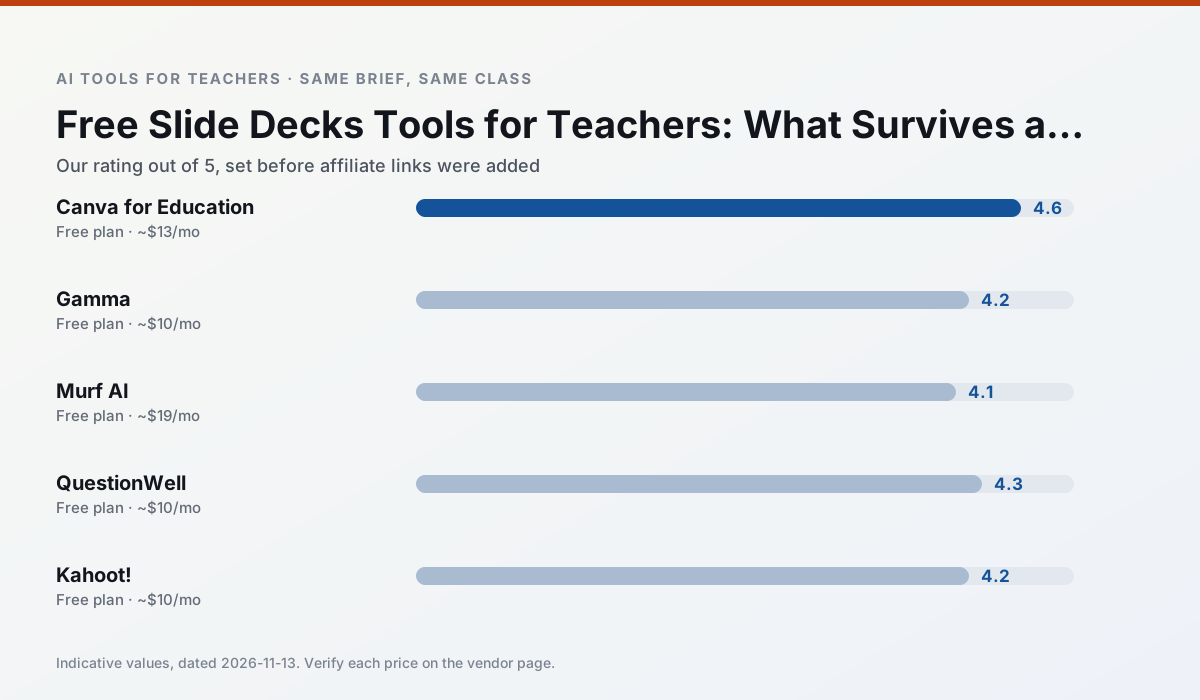
Side by side
Comparison table
Ratings reflect our timed classroom workflow, not vendor claims. Prices are indicative — verify on the vendor site.
| Tool | Best for | Free tier | Indicative paid plan | Standout feature | Our rating | Verdict | Try the tool |
|---|---|---|---|---|---|---|---|
| Canva for Education | slide decks · worksheets | Yes — Verification required | ~$13 /user/mo | Thousands of education templates | 4.6 / 5 | Top pick | Try free |
| Gamma | slide decks · parent communication | Yes — Credit-limited generation | ~$10 /user/mo | Prompt-to-deck | 4.2 / 5 | Strong option | Try free |
| Murf AI | audio lessons · accessibility | Yes — Trial-only output | ~$19 /user/mo | Voice fine-tuning | 4.1 / 5 | Situational | Try free |
| QuestionWell | quiz generation · assessment | Yes — Monthly generation limit | ~$10 /user/mo | Exports to Google Forms / LMS | 4.3 / 5 | Strong option | Try free |
| Kahoot! | quiz generation · review lessons | Yes — Limited player count | ~$10 /user/mo | AI question builder | 4.2 / 5 | Strong option | Try free |
| Quizizz | quiz generation · formative assessment | Yes — Core quiz creation | ~$15 /user/mo | AI question generator | 4.4 / 5 | Strong option | Try free |
Match your situation
Best for X
Different jobs need different tools. Here is what we would open first in each case.
On the daily cycle, Canva for Education saves the most edit time per task; the paid tier mostly buys more runs rather than better ones.
Nothing on Gamma's free tier is a teaser demo; the limits are documented and a normal week fits inside them.
Murf AI answers the three questions a district actually asks: rostering, admin controls and a data-processing agreement. That is usually what decides a school purchase.
Setup cost is one login for QuestionWell; everything else can wait until you know the tool is useful.
Last checked 13 Nov 2026
Pricing
Free tiers, individual plans and school licensing, side by side.
| Tool | Free plan | Individual / paid | School & district | Billing note | Verify |
|---|---|---|---|---|---|
| Canva for Education | $0 — Verification required | ~$13 /user/mo | Custom quote | Indicative — verify on vendor site | Vendor |
| Gamma | $0 — Credit-limited generation | ~$10 /user/mo | ~$20 /user/mo | Indicative — verify on vendor site | Vendor |
| Murf AI | $0 — Trial-only output | ~$19 /user/mo | ~$39 /user/mo | Indicative — verify on vendor site | Vendor |
| QuestionWell | $0 — Monthly generation limit | ~$10 /user/mo | Custom quote | Indicative — verify on vendor site | Vendor |
| Kahoot! | $0 — Limited player count | ~$10 /user/mo | Custom quote | Indicative — verify on vendor site | Vendor |
| Quizizz | $0 — Core quiz creation | ~$15 /user/mo | Custom quote | Indicative — verify on vendor site | Vendor |
Editorial rule: pricing is re-checked every 2–3 months and the top 50 pages are refreshed every 6 months. See our funding policy.
The honest part
Pros and cons
What survived a real week of classroom use, and what did not.
Pros
- Effectively free for verified teachers
- Huge template library
- No design skills needed
Cons
- AI features are capped
- Easy to produce cluttered slides
- Account verification can be slow
Pros
- Fastest path from outline to deck
- Modern-looking output by default
- Good export options
Cons
- Design control is limited
- Credits run out quickly
- Not built for student data
Pros
- Very clean audio
- Good pacing controls
- Easy slide integration
Cons
- Commercial licensing rules matter
- Free tier is not usable long-term
- Single-purpose
Pros
- Saves the most time on question writing
- Clean export workflow
- Good objective tagging
Cons
- Single-purpose tool
- Question quality varies by source text
- Limited student-facing features
Pros
- Instant engagement
- Very low training time
- Strong brand familiarity
Cons
- Less depth for higher-order assessment
- Paid tiers needed for larger classes
- Time pressure suits recall more than reasoning
In the classroom
Use cases
Five concrete workflows, with the tool we would open for each one.
A weekly family newsletter from bullet notes
Newsletters fail on length, not tone. Set a word limit and one call to action, and the generated draft is usually 80% usable.
Recommended: Canva for EducationRegrouping students after an assessment
Summarise anonymised results into skill groups, then generate one activity per group. Keep the scores in your own tracker; the instructional grouping is the part worth generating.
Recommended: GammaA Monday morning lesson plan in twelve minutes
The twelve minutes come from not rewriting the skeleton. Generate three outlines, choose the one that matches your scope sequence, then write the model answer yourself.
Recommended: Murf AIThree reading levels from one source text
Paste a vetted text, ask for supported, core and extension versions, then check the vocabulary list by hand. Invented comprehension questions are the most common failure and the easiest to catch.
Recommended: QuestionWellRubric and feedback comments in one pass
Reorder the workflow so the rubric is yours and the comments are generated. Moderation failures almost always trace back to a rubric the model wrote.
Recommended: Kahoot!
Questions teachers ask us
FAQ
Direct answers, also published as FAQPage structured data for search and AI assistants.
Which free plan lasts a full week?
What breaks first on a free plan?
Is a free plan enough for a department?
Sources & further reading
Our recommendation
Try Gamma free for your next slide decks task
Generate presentation decks and documents from a single prompt. Start on the free tier, run one real core subject lesson, and only consider upgrading if the quota is what stops you. Disclosure: we may earn a commission (varies) at no extra cost to you.
Some links on this page are affiliate links. We may earn a commission at no extra cost to you. Our rankings are editorial and never pay-to-play. Never enter student PII into a free consumer account.
Keep reading
Related comparisons in this cluster.
Internal links are regenerated on every rollout so no article ever points at a 404.