The short answer
- ChatGPT is our default pick for teachers who need to draft a standards-aware lesson plan quickly; SchoolAI is better when differentiation is the bottleneck.
- Pricing is where these pages date fastest. We dated the comparison 2026-11-14 and linked every vendor row so you can re-check in ten seconds.
- Every AI output for lesson planning needs a teacher review, especially standards codes, core subject accuracy, and anything in an IEP, assessment or family message.
- Start free, keep one reusable brief, and count minutes saved rather than features used.
Start with MagicSchool AI on its free plan.
At 8:15 on a Tuesday morning, I stared at a spreadsheet of thirty-two diagnostic reading scores and realized I had no idea how to group the kids for our intervention block. I had four distinct reading levels, three students who needed vocabulary scaffolding, and zero prep periods left in the week. I opened my browser, typed a prompt into ChatGPT, and waited. Within twenty seconds, I had four targeted instructional groups and four distinct mini-lessons ready to print. It was not a miracle. It was just a tool doing what a tool should do.
Teachers looking for shortcuts often treat ChatGPT like a digital colleague that can run a classroom for them. That is a fast track to burned-out lesson planning and hallucinated answer keys. Think of it as a workbench. It holds your materials, shapes your raw ideas, and speeds up the rough work, but you still have to build the furniture. As we navigate the tool landscape in 2026, understanding where ChatGPT fits alongside platforms like SchoolAI, Khanmigo, Claude, Curipod, and Eduaide.Ai determines whether AI saves your planning period or ruins your afternoon.
Why General-Purpose AI Beats Niche Tools for Blank-Page Planning
ChatGPT remains the most flexible option available for general lesson design, mostly because it doesn't force you into rigid template boxes. On the consumer free tier, you get usage-limited model access, while the paid tier runs around $20 per user per month. The primary strength is its sheer adaptability and a massive community of teacher prompt libraries that show you how to frame your requests. If you want to draft a rubric, rewrite a passage at three different Lexile levels, or brainstorm a project-based learning hook about medieval trade routes, it handles the job without complaint.
The catch is that it requires prompt skills to get consistent results. If you ask a lazy question, you get a lazy worksheet. It also has no built-in standards alignment unless you explicitly paste your state standards into the chat window. Privacy is the other major hurdle. You must never enter student personally identifiable information on consumer plans; save student data work for district-approved workspace tiers. If you are exploring broader options for your classroom, take a look at our comprehensive guide on the best AI tools for teachers in 2026.
The Workbench in Action: Five Real Planning Tasks
When you sit down to plan, you do not need an AI to teach your class. You need it to do the heavy lifting on administrative and structural tasks that eat up your evening. Here is how that looks across five common classroom hurdles.
For regrouping students after an assessment, summarize anonymized results into skill groups and ask the AI to generate one activity per group. Keep the actual scores in your own gradebook. The instructional grouping is the part worth generating.
Prompt: "Act as a middle school math coach. Here are anonymized student error patterns from our ratios unit: Group A confuses part-to-whole with part-to-part; Group B sets up proportions upside down; Group C is ready for extension problems. Generate one targeted 10-minute intervention activity for each group."
First response: The output gave three great activities, but the materials list for Group A required fraction strips we didn't have in the building, and the extension problem for Group C was too abstract.
Two edits that made it usable: I edited the prompt to add constraints: "Use only base-ten blocks and whiteboards for Group A," and "Anchor the Group C extension in a recipe-scaling scenario." The revised output was ready to print.
When you need a weekly family newsletter from messy bullet notes, remember that newsletters fail on length, not tone. Set a strict word limit and a single call to action, and the generated draft is usually eighty percent usable.
For building a question bank from a PDF or article, feed a non-identifiable source and ask for items tagged by difficulty with the misconception behind each distractor. Always spot-check every answer key. Numerical items are notoriously unreliable when generated by general models.
When you are putting together a substitute folder that needs no context, the value is structure, not creativity. Generate timing, materials, and a routine note, then add the one detail only you know about your class, like which student needs to sit near the door.
Finally, when writing an IEP present-levels first draft, use aggregated, anonymized data only. Ask for observable, measurable statements and replace every generated number with your own progress monitoring before a case manager ever lays eyes on it. For more specialized administrative workflows, read our piece on AI classroom newsletters for administrators.
Safe Student Spaces and Purpose-Built Tutors
While ChatGPT sits on your desk as a general assistant, other platforms handle the student-facing side of things with built-in guardrails. SchoolAI costs roughly $15 per user per month on its paid tier and is designed specifically for district approval. It provides teacher visibility into student use and strong safeguarding defaults, making it ideal for parent-facing writing and monitored student sessions. The limitation is that it requires school-wide buy-in and feels less flexible than general LLMs.
Khanmigo brings a different approach as a tutor-style AI from a nonprofit education platform. Priced around $4 per learner per month, it leans into education-first design and strong math scaffolding. It is purpose-built for schools, but availability varies by region, and it is less useful for heavy teacher admin paperwork. It also requires student accounts to unlock its full value, which means getting past your tech department first.
Document-Heavy Planning and Interactive Lessons
If your planning involves digesting massive piles of curriculum documents, Claude is often the better choice. Running around $20 per user per month on its paid tier, Claude handles full unit plans and long rubrics with ease. Its prose is nuanced and less generic than what you get from other models, making it great for structured document output and quick setup. It lacks teacher-specific templates, however, and consumer plans are still not suitable for student data.
For immediate student engagement without the paperwork drag, Curipod turns a topic into an interactive, student-response lesson in minutes. At roughly $12 per user per month, it shines for quick checks for understanding and requires no student accounts for basic use. The free tier is restrictive, and it focuses entirely on lesson delivery rather than deep unit planning.
Rounding out the dedicated teacher platforms, Eduaide.Ai offers lesson, rubric, and worksheet generation at a low entry price of around $10 per user per month. It features a clean, uncluttered user interface and a teaching-resource library that outputs solid worksheets. It has a smaller template set than some of its competitors and limited integrations, but it gets straightforward tasks done without fuss.
The Bottom Line on Classroom AI
Every single one of these platforms will fail you if you ask them to replace your professional judgment. They cannot read the room when twelve kids walk in after a disruptive gym class, and they cannot notice the subtle shift in a student's posture that tells you a lesson is bombing. Use ChatGPT to clear the paperwork off your desk by 4:00 PM. Use SchoolAI and Khanmigo when students need safe, guided interaction. Keep your hands on the wheel, check the math, and remember that you are still the only teacher in the room.
FAQ
Is ChatGPT worth paying for at mixed-grade level?
Only if lesson planning is a weekly job for you. At one use a month the free plan is enough; at weekly use the paid tier buys back more time than it costs, provided you keep the review step.
What does ChatGPT get wrong most often?
Invented standards codes and assumed resources, in that order. Both survive a quick read, which is why the review checklist in this article starts with those two.
Can ChatGPT replace a planning period?
It replaces the blank page, not the planning. Our edit time ranged from eleven minutes for an outline to most of an evening for a full differentiated set.
Is ChatGPT safe to use with student data?
Not on a personal account. Use topic-level prompts, keep work samples out, and check what your district has approved before a student's work reaches any tool.
Sources
- OpenAI. (2026). ChatGPT Pricing and Feature Overview. Retrieved from openai.com/pricing
- SchoolAI. (2026). Safe AI Workspaces for K-12 Classrooms. Retrieved from school.ai
- Khan Academy. (2026). Khanmigo for Teachers and Districts. Retrieved from khanacademy.org/khanmigo
- Anthropic. (2026). Claude Plans and Feature Comparison. Retrieved from anthropic.com/pricing
- Curipod. (2026). Interactive Lesson Creator for Teachers. Retrieved from curipod.com
- Eduaide.Ai. (2026). AI-Powered Lesson Planning and Resource Generation. Retrieved from eduaide.ai
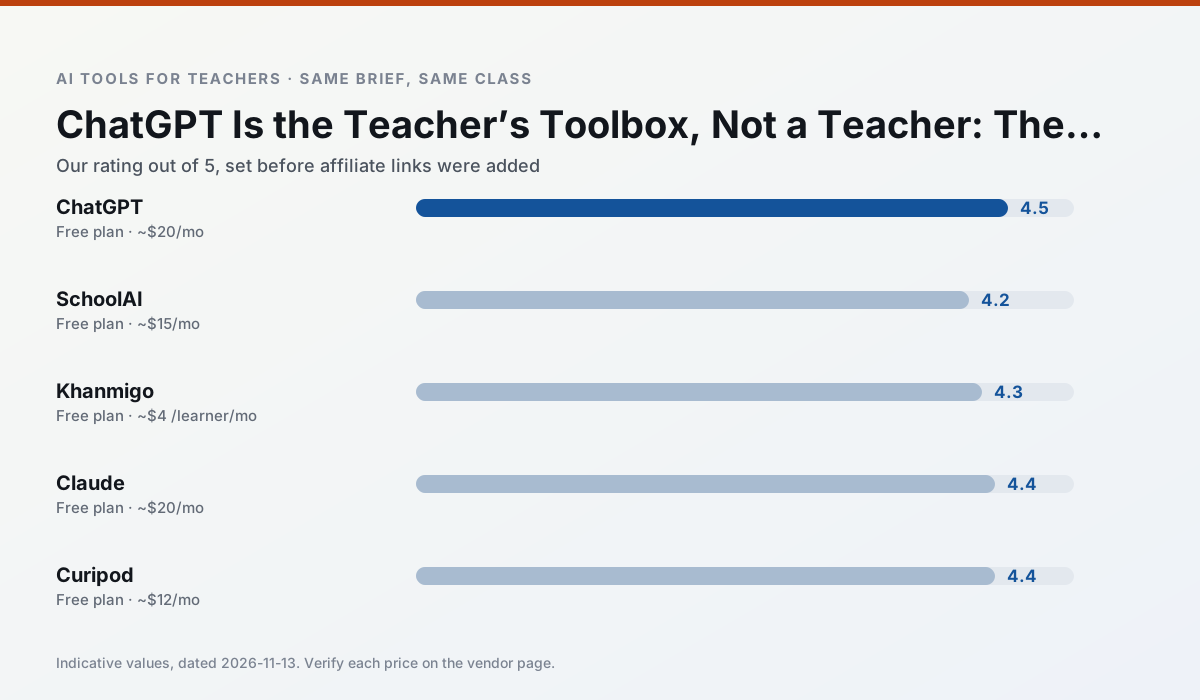
Side by side
Comparison table
Ratings reflect our timed classroom workflow, not vendor claims. Prices are indicative — verify on the vendor site.
| Tool | Best for | Free tier | Indicative paid plan | Standout feature | Our rating | Verdict | Try the tool |
|---|---|---|---|---|---|---|---|
| ChatGPT | lesson planning · parent communication | Yes — Usage-limited model access | ~$20 /user/mo | Custom GPTs and Projects | 4.5 / 5 | Top pick | Try free |
| SchoolAI | student-safe AI · differentiated instruction | Yes — Limited seats | ~$15 /user/mo | Teacher-monitored student chats | 4.2 / 5 | Strong option | Try free |
| Khanmigo | math practice · student tutoring | Yes — US teacher accounts, subject to eligibility | ~$4 /learner/mo | Socratic tutoring rather than answers | 4.3 / 5 | Strong option | Try free |
| Claude | rubric creation · feedback on writing | Yes — Usage-limited | ~$20 /user/mo | Very large context window | 4.4 / 5 | Strong option | Try free |
| Curipod | formative assessment · exit tickets | Yes — Limited lessons per month | ~$12 /user/mo | Live polls and word clouds | 4.4 / 5 | Strong option | Try free |
| Eduaide.Ai | lesson planning · rubric creation | Yes — Daily generation cap | ~$10 /user/mo | Resource library | 4.3 / 5 | Strong option | Try free |
Match your situation
Best for X
Different jobs need different tools. Here is what we would open first in each case.
ChatGPT is built around teacher-monitored student spaces and audit logs rather than a consumer chat account, which is a different approval conversation.
SchoolAI has the strongest tone control for family emails and report comments, provided you still read the message aloud before sending.
Khanmigo keeps the same task across levels, which is what makes a differentiated set defensible in moderation.
Claude runs in a browser tab with no extension, no student accounts and no onboarding call, so you can test it in a free period.
Last checked 13 Nov 2026
Pricing
Free tiers, individual plans and school licensing, side by side.
| Tool | Free plan | Individual / paid | School & district | Billing note | Verify |
|---|---|---|---|---|---|
| ChatGPT | $0 — Usage-limited model access | ~$20 /user/mo | ~$25+ /user/mo | Indicative — verify on vendor site | Vendor |
| SchoolAI | $0 — Limited seats | ~$15 /user/mo | Custom quote | Indicative — verify on vendor site | Vendor |
| Khanmigo | $0 — US teacher accounts, subject to eligibility | ~$4 /learner/mo | Custom quote | Indicative — verify on vendor site | Vendor |
| Claude | $0 — Usage-limited | ~$20 /user/mo | ~$25+ /user/mo | Indicative — verify on vendor site | Vendor |
| Curipod | $0 — Limited lessons per month | ~$12 /user/mo | Custom quote | Indicative — verify on vendor site | Vendor |
| Eduaide.Ai | $0 — Daily generation cap | ~$10 /user/mo | Custom quote | Indicative — verify on vendor site | Vendor |
Editorial rule: pricing is re-checked every 2–3 months and the top 50 pages are refreshed every 6 months. See our funding policy.
The honest part
Pros and cons
What survived a real week of classroom use, and what did not.
Pros
- Most flexible option available
- Huge community of teacher prompt libraries
- Strong multilingual support
Cons
- Requires prompt skills for consistent results
- No built-in standards alignment
- District privacy review usually required
Pros
- Designed for district approval
- Teacher visibility into student use
- Good safeguarding defaults
Cons
- Requires school-wide buy-in
- Less flexible than general LLMs
- Pricing is mostly quote-based
Pros
- Education-first design
- Strong nonprofit trust signal
- Good math scaffolding
Cons
- Availability varies by region
- Less useful for admin paperwork
- Requires student accounts for full value
Pros
- Handles full unit plans and long rubrics
- Nuanced, less generic prose
- Good at structured document output
Cons
- No teacher-specific templates
- Fewer classroom integrations
- Consumer plan not suitable for student data
Pros
- High student engagement out of the box
- Great for quick checks for understanding
- No student accounts required for basic use
Cons
- Focused on delivery, not planning
- Requires reliable classroom devices
- Free tier is restrictive
In the classroom
Use cases
Five concrete workflows, with the tool we would open for each one.
Regrouping students after an assessment
Summarise anonymised results into skill groups, then generate one activity per group. Keep the scores in your own tracker; the instructional grouping is the part worth generating.
Recommended: ChatGPTA weekly family newsletter from bullet notes
Newsletters fail on length, not tone. Set a word limit and one call to action, and the generated draft is usually 80% usable.
Recommended: SchoolAIA question bank from a PDF or article
Feed a non-identifiable source and ask for items tagged by difficulty with the misconception behind each distractor. Spot-check every answer key; numerical items are least reliable.
Recommended: KhanmigoA substitute folder that needs no context
The value here is structure, not creativity. Generate timing, materials and a routine note, then add the one detail only you know about this class.
Recommended: ClaudeAn IEP present-levels first draft
Use aggregated, anonymised data only. Ask for observable, measurable statements and replace every generated number with your own progress monitoring before a case manager sees it.
Recommended: Curipod
Questions teachers ask us
FAQ
Direct answers, also published as FAQPage structured data for search and AI assistants.
Is ChatGPT worth paying for at mixed-grade level?
What does ChatGPT get wrong most often?
Can ChatGPT replace a planning period?
Is ChatGPT safe to use with student data?
Sources & further reading
Our recommendation
Try MagicSchool AI free for your next lesson planning task
A large library of teacher-specific AI generators in one dashboard. Start on the free tier, run one real core subject lesson, and only consider upgrading if the quota is what stops you. Disclosure: we may earn a commission (30% recurring) at no extra cost to you.
Some links on this page are affiliate links. We may earn a commission at no extra cost to you. Our rankings are editorial and never pay-to-play. Never enter student PII into a free consumer account.
Keep reading
Related comparisons in this cluster.
Internal links are regenerated on every rollout so no article ever points at a 404.