The short answer
- Colossyan is our default pick for teachers who need to draft a standards-aware lesson plan quickly; ElevenLabs is better when differentiation is the bottleneck.
- Pricing is where these pages date fastest. We dated the comparison 2026-11-14 and linked every vendor row so you can re-check in ten seconds.
- Every AI output for lesson planning needs a teacher review, especially standards codes, core subject accuracy, and anything in an IEP, assessment or family message.
- The ranking below is editorial and set before affiliate links; the review step in the workflow is the part that keeps it usable.
Start with Colossyan on its free plan.
It is Tuesday morning at 6:45 AM, and my throat feels like sandpaper. My phone is vibrating against the nightstand with four separate texts from colleagues who have also caught whatever is circulating through the third-grade hallway. I do not have sub plans. I do not have a voice. In past years, this meant a frantic fifteen-minute scramble to scribble garbage worksheets on a copier that was jammed with cardstock, followed by a full day of sub guilt. This year, the reality of ai for flu season looks very different.
Building a coherent emergency day from your bed is entirely possible if you stop trying to generate full units and start building targeted content blocks. When you are out sick, subs do not need a pedagogical masterpiece. They need clear instructions, predictable routines, and materials that do not require an education degree to supervise. Over the last two terms, I have tested six platforms to see which ones actually hold up when a substitute teacher walks into a room blind.
Why Emergency Sub Plans Fail Without AI
The fundamental flaw of traditional sub folders is that they are either too vague to be useful or too complex for a stranger to run. Subs waste twenty minutes deciphering handwriting or hunting down missing worksheets. If you use generative tools correctly, you can bypass the blank page panic and build a robust packet in under fifteen minutes. The secret is knowing which tool handles which part of the emergency workflow.
For the visual layout and slide decks that anchor the day, Canva for Education remains the best for quick setup. It is free for verified teachers, though account verification can be slow, so do this before flu season hits. The template library saves you from designing layouts from scratch, allowing you to quickly drop in morning meeting prompts, independent reading blocks, and math rotations. The risk with Canva is clutter. It is very easy to produce slides that look gorgeous to an adult but overwhelm eight-year-olds who are staring at a stranger across the room. Keep the design clean and use the AI writing features only to draft basic discussion questions, not whole lessons.
Generating the Core Instructional Materials
When you need a Monday morning lesson plan in twelve minutes flat, you have to let go of the urge to write every single prompt from scratch. The time savings come from refusing to rewrite the skeleton. I typically generate three distinct outlines in Gamma, choose the one that actually matches our current scope and sequence, and then write the model answer myself. Gamma is best for schools and districts, turning a single text prompt into a presentation deck or document almost instantly.
Prompt: "Create a four-slide instructional sequence for a middle school history substitute covering the Louisiana Purchase. Include a warm-up question, a primary source excerpt, three comprehension checks, and an independent writing prompt. Keep teacher notes explicit."
Draft output: Gamma generated a clean, modern deck with four distinct cards. The warm-up was decent, but the primary source excerpt was too long for a forty-five-minute class managed by a sub.
First edit: Cut the primary source text in half to ensure students actually finish it before the timer goes off.
Second edit: Added explicit directions in the teacher notes section telling the sub to have students read the text aloud in pairs rather than silently.
Gamma is fast, but design control is limited, and your credits will run out quickly if you keep generating whole decks from scratch. Treat it as a content tool only and never upload student work into it.
Audio and Video for Absent Teachers
Sometimes a sub needs more than just a slide deck. If you need to explain a complex multi-step science lab or deliver direct instruction while your voice is shot, audio integration bridges the gap. ElevenLabs is the best overall for daily use, offering natural-sounding AI voiceover and text-to-speech for learning materials. It runs on a monthly character quota with a paid tier around $5 /user/mo (indicative), making it accessible for individual classroom budgets.
I use ElevenLabs to record the morning instructions and math minilessons so the sub literally just has to hit play. The pacing is steady, the articulation is clear, and it maintains my actual tone of voice if I use a cloned profile with documented consent. Be careful with voice cloning, and never clone a student's or colleague's voice without written permission. The main limit is that it is not a teaching platform, meaning you still have to pair the audio file with a visual worksheet or slide deck.
If you need video components that feature a presenter, the landscape shifts toward avatar tools. Colossyan builds training and explainer videos from documents and scripts, acting as the best free option if you utilize trial features, though it has no permanent free plan and sits at roughly $27 /user/mo (indicative). It is strong for staff training and compliance exports, translating text into a talking head video very quickly.
Similarly, Synthesia turns a script into a presenter-led video with AI avatars for about $29 /user/mo (indicative). It removes the need for camera or editing skills, which is a lifesaver when you look like death warmed over. However, the cost is hard to justify for a single teacher, and avatar videos can feel deeply impersonal to elementary students who are already unsettled by your absence.
For multilingual classrooms or communicating with diverse families while you recover, HeyGen offers best-in-class lip-sync translation at roughly $29 /user/mo (indicative). It is fantastic for translating instructional content and weekly newsletters, but the credit-based pricing is confusing, and it is absolute overkill for everyday single-classroom lessons.
Two Things That Went Wrong in Real Use
My first major failure with these tools happened when I tried to use Gamma to generate an entire day of math differentiation while I had a fever of 102. I trusted the AI to create accurate word problems based on our fractions unit. When I returned two days later, I discovered the generated worksheet had accidentally repeated the exact same problem with different names five times, leading to complete mutiny among my advanced group. Now, I always generate the skill groupings myself in my own tracker and only use AI to draft the final prompt text.
My second mistake involved HeyGen. I attempted to translate a complex parent communication about a schedule change into Spanish using a quick video clip. I forgot to check the back-translation of a specific idiom regarding our hallway transition policy. It translated into something that sounded remarkably like a threat. From that day on, I draft my parent emails in plain, warm language with no names, translate them, and then back-translate the important sentences to check meaning manually. If you want a broader look at how these platforms fit into larger workflows, check our guide on the best ai tools for teachers 2026.
Assembling the Emergency Packet
Putting it all together before you close your laptop for the night is a matter of discipline. Do not try to build a week's worth of materials in one sitting. Build one solid day. Pair a Canva template with an ElevenLabs audio track for the morning introduction, and use Gamma for the afternoon reading block. Leave the specific behavioral notes and student seating charts on paper on your desk.
If you are a paraprofessional or support staff member stepping in to cover multiple classrooms during a severe flu outbreak, you can streamline your support strategies by reading our guide on ai accommodations for paraprofessionals. The goal of using these tools is not to replace the human element of teaching. The goal is to lower the barrier to entry so you can actually stay home, rest, and recover without dreading the pile of chaotic work waiting for you on Wednesday morning.
FAQ
How long does this workflow take?
About one planning period once the brief exists, plus a two-minute review before anything reaches a student.
Which tool should I start with?
Colossyan on its free plan, on a real task, before any purchase conversation.
What if the output is unusable?
Rewrite the brief, not the output. In our logs an unusable draft almost always traced back to a vague brief.
Sources
- Colossyan Product Overview and Pricing: https://www.colossyan.com/pricing
- ElevenLabs Voice Generation Specifications: https://elevenlabs.io/pricing
- Canva for Education Terms and Verification: https://www.canva.com/education/
- Gamma App Features and Export Options: https://gamma.app/pricing
- Synthesia Avatar and Script Generation: https://www.synthesia.io/pricing
- HeyGen Translation and Video Tools: https://www.heygen.com/pricing
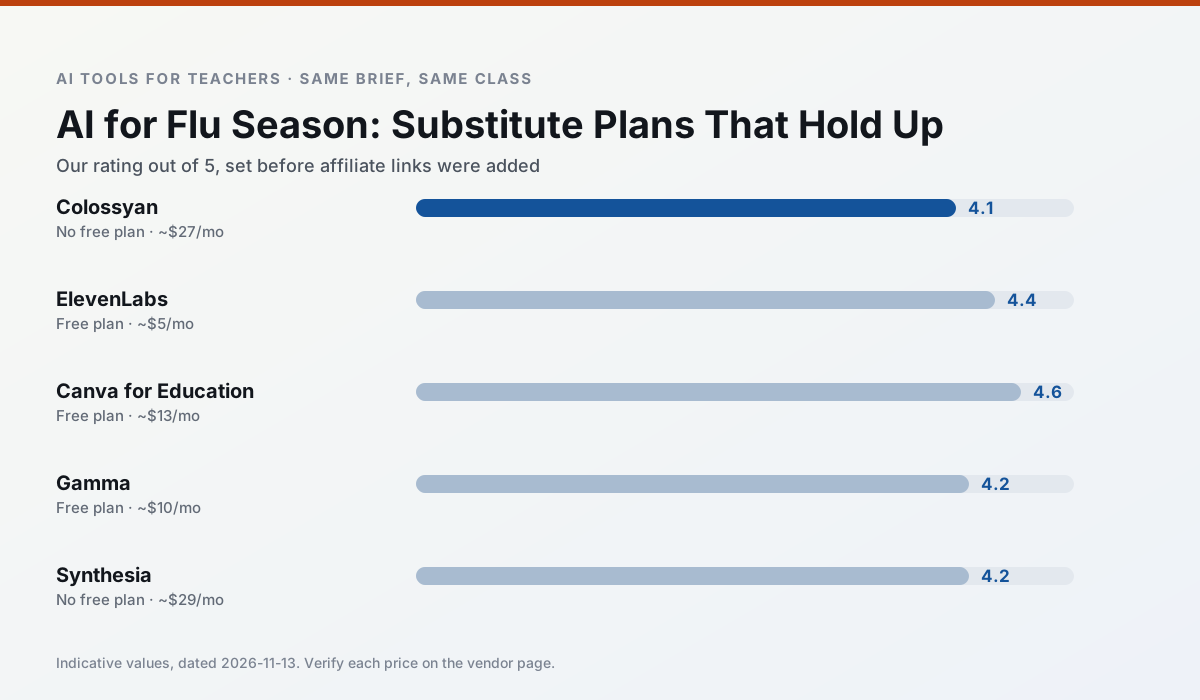
Side by side
Comparison table
Ratings reflect our timed classroom workflow, not vendor claims. Prices are indicative — verify on the vendor site.
| Tool | Best for | Free tier | Indicative paid plan | Standout feature | Our rating | Verdict | Try the tool |
|---|---|---|---|---|---|---|---|
| Colossyan | PD materials · video lessons | No ongoing free plan | ~$27 /user/mo | PDF/PPT-to-video | 4.1 / 5 | Situational | Try free |
| ElevenLabs | accessibility · reading intervention | Yes — Monthly character quota | ~$5 /user/mo | Very natural voices | 4.4 / 5 | Strong option | Try free |
| Canva for Education | slide decks · worksheets | Yes — Verification required | ~$13 /user/mo | Thousands of education templates | 4.6 / 5 | Top pick | Try free |
| Gamma | slide decks · parent communication | Yes — Credit-limited generation | ~$10 /user/mo | Prompt-to-deck | 4.2 / 5 | Strong option | Try free |
| Synthesia | flipped lessons · video lessons | No ongoing free plan | ~$29 /user/mo | 140+ languages | 4.2 / 5 | Strong option | Try free |
| HeyGen | video lessons · translation | Yes — Limited credit plan | ~$29 /user/mo | Video translation | 4.3 / 5 | Strong option | Try free |
Match your situation
Best for X
Different jobs need different tools. Here is what we would open first in each case.
Nothing on Colossyan's free tier is a teaser demo; the limits are documented and a normal week fits inside them.
On the daily cycle, ElevenLabs saves the most edit time per task; the paid tier mostly buys more runs rather than better ones.
Setup cost is one login for Canva for Education; everything else can wait until you know the tool is useful.
For a school rollout, Gamma offers the paperwork and the admin console; the classroom features are standard by comparison.
Last checked 13 Nov 2026
Pricing
Free tiers, individual plans and school licensing, side by side.
| Tool | Free plan | Individual / paid | School & district | Billing note | Verify |
|---|---|---|---|---|---|
| Colossyan | No ongoing free tier | ~$27 /user/mo | Custom quote | Indicative — verify on vendor site | Vendor |
| ElevenLabs | $0 — Monthly character quota | ~$5 /user/mo | ~$22 /user/mo | Indicative — verify on vendor site | Vendor |
| Canva for Education | $0 — Verification required | ~$13 /user/mo | Custom quote | Indicative — verify on vendor site | Vendor |
| Gamma | $0 — Credit-limited generation | ~$10 /user/mo | ~$20 /user/mo | Indicative — verify on vendor site | Vendor |
| Synthesia | No ongoing free tier | ~$29 /user/mo | Custom quote | Indicative — verify on vendor site | Vendor |
| HeyGen | $0 — Limited credit plan | ~$29 /user/mo | Custom quote | Indicative — verify on vendor site | Vendor |
Editorial rule: pricing is re-checked every 2–3 months and the top 50 pages are refreshed every 6 months. See our funding policy.
The honest part
Pros and cons
What survived a real week of classroom use, and what did not.
Pros
- Strong for staff training, not just lessons
- Good compliance/LMS export
- Fast document-to-video
Cons
- No permanent free plan
- Higher price point
- Less suited to K-12 student-facing content
Pros
- Excellent for accessible audio versions
- Low entry price
- Fast generation
Cons
- Quota-based billing
- Voice cloning consent considerations
- Not a teaching platform
Pros
- Effectively free for verified teachers
- Huge template library
- No design skills needed
Cons
- AI features are capped
- Easy to produce cluttered slides
- Account verification can be slow
Pros
- Fastest path from outline to deck
- Modern-looking output by default
- Good export options
Cons
- Design control is limited
- Credits run out quickly
- Not built for student data
Pros
- No camera or editing skills required
- Excellent multilingual voice output
- Easy updates to existing videos
Cons
- Cost is hard to justify for a single teacher
- Avatar video can feel impersonal
- No free ongoing tier
In the classroom
Use cases
Five concrete workflows, with the tool we would open for each one.
Regrouping students after an assessment
Summarise anonymised results into skill groups, then generate one activity per group. Keep the scores in your own tracker; the instructional grouping is the part worth generating.
Recommended: ColossyanA weekly family newsletter from bullet notes
Newsletters fail on length, not tone. Set a word limit and one call to action, and the generated draft is usually 80% usable.
Recommended: ElevenLabsThree reading levels from one source text
Paste a vetted text, ask for supported, core and extension versions, then check the vocabulary list by hand. Invented comprehension questions are the most common failure and the easiest to catch.
Recommended: Canva for EducationA Monday morning lesson plan in twelve minutes
The twelve minutes come from not rewriting the skeleton. Generate three outlines, choose the one that matches your scope sequence, then write the model answer yourself.
Recommended: GammaA parent email in two languages
Draft in plain, warm language with no names, translate, then back-translate the important sentences to check meaning. Keep specific incidents out of the prompt and add them yourself.
Recommended: Synthesia
Questions teachers ask us
FAQ
Direct answers, also published as FAQPage structured data for search and AI assistants.
How long does this workflow take?
Which tool should I start with?
What if the output is unusable?
Sources & further reading
Our recommendation
Try Colossyan free for your next lesson planning task
Training and explainer videos built from documents and scripts. Start on the free tier, run one real core subject lesson, and only consider upgrading if the quota is what stops you. Disclosure: we may earn a commission (25–50% recurring) at no extra cost to you.
Some links on this page are affiliate links. We may earn a commission at no extra cost to you. Our rankings are editorial and never pay-to-play. Never enter student PII into a free consumer account.
Keep reading
Related comparisons in this cluster.
Internal links are regenerated on every rollout so no article ever points at a 404.