The short answer
- Diffit is our default pick for Primary who need to build levelled passages and word work quickly; ElevenLabs is better when differentiation is the bottleneck.
- The cheapest honest test is a week of real work on the free plans: Diffit: Yes — Limited generations per month; ElevenLabs: Yes — Monthly character quota; ChatGPT: Yes — Usage-limited model access. If a tool is still open on Friday, it has earned a paid conversation.
- Every AI output for reading intervention needs a teacher review, especially standards codes, core subject accuracy, and anything in an IEP, assessment or family message.
- Trial one tool for a week of real reading intervention work before any purchase conversation; the quota is the honest test.
Start with ElevenLabs on its free plan.
At 8:45 on a Tuesday morning, I had a second-grade reading group staring at me while trying to read a science article written for a high school audience because district mandates require complex text exposure. Six of those kids were decoding at a late kindergarten level, two were bilingual learners still building English syntax, and one was reading chapter books independently. You cannot hand that crowd a single worksheet and survive the next twenty minutes. This is where AI reading intervention for primary classrooms stops being a tech-conference talking point and becomes survival gear.
Most teachers approach reading intervention by hunting for leveled readers that never quite match the interest level or the skill gap. We have tested a half-dozen platforms over the past term to see which ones actually reduce planning time without making our instruction robotic. If you want a broader view of how these utilities fit into daily planning, our guide on best AI tools for teachers 2026 covers the broader landscape. For primary reading specifically, the tools below handle everything from text leveling to audio scaffolding.
Leveling Text Without Losing the Content
When you need the same science or social studies concept accessible to every reader in the room, Diffit is the utility that saves your weekend. You paste in an article or drop a URL, and it generates leveled reading passages, vocabulary lists, and comprehension questions. The free tier offers limited generations per month, while the paid tier sits around $15 per user monthly. It shines in mixed-ability classes because you can spin up three versions of the exact same text at different Lexile bands. The catch is that leveling is approximate rather than a formal psychometric assessment, and heavy use will burn through your free quota fast. Never paste student-identifiable data into the generator, and check your district compliance rules first.
Prompt: Diffit Leveling Prompt "Take this text about monarch butterfly migration and rewrite it for a 2nd-grade reading level, using simple sentence structures, high-frequency sight words, and a glossary of 4 bolded vocabulary words at the top."
What came back: A clean three-paragraph passage with a glossary, but the sentences were still a bit compound-heavy for my lowest readers, and it missed the vocabulary word "chrysalis."
Two edits that made it usable: I manually added "chrysalis" to the glossary list and split the compound sentences in paragraph two into two distinct statements.
Building Audio Scaffolds for Developing Readers
Reading intervention often fails because struggling primary students spend all their cognitive load on decoding and never reach comprehension. ElevenLabs solves this by turning any leveled text into natural-sounding AI voiceover and text-to-speech files. The free tier gives you a monthly character quota, and the paid tier runs around $5 per user monthly. It is exceptionally good for creating accessible audio versions of your intervention texts so students can listen while tracking the print. Keep in mind that it is billed strictly by character quota, and you must never clone a student or colleague's voice without written consent. It is not a teaching platform on its own, but it pairs nicely with any text you generate elsewhere. For more ideas on supporting diverse learners, look at our piece on AI accommodations for paraprofessionals.
Managing Intervention Groups and Question Sets
Once your texts are leveled and your audio is recorded, you need to group students and check their understanding. ChatGPT is our pick for parent-facing writing and general brainstorming, costing about $20 per user monthly on paid tiers with a usage-limited free model. It works well if you feed it anonymized assessment data to help summarize results into skill groups, then generate one targeted activity per group. Do not put student personally identifiable information on consumer plans.
You can also use it to build a question bank from a PDF or article by feeding in a non-identifiable source and asking for items tagged by difficulty, along with the misconception behind each distractor. Always spot-check every answer key, because numerical items are notoriously unreliable.
Claude is our choice for schools and districts that need heavy document processing, priced around $20 per user monthly on paid tiers with a usage-limited free version. It handles full unit plans, long rubrics, and structured document outputs with a nuanced prose style that feels less generic than its competitors. It lacks teacher-specific templates, but its massive context window makes it unbeatable for analyzing a stack of curriculum standards against your reading intervention scope. Always use an approved workspace tier for any school-related documents to maintain data hygiene.
All-in-One Generators for Busy Primary Classrooms
When you do not have time to write complex prompts, MagicSchool AI gives you a massive library of teacher-specific AI generators in one dashboard. The free tier includes core generators with monthly limits, and the paid tier is roughly $12 per user monthly. It is the fastest platform to learn because it requires almost no prompting skill. You click the generator for "reading passage" or "phonics word list," fill in a few dropdown menus, and get an immediate output. The vendor states that no student PII is required for core generators, but district approval can be slow, and the best features sit behind the paywall.
Eduaide.Ai is another dedicated teaching platform offering lesson, rubric, and worksheet generation with a clean, uncluttered user interface. The free tier operates on a daily generation cap, and the paid plan sits near $10 per user monthly. It features a smaller template set than MagicSchool, but its worksheet and rubric outputs are sharp. Always confirm data retention settings before you use any platform for student-adjacent tasks, and remember that outputs still need a human teacher to check them against your actual phonics scope and sequence.
Two Things That Went Wrong in Real Use
No AI intervention workflow survives first contact with an actual classroom without breaking. Here is what happened to me and how I fixed it.
First, I trusted an AI text generator to create a decodable text focused entirely on the "igh" vowel team for my intervention group. I printed twenty copies, handed them out, and watched every single reader stumble because the generator had casually stuffed in words like "through," "laugh," and "beautiful" without checking phonics constraints. It treated the task like a general vocabulary exercise rather than a strict decoding drill. To fix it, I now run a strict negative constraint prompt: "Use only closed syllables, silent-e patterns, and the 'igh' vowel team. Do not include sight words outside of the Fry first hundred."
Second, I tried using an AI assistant to analyze a batch of running records and group my students automatically. I copied and pasted raw reading accuracy percentages and error types into a consumer-tier chat window, forgetting for a second that I was dealing with identifiable data. I caught myself before hitting enter, cleared the chat, and re-entered the data using student ID numbers instead of names. The lesson here is simple. Never paste student names or identifying details into any tool unless your district has an active, verified data privacy agreement in writing.
FAQ
Can AI do reading intervention at mixed-grade level?
It can produce a first draft and a structure. The level judgement, the standards check and the tone are teacher decisions.
Which tool is best for reading intervention?
Diffit on the evidence in this article, with ElevenLabs as the second opinion. Neither replaces the review step.
What is the biggest risk?
A confident, plausible output that nobody checked. The five checks below exist for that reason.
Sources
- Diffit vendor documentation and pricing models: https://diffit.me
- ElevenLabs voice generation guidelines and pricing: https://elevenlabs.io
- OpenAI ChatGPT business and privacy tier specifications: https://openai.com
- Anthropic Claude enterprise data handling notes: https://anthropic.com
- MagicSchool AI feature overview and school district compliance statements: https://magicschool.ai
- Eduaide.Ai platform capabilities and rate-limit documentation: https://eduaide.ai
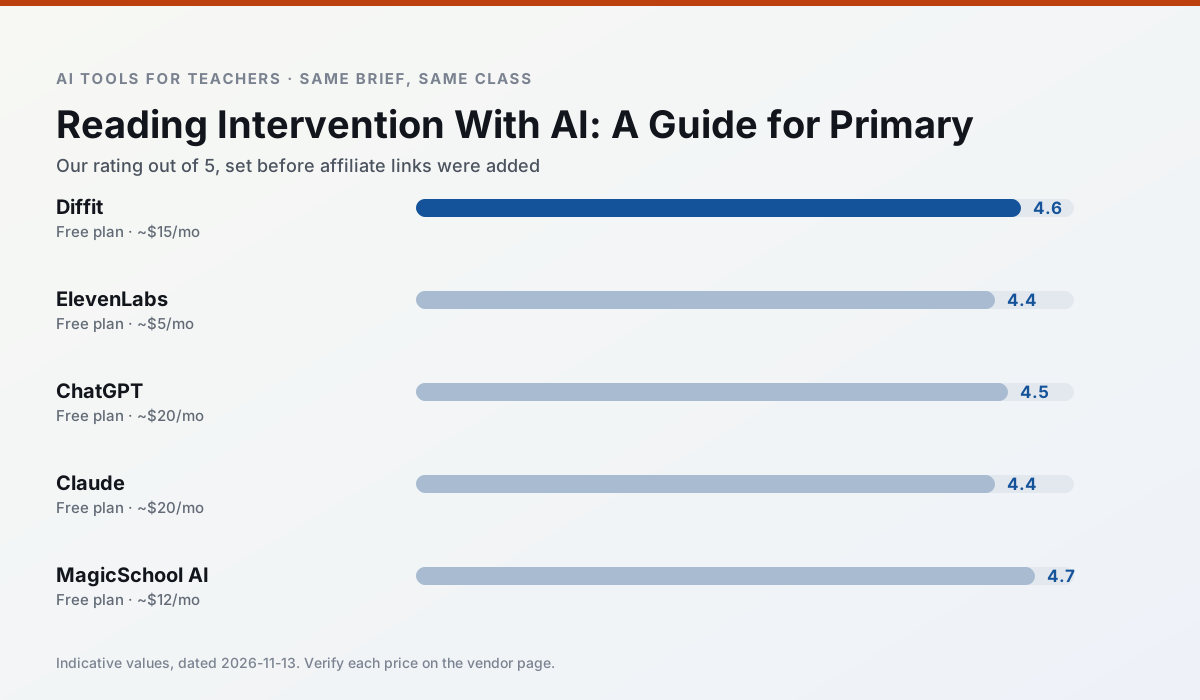
Side by side
Comparison table
Ratings reflect our timed classroom workflow, not vendor claims. Prices are indicative — verify on the vendor site.
| Tool | Best for | Free tier | Indicative paid plan | Standout feature | Our rating | Verdict | Try the tool |
|---|---|---|---|---|---|---|---|
| Diffit | differentiated instruction · reading intervention | Yes — Limited generations per month | ~$15 /user/mo | Lexile-style leveling | 4.6 / 5 | Top pick | Try free |
| ElevenLabs | accessibility · reading intervention | Yes — Monthly character quota | ~$5 /user/mo | Very natural voices | 4.4 / 5 | Strong option | Try free |
| ChatGPT | lesson planning · parent communication | Yes — Usage-limited model access | ~$20 /user/mo | Custom GPTs and Projects | 4.5 / 5 | Top pick | Try free |
| Claude | rubric creation · feedback on writing | Yes — Usage-limited | ~$20 /user/mo | Very large context window | 4.4 / 5 | Strong option | Try free |
| MagicSchool AI | lesson planning · differentiation | Yes — Core generators with monthly usage limits | ~$12 /user/mo | 80+ teacher-specific tools | 4.7 / 5 | Top pick | Try free |
| Eduaide.Ai | lesson planning · rubric creation | Yes — Daily generation cap | ~$10 /user/mo | Resource library | 4.3 / 5 | Strong option | Try free |
Match your situation
Best for X
Different jobs need different tools. Here is what we would open first in each case.
Diffit is built around teacher-monitored student spaces and audit logs rather than a consumer chat account, which is a different approval conversation.
ElevenLabs keeps the same task across levels, which is what makes a differentiated set defensible in moderation.
ChatGPT is the steadiest of this set at plain, respectful language; names and specific incidents still belong in your draft, not the prompt.
For a school rollout, Claude offers the paperwork and the admin console; the classroom features are standard by comparison.
Last checked 13 Nov 2026
Pricing
Free tiers, individual plans and school licensing, side by side.
| Tool | Free plan | Individual / paid | School & district | Billing note | Verify |
|---|---|---|---|---|---|
| Diffit | $0 — Limited generations per month | ~$15 /user/mo | Custom quote | Indicative — verify on vendor site | Vendor |
| ElevenLabs | $0 — Monthly character quota | ~$5 /user/mo | ~$22 /user/mo | Indicative — verify on vendor site | Vendor |
| ChatGPT | $0 — Usage-limited model access | ~$20 /user/mo | ~$25+ /user/mo | Indicative — verify on vendor site | Vendor |
| Claude | $0 — Usage-limited | ~$20 /user/mo | ~$25+ /user/mo | Indicative — verify on vendor site | Vendor |
| MagicSchool AI | $0 — Core generators with monthly usage limits | ~$12 /user/mo | Custom quote | Indicative — verify on vendor site | Vendor |
| Eduaide.Ai | $0 — Daily generation cap | ~$10 /user/mo | Custom quote | Indicative — verify on vendor site | Vendor |
Editorial rule: pricing is re-checked every 2–3 months and the top 50 pages are refreshed every 6 months. See our funding policy.
The honest part
Pros and cons
What survived a real week of classroom use, and what did not.
Pros
- Excellent for mixed-ability classes
- Produces printable and digital versions
- Minimal setup
Cons
- Narrower scope than all-in-one suites
- Leveling is approximate, not a formal assessment
- Heavy use burns through the free quota
Pros
- Excellent for accessible audio versions
- Low entry price
- Fast generation
Cons
- Quota-based billing
- Voice cloning consent considerations
- Not a teaching platform
Pros
- Most flexible option available
- Huge community of teacher prompt libraries
- Strong multilingual support
Cons
- Requires prompt skills for consistent results
- No built-in standards alignment
- District privacy review usually required
Pros
- Handles full unit plans and long rubrics
- Nuanced, less generic prose
- Good at structured document output
Cons
- No teacher-specific templates
- Fewer classroom integrations
- Consumer plan not suitable for student data
Pros
- Widest purpose-built template library
- Strong free tier for individual teachers
- Fast to learn with almost no prompting skill
Cons
- Outputs still need standards review
- Best features sit behind the paid tier
- District approval can be slow
In the classroom
Use cases
Five concrete workflows, with the tool we would open for each one.
A weekly family newsletter from bullet notes
Newsletters fail on length, not tone. Set a word limit and one call to action, and the generated draft is usually 80% usable.
Recommended: DiffitRegrouping students after an assessment
Summarise anonymised results into skill groups, then generate one activity per group. Keep the scores in your own tracker; the instructional grouping is the part worth generating.
Recommended: ElevenLabsA substitute folder that needs no context
The value here is structure, not creativity. Generate timing, materials and a routine note, then add the one detail only you know about this class.
Recommended: ChatGPTA question bank from a PDF or article
Feed a non-identifiable source and ask for items tagged by difficulty with the misconception behind each distractor. Spot-check every answer key; numerical items are least reliable.
Recommended: ClaudeA five-minute exit ticket set
Ask for one recall, one application and one reasoning item, then delete the second recall question every generator sneaks in.
Recommended: MagicSchool AI
Questions teachers ask us
FAQ
Direct answers, also published as FAQPage structured data for search and AI assistants.
Can AI do reading intervention at mixed-grade level?
Which tool is best for reading intervention?
What is the biggest risk?
Sources & further reading
Our recommendation
Try ElevenLabs free for your next reading intervention task
Natural-sounding AI voiceover and text-to-speech for learning materials. Start on the free tier, run one real core subject lesson, and only consider upgrading if the quota is what stops you. Disclosure: we may earn a commission (22% recurring) at no extra cost to you.
Some links on this page are affiliate links. We may earn a commission at no extra cost to you. Our rankings are editorial and never pay-to-play. Never enter student PII into a free consumer account.
Keep reading
Related comparisons in this cluster.
Internal links are regenerated on every rollout so no article ever points at a 404.