The short answer
- Grammarly is our default pick for teachers who need to draft a standards-aware lesson plan quickly; Notion AI is better when differentiation is the bottleneck.
- Grammarly handles the broad case; Notion AI handles the narrow one. Anything beyond that pair should be justified by a recurring weekly job, not a feature demo.
- Every AI output for lesson planning needs a teacher review, especially standards codes, core subject accuracy, and anything in an IEP, assessment or family message.
- Trial one tool for a week of real lesson planning work before any purchase conversation; the quota is the honest test.
Start with Grammarly on its free plan.
By October, the desk looks like a paper recycling yard crossed with a crime scene. Last year, I tried using a dozen different AI novelties for grading, planning, and parent communication, and I spent more time wrestling with login screens than I saved in actual minutes. This term, I tightened the loop. Using ai across one assessment cycle, start to finish means picking tools that handle specific choke points without making you relearn how to teach. Here is how five different applications actually hold up when the bell rings at 7:30 AM and thirty essays are sitting in your bag.
Planning the Unit and Stashing the Notes
Before you write a single assessment, you need a place to store standards, anchor texts, and pacing guides that do not require an archaeological dig to find. Notion AI (~$10 /user/mo indicative) is my long-term home base for curriculum records. The free tier gives you limited AI usage, which is fine for testing, but the real power is the team collaboration and flexible database structure. When I map out a four-week unit, I use Notion AI to draft the initial skeleton of lessons. The catch is that setup time is significant, and the AI add-on pricing has changed more than once. You also have to remember never to store student PII in personal workspaces.
When a Tuesday morning hits and I am home with a migraine, I need a substitute folder that needs no context. The value here is structure, not creativity. I use Notion to generate the timing, materials, and a routine note, then add the one detail only you know about this class, like which student needs to sit near the pencil sharpener.
Drafting the Questions and Exit Tickets
Once the unit plan is set, you need items that actually measure student thinking instead of just copying definitions from the glossary. You can feed a non-identifiable source text into an AI workspace and ask for items tagged by difficulty, complete with the misconception behind each distractor. You must spot-check every answer key, because numerical items are the least reliable. For day-to-day checks, I run a five-minute exit ticket set where I ask for one recall, one application, and one reasoning item, and then I delete the second recall question every generator sneaks in.
If you are looking for student-safe deployments, Grammarly (~$12 /user/mo indicative) handles the polish on my teacher-facing prompts and parent newsletters. The free tier covers core grammar and tone checks, and it has a very low learning curve because it works everywhere you already write. It catches errors in high-stakes parent emails, though the premium tier is needed for tone rewriting. You need to disable text collection on school devices and check your local DPA. It is not education-specific, and if you lean on it too hard, it can flatten your natural teacher voice.
Submitting and Scanning Paper Work
Most high school classrooms still run on physical paper, no matter how many tablets districts buy. Class Companion (~$12 /user/mo indicative) is the best for schools and districts because it provides AI feedback on handwritten and scanned student work. The free tier is limited to a few assignments, but it is exceptionally useful where work is done on paper, offering fast, specific comments with good math support. Scan quality directly affects accuracy, and the feedback still requires teacher review. Because student work is uploaded, a proper DPA is required.
When grading essay drafts, moderation failures almost always trace back to a rubric the model wrote. You have to reorder the workflow so the rubric is yours and the comments are generated. For institutional writing feedback and similarity checking, many high schools rely on Turnitin Clarity / Feedback Studio (custom quote indicative). There is no free tier, and individual teachers cannot buy it directly since it requires heavy administrative setup. It is best for parent-facing writing records and consistent institutional workflows, though AI detection remains contested and you must verify local FERPA configurations. If you want a broader look at administrative workloads, read our guide on ai data analysis for administrators.
Prompt: Act as an 11th-grade English teacher. Generate three rubric-aligned feedback comments for an argumentative essay paragraph that lacks a clear warrant connecting the evidence to the claim.
Generated Output: "Your paragraph contains evidence from the text, but you failed to analyze it effectively. Make sure you explain how your quote supports your thesis statement so the reader is not left guessing your argument."
Edits made:
- Changed "failed to analyze" to "the bridge is missing between your quote and your claim."
- Added a direct reference to their specific sentence structure to match how I talk during conference time.
Multimedia Summaries and Parent Reports
Sometimes written text is not enough to get families on board or to help multilingual learners grasp a complex historical timeline. Fliki (~$21 /user/mo indicative) offers text-to-video with stock media and AI voiceover. The free tier is watermarked with limited minutes, and it is a pure content tool, so you must avoid any student PII. It is good for explainer visuals without needing an avatar, though the output can look generic and the price jumps between tiers.
For standalone audio materials, Murf AI (~$19 /user/mo indicative) gives you studio-quality voiceover for presentations. The free tier is trial-only, and the paid plan runs around $19 /user/mo indicative. It provides very clean audio and good pacing controls with easy slide integration. You have to pay attention to commercial licensing rules and check license terms before distributing audio publicly. Both media tools work well when paired with the core systems detailed in our best ai tools for teachers 2026 overview.
When you reach the end of the grading window, IEP present-levels first drafts take up an entire weekend if you let them. Use aggregated, anonymised data only. Ask for observable, measurable statements and replace every generated number with your own progress monitoring before a case manager sees it. AI across one assessment cycle, start to finish is not about automating your job away. It is about shrinking the administrative drag so you have enough energy left to actually talk to the kids on Monday morning.
FAQ
How long does this workflow take?
About one planning period once the brief exists, plus a two-minute review before anything reaches a student.
Which tool should I start with?
Grammarly on its free plan, on a real task, before any purchase conversation.
What if the output is unusable?
Rewrite the brief, not the output. In our logs an unusable draft almost always traced back to a vague brief.
Sources
- Grammarly Education Overview: grammarly.com/edu
- Notion AI Workspace Pricing & Features: notion.so/product/ai
- Turnitin Feedback Studio & Clarity Specifications: turnitin.com
- Class Companion Platform Data: classcompanion.com
- Fliki Text-to-Video Limits: fliki.ai
- Murf AI Voice Generation Terms: murf.ai
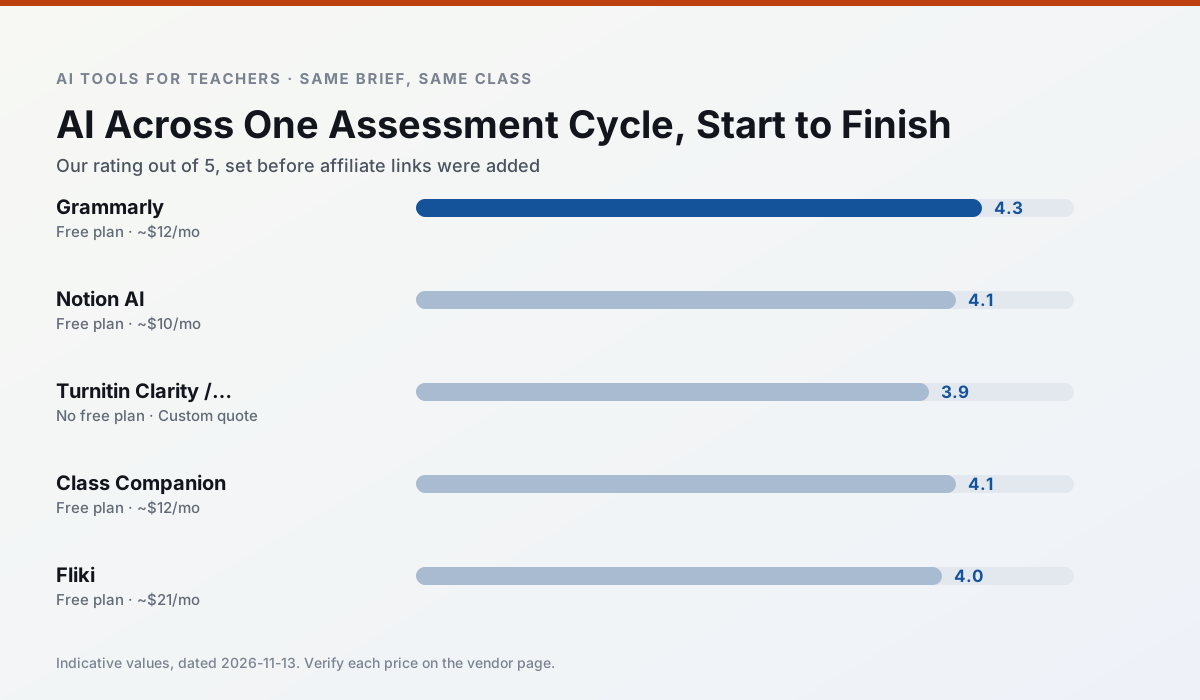
Side by side
Comparison table
Ratings reflect our timed classroom workflow, not vendor claims. Prices are indicative — verify on the vendor site.
| Tool | Best for | Free tier | Indicative paid plan | Standout feature | Our rating | Verdict | Try the tool |
|---|---|---|---|---|---|---|---|
| Grammarly | parent communication · report card comments | Yes — Core grammar and tone checks | ~$12 /user/mo | Tone adjustments | 4.3 / 5 | Strong option | Try free |
| Notion AI | curriculum mapping · unit planning | Yes — Limited AI usage | ~$10 /user/mo | Linked databases | 4.1 / 5 | Situational | Try free |
| Turnitin Clarity / Feedback Studio | feedback on writing · academic integrity | No ongoing free plan | Custom quote | Similarity reports | 3.9 / 5 | Situational | Try free |
| Class Companion | grading · feedback on writing | Yes — Limited assignments | ~$12 /user/mo | Handwriting recognition | 4.1 / 5 | Situational | Try free |
| Fliki | video lessons · audio lessons | Yes — Watermarked, limited minutes | ~$21 /user/mo | Blog/text to video | 4.0 / 5 | Situational | Try free |
| Murf AI | audio lessons · accessibility | Yes — Trial-only output | ~$19 /user/mo | Voice fine-tuning | 4.1 / 5 | Situational | Try free |
Match your situation
Best for X
Different jobs need different tools. Here is what we would open first in each case.
For anything students touch directly, Grammarly offers the supervision controls and logging that IT will ask about first.
Notion AI produces levelled versions from one source in a single pass, which is the highest-value differentiation shortcut we tested at this level.
Turnitin Clarity / Feedback Studio has the strongest tone control for family emails and report comments, provided you still read the message aloud before sending.
For a school rollout, Class Companion offers the paperwork and the admin console; the classroom features are standard by comparison.
Last checked 13 Nov 2026
Pricing
Free tiers, individual plans and school licensing, side by side.
| Tool | Free plan | Individual / paid | School & district | Billing note | Verify |
|---|---|---|---|---|---|
| Grammarly | $0 — Core grammar and tone checks | ~$12 /user/mo | ~$15 /user/mo | Indicative — billed annually | Vendor |
| Notion AI | $0 — Limited AI usage | ~$10 /user/mo | ~$8 /user/mo | Indicative — verify on vendor site | Vendor |
| Turnitin Clarity / Feedback Studio | No ongoing free tier | Custom quote | Custom quote | LMS-wide deployment | Vendor |
| Class Companion | $0 — Limited assignments | ~$12 /user/mo | Custom quote | Indicative — verify on vendor site | Vendor |
| Fliki | $0 — Watermarked, limited minutes | ~$21 /user/mo | ~$66 /user/mo | Indicative — verify on vendor site | Vendor |
| Murf AI | $0 — Trial-only output | ~$19 /user/mo | ~$39 /user/mo | Indicative — verify on vendor site | Vendor |
Editorial rule: pricing is re-checked every 2–3 months and the top 50 pages are refreshed every 6 months. See our funding policy.
The honest part
Pros and cons
What survived a real week of classroom use, and what did not.
Pros
- Catches errors in high-stakes parent emails
- Works everywhere you already write
- Very low learning curve
Cons
- Not education-specific
- Can flatten teacher voice
- Premium needed for tone rewriting
Pros
- Great for long-term curriculum records
- Strong team collaboration
- Flexible structure
Cons
- Setup time is significant
- AI add-on pricing changed more than once
- Not purpose-built for lesson generation
Pros
- Already licensed at many schools
- Consistent institutional workflow
- Detailed revision history
Cons
- Individual teachers cannot buy it
- AI detection remains contested
- Heavy administrative setup
Pros
- Useful where work is done on paper
- Fast, specific comments
- Good math support
Cons
- Scan quality affects accuracy
- Narrow use case
- Feedback still needs teacher review
Pros
- No avatar needed
- Good for explainer visuals
- Simple editor
Cons
- Minute-based limits
- Output can look generic
- Price jumps between tiers
In the classroom
Use cases
Five concrete workflows, with the tool we would open for each one.
A substitute folder that needs no context
The value here is structure, not creativity. Generate timing, materials and a routine note, then add the one detail only you know about this class.
Recommended: GrammarlyA question bank from a PDF or article
Feed a non-identifiable source and ask for items tagged by difficulty with the misconception behind each distractor. Spot-check every answer key; numerical items are least reliable.
Recommended: Notion AIA five-minute exit ticket set
Ask for one recall, one application and one reasoning item, then delete the second recall question every generator sneaks in.
Recommended: Turnitin Clarity / Feedback StudioAn IEP present-levels first draft
Use aggregated, anonymised data only. Ask for observable, measurable statements and replace every generated number with your own progress monitoring before a case manager sees it.
Recommended: Class CompanionRubric and feedback comments in one pass
Reorder the workflow so the rubric is yours and the comments are generated. Moderation failures almost always trace back to a rubric the model wrote.
Recommended: Fliki
Questions teachers ask us
FAQ
Direct answers, also published as FAQPage structured data for search and AI assistants.
How long does this workflow take?
Which tool should I start with?
What if the output is unusable?
Sources & further reading
Our recommendation
Try Grammarly free for your next lesson planning task
Writing assistant for polished parent emails, newsletters and reports. Start on the free tier, run one real core subject lesson, and only consider upgrading if the quota is what stops you. Disclosure: we may earn a commission ($20 per paid upgrade + $0.20/signup) at no extra cost to you.
Some links on this page are affiliate links. We may earn a commission at no extra cost to you. Our rankings are editorial and never pay-to-play. Never enter student PII into a free consumer account.
Keep reading
Related comparisons in this cluster.
Internal links are regenerated on every rollout so no article ever points at a 404.