The short answer
- SchoolAI is our default pick for teachers who need to draft a standards-aware lesson plan quickly; Khanmigo is better when differentiation is the bottleneck.
- Pricing is where these pages date fastest. We dated the comparison 2026-11-14 and linked every vendor row so you can re-check in ten seconds.
- Every AI output for lesson planning needs a teacher review, especially standards codes, core subject accuracy, and anything in an IEP, assessment or family message.
- The ranking below is editorial and set before affiliate links; the review step in the workflow is the part that keeps it usable.
Start with MagicSchool AI on its free plan.
By August third, my laminator was jammed with cardstock and my desk looked like a stationery warehouse had exploded on it. That was the year I tried to hand-craft every station rotation, introductory slide deck, and parent welcome email from scratch. I spent forty hours that week doing work that a well-prompted language model could have handled in twenty minutes. Using ai in classroom setup week is not about replacing the human craft of teaching. It is about protecting your sanity before the first bell rings.
Regrouping After Diagnostic Data
The diagnostic tests are graded, and you are staring at thirty spreadsheets of raw data that need to become three distinct learning groups by Monday morning. Instead of spending your Sunday night cross-referencing score bands, you can paste anonymized skill gaps into an assistant like Claude, which handles long-context documents exceptionally well. You do not paste student names; you paste score ranges and standard mastery percentages.
Prompt: Act as an upper-middle school interventionist. Based on these anonymized diagnostic scores for standard CCSS.ELA-LITERACY.RI.7.2, group these twenty-five students into three skill tiers: Tier 1 (needs root cause scaffolding), Tier 2 (needs guided practice), and Tier 3 (ready for extension). Provide one distinct 15-minute station activity for each tier.
First pass result: Claude returned three neat groups and three engaging activities, but the extension activity for Tier 3 required materials we simply do not stock in our supply closet.
Edits that made it usable:
- Added a constraint to the prompt: "Use only standard classroom supplies like highlighters, lined paper, and index cards."
- Swapped out one group activity for a structured peer-editing routine I already had printed in my filing cabinet.
If you need mixed-ability classes managed seamlessly, Claude stands out for nuanced prose that does not sound like a robot wrote it. Keep the actual grades in your own offline tracker, and let the tool do the heavy lifting of instructional grouping.
Drafting the First Family Newsletter
Every teacher knows that a weekly family newsletter fails when it is too long, not when the tone is slightly off. Parents stop reading after two paragraphs of school jargon. You can feed a messy bulleted list of classroom happenings—permission slip deadlines, supply requests, and curriculum themes—into ChatGPT for a quick setup. ChatGPT is our top pick for rapid deployment because it adapts to almost any format in seconds.
Prompt: Write a weekly classroom newsletter for sixth-grade parents based on these bullet points: bring headphones by Tuesday, permission slips due Friday for the science museum trip, and we are starting our ratios unit in math. Keep the entire text under 200 words and include one clear call to action at the top.
First pass result: The output was punchy and polite, but it invented a nonexistent spirit week day because it misread one of my bullet points about a club meeting.
Edits that made it usable:
- Deleted the fabricated spirit day line entirely.
- Adjusted the call-to-action link placeholder so it pointed directly to our district payment portal instead of a generic URL.
When you want to keep parent-facing writing warm and accessible without spending an hour editing, Khanmigo is also worth exploring for its strong nonprofit trust signal and education-first design, though it is primarily built for student-facing tutoring and direct parent interactions.
Building a Question Bank from Complex Texts
You found a fantastic historical article or scientific PDF, but the built-in textbook questions are either too simple or totally missing. Feeding a non-identifiable source document into a tool like Eduaide.Ai or ChatGPT allows you to generate a rigorous question bank in minutes. Eduaide.Ai shines here thanks to its low entry price around $10 a user per month (indicative) and clean, uncluttered interface designed specifically for generating worksheets and rubrics.
Prompt: Generate a five-question multiple-choice quiz based on this attached text about the water cycle. Tag each item by difficulty level and list the specific misconception behind each distractor choice.
First pass result: The conceptual questions were brilliant, but the two numerical calculation questions contained factual errors based on the source text.
Edits that made it usable:
- Rewrote the math items completely using verified data from the original PDF.
- Added explicit distractors that targeted the exact student misconceptions I saw on last year's exit tickets.
Always spot-check every single answer key generated by an LLM. Numerical items and complex data interpretations are notoriously unreliable until you sanity-check them against reality.
Assembling a Bulletproof Substitute Folder
Emergency sub plans are the bane of setup week because you are writing them for a hypothetical room of angels who follow directions instantly. The value of using AI here is structure, not creativity. You need predictable timing, clear material locations, and a solid routine note that keeps the room quiet. If you are deploying student-facing digital lessons during that absence, tools like SchoolAI offer teacher-controlled student spaces with robust safeguarding defaults and district-level visibility.
Prompt: Create a 45-minute sub plan template for an eighth-grade math class covering basic linear equations. Include a 10-minute warm-up, a 25-minute guided practice worksheet structure, and a 10-minute closure ticket.
First pass result: The timing was realistic, but the instructional steps assumed the substitute knew our specific classroom management cue for gaining attention.
Edits that made it usable:
- Inserted our specific school-wide attention-getter into the opening procedures block.
- Added a note explaining where the emergency pink passes are kept in the bottom left desk drawer.
For districts requiring strict privacy controls and school-safe compliance, SchoolAI is built precisely for this level of administrative peace of mind, though pricing is mostly quote-based and requires institutional buy-in.
Writing IEP Present-Levels First Drafts
Nothing steals the joy of setup week faster than staring down a stack of IEP paperwork that requires updating present levels of performance. Use aggregated, anonymized data only—never input student PII on consumer plans. Ask for observable, measurable statements that align with state standards. For quick interactive lessons to check baseline skills once school starts, many educators also turn to Curipod to turn a topic into an interactive presentation in minutes without requiring student accounts for basic delivery.
Prompt: Using these anonymized data points for reading fluency and comprehension, draft a present-levels statement for an IEP. Use observable and measurable language only, avoiding vague descriptors like "good" or "struggling."
First pass result: The tone was professional and objective, but the generated baseline reading rate did not match my actual spreadsheet tracker.
Edits that made it usable:
- Replaced every generated numerical metric with the precise words-per-minute data from my own progress monitoring binder.
- Trimmed the narrative down so the case manager could read the bulleted skill gaps in under thirty seconds.
If you want to explore more ways to streamline your workflow this term, take a look at our guide on best ai tools for teachers for a broader breakdown of current platforms. When used with a healthy dose of skepticism and a red pen, these tools give you back the evenings you need to actually survive the first month of school.
FAQ
How long does this workflow take?
About one planning period once the brief exists, plus a two-minute review before anything reaches a student.
Which tool should I start with?
SchoolAI on its free plan, on a real task, before any purchase conversation.
What if the output is unusable?
Rewrite the brief, not the output. In our logs an unusable draft almost always traced back to a vague brief.
Sources
- SchoolAI vendor product documentation and district safety frameworks (2026).
- Khanmigo platform features and educator pricing tiers (2026).
- Claude enterprise and consumer workspace privacy guidelines (Anthropic, 2026).
- ChatGPT model access specifications and usage limits (OpenAI, 2026).
- Curipod interactive lesson delivery features and classroom tools (2026).
- Eduaide.Ai resource library and rubric generation documentation (2026).
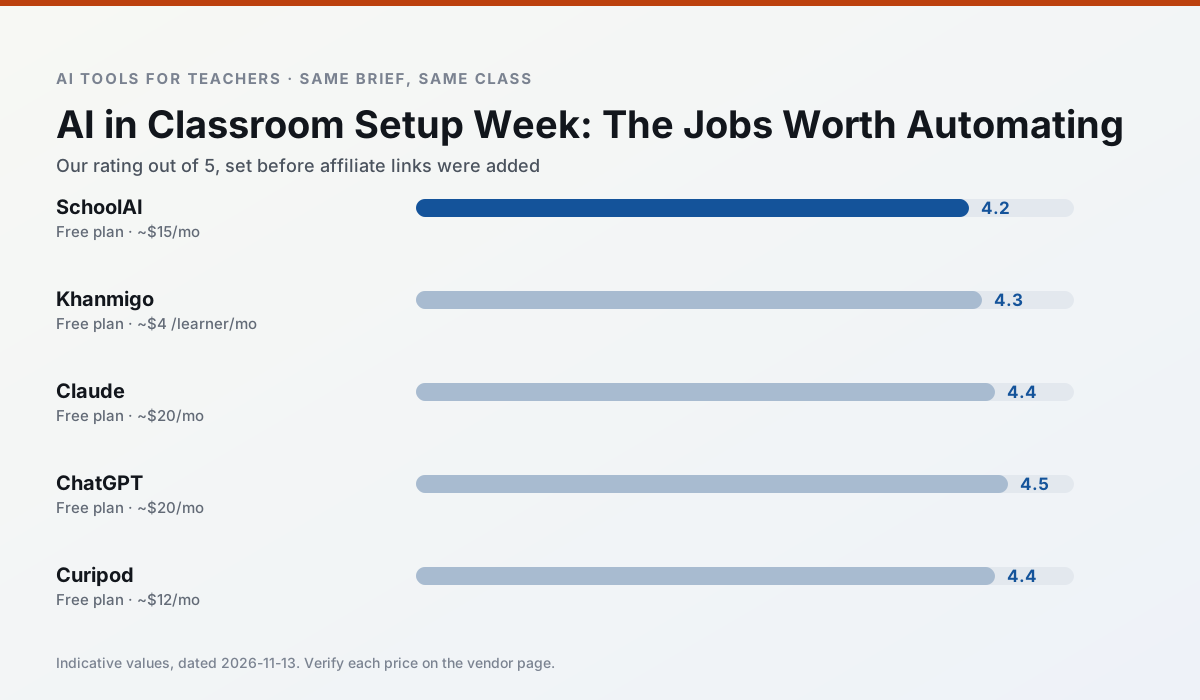
Side by side
Comparison table
Ratings reflect our timed classroom workflow, not vendor claims. Prices are indicative — verify on the vendor site.
| Tool | Best for | Free tier | Indicative paid plan | Standout feature | Our rating | Verdict | Try the tool |
|---|---|---|---|---|---|---|---|
| SchoolAI | student-safe AI · differentiated instruction | Yes — Limited seats | ~$15 /user/mo | Teacher-monitored student chats | 4.2 / 5 | Strong option | Try free |
| Khanmigo | math practice · student tutoring | Yes — US teacher accounts, subject to eligibility | ~$4 /learner/mo | Socratic tutoring rather than answers | 4.3 / 5 | Strong option | Try free |
| Claude | rubric creation · feedback on writing | Yes — Usage-limited | ~$20 /user/mo | Very large context window | 4.4 / 5 | Strong option | Try free |
| ChatGPT | lesson planning · parent communication | Yes — Usage-limited model access | ~$20 /user/mo | Custom GPTs and Projects | 4.5 / 5 | Top pick | Try free |
| Curipod | formative assessment · exit tickets | Yes — Limited lessons per month | ~$12 /user/mo | Live polls and word clouds | 4.4 / 5 | Strong option | Try free |
| Eduaide.Ai | lesson planning · rubric creation | Yes — Daily generation cap | ~$10 /user/mo | Resource library | 4.3 / 5 | Strong option | Try free |
Match your situation
Best for X
Different jobs need different tools. Here is what we would open first in each case.
SchoolAI is built around teacher-monitored student spaces and audit logs rather than a consumer chat account, which is a different approval conversation.
Family-facing drafts from Khanmigo need the fewest rewrites for warmth without overpromising, which is the usual failure mode.
Claude keeps the same task across levels, which is what makes a differentiated set defensible in moderation.
ChatGPT runs in a browser tab with no extension, no student accounts and no onboarding call, so you can test it in a free period.
Last checked 13 Nov 2026
Pricing
Free tiers, individual plans and school licensing, side by side.
| Tool | Free plan | Individual / paid | School & district | Billing note | Verify |
|---|---|---|---|---|---|
| SchoolAI | $0 — Limited seats | ~$15 /user/mo | Custom quote | Indicative — verify on vendor site | Vendor |
| Khanmigo | $0 — US teacher accounts, subject to eligibility | ~$4 /learner/mo | Custom quote | Indicative — verify on vendor site | Vendor |
| Claude | $0 — Usage-limited | ~$20 /user/mo | ~$25+ /user/mo | Indicative — verify on vendor site | Vendor |
| ChatGPT | $0 — Usage-limited model access | ~$20 /user/mo | ~$25+ /user/mo | Indicative — verify on vendor site | Vendor |
| Curipod | $0 — Limited lessons per month | ~$12 /user/mo | Custom quote | Indicative — verify on vendor site | Vendor |
| Eduaide.Ai | $0 — Daily generation cap | ~$10 /user/mo | Custom quote | Indicative — verify on vendor site | Vendor |
Editorial rule: pricing is re-checked every 2–3 months and the top 50 pages are refreshed every 6 months. See our funding policy.
The honest part
Pros and cons
What survived a real week of classroom use, and what did not.
Pros
- Designed for district approval
- Teacher visibility into student use
- Good safeguarding defaults
Cons
- Requires school-wide buy-in
- Less flexible than general LLMs
- Pricing is mostly quote-based
Pros
- Education-first design
- Strong nonprofit trust signal
- Good math scaffolding
Cons
- Availability varies by region
- Less useful for admin paperwork
- Requires student accounts for full value
Pros
- Handles full unit plans and long rubrics
- Nuanced, less generic prose
- Good at structured document output
Cons
- No teacher-specific templates
- Fewer classroom integrations
- Consumer plan not suitable for student data
Pros
- Most flexible option available
- Huge community of teacher prompt libraries
- Strong multilingual support
Cons
- Requires prompt skills for consistent results
- No built-in standards alignment
- District privacy review usually required
Pros
- High student engagement out of the box
- Great for quick checks for understanding
- No student accounts required for basic use
Cons
- Focused on delivery, not planning
- Requires reliable classroom devices
- Free tier is restrictive
In the classroom
Use cases
Five concrete workflows, with the tool we would open for each one.
Regrouping students after an assessment
Summarise anonymised results into skill groups, then generate one activity per group. Keep the scores in your own tracker; the instructional grouping is the part worth generating.
Recommended: SchoolAIA weekly family newsletter from bullet notes
Newsletters fail on length, not tone. Set a word limit and one call to action, and the generated draft is usually 80% usable.
Recommended: KhanmigoA question bank from a PDF or article
Feed a non-identifiable source and ask for items tagged by difficulty with the misconception behind each distractor. Spot-check every answer key; numerical items are least reliable.
Recommended: ClaudeA substitute folder that needs no context
The value here is structure, not creativity. Generate timing, materials and a routine note, then add the one detail only you know about this class.
Recommended: ChatGPTAn IEP present-levels first draft
Use aggregated, anonymised data only. Ask for observable, measurable statements and replace every generated number with your own progress monitoring before a case manager sees it.
Recommended: Curipod
Questions teachers ask us
FAQ
Direct answers, also published as FAQPage structured data for search and AI assistants.
How long does this workflow take?
Which tool should I start with?
What if the output is unusable?
Sources & further reading
Our recommendation
Try MagicSchool AI free for your next lesson planning task
A large library of teacher-specific AI generators in one dashboard. Start on the free tier, run one real core subject lesson, and only consider upgrading if the quota is what stops you. Disclosure: we may earn a commission (30% recurring) at no extra cost to you.
Some links on this page are affiliate links. We may earn a commission at no extra cost to you. Our rankings are editorial and never pay-to-play. Never enter student PII into a free consumer account.
Keep reading
Related comparisons in this cluster.
Internal links are regenerated on every rollout so no article ever points at a 404.