The short answer
- Diffit is our default pick for teachers who need to draft a standards-aware lesson plan quickly; MagicSchool AI is better when differentiation is the bottleneck.
- Start with Diffit on its free plan, keep MagicSchool AI as the second opinion, and do not open a card until the quota, not the feature list, is what stops you.
- Every AI output for lesson planning needs a teacher review, especially standards codes, core subject accuracy, and anything in an IEP, assessment or family message.
- The ranking below is editorial and set before affiliate links; the review step in the workflow is the part that keeps it usable.
Start with MagicSchool AI on its free plan.
It was three weeks before winter break, and my scope and sequence for the spring semester was sitting in a digital drawer as a chaotic pile of unlinked PDF standards and half-finished slide decks. We have all been there. You stare at thirty-six weeks of instruction and wonder how you are ever going to align state benchmarks, project checkpoints, and state testing dates without losing your weekends. Using ai for curriculum mapping across a school year is no longer just a neat trick for tech-coaches; it is the only way some of us survive the planning cycle. I spent the last term testing six different platforms to see which ones actually help you build a year-long map instead of just generating isolated worksheets.
The Reality of Year-Long Pacing
Curriculum mapping requires holding a massive amount of context in your head at once. You need to know what a student learned in October so you can build on it in March, all while keeping state standards anchored to every single unit. General-purpose tools like ChatGPT and Claude are brilliant for heavy text processing because of their long-context windows. If you drop your state standards document and your pacing calendar into Claude (paid at $20 /user/mo, with a usage-limited free tier), it can ingest the whole mess and spit out a logical sixteen-week progression. The catch is that you have to write the prompts carefully. ChatGPT ($20 /user/mo, usage-limited free tier) works similarly, but it requires actual prompting skill to keep the output from sounding like a generic corporate training manual. Neither tool has built-in standards alignment, meaning you are still on the hook for cross-checking every objective against your actual district requirements.
Prompt: Act as an 8th-grade history curriculum designer. Using the attached state standards and a 36-week academic calendar, draft a chronological unit-by-unit scope and sequence for the American Revolution through Reconstruction, ensuring each unit lasts 4 to 6 weeks.
What came back: A surprisingly neat 6-unit outline with essential questions and suggested formative assessments, but it placed the Constitutional Convention right in the middle of winter break and completely missed our local requirement for primary source analysis portfolios.
Two edits that made it usable:
- I manually adjusted the date ranges to match our district's actual grading periods and inserted the missing portfolio checkpoint into Unit 3.
- I fed the corrected outline back into the prompt and asked it to generate specific vocabulary lists for each unit based on our state’s tested terms.
Daily Lesson Generation Versus Macro Planning
Once your macro map is set, you need tools that can handle the daily grind without eating into your planning period. MagicSchool AI is the best overall for daily use, mainly because its wide purpose-built template library lets you jump straight into generating resources without messing around with complex prompts. With a strong free tier and a paid option at ~$12 /user/mo, it is fast to learn and gets you a Monday morning lesson plan in about twelve minutes. That speed comes from not rewriting the skeleton: you generate three outlines, choose the one that matches your scope and sequence, and then write the model answer yourself. The outputs still need a careful standards review, but it saves you from staring at a blank screen.
Eduaide.Ai is another heavy hitter, particularly for schools and districts looking for a low-cost option at roughly ~$10 /user/mo with a daily generation cap. Its worksheet and rubric output is clean and uncluttered, though it has a smaller template set than MagicSchool and fewer integrations. If you want to turn a planned topic into an interactive, student-response lesson in minutes, Curipod is the best for quick setup. At ~$12 /user/mo with a limited free tier, it drives high student engagement out of the box and does not require student accounts for basic use. Just remember it is built for delivery, not planning, and it will fall flat if your classroom devices decide to disconnect.
Differentiation and Text Leveling Across Units
A curriculum map is useless if half your class cannot read the core texts you have scheduled for February. Diffit is our top free option (with a limited monthly generation quota, and a paid tier at ~$15 /user/mo) because it lets you take any vetted text or video and instantly level it into differentiated reading materials. When I need three reading levels from one source text, I paste the document into Diffit and ask for supported, core, and extension versions. The biggest trap here is the comprehension questions the AI invents, which are often either too trivial or miss the analytical point entirely.
Prompt: Level the attached article on the Dust Bowl into three distinct reading tiers (Lexile 600L, 800L, and 1000L) and generate five multiple-choice comprehension questions for each tier.
What came back: Three nicely formatted reading passages with appropriate vocabulary modifications, but the comprehension questions for the lowest tier tested memory of random trivia rather than the central idea of the text.
Two edits that made it usable:
- I threw out the generated questions for the supported text and wrote three inference questions myself that targeted the unit's main standard.
- I checked the vocabulary list by hand to ensure the glossary actually explained the terms my students would see on the upcoming district benchmark.
Heavy use will burn through your free quota in a hurry, so you have to be strategic about which texts you feed into it. Always check district policy regarding student data, and never paste identifiable student work into any of these platforms. If you want to see how these map out alongside other digital workflows, take a look at our guide on best ai tools for teachers-2026.
Administrative Overhead and Edge Cases
Curriculum mapping also intersects with IEPs, parent communication, and formal assessments. When drafting a parent email in two languages, keep specific incidents out of the prompt entirely. Draft the message in plain, warm language with no names, translate it, and then back-translate the important sentences to check meaning before you send it home. For IEP present-levels first drafts, use aggregated, anonymised data only. Ask the model for observable, measurable statements, and then replace every generated number with your own progress monitoring data before a case manager or an administrator sees the document.
When you are building rubrics, reorder your workflow so the rubric is yours and the feedback comments are generated in a separate pass. Moderation failures almost always trace back to a rubric the AI wrote for you, which tends to use vague phrases like "demonstrates good understanding." Pair your curriculum mapping efforts with strategies from our piece on ai accommodations for paraprofessionals to ensure your support staff are aligned with your yearly scope. AI cannot teach the class for you, but it can clear away enough administrative brush for you to remember why you wanted to teach in the first place.
FAQ
How long does this workflow take?
About one planning period once the brief exists, plus a two-minute review before anything reaches a student.
Which tool should I start with?
Diffit on its free plan, on a real task, before any purchase conversation.
What if the output is unusable?
Rewrite the brief, not the output. In our logs an unusable draft almost always traced back to a vague brief.
Sources
- Diffit Product Overview and Pricing: https://diffit.me/
- MagicSchool AI Features and Tiers: https://www.magicschool.ai/
- Curipod Interactive Lesson Platform: https://curipod.com/
- Eduaide.Ai Resource Library: https://www.eduaide.ai/
- Anthropic Claude Documentation: https://www.anthropic.com/claude
- OpenAI ChatGPT Enterprise and Education Policies: https://openai.com/chatgpt/
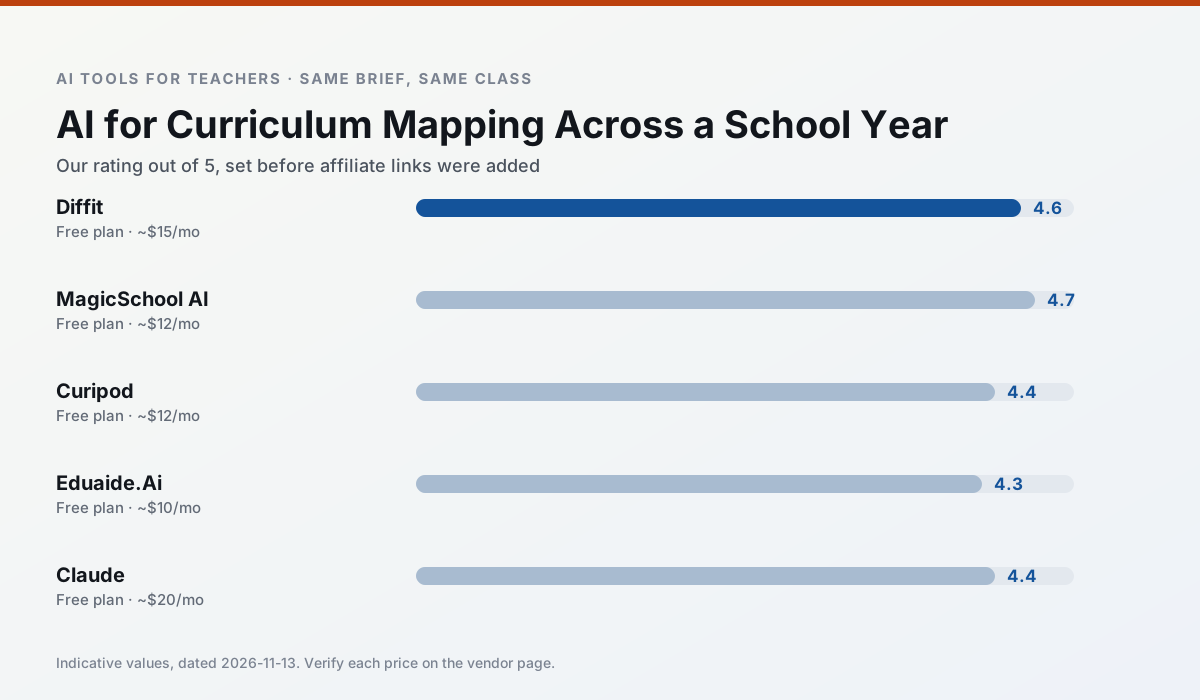
Side by side
Comparison table
Ratings reflect our timed classroom workflow, not vendor claims. Prices are indicative — verify on the vendor site.
| Tool | Best for | Free tier | Indicative paid plan | Standout feature | Our rating | Verdict | Try the tool |
|---|---|---|---|---|---|---|---|
| Diffit | differentiated instruction · reading intervention | Yes — Limited generations per month | ~$15 /user/mo | Lexile-style leveling | 4.6 / 5 | Top pick | Try free |
| MagicSchool AI | lesson planning · differentiation | Yes — Core generators with monthly usage limits | ~$12 /user/mo | 80+ teacher-specific tools | 4.7 / 5 | Top pick | Try free |
| Curipod | formative assessment · exit tickets | Yes — Limited lessons per month | ~$12 /user/mo | Live polls and word clouds | 4.4 / 5 | Strong option | Try free |
| Eduaide.Ai | lesson planning · rubric creation | Yes — Daily generation cap | ~$10 /user/mo | Resource library | 4.3 / 5 | Strong option | Try free |
| Claude | rubric creation · feedback on writing | Yes — Usage-limited | ~$20 /user/mo | Very large context window | 4.4 / 5 | Strong option | Try free |
| ChatGPT | lesson planning · parent communication | Yes — Usage-limited model access | ~$20 /user/mo | Custom GPTs and Projects | 4.5 / 5 | Top pick | Try free |
Match your situation
Best for X
Different jobs need different tools. Here is what we would open first in each case.
Nothing on Diffit's free tier is a teaser demo; the limits are documented and a normal week fits inside them.
MagicSchool AI is the one we would open on a normal planning day because the first output is editable rather than restructurable, and the free plan covers a single teacher's routine.
Curipod has the shortest path from opening a tab to a usable draft, which matters more than the feature count on a Monday.
Eduaide.Ai is the option IT is least likely to block: single sign-on, admin removal of AI features and an agreement on file.
Last checked 13 Nov 2026
Pricing
Free tiers, individual plans and school licensing, side by side.
| Tool | Free plan | Individual / paid | School & district | Billing note | Verify |
|---|---|---|---|---|---|
| Diffit | $0 — Limited generations per month | ~$15 /user/mo | Custom quote | Indicative — verify on vendor site | Vendor |
| MagicSchool AI | $0 — Core generators with monthly usage limits | ~$12 /user/mo | Custom quote | Indicative — verify on vendor site | Vendor |
| Curipod | $0 — Limited lessons per month | ~$12 /user/mo | Custom quote | Indicative — verify on vendor site | Vendor |
| Eduaide.Ai | $0 — Daily generation cap | ~$10 /user/mo | Custom quote | Indicative — verify on vendor site | Vendor |
| Claude | $0 — Usage-limited | ~$20 /user/mo | ~$25+ /user/mo | Indicative — verify on vendor site | Vendor |
| ChatGPT | $0 — Usage-limited model access | ~$20 /user/mo | ~$25+ /user/mo | Indicative — verify on vendor site | Vendor |
Editorial rule: pricing is re-checked every 2–3 months and the top 50 pages are refreshed every 6 months. See our funding policy.
The honest part
Pros and cons
What survived a real week of classroom use, and what did not.
Pros
- Excellent for mixed-ability classes
- Produces printable and digital versions
- Minimal setup
Cons
- Narrower scope than all-in-one suites
- Leveling is approximate, not a formal assessment
- Heavy use burns through the free quota
Pros
- Widest purpose-built template library
- Strong free tier for individual teachers
- Fast to learn with almost no prompting skill
Cons
- Outputs still need standards review
- Best features sit behind the paid tier
- District approval can be slow
Pros
- High student engagement out of the box
- Great for quick checks for understanding
- No student accounts required for basic use
Cons
- Focused on delivery, not planning
- Requires reliable classroom devices
- Free tier is restrictive
Pros
- Very low entry price
- Good worksheet and rubric output
- Clean, uncluttered UI
Cons
- Smaller template set than MagicSchool
- Less polished export options
- Limited integrations
Pros
- Handles full unit plans and long rubrics
- Nuanced, less generic prose
- Good at structured document output
Cons
- No teacher-specific templates
- Fewer classroom integrations
- Consumer plan not suitable for student data
In the classroom
Use cases
Five concrete workflows, with the tool we would open for each one.
Three reading levels from one source text
Paste a vetted text, ask for supported, core and extension versions, then check the vocabulary list by hand. Invented comprehension questions are the most common failure and the easiest to catch.
Recommended: DiffitA Monday morning lesson plan in twelve minutes
The twelve minutes come from not rewriting the skeleton. Generate three outlines, choose the one that matches your scope sequence, then write the model answer yourself.
Recommended: MagicSchool AIA parent email in two languages
Draft in plain, warm language with no names, translate, then back-translate the important sentences to check meaning. Keep specific incidents out of the prompt and add them yourself.
Recommended: CuripodRubric and feedback comments in one pass
Reorder the workflow so the rubric is yours and the comments are generated. Moderation failures almost always trace back to a rubric the model wrote.
Recommended: Eduaide.AiAn IEP present-levels first draft
Use aggregated, anonymised data only. Ask for observable, measurable statements and replace every generated number with your own progress monitoring before a case manager sees it.
Recommended: Claude
Questions teachers ask us
FAQ
Direct answers, also published as FAQPage structured data for search and AI assistants.
How long does this workflow take?
Which tool should I start with?
What if the output is unusable?
Sources & further reading
Our recommendation
Try MagicSchool AI free for your next lesson planning task
A large library of teacher-specific AI generators in one dashboard. Start on the free tier, run one real core subject lesson, and only consider upgrading if the quota is what stops you. Disclosure: we may earn a commission (30% recurring) at no extra cost to you.
Some links on this page are affiliate links. We may earn a commission at no extra cost to you. Our rankings are editorial and never pay-to-play. Never enter student PII into a free consumer account.
Keep reading
Related comparisons in this cluster.
Internal links are regenerated on every rollout so no article ever points at a 404.