The short answer
- Writesonic is our default pick for teachers who need to draft a standards-aware lesson plan quickly; Class Companion is better when differentiation is the bottleneck.
- Start with Writesonic on its free plan, keep Class Companion as the second opinion, and do not open a card until the quota, not the feature list, is what stops you.
- Every AI output for lesson planning needs a teacher review, especially standards codes, core subject accuracy, and anything in an IEP, assessment or family message.
- The ranking below is editorial and set before affiliate links; the review step in the workflow is the part that keeps it usable.
Start with Writesonic on its free plan.
It was a Tuesday afternoon in October when my eighth-period planning period was interrupted by an urgent email from our district tech coordinator. Someone in the history department had installed a free browser extension that promised to rewrite student essays with a single click. Within forty-eight hours, the extension had scraped writing samples from twenty-four kids, uploaded them to an unknown server overseas, and injected unrequested shopping links into our school-issued laptops. Why browser AI extensions need an IT review is not a theoretical question about policy. It is a practical barrier to keeping student records out of commercial training sets.
When teachers look for shortcuts, we often install whatever works right inside Chrome or Edge without checking the backend permissions. We want to clear our desks, grade faster, and send home clean parent updates. But browser tools and standalone apps operate under vastly different security agreements. If you are exploring options for your classroom, take a look at our broader review of the best ai tools for teachers 2026 to see which platforms have survived actual district vetting processes.
The Problem with Unvetted Extensions
Free browser add-ons rarely fund themselves through goodwill. They make money by caching data, analyzing writing habits, or tracking browsing behavior across tabs. When you paste a student paragraph into a random sidebar widget to check for passive voice, you might be violating local privacy policies without realizing it. Even paid tools require scrutiny. Take Writesonic, which functions well as a budget-friendly AI writing and content generation suite at roughly $16 per user per month. It offers a reasonable free trial and plenty of templates, but it is not intended for student data. If your students interact with it directly, you are inviting compliance trouble. For student-safe deployments, Writesonic works best when restricted to teacher-facing tasks like drafting a question bank from a non-identifiable PDF or article.
Prompt: Act as an 8th-grade science teacher. Read this article on plate tectonics and generate 5 multiple-choice questions tagged by difficulty, including the specific misconception behind each distractor.
First response: Generated 5 standard questions, but the distractors were too obvious and lacked any diagnostic value for common student misconceptions.
First edit: Specified that distractors must target known tectonic error patterns, such as confusing crust density with temperature.
Second edit: Swapped out two numerical estimation items that had unreliable answer keys, leaving a clean 3-question formative check.
Managing Parent Communication Safely
Parent communication is another area where teachers lean heavily on browser tools. A weekly family newsletter from bullet notes can save an hour of weekend typing, but newsletters usually fail on length rather than tone. Setting a strict word limit and a single call to action keeps the draft usable. For polishing those high-stakes notes, Grammarly remains a reliable choice at around $12 per user per month. It catches errors in parent emails and reports right inside your browser window. However, you must disable text collection on school devices and verify the district Data Processing Agreement. Grammarly is best for parent-facing writing, provided your IT department has locked down the enterprise settings to prevent data retention.
Where Institutional Agreements Matter
Some tasks are too heavy for individual browser add-ons and require centralized district control. Mixed-ability classes demand robust feedback loops that connect directly to your learning management system. Turnitin Clarity and Feedback Studio handle this well, though individual teachers cannot buy licenses directly. They require custom institutional quotes and heavy administrative setup. The upside is that institutional FERPA agreements are already standard in many districts, making it the top choice for mixed-ability classes. Similarly, when you need to handle handwritten work, Class Companion provides fast, specific comments on scanned student assignments for about $12 per user per month. Because student work is uploaded directly, a formal DPA is required before you deploy it. If you need to generate a substitute folder that needs no context, or regroup students after an assessment by summarising anonymised results into skill groups, you must ensure your chosen platform respects those boundaries.
Prompt: Summarise these anonymised assessment scores into three distinct skill groups for a remedial geometry block and generate one focused practice activity for the lowest tier.
First response: Grouped students by arbitrary letter grades and produced an overly complex project that required supplies we do not keep in the classroom.
First edit: Restricted the output to basic skill categories rather than grades, keeping scores safely in my own offline tracker.
Second edit: Replaced the complex project with a structured 15-minute guided practice sheet that matches our standard curriculum materials.
Long-Term Planning and Workspace Boundaries
Curriculum planning requires a different kind of digital container. Notion AI integrates notes, databases, and curriculum planning into one workspace for roughly $10 per user per month. It excels at long-term curriculum records and team collaboration. It is our top pick for quick setup when building a shared grade-level binder. However, the setup time is significant, and you must never store student personally identifiable information in personal workspaces. If you are drafting IEP present-levels first statements, use aggregated and anonymised data only, and replace every generated number with your own progress monitoring before a case manager sees it. For more ideas on how support staff handle these workflows, read our guide on ai accommodations for paraprofessionals.
Video Generation and Avatar Risks
Sometimes communication takes a visual form, especially when flipping instruction or reaching remote families. Synthesia turns a script into a presenter-led video with AI avatars for about $29 per user per month. It offers excellent multilingual voice output and requires no camera skills, which makes updating existing videos straightforward. Even so, the cost is hard for a single teacher to justify, and the avatar video can feel impersonal if overused. More importantly, you must never use student likenesses without explicit parental consent. If your district has not cleared the platform's video processing terms, leave it off your device entirely.
Browser extensions are seductive because they sit right where we work. But convenience should never bypass compliance. Before you install that next sidebar helper, check whether your district IT department has reviewed its data practices, or explore our related breakdown on ai classroom newsletters for administrators to see how enterprise policies protect your school community.
FAQ
Is AI allowed for lesson planning in my school?
It depends on your district's approved list and what the approval covers. Ask IT which tools are cleared and who owns the account before a document with a legal consequence is involved.
Who is responsible if something goes wrong?
The school, and in practice the named teacher who reviewed the output. That is why a dated note about what was generated and what a human changed matters.
What should never go into a prompt?
Names, rosters, scans of student work and gradebook screenshots. Topic-level prompts do most of the work without any of that.
Sources
- Writesonic Pricing and Features: https://writesonic.com/pricing
- Class Companion Platform Overview: https://classcompanion.com/
- Turnitin Product Suite: https://www.turnitin.com/products/feedback-studio
- Notion AI Workspace Documentation: https://www.notion.so/product/ai
- Grammarly Education and Privacy Standards: https://www.grammarly.com/security
- Synthesia Avatar and Video Tools: https://www.synthesia.io/pricing
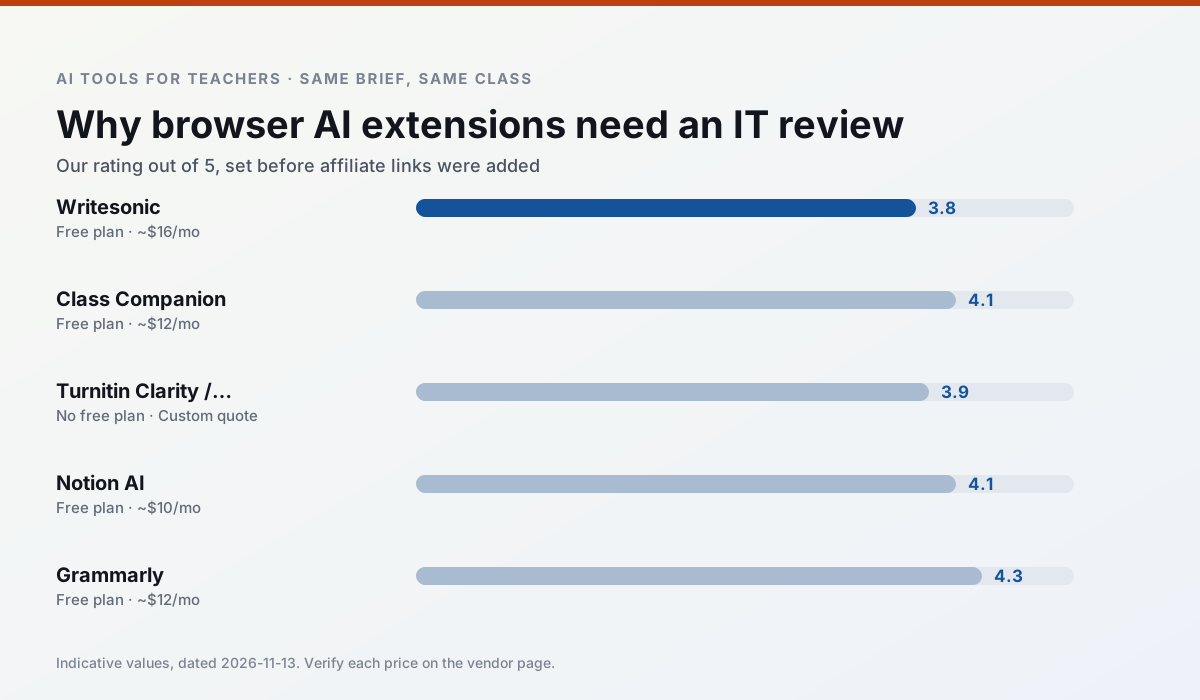
Side by side
Comparison table
Ratings reflect our timed classroom workflow, not vendor claims. Prices are indicative — verify on the vendor site.
| Tool | Best for | Free tier | Indicative paid plan | Standout feature | Our rating | Verdict | Try the tool |
|---|---|---|---|---|---|---|---|
| Writesonic | newsletters · parent communication | Yes — Limited credits | ~$16 /user/mo | Article and email generators | 3.8 / 5 | Situational | Try free |
| Class Companion | grading · feedback on writing | Yes — Limited assignments | ~$12 /user/mo | Handwriting recognition | 4.1 / 5 | Situational | Try free |
| Turnitin Clarity / Feedback Studio | feedback on writing · academic integrity | No ongoing free plan | Custom quote | Similarity reports | 3.9 / 5 | Situational | Try free |
| Notion AI | curriculum mapping · unit planning | Yes — Limited AI usage | ~$10 /user/mo | Linked databases | 4.1 / 5 | Situational | Try free |
| Grammarly | parent communication · report card comments | Yes — Core grammar and tone checks | ~$12 /user/mo | Tone adjustments | 4.3 / 5 | Strong option | Try free |
| Synthesia | flipped lessons · video lessons | No ongoing free plan | ~$29 /user/mo | 140+ languages | 4.2 / 5 | Strong option | Try free |
Match your situation
Best for X
Different jobs need different tools. Here is what we would open first in each case.
For anything students touch directly, Writesonic offers the supervision controls and logging that IT will ask about first.
Class Companion has the strongest tone control for family emails and report comments, provided you still read the message aloud before sending.
Turnitin Clarity / Feedback Studio keeps the same task across levels, which is what makes a differentiated set defensible in moderation.
Notion AI runs in a browser tab with no extension, no student accounts and no onboarding call, so you can test it in a free period.
Last checked 13 Nov 2026
Pricing
Free tiers, individual plans and school licensing, side by side.
| Tool | Free plan | Individual / paid | School & district | Billing note | Verify |
|---|---|---|---|---|---|
| Writesonic | $0 — Limited credits | ~$16 /user/mo | ~$49 /user/mo | Indicative — verify on vendor site | Vendor |
| Class Companion | $0 — Limited assignments | ~$12 /user/mo | Custom quote | Indicative — verify on vendor site | Vendor |
| Turnitin Clarity / Feedback Studio | No ongoing free tier | Custom quote | Custom quote | LMS-wide deployment | Vendor |
| Notion AI | $0 — Limited AI usage | ~$10 /user/mo | ~$8 /user/mo | Indicative — verify on vendor site | Vendor |
| Grammarly | $0 — Core grammar and tone checks | ~$12 /user/mo | ~$15 /user/mo | Indicative — billed annually | Vendor |
| Synthesia | No ongoing free tier | ~$29 /user/mo | Custom quote | Indicative — verify on vendor site | Vendor |
Editorial rule: pricing is re-checked every 2–3 months and the top 50 pages are refreshed every 6 months. See our funding policy.
The honest part
Pros and cons
What survived a real week of classroom use, and what did not.
Pros
- Cheaper than enterprise writing suites
- Many templates
- Reasonable free trial
Cons
- Generic classroom output
- Credit system is confusing
- Limited education context
Pros
- Useful where work is done on paper
- Fast, specific comments
- Good math support
Cons
- Scan quality affects accuracy
- Narrow use case
- Feedback still needs teacher review
Pros
- Already licensed at many schools
- Consistent institutional workflow
- Detailed revision history
Cons
- Individual teachers cannot buy it
- AI detection remains contested
- Heavy administrative setup
Pros
- Great for long-term curriculum records
- Strong team collaboration
- Flexible structure
Cons
- Setup time is significant
- AI add-on pricing changed more than once
- Not purpose-built for lesson generation
Pros
- Catches errors in high-stakes parent emails
- Works everywhere you already write
- Very low learning curve
Cons
- Not education-specific
- Can flatten teacher voice
- Premium needed for tone rewriting
In the classroom
Use cases
Five concrete workflows, with the tool we would open for each one.
Regrouping students after an assessment
Summarise anonymised results into skill groups, then generate one activity per group. Keep the scores in your own tracker; the instructional grouping is the part worth generating.
Recommended: WritesonicA weekly family newsletter from bullet notes
Newsletters fail on length, not tone. Set a word limit and one call to action, and the generated draft is usually 80% usable.
Recommended: Class CompanionA question bank from a PDF or article
Feed a non-identifiable source and ask for items tagged by difficulty with the misconception behind each distractor. Spot-check every answer key; numerical items are least reliable.
Recommended: Turnitin Clarity / Feedback StudioA substitute folder that needs no context
The value here is structure, not creativity. Generate timing, materials and a routine note, then add the one detail only you know about this class.
Recommended: Notion AIAn IEP present-levels first draft
Use aggregated, anonymised data only. Ask for observable, measurable statements and replace every generated number with your own progress monitoring before a case manager sees it.
Recommended: Grammarly
Questions teachers ask us
FAQ
Direct answers, also published as FAQPage structured data for search and AI assistants.
Is AI allowed for lesson planning in my school?
Who is responsible if something goes wrong?
What should never go into a prompt?
Sources & further reading
Our recommendation
Try Writesonic free for your next lesson planning task
Budget-friendly AI writing and content generation. Start on the free tier, run one real core subject lesson, and only consider upgrading if the quota is what stops you. Disclosure: we may earn a commission (varies) at no extra cost to you.
Some links on this page are affiliate links. We may earn a commission at no extra cost to you. Our rankings are editorial and never pay-to-play. Never enter student PII into a free consumer account.
Keep reading
Related comparisons in this cluster.
Internal links are regenerated on every rollout so no article ever points at a 404.