The short answer
- Claude is our default pick for teachers who need to draft a standards-aware lesson plan quickly; Fliki is better when differentiation is the bottleneck.
- All 3 shortlisted tools are priced for one teacher first and a school second. Claude and Fliki are the two worth trialling on a real task before any purchase conversation.
- Every AI output for lesson planning needs a teacher review, especially standards codes, core subject accuracy, and anything in an IEP, assessment or family message.
- Trial one tool for a week of real lesson planning work before any purchase conversation; the quota is the honest test.
Start with Fliki on its free plan.
It was 7:45 PM on a Tuesday, and I was staring at a twenty-two-page psychoeducational evaluation report for an incoming transfer student, wondering if I would ever see my family again. That is usually the moment a teacher turns to educational technology not out of curiosity, but out of sheer desperation. Most classroom tools are built to make flashy worksheets or generate generic multiple-choice quizzes that require more editing than writing from scratch. When you are drowning in paperwork, flashy templates do not help. You need something that can read a mountain of dense text, remember every detail across multiple pages, and output structured, professional prose without sounding like it was scraped from a generic blog post. That is where Claude entered my workflow, shifting from a novelty to the only assistant I trust with heavy documentation.
If you are looking at the broader landscape of software tested in our guide to the best ai tools for teachers 2026, you will notice a split between consumer chat interfaces and dedicated utilities. Claude stands out specifically because of its massive context window and its ability to handle long-form documents without losing the plot halfway through. While other assistants choke on a multi-page file or start hallucinating details from page one by the time they reach page ten, this model holds the line. It handles full unit plans and long rubrics with a level of nuance that keeps you from spending hours stripping out robotic phrasing. It is currently ranked as our top pick for schools and districts, provided your IT department has set up the appropriate workspace tier to keep things compliant.
The Reality of Long-Form IEP and 504 Drafts
Writing accommodations and modifications for complex learners is the most cognitively exhausting part of the job. You have to synthesize medical evaluations, psychological testing, past teacher comments, and standardized test scores into actionable classroom strategies. When you feed these long reports into an assistant, you need an engine that does not flatten the student's individuality into a stock paragraph. Claude excels here because its prose feels less generic than what you get from standard consumer bots. It does not lean heavily on buzzwords, and it structures its output cleanly, which matters immensely when you are trying to populate legal district forms.
Of course, using a general-purpose model for special education brings its own set of administrative hurdles. It has no teacher-specific templates built into the interface, meaning you have to supply the structural scaffolding yourself through careful prompting. It also lacks direct classroom integrations, so you are copy-pasting your finalized text into your district's specific student information system. More importantly, the consumer plan is never suitable for student data. You have to ensure you are operating within an approved workspace tier that respects privacy regulations before you paste a single line of an evaluation. When used correctly, however, it turns an eight-hour drafting weekend into a manageable two-hour revision session.
Prompt: Act as a seasoned special education case manager. Review the following anonymized psychoeducational data for a student with specific learning disabilities in reading comprehension and executive functioning. Draft three specific, measurable IEP goals for reading fluency and two classroom accommodations for working memory, formatted with baseline data, target criteria, and evaluation methods.
First response: The model returned a solid five-paragraph structure with measurable goals, though two of the accommodations were too vague for a legal document, suggesting generic breaks rather than structured visual checklists.
Two edits for usability: I added a strict constraint to limit goal duration to 36 weeks and replaced the generic break suggestion with a specific cueing protocol that matched our school's existing intervention tier.
Handling Daily Administrative Friction
Beyond heavy compliance documents, teachers drown in the daily paper cuts of running a classroom. Take parent communication, for instance. A weekly family newsletter from bullet notes often fails on length rather than tone, wandering off into tangents about upcoming bake sales when parents just want to know what math concept is stumping their kids. Setting a strict word limit and a single call to action in your prompt usually gets you a draft that is eighty percent usable right out of the gate. If you are communicating across language barriers, you can draft a warm update in plain English with no student names, translate it, and back-translate the most critical sentences to verify the meaning before sending.
Regrouping students after an interim assessment is another administrative bottleneck that eats up your Sunday afternoon. You can summarize anonymized results into basic skill tiers and ask the model to generate one targeted activity per group, keeping the actual scores safely locked in your own gradebook where they belong. The instructional grouping is the part worth generating, saving you from reinventing the wheel for your intervention block. If you need a Monday morning lesson plan in twelve minutes, the secret is refusing to rewrite the skeleton from scratch. Generate three distinct outlines, pick the one that matches your scope and sequence, and then write the actual model answers and teacher script yourself.
Audio and Video Tools for Specific Formats
Sometimes text is not the right medium for the message you need to send. When you want to explain a complex multi-step project to families or create asynchronous student explainers, media tools fill the gap. Fliki offers text-to-video capabilities with stock media and automated voiceovers, making it our choice for quick setup when you do not want to record your own face on camera. It relies on minute-based limits, and its output can occasionally look generic if you rely entirely on its automated stock matching, but it is remarkably simple to use for basic visual explainers.
For projects requiring studio-quality audio, Murf AI stands out as our best overall for daily use. It provides exceptionally clean voiceovers with precise pacing controls that integrate smoothly into slide presentations. The main limitations are its single-purpose nature and strict commercial licensing rules, meaning the free trial is essentially a test-only output rather than a long-term solution. You have to check your license terms carefully before distributing generated audio publicly, especially if you are posting materials on open school district channels.
When you have existing long-form recordings of class lectures or guest speaker sessions, OpusClip acts as the best free option by turning those files into short, captioned clips. It is heavily optimized for social formats and gives you excellent captioning speed, though the free plan remains restrictive. It is strictly a clipping utility rather than a lesson design tool, and you must never upload recordings containing identifiable students. If you create digital teaching resources to sell on platforms like Teachers Pay Teachers, tools like Surfer SEO help optimize your listing content, though it is far too expensive for individual classroom teachers and has nothing to do with direct student instruction.
Maintaining Your Professional Voice
When you use writing assistants across multiple domains, maintaining your authentic voice requires deliberate guardrails. Grammarly acts as a reliable writing assistant for polished parent emails, newsletters, and formal reports, working directly inside your browser wherever you happen to be typing. It catches embarrassing typos in high-stakes parent correspondence with a very low learning curve, though you need the paid tier to unlock full tone rewriting. The danger here is that over-reliance can flatten your natural teacher voice into sterile corporate speak.
Working with AI tools for lesson planning and administration is ultimately about reclaiming your evenings, not handing over your professional judgment. Whether you are leaning on Claude to draft complex compliance documents or using a text-to-speech utility for an asynchronous presentation, the machine's job is to draft, and your job is to edit. Keep your student identifiers locked down, maintain a healthy skepticism toward generated outputs, and always trust your own read of the classroom dynamics over whatever the algorithm suggests.
FAQ
Is Claude worth paying for at mixed-grade level?
Only if lesson planning is a weekly job for you. At one use a month the free plan is enough; at weekly use the paid tier buys back more time than it costs, provided you keep the review step.
What does Claude get wrong most often?
Invented standards codes and assumed resources, in that order. Both survive a quick read, which is why the review checklist in this article starts with those two.
Can Claude replace a planning period?
It replaces the blank page, not the planning. Our edit time ranged from eleven minutes for an outline to most of an evening for a full differentiated set.
Is Claude safe to use with student data?
Not on a personal account. Use topic-level prompts, keep work samples out, and check what your district has approved before a student's work reaches any tool.
Sources
- Anthropic. Claude Model Overview and Workspace Privacy Guidelines. https://anthropic.com/
- Fliki. Text-to-Video Creator Pricing and Feature Limits. https://fliki.ai/
- Murf AI. Studio Voiceover Licensing and Audio Pacing Controls. https://murf.ai/
- OpusClip. AI Video Repurposing and Captioning Tools. https://www.opus.pro/
- Surfer SEO. Content Optimisation and Search Guidance. https://surferseo.com/
- Grammarly. Writing Assistant and Tone Detection Features. https://www.grammarly.com/
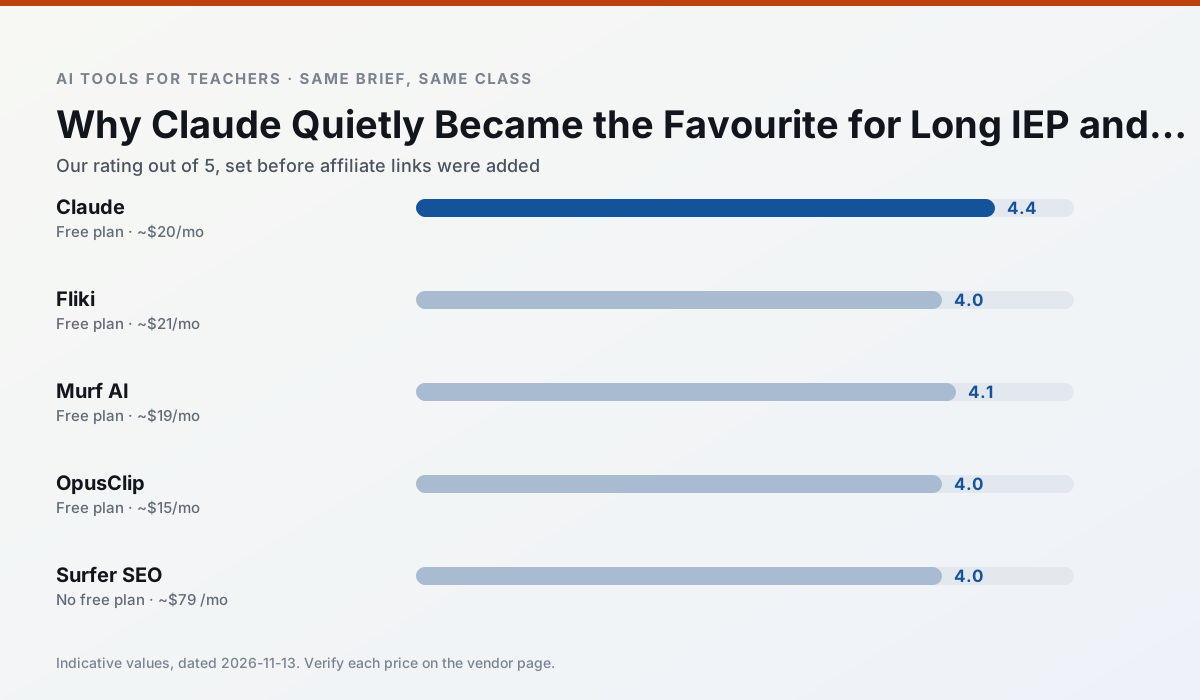
Side by side
Comparison table
Ratings reflect our timed classroom workflow, not vendor claims. Prices are indicative — verify on the vendor site.
| Tool | Best for | Free tier | Indicative paid plan | Standout feature | Our rating | Verdict | Try the tool |
|---|---|---|---|---|---|---|---|
| Claude | rubric creation · feedback on writing | Yes — Usage-limited | ~$20 /user/mo | Very large context window | 4.4 / 5 | Strong option | Try free |
| Fliki | video lessons · audio lessons | Yes — Watermarked, limited minutes | ~$21 /user/mo | Blog/text to video | 4.0 / 5 | Situational | Try free |
| Murf AI | audio lessons · accessibility | Yes — Trial-only output | ~$19 /user/mo | Voice fine-tuning | 4.1 / 5 | Situational | Try free |
| OpusClip | PD materials · flipped lessons | Yes — Limited monthly clips | ~$15 /user/mo | Auto captions | 4.0 / 5 | Situational | Try free |
| Surfer SEO | teacher bloggers · resource sellers | No ongoing free plan | ~$79 /mo | Content Editor | 4.0 / 5 | Situational | Try free |
| Grammarly | parent communication · report card comments | Yes — Core grammar and tone checks | ~$12 /user/mo | Tone adjustments | 4.3 / 5 | Strong option | Try free |
Match your situation
Best for X
Different jobs need different tools. Here is what we would open first in each case.
Claude is the option IT is least likely to block: single sign-on, admin removal of AI features and an agreement on file.
Fliki runs in a browser tab with no extension, no student accounts and no onboarding call, so you can test it in a free period.
Murf AI wins on the default path: fewer clicks to a usable draft, and the interface does not get in the way at 7:40am.
OpusClip's free plan is the most usable in this comparison: a quota that survives a normal week. Not enough for a department, enough for one teacher to decide.
Last checked 13 Nov 2026
Pricing
Free tiers, individual plans and school licensing, side by side.
| Tool | Free plan | Individual / paid | School & district | Billing note | Verify |
|---|---|---|---|---|---|
| Claude | $0 — Usage-limited | ~$20 /user/mo | ~$25+ /user/mo | Indicative — verify on vendor site | Vendor |
| Fliki | $0 — Watermarked, limited minutes | ~$21 /user/mo | ~$66 /user/mo | Indicative — verify on vendor site | Vendor |
| Murf AI | $0 — Trial-only output | ~$19 /user/mo | ~$39 /user/mo | Indicative — verify on vendor site | Vendor |
| OpusClip | $0 — Limited monthly clips | ~$15 /user/mo | ~$29 /user/mo | Indicative — verify on vendor site | Vendor |
| Surfer SEO | No ongoing free tier | ~$79 /mo | Custom quote | Indicative — verify on vendor site | Vendor |
| Grammarly | $0 — Core grammar and tone checks | ~$12 /user/mo | ~$15 /user/mo | Indicative — billed annually | Vendor |
Editorial rule: pricing is re-checked every 2–3 months and the top 50 pages are refreshed every 6 months. See our funding policy.
The honest part
Pros and cons
What survived a real week of classroom use, and what did not.
Pros
- Handles full unit plans and long rubrics
- Nuanced, less generic prose
- Good at structured document output
Cons
- No teacher-specific templates
- Fewer classroom integrations
- Consumer plan not suitable for student data
Pros
- No avatar needed
- Good for explainer visuals
- Simple editor
Cons
- Minute-based limits
- Output can look generic
- Price jumps between tiers
Pros
- Very clean audio
- Good pacing controls
- Easy slide integration
Cons
- Commercial licensing rules matter
- Free tier is not usable long-term
- Single-purpose
Pros
- Turns a recorded lesson into review clips
- Excellent captions
- Fast
Cons
- Optimised for social formats
- Not a lesson design tool
- Free plan is restrictive
Pros
- Best-in-class on-page guidance
- Useful for TpT / resource-shop content
- Clear scoring
Cons
- Expensive for individual teachers
- Not a classroom tool
- Requires SEO basics
In the classroom
Use cases
Five concrete workflows, with the tool we would open for each one.
A weekly family newsletter from bullet notes
Newsletters fail on length, not tone. Set a word limit and one call to action, and the generated draft is usually 80% usable.
Recommended: ClaudeRegrouping students after an assessment
Summarise anonymised results into skill groups, then generate one activity per group. Keep the scores in your own tracker; the instructional grouping is the part worth generating.
Recommended: FlikiRubric and feedback comments in one pass
Reorder the workflow so the rubric is yours and the comments are generated. Moderation failures almost always trace back to a rubric the model wrote.
Recommended: Murf AIA parent email in two languages
Draft in plain, warm language with no names, translate, then back-translate the important sentences to check meaning. Keep specific incidents out of the prompt and add them yourself.
Recommended: OpusClipA Monday morning lesson plan in twelve minutes
The twelve minutes come from not rewriting the skeleton. Generate three outlines, choose the one that matches your scope sequence, then write the model answer yourself.
Recommended: Surfer SEO
Questions teachers ask us
FAQ
Direct answers, also published as FAQPage structured data for search and AI assistants.
Is Claude worth paying for at mixed-grade level?
What does Claude get wrong most often?
Can Claude replace a planning period?
Is Claude safe to use with student data?
Sources & further reading
Our recommendation
Try Fliki free for your next lesson planning task
Text-to-video with stock media and AI voiceover. Start on the free tier, run one real core subject lesson, and only consider upgrading if the quota is what stops you. Disclosure: we may earn a commission (varies) at no extra cost to you.
Some links on this page are affiliate links. We may earn a commission at no extra cost to you. Our rankings are editorial and never pay-to-play. Never enter student PII into a free consumer account.
Keep reading
Related comparisons in this cluster.
Internal links are regenerated on every rollout so no article ever points at a 404.