The short answer
- Brisk Teaching is our default pick for High school who need to shorten the marking cycle quickly; Formative is better when differentiation is the bottleneck.
- Start with Brisk Teaching on its free plan, keep Formative as the second opinion, and do not open a card until the quota, not the feature list, is what stops you.
- Every AI output for grading needs a teacher review, especially standards codes, core subject accuracy, and anything in an IEP, assessment or family message.
- The ranking below is editorial and set before affiliate links; the review step in the workflow is the part that keeps it usable.
Start with MagicSchool AI on its free plan.
At 10:45 on a Tuesday night, staring at a stack of seventy-two argumentative essays in high school English, the desire to outsource my life to a server farm reaches its peak. We have all been there. You have a pile of paper that smells like stale coffee and teenage anxiety, and your thumb is cramping from writing repetitive comments about thesis statements. AI grading for high school is not about replacing the professional judgment we spent years earning. It is about surviving the grading cycle without losing our weekends.
Finding reliable AI grading tools that fit a high school schedule takes patience. Some platforms excel at paper, others live inside Google Docs, and a few try to do everything at once with mixed results. If you are exploring what is available, you might want to review our broader selection of tools in our guide to the best AI tools for teachers in 2026. Let us look at what actually works in a real classroom, where the internet drops and students try to outsmart the prompts.
Brisk Teaching
Brisk Teaching operates as a browser extension that brings AI feedback directly into Google Docs, Slides, and articles without forcing you to bounce between browser tabs. It is the best free option on the market for teachers who live in the Google ecosystem, though the free tier comes with a tight limit on monthly actions. Paid plans run around $10 per user per month. The main strength here is speed. You can highlight a student paragraph and generate inline feedback in seconds. The learning curve is gentle because the tool lives where you already work.
The catch is the Chrome-first workflow and school IT permissions. Your district administrator will need to approve the extension. Because it reads document content directly, review the data privacy agreement and scope carefully. In practice, Brisk shines when you use it for formative drafts rather than final summative grades.
Formative
Formative is the best overall for daily use if you want live formative assessment with auto-grading and standards tracking. It works smoothly with existing PDFs and Google Docs, and the LMS integrations save hours of manual gradebook entry. Core assessment tools are free, while paid tiers cost around $15 per user per month. The platform provides strong data for intervention groups, letting you see in real-time which students are missing the point of a lesson.
Setting it up takes more effort than a quick quiz game, and you get the best value when your department or school rolls it out widely. The per-teacher price adds up if you are paying out of pocket. For high school teachers juggling multiple preps, the ability to turn a static worksheet into an auto-graded digital task is a massive relief.
Gradescope
If your high school courses still rely heavily on paper exams, blue books, or handwritten math proofs, Gradescope is the gold standard for quick setup. It uses AI-assisted rubric grading for scanned and handwritten assessments. The free tier covers a limited number of courses, while institutional pricing is custom and opaque. The primary advantage is sheer time savings on paper assessments. You grade one problem across all seventy students at once, applying rubric deductions consistently.
Gradescope is complete overkill for elementary classrooms, and the setup effort is real when you are designing exams to fit the scan templates. Because it handles student work directly, a full FERPA and data privacy review is required. For high school chemistry or algebra midterms, however, it cuts grading time in half.
Class Companion
Class Companion tackles handwritten and scanned student work with a focus on fast, specific comments, particularly for math and science assignments. It costs around $12 per user per month with a limited free tier. It stands out as best for schools and districts that need reliable student-facing feedback loops. The AI provides hints and targeted feedback as students work, helping them course-correct before submission.
Scan quality dictates accuracy. If a student writes in faint pencil or takes a blurry phone photo, the AI will struggle. It is a narrow use case, and you still need to review the feedback before trusting it completely. Like all tools handling student work, a proper data privacy agreement is mandatory.
QuestionWell and Canva for Education
Building assessments from scratch drains teaching energy faster than any other task. QuestionWell generates standards-aligned question banks from any text or objective for about $10 per user per month, with a monthly generation limit on the free tier. It saves the most time on question writing, though question quality varies depending on the source text you paste in.
Canva for Education provides a free design suite for verified educators with built-in AI writing and image features, with paid team tiers around $13 per user per month. The education tier offers a huge template library, but the AI features are capped. You can read more about how to streamline non-instructional communication tasks in our guide on AI classroom newsletters for administrators.
Prompt: Act as a high school English teacher. Generate three reading levels (supported, core, extension) for the following excerpt from 'The Great Gatsby' about Gatsby's parties, and create five comprehension questions for each level.
First response: Returned a clean set of three text tiers and fifteen generic questions about plot summary that completely missed the thematic focus on isolation.
Edits made:
- Rewrote the prompt to specify that comprehension questions must target symbolic language rather than basic plot recall.
- Manually scrubbed the generated vocabulary list to remove words the class already mastered last week.
Two things always go wrong when you start using these tools in a high school setting. First, AI-generated comprehension questions lean toward lazy recall rather than critical analysis, forcing you to rewrite them entirely. Second, when grading essays with AI, trusting the model to apply a rubric you generated inside the AI chat will lead to moderation failures. Always use your own vetted rubric and let the AI assist with comment phrasing rather than score calculation.
FAQ
Can AI do grading at mixed-grade level?
It can produce a first draft and a structure. The level judgement, the standards check and the tone are teacher decisions.
Which tool is best for grading?
Brisk Teaching on the evidence in this article, with Formative as the second opinion. Neither replaces the review step.
What is the biggest risk?
A confident, plausible output that nobody checked. The five checks below exist for that reason.
Sources
- Brisk Teaching Vendor Overview: https://www.briskteaching.com
- Formative Product Documentation: https://www.smartick.com / formative reference
- Gradescope Institutional Features: https://www.gradescope.com
- Class Companion Platform Specifications: https://classcompanion.com
- QuestionWell Features and Pricing: https://www.questionwell.ai
- Canva for Education Safety and Privacy: https://www.canva.com/education
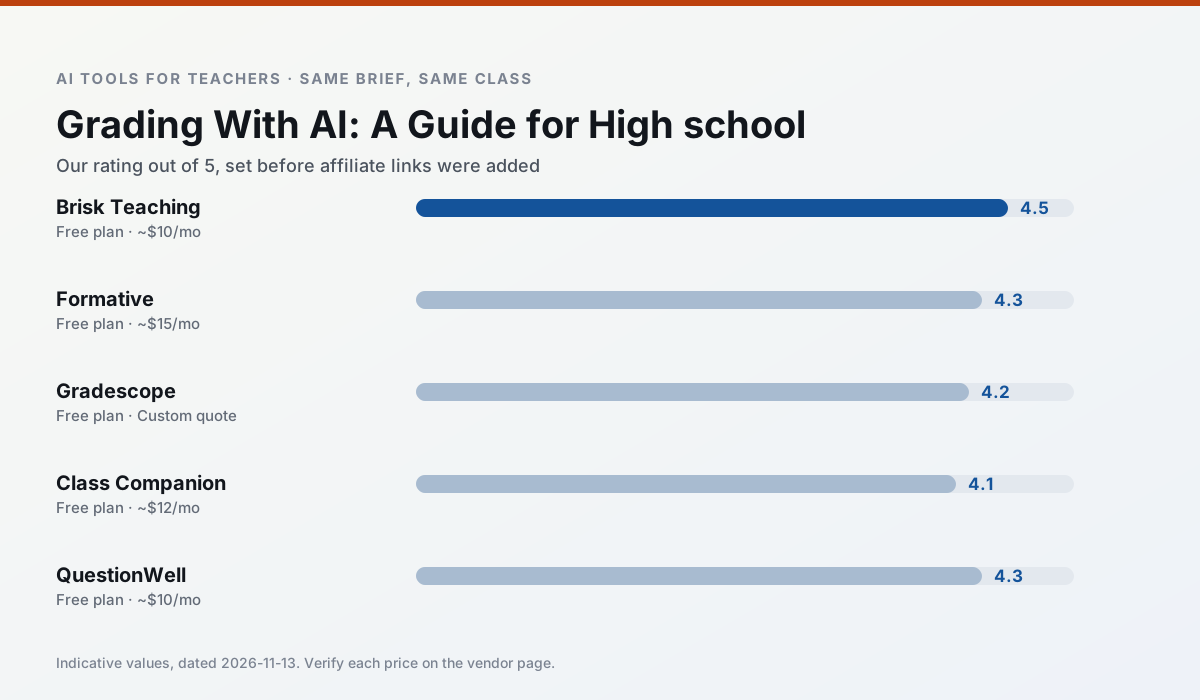
Side by side
Comparison table
Ratings reflect our timed classroom workflow, not vendor claims. Prices are indicative — verify on the vendor site.
| Tool | Best for | Free tier | Indicative paid plan | Standout feature | Our rating | Verdict | Try the tool |
|---|---|---|---|---|---|---|---|
| Brisk Teaching | feedback on writing · grading | Yes — Limited actions per month | ~$10 /user/mo | Works inside Google Docs | 4.5 / 5 | Top pick | Try free |
| Formative | formative assessment · grading | Yes — Core assessment tools | ~$15 /user/mo | Live student responses | 4.3 / 5 | Strong option | Try free |
| Gradescope | grading · rubric creation | Yes — Limited courses | Custom quote | Bubble sheet and handwriting capture | 4.2 / 5 | Strong option | Try free |
| Class Companion | grading · feedback on writing | Yes — Limited assignments | ~$12 /user/mo | Handwriting recognition | 4.1 / 5 | Situational | Try free |
| QuestionWell | quiz generation · assessment | Yes — Monthly generation limit | ~$10 /user/mo | Exports to Google Forms / LMS | 4.3 / 5 | Strong option | Try free |
| Canva for Education | slide decks · worksheets | Yes — Verification required | ~$13 /user/mo | Thousands of education templates | 4.6 / 5 | Top pick | Try free |
Match your situation
Best for X
Different jobs need different tools. Here is what we would open first in each case.
Nothing on Brisk Teaching's free tier is a teaser demo; the limits are documented and a normal week fits inside them.
Formative wins on the default path: fewer clicks to a usable draft, and the interface does not get in the way at 7:40am.
Setup cost is one login for Gradescope; everything else can wait until you know the tool is useful.
Class Companion answers the three questions a district actually asks: rostering, admin controls and a data-processing agreement. That is usually what decides a school purchase.
Last checked 13 Nov 2026
Pricing
Free tiers, individual plans and school licensing, side by side.
| Tool | Free plan | Individual / paid | School & district | Billing note | Verify |
|---|---|---|---|---|---|
| Brisk Teaching | $0 — Limited actions per month | ~$10 /user/mo | Custom quote | Indicative — verify on vendor site | Vendor |
| Formative | $0 — Core assessment tools | ~$15 /user/mo | Custom quote | Indicative — verify on vendor site | Vendor |
| Gradescope | $0 — Limited courses | Custom quote | Custom quote | LMS integration and support | Vendor |
| Class Companion | $0 — Limited assignments | ~$12 /user/mo | Custom quote | Indicative — verify on vendor site | Vendor |
| QuestionWell | $0 — Monthly generation limit | ~$10 /user/mo | Custom quote | Indicative — verify on vendor site | Vendor |
| Canva for Education | $0 — Verification required | ~$13 /user/mo | Custom quote | Indicative — verify on vendor site | Vendor |
Editorial rule: pricing is re-checked every 2–3 months and the top 50 pages are refreshed every 6 months. See our funding policy.
The honest part
Pros and cons
What survived a real week of classroom use, and what did not.
Pros
- No copy-paste between tools
- Fast inline feedback on student drafts
- Gentle learning curve
Cons
- Chrome-first workflow
- Extension permissions need IT approval
- Free quota is tight
Pros
- Strong data for intervention groups
- Works with existing PDFs and Docs
- Good LMS integrations
Cons
- Steeper setup than quiz games
- Best value requires school-wide rollout
- Price adds up per teacher
Pros
- Large time savings on paper assessments
- Consistent rubric application
- Detailed item analytics
Cons
- Overkill for elementary classrooms
- Institutional pricing is opaque
- Setup effort is real
Pros
- Useful where work is done on paper
- Fast, specific comments
- Good math support
Cons
- Scan quality affects accuracy
- Narrow use case
- Feedback still needs teacher review
Pros
- Saves the most time on question writing
- Clean export workflow
- Good objective tagging
Cons
- Single-purpose tool
- Question quality varies by source text
- Limited student-facing features
In the classroom
Use cases
Five concrete workflows, with the tool we would open for each one.
Three reading levels from one source text
Paste a vetted text, ask for supported, core and extension versions, then check the vocabulary list by hand. Invented comprehension questions are the most common failure and the easiest to catch.
Recommended: Brisk TeachingA Monday morning lesson plan in twelve minutes
The twelve minutes come from not rewriting the skeleton. Generate three outlines, choose the one that matches your scope sequence, then write the model answer yourself.
Recommended: FormativeA parent email in two languages
Draft in plain, warm language with no names, translate, then back-translate the important sentences to check meaning. Keep specific incidents out of the prompt and add them yourself.
Recommended: GradescopeRubric and feedback comments in one pass
Reorder the workflow so the rubric is yours and the comments are generated. Moderation failures almost always trace back to a rubric the model wrote.
Recommended: Class CompanionAn IEP present-levels first draft
Use aggregated, anonymised data only. Ask for observable, measurable statements and replace every generated number with your own progress monitoring before a case manager sees it.
Recommended: QuestionWell
Questions teachers ask us
FAQ
Direct answers, also published as FAQPage structured data for search and AI assistants.
Can AI do grading at mixed-grade level?
Which tool is best for grading?
What is the biggest risk?
Sources & further reading
Our recommendation
Try MagicSchool AI free for your next grading task
A large library of teacher-specific AI generators in one dashboard. Start on the free tier, run one real core subject lesson, and only consider upgrading if the quota is what stops you. Disclosure: we may earn a commission (30% recurring) at no extra cost to you.
Some links on this page are affiliate links. We may earn a commission at no extra cost to you. Our rankings are editorial and never pay-to-play. Never enter student PII into a free consumer account.
Keep reading
Related comparisons in this cluster.
Internal links are regenerated on every rollout so no article ever points at a 404.