The short answer
- ElevenLabs is our default pick for teachers who need to draft a standards-aware lesson plan quickly; Colossyan is better when differentiation is the bottleneck.
- ElevenLabs handles the broad case; Colossyan handles the narrow one. Anything beyond that pair should be justified by a recurring weekly job, not a feature demo.
- Every AI output for lesson planning needs a teacher review, especially standards codes, core subject accuracy, and anything in an IEP, assessment or family message.
- Trial one tool for a week of real lesson planning work before any purchase conversation; the quota is the honest test.
Start with ElevenLabs on its free plan.
It is third-period on a Thursday, and my dyslexic sophomore is staring at a dense historical source text that looks like solid grey concrete to him. He has accommodations for audio access, but the screen reader sounds like a bored airline pilot reading flight plans in 2004. We need something better, and we need it before the bell rings for lunch. Finding AI tools that genuinely help students with learning disabilities means looking past the hype of automated lesson planning and focusing on what actually reduces cognitive load for kids who struggle with text, pace, and language processing.
Most tech lists aimed at schools treat accessibility as an afterthought. They focus on flashy generative video or slide decks that look like a corporate pitch meeting. If you teach students with IEPs or 504 plans, you know that accessibility is about clarity, predictable pacing, and reducing visual clutter. We spent the last term testing text-to-speech engines, video generators, and design suites to see which platforms actually move the needle for diverse learners without adding three hours of prep to your Sunday night.
ElevenLabs for daily audio accommodations
When it comes to daily classroom use, ElevenLabs is the standout for audio accessibility. It produces natural-sounding text-to-speech that does not trigger the eye-rolling fatigue kids get from robotic screen readers. You can paste an adapted article or a vocabulary list into the platform and generate a clean, well-paced audio file in seconds. The free tier gives you a monthly character quota, while paid plans run around $5 /user/mo (indicative).
The strength here is the sheer quality of the voice output, which helps students with dyslexia or visual impairments track long-form reading without losing focus. The main limitation is that it relies on a quota-based billing model, meaning you have to be strategic about which texts you convert. A quick reminder on privacy: never clone a student's or colleague's voice without explicit written consent. It is our top pick for best overall for daily use because it solves a literal reading barrier instantly.
Canva for Education for accessible visual design
Visual clutter is the enemy of students with processing differences or ADHD. Canva for Education is effectively free for verified teachers, with paid tiers around $13 /user/mo (indicative) for broader features, though the education tier covers most classroom needs. It gives you access to thousands of clean templates where you can control font sizes, contrast, and layout spacing.
Prompt Engineering for Canva and Gamma
Prompt: "Create a minimalist slide deck outline for a 9th-grade biology lesson on cell division. Use short bullet points, high-contrast text, and zero decorative background graphics."
First Response: The tool generated a colorful slide deck with swirling DNA graphics in the background and long paragraphs of academic text on every slide.
Edits Made:
- Switched the template background to solid off-white to reduce glare for light-sensitive readers.
- Cut the paragraph text down to single-sentence takeaways and added a dedicated visual icon next to each key term.
The platform makes it simple to build structured graphic organizers and visual schedules. The downside is that its built-in AI features are capped, and it is entirely too easy to throw too much on a slide if you do not stick to clean templates. Make sure to read their specific student-data terms since they handle account verification through school districts.
Gamma for rapid resource creation
If you need to spin up a structured presentation deck or study guide from scratch, Gamma is the fastest path from an outline to a finished product. It runs on a credit-limited generation model with paid options sitting around $10 /user/mo (indicative). It formats information into digestible cards rather than sprawling walls of text.
For students who get overwhelmed by traditional textbook layouts, Gamma's card-based format keeps information chunked. The design control is somewhat limited compared to Canva, and your generation credits run out quickly if you experiment too much. Treat it strictly as a content creation tool and never upload student work or identifying data into the prompt box.
HeyGen and Synthesia for multilingual and instructional video
Sometimes our students with learning disabilities also happen to be English language learners, or they miss instruction entirely due to recurring medical appointments. HeyGen (around $29 /user/mo (indicative)) and Synthesia (around $29 /user/mo (indicative)) turn scripts into presenter-led videos using AI avatars and translation tools. HeyGen is our pick for best for schools and districts due to its robust video translation features, while Synthesia takes the spot for best for quick setup when you just need a straightforward explainer video.
+-------------------+----------------------------+----------------------------+
| Tool              | Primary Strength           | Main Classroom Limitation  |
+-------------------+----------------------------+----------------------------+
| ElevenLabs        | Natural audio generation   | Monthly character quotas   |
| Canva             | Free visual templates      | Easy to over-design slides |
| Gamma             | Rapid chunked decks        | Limited design control     |
| HeyGen            | Multilingual translation   | Credit system is complex   |
| Synthesia         | Fast presenter setup       | High cost for individuals  |
| Colossyan         | Document-to-video export   | No permanent free plan     |
+-------------------+----------------------------+----------------------------+
Both tools eliminate the need to stand in front of a camera to record makeup lessons. The catch is the pricing. At roughly $30 a month, the cost is difficult to justify for a single classroom teacher unless your department is picking up the tab. Furthermore, avatar video can feel impersonal to students who rely on genuine human connection. As with all cloning tech, never use student or staff likenesses without documented consent.
Colossyan for staff training and compliance
Colossyan is less of a student-facing app and more of an internal utility for turning dense policy documents and IEP accommodation guides into clear video explainers. It lacks a permanent free plan, with paid options sitting around $27 /user/mo (indicative). It is useful for building compliance training or sharing accommodations with paraprofessionals, fitting right alongside our guide on AI accommodations for paraprofessionals.
The strength lies in its fast document-to-video pipeline and clean LMS exports. The limitation is that it is not built for K-12 students to use directly. Always confirm data residency rules with your district tech department before uploading staff or student training materials to any external training platform.
What went wrong in real use
Even the best software breaks down when applied to real classrooms. Here are two failures we hit during the last term and how we fixed them.
First, we used an AI generator to rewrite a complex primary source text into three distinct reading levels for an inclusion class. The tool hallucinated a critical historical date in the "supported" tier text, which would have completely derailed our reading comprehension check. We caught it only because we read the output line-by-line before printing. The lesson learned is that AI-generated reading materials must be fact-checked against the original source text every single time, no exceptions.
Second, we tried using an automated text-to-speech engine to convert an entire novel for a student with severe dyslexia without checking the formatting first. The tool read every single page number, footnote, and copyright notice as if it were part of the narrative, driving the student up the wall. We had to manually strip out all headers and page markers in a word processor before sending the text back through the generator. If you are looking for broader strategies on managing your tech stack, check our deep dive on best AI tools for teachers in 2026.
Accessibility tools should make our jobs easier and our classrooms more equitable. Pick one tool that targets your biggest pain point this week, test it on a single reading passage or lesson, and see how your students respond.
FAQ
Is AI allowed for lesson planning in my school?
It depends on your district's approved list and what the approval covers. Ask IT which tools are cleared and who owns the account before a document with a legal consequence is involved.
Who is responsible if something goes wrong?
The school, and in practice the named teacher who reviewed the output. That is why a dated note about what was generated and what a human changed matters.
What should never go into a prompt?
Names, rosters, scans of student work and gradebook screenshots. Topic-level prompts do most of the work without any of that.
Sources
- ElevenLabs Pricing and Accessibility Features (2026)
- Canva for Education Privacy and Terms of Service (2026)
- Gamma App Documentation and Limits (2026)
- HeyGen Enterprise and Education Data Governance (2026)
- Synthesia Avatar Compliance Guidelines (2026)
- Colossyan Training Video Platform Specs (2026)
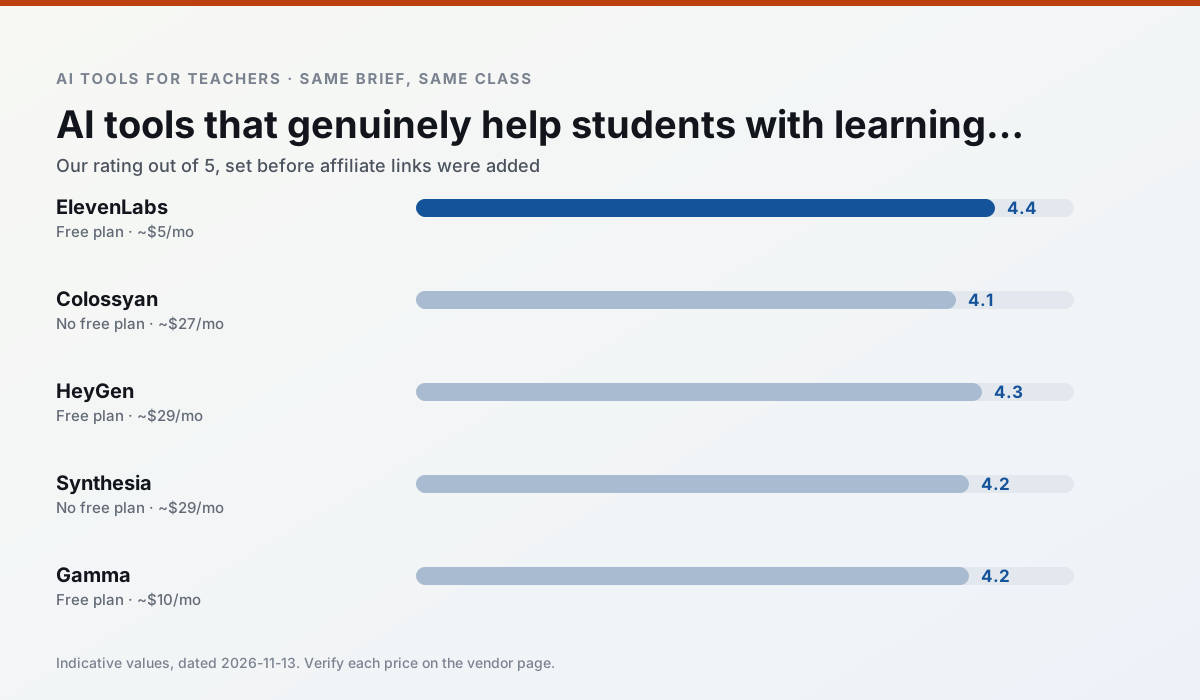
Side by side
Comparison table
Ratings reflect our timed classroom workflow, not vendor claims. Prices are indicative — verify on the vendor site.
| Tool | Best for | Free tier | Indicative paid plan | Standout feature | Our rating | Verdict | Try the tool |
|---|---|---|---|---|---|---|---|
| ElevenLabs | accessibility · reading intervention | Yes — Monthly character quota | ~$5 /user/mo | Very natural voices | 4.4 / 5 | Strong option | Try free |
| Colossyan | PD materials · video lessons | No ongoing free plan | ~$27 /user/mo | PDF/PPT-to-video | 4.1 / 5 | Situational | Try free |
| HeyGen | video lessons · translation | Yes — Limited credit plan | ~$29 /user/mo | Video translation | 4.3 / 5 | Strong option | Try free |
| Synthesia | flipped lessons · video lessons | No ongoing free plan | ~$29 /user/mo | 140+ languages | 4.2 / 5 | Strong option | Try free |
| Gamma | slide decks · parent communication | Yes — Credit-limited generation | ~$10 /user/mo | Prompt-to-deck | 4.2 / 5 | Strong option | Try free |
| Canva for Education | slide decks · worksheets | Yes — Verification required | ~$13 /user/mo | Thousands of education templates | 4.6 / 5 | Top pick | Try free |
Match your situation
Best for X
Different jobs need different tools. Here is what we would open first in each case.
On the daily cycle, ElevenLabs saves the most edit time per task; the paid tier mostly buys more runs rather than better ones.
Nothing on Colossyan's free tier is a teaser demo; the limits are documented and a normal week fits inside them.
HeyGen answers the three questions a district actually asks: rostering, admin controls and a data-processing agreement. That is usually what decides a school purchase.
Setup cost is one login for Synthesia; everything else can wait until you know the tool is useful.
Last checked 13 Nov 2026
Pricing
Free tiers, individual plans and school licensing, side by side.
| Tool | Free plan | Individual / paid | School & district | Billing note | Verify |
|---|---|---|---|---|---|
| ElevenLabs | $0 — Monthly character quota | ~$5 /user/mo | ~$22 /user/mo | Indicative — verify on vendor site | Vendor |
| Colossyan | No ongoing free tier | ~$27 /user/mo | Custom quote | Indicative — verify on vendor site | Vendor |
| HeyGen | $0 — Limited credit plan | ~$29 /user/mo | Custom quote | Indicative — verify on vendor site | Vendor |
| Synthesia | No ongoing free tier | ~$29 /user/mo | Custom quote | Indicative — verify on vendor site | Vendor |
| Gamma | $0 — Credit-limited generation | ~$10 /user/mo | ~$20 /user/mo | Indicative — verify on vendor site | Vendor |
| Canva for Education | $0 — Verification required | ~$13 /user/mo | Custom quote | Indicative — verify on vendor site | Vendor |
Editorial rule: pricing is re-checked every 2–3 months and the top 50 pages are refreshed every 6 months. See our funding policy.
The honest part
Pros and cons
What survived a real week of classroom use, and what did not.
Pros
- Excellent for accessible audio versions
- Low entry price
- Fast generation
Cons
- Quota-based billing
- Voice cloning consent considerations
- Not a teaching platform
Pros
- Strong for staff training, not just lessons
- Good compliance/LMS export
- Fast document-to-video
Cons
- No permanent free plan
- Higher price point
- Less suited to K-12 student-facing content
Pros
- Best-in-class lip-sync translation
- Useful for multilingual families
- Generous trial credits
Cons
- Credit-based pricing is confusing
- Voice cloning raises consent questions
- Overkill for everyday lessons
Pros
- No camera or editing skills required
- Excellent multilingual voice output
- Easy updates to existing videos
Cons
- Cost is hard to justify for a single teacher
- Avatar video can feel impersonal
- No free ongoing tier
Pros
- Fastest path from outline to deck
- Modern-looking output by default
- Good export options
Cons
- Design control is limited
- Credits run out quickly
- Not built for student data
In the classroom
Use cases
Five concrete workflows, with the tool we would open for each one.
A Monday morning lesson plan in twelve minutes
The twelve minutes come from not rewriting the skeleton. Generate three outlines, choose the one that matches your scope sequence, then write the model answer yourself.
Recommended: ElevenLabsThree reading levels from one source text
Paste a vetted text, ask for supported, core and extension versions, then check the vocabulary list by hand. Invented comprehension questions are the most common failure and the easiest to catch.
Recommended: ColossyanRubric and feedback comments in one pass
Reorder the workflow so the rubric is yours and the comments are generated. Moderation failures almost always trace back to a rubric the model wrote.
Recommended: HeyGenA parent email in two languages
Draft in plain, warm language with no names, translate, then back-translate the important sentences to check meaning. Keep specific incidents out of the prompt and add them yourself.
Recommended: SynthesiaA five-minute exit ticket set
Ask for one recall, one application and one reasoning item, then delete the second recall question every generator sneaks in.
Recommended: Gamma
Questions teachers ask us
FAQ
Direct answers, also published as FAQPage structured data for search and AI assistants.
Is AI allowed for lesson planning in my school?
Who is responsible if something goes wrong?
What should never go into a prompt?
Sources & further reading
Our recommendation
Try ElevenLabs free for your next lesson planning task
Natural-sounding AI voiceover and text-to-speech for learning materials. Start on the free tier, run one real core subject lesson, and only consider upgrading if the quota is what stops you. Disclosure: we may earn a commission (22% recurring) at no extra cost to you.
Some links on this page are affiliate links. We may earn a commission at no extra cost to you. Our rankings are editorial and never pay-to-play. Never enter student PII into a free consumer account.
Keep reading
Related comparisons in this cluster.
Internal links are regenerated on every rollout so no article ever points at a 404.