The short answer
- Formative is our default pick for Resource intervention who need to summarise assessment results into groups quickly; Writesonic is better when differentiation is the bottleneck.
- Start with Formative on its free plan, keep Writesonic as the second opinion, and do not open a card until the quota, not the feature list, is what stops you.
- Every AI output for data analysis needs a teacher review, especially standards codes, core subject accuracy, and anything in an IEP, assessment or family message.
- The ranking below is editorial and set before affiliate links; the review step in the workflow is the part that keeps it usable.
Start with Writesonic on its free plan.
Seventeen mid-term diagnostic spreadsheets sat open on my desktop, each one a graveyard of fraction errors and reading comprehension gaps. As a resource interventionist, my job depends on turning those numbers into working small groups by Monday morning, but the actual sorting usually eats my entire prep period. AI assessment data analysis for resource intervention has changed how I build those groups, though not by magically fixing my district SIS. When you use tools with a clear purpose, you can bypass the manual spreadsheet sorting and get straight to the intervention groups your students need.
If you are looking at the broader landscape of software options, our guide on the best AI tools for teachers lists several platforms that handle everything from text adaptation to audio generation. For intervention work specifically, the right tool needs to bridge raw diagnostic data and actionable instructional groupings without violating student privacy. Let us look at how specific platforms handle this workflow, starting with the core assessment tools.
Formative for Live Intervention Groups
When you need real-time data that maps directly to standards, Formative is the best free option for everyday classroom use. You can upload existing PDFs and Docs, turn them into interactive assignments, and watch student responses roll in live. The free tier gives you core assessment tools, while the paid tier runs around fifteen dollars a user per month, making it a solid choice if your school already has a site license. The setup is definitely steeper than a simple flashcard quiz game, and the real value unlocks when your entire department uses it.
The biggest strength here is the reporting. It cleanly tracks who missed which standard, which makes grouping kids for Tuesday's intervention block much faster. You still need to keep actual student names secure in your local tracker, but using the platform's standard breakdowns lets you see conceptual bottlenecks immediately. It also integrates well with major learning management systems, which cuts down on the friction of pushing out diagnostic tasks.
Writesonic for Daily Content and Prompts
If you need a reliable workhorse for turning assessment themes into daily practice paragraphs, Writesonic stands out as the best overall for daily use. While it functions as a budget-friendly writing and content generation suite at about sixteen dollars a user per month after limited free credits, it handles text generation tasks efficiently. The interface gives you plenty of templates, though the sheer variety can feel overwhelming if you just want a quick warm-up passage.
The risk with writing tools is generic classroom output. If you prompt it vaguely, you get a worksheet that sounds like it was written by a committee in 1994. You have to feed it specific error patterns from your diagnostic data.
Prompt: Act as an elementary intervention specialist. Based on an anonymized exit ticket where 8 students failed to identify the main idea in a non-fiction text about ecosystems, write three short leveled paragraphs about tide pools, each with a distinct vocabulary focus for below-level, on-level, and extension readers.
Initial output: A generic text about crabs with overly complex definitions and a weak comprehension quiz.
Edit one: Replaced the quiz questions with explicit sentence stems for the students to complete orally.
Edit two: Swapped out four tier-two vocabulary words that did not match our current spelling list.
Murf AI for Quick Audio Support
For students who struggle with reading stamina during intervention sessions, adding audio support helps bridge the gap. Murf AI is our pick for best for quick setup when generating studio-quality voiceover for presentations and audio materials. The free tier is strictly trial-only output, and the paid plan sits around nineteen dollars a user per month. It delivers very clean audio with straightforward pacing controls and easy slide integration.
You have to watch the commercial licensing rules if you plan to share these audio files outside your password-protected classroom page. The platform is intentionally single-purpose, which means it does a few audio things exceptionally well rather than trying to be a full lesson planner.
Fliki for Explainer Visuals
Sometimes an intervention group needs to see a process in action before they can tackle the worksheet. Fliki is our choice for best for schools and districts, offering text-to-video capabilities with stock media and AI voiceover. It runs about twenty-one dollars a user per month, with a free tier that features watermarks and strict minute limits. You do not need digital avatars, which keeps the focus on the actual content rather than distracting animations.
The editor is simple, but the minute-based limits mean you need to keep your instructional videos short and punchy. The output can look a bit generic if you rely entirely on stock media, so you will want to curate the visuals carefully. Remember that this is strictly a content creation tool, so you should never upload student personally identifiable information into its prompts.
Surfer SEO and Resource Publishing
If you create your own intervention materials and publish them online for other teachers, Surfer SEO is the heavy-duty tool for content optimization. It has no free tier and runs around seventy-nine dollars a month, making it quite expensive for individual teachers. It provides best-in-class on-page guidance and clear scoring for resource shops.
This is not a classroom tool, and it will not help you group your third-period math intervention students. It is built strictly for creators who need to make their teacher-author resources discoverable on marketplaces. Like all content suites, it has no business touching student data of any kind.
OpusClip for Lesson Review
Turning a recorded intervention session or direct instruction segment into bite-sized review clips is where OpusClip comes in handy. At about fifteen dollars a user per month with a restrictive free plan, it takes long recordings and chops them into captioned shorts. The captions are exceptionally accurate, and the processing speed saves you from spending your lunch break editing video files.
The catch is that the tool is heavily optimized for social media formats rather than instructional pedagogy. More importantly, you must never upload classroom recordings containing identifiable students into public or semi-public automated clipping tools without explicit district release forms. Stick to recording your own screen and voice while explaining a math algorithm, then let the tool generate review clips for your absent students.
What Went Wrong in Real Use
Using AI tools for data analysis and intervention planning sounds seamless in theory, but my classroom is messy. Last October, I tried to dump a raw CSV file of benchmark scores into a general-purpose writing tool to automatically write parent update letters. The output was a disaster. It hallucinated specific reading levels for kids who had just joined my roster two days prior, and it used a tone that sounded like a corporate layoff notice. I spent forty minutes manually correcting fabricated data before I realized I was working harder than I would have with a blank Word document. Now, I keep the raw scores in my secure local tracker, and I only use AI to generate the instructional activities based on skill categories I define myself.
Another time, I trusted an AI tool to generate a set of reading comprehension questions based on a historical passage about immigration. The text was solid, but the questions relied on tricky inference leaps that tripped up my English language learners completely. The multiple-choice distractors were so poorly constructed that even my top readers were guessing. I learned that invented comprehension questions are the most common failure point and the easiest to catch if you read them through the eyes of your lowest reader first. For more strategies on supporting diverse learners, read our guide on AI accommodations for paraprofessionals.
Intervention teaching is fundamentally human work. AI assessment data analysis for resource intervention simply handles the heavy lifting of sorting categories and drafting initial templates. Keep your data secure, check every generated question for bias or logic leaps, and let the software buy you back ten minutes of prep time so you can actually talk to your kids.
FAQ
Can AI do data analysis at mixed-grade level?
It can produce a first draft and a structure. The level judgement, the standards check and the tone are teacher decisions.
Which tool is best for data analysis?
Formative on the evidence in this article, with Writesonic as the second opinion. Neither replaces the review step.
What is the biggest risk?
A confident, plausible output that nobody checked. The five checks below exist for that reason.
Sources
- Formative Pricing and Features: https://goformative.com/pricing
- Writesonic Plans: https://writesonic.com/pricing
- Murf AI Audio Studio: https://murf.ai/pricing
- Fliki Video Generation: https://fliki.ai/pricing
- Surfer SEO Optimization: https://surferseo.com/pricing
- OpusClip Video Repurposing: https://www.opus.pro/pricing
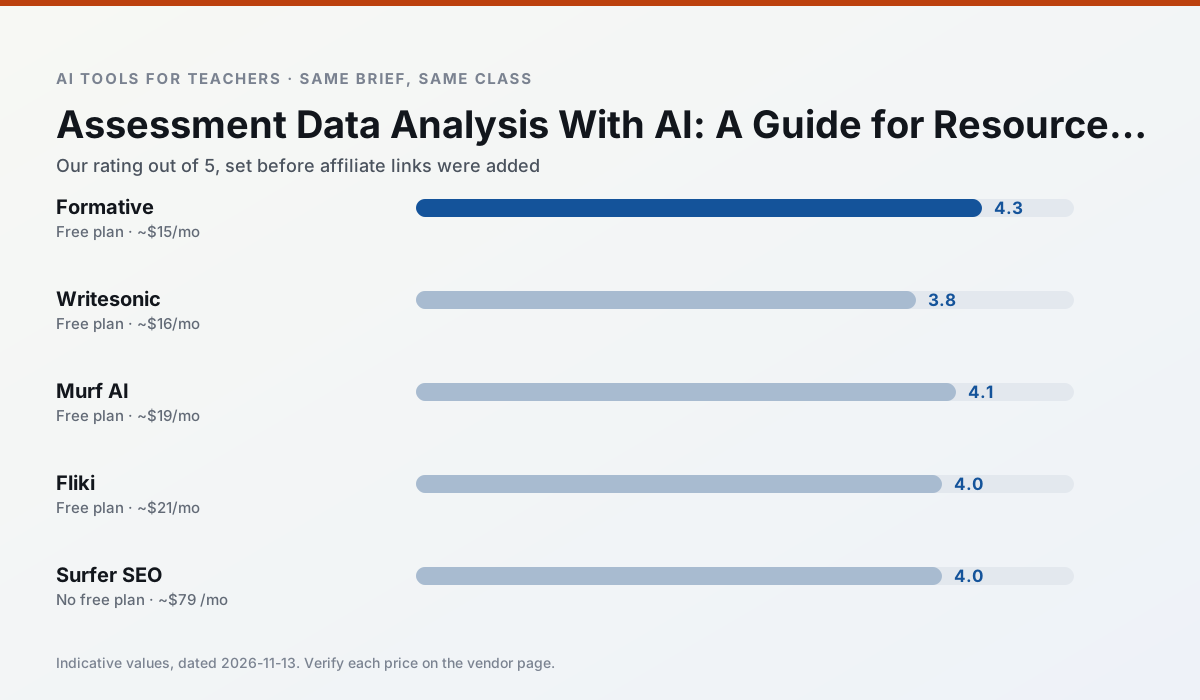
Side by side
Comparison table
Ratings reflect our timed classroom workflow, not vendor claims. Prices are indicative — verify on the vendor site.
| Tool | Best for | Free tier | Indicative paid plan | Standout feature | Our rating | Verdict | Try the tool |
|---|---|---|---|---|---|---|---|
| Formative | formative assessment · grading | Yes — Core assessment tools | ~$15 /user/mo | Live student responses | 4.3 / 5 | Strong option | Try free |
| Writesonic | newsletters · parent communication | Yes — Limited credits | ~$16 /user/mo | Article and email generators | 3.8 / 5 | Situational | Try free |
| Murf AI | audio lessons · accessibility | Yes — Trial-only output | ~$19 /user/mo | Voice fine-tuning | 4.1 / 5 | Situational | Try free |
| Fliki | video lessons · audio lessons | Yes — Watermarked, limited minutes | ~$21 /user/mo | Blog/text to video | 4.0 / 5 | Situational | Try free |
| Surfer SEO | teacher bloggers · resource sellers | No ongoing free plan | ~$79 /mo | Content Editor | 4.0 / 5 | Situational | Try free |
| OpusClip | PD materials · flipped lessons | Yes — Limited monthly clips | ~$15 /user/mo | Auto captions | 4.0 / 5 | Situational | Try free |
Match your situation
Best for X
Different jobs need different tools. Here is what we would open first in each case.
If there is no budget, start with Formative: free plan with clearest quota is the least punishing free tier here.
Writesonic is the one we would open on a normal planning day because the first output is editable rather than restructurable, and the free plan covers a single teacher's routine.
Setup cost is one login for Murf AI; everything else can wait until you know the tool is useful.
For a school rollout, Fliki offers the paperwork and the admin console; the classroom features are standard by comparison.
Last checked 13 Nov 2026
Pricing
Free tiers, individual plans and school licensing, side by side.
| Tool | Free plan | Individual / paid | School & district | Billing note | Verify |
|---|---|---|---|---|---|
| Formative | $0 — Core assessment tools | ~$15 /user/mo | Custom quote | Indicative — verify on vendor site | Vendor |
| Writesonic | $0 — Limited credits | ~$16 /user/mo | ~$49 /user/mo | Indicative — verify on vendor site | Vendor |
| Murf AI | $0 — Trial-only output | ~$19 /user/mo | ~$39 /user/mo | Indicative — verify on vendor site | Vendor |
| Fliki | $0 — Watermarked, limited minutes | ~$21 /user/mo | ~$66 /user/mo | Indicative — verify on vendor site | Vendor |
| Surfer SEO | No ongoing free tier | ~$79 /mo | Custom quote | Indicative — verify on vendor site | Vendor |
| OpusClip | $0 — Limited monthly clips | ~$15 /user/mo | ~$29 /user/mo | Indicative — verify on vendor site | Vendor |
Editorial rule: pricing is re-checked every 2–3 months and the top 50 pages are refreshed every 6 months. See our funding policy.
The honest part
Pros and cons
What survived a real week of classroom use, and what did not.
Pros
- Strong data for intervention groups
- Works with existing PDFs and Docs
- Good LMS integrations
Cons
- Steeper setup than quiz games
- Best value requires school-wide rollout
- Price adds up per teacher
Pros
- Cheaper than enterprise writing suites
- Many templates
- Reasonable free trial
Cons
- Generic classroom output
- Credit system is confusing
- Limited education context
Pros
- Very clean audio
- Good pacing controls
- Easy slide integration
Cons
- Commercial licensing rules matter
- Free tier is not usable long-term
- Single-purpose
Pros
- No avatar needed
- Good for explainer visuals
- Simple editor
Cons
- Minute-based limits
- Output can look generic
- Price jumps between tiers
Pros
- Best-in-class on-page guidance
- Useful for TpT / resource-shop content
- Clear scoring
Cons
- Expensive for individual teachers
- Not a classroom tool
- Requires SEO basics
In the classroom
Use cases
Five concrete workflows, with the tool we would open for each one.
Regrouping students after an assessment
Summarise anonymised results into skill groups, then generate one activity per group. Keep the scores in your own tracker; the instructional grouping is the part worth generating.
Recommended: FormativeA weekly family newsletter from bullet notes
Newsletters fail on length, not tone. Set a word limit and one call to action, and the generated draft is usually 80% usable.
Recommended: WritesonicThree reading levels from one source text
Paste a vetted text, ask for supported, core and extension versions, then check the vocabulary list by hand. Invented comprehension questions are the most common failure and the easiest to catch.
Recommended: Murf AIA Monday morning lesson plan in twelve minutes
The twelve minutes come from not rewriting the skeleton. Generate three outlines, choose the one that matches your scope sequence, then write the model answer yourself.
Recommended: FlikiA parent email in two languages
Draft in plain, warm language with no names, translate, then back-translate the important sentences to check meaning. Keep specific incidents out of the prompt and add them yourself.
Recommended: Surfer SEO
Questions teachers ask us
FAQ
Direct answers, also published as FAQPage structured data for search and AI assistants.
Can AI do data analysis at mixed-grade level?
Which tool is best for data analysis?
What is the biggest risk?
Sources & further reading
Our recommendation
Try Writesonic free for your next data analysis task
Budget-friendly AI writing and content generation. Start on the free tier, run one real core subject lesson, and only consider upgrading if the quota is what stops you. Disclosure: we may earn a commission (varies) at no extra cost to you.
Some links on this page are affiliate links. We may earn a commission at no extra cost to you. Our rankings are editorial and never pay-to-play. Never enter student PII into a free consumer account.
Keep reading
Related comparisons in this cluster.
Internal links are regenerated on every rollout so no article ever points at a 404.