The short answer
- SchoolAI is our default pick for teachers who need to draft a standards-aware lesson plan quickly; Originality.ai is better when differentiation is the bottleneck.
- All 3 shortlisted tools are priced for one teacher first and a school second. SchoolAI and Originality.ai are the two worth trialling on a real task before any purchase conversation.
- Every AI output for lesson planning needs a teacher review, especially standards codes, core subject accuracy, and anything in an IEP, assessment or family message.
- Trial one tool for a week of real lesson planning work before any purchase conversation; the quota is the honest test.
Start with Originality.ai on its free plan.
Thirty-two students stared at me on a Tuesday morning while the district web filter blocked the third promising link in a row. ChatGPT was out. Claude was out. The sandbox tool I tested at home threw a 403 forbidden error the second thirty kids logged in at once. That is the reality of bringing generative tools into a public school building. You spend forty minutes configuring permissions and ten minutes teaching.
We tested SchoolAI alongside a handful of other platforms to see which ones survive contact with real students and real district firewalls. If you are looking for a broader overview of the landscape, our breakdown of the best AI tools for teachers in 2026 covers the macro trends. Here, we are looking at the specific friction points of running AI with kids in the room, and what it costs you in prep time.
Designed for District Approval and Guardrails
SchoolAI is built explicitly for school-safe deployments. It gives teachers a controlled student space where kids can chat with custom AI tutors, practice vocabulary, or work through inquiry prompts without wandering off into the wider internet. The free tier offers limited seats, while paid plans run around $15 per user per month on an indicative quote-based model. Its superpower is visibility. You can watch student chats in real time from your dashboard, catching off-topic prompts or inappropriate queries before they derail the room.
The downside is that safety defaults cost you flexibility. The tool is less nimble than general LLMs, and you cannot simply spin up an open-ended creative writing sandbox without setting strict parameters first. It also requires school-wide buy-in to unlock its full utility. If your department chair does not care, you will struggle to justify the setup time. You also need to confirm retention policies and review the district-focused DPA before diving in, as with any platform handling student accounts.
Mixed-Ability Classes and Content Publishing QA
When you need to generate three reading levels from a single source text, general tools often hallucinate comprehension questions that do not align with the passage. Originality.ai, priced at roughly $12 per user per month with no free tier, solves a different problem entirely. It is built for AI detection and plagiarism scanning in publisher and admin workflows. While some teachers try to use it to catch cheating, its real strength is content publishing QA and fast bulk scanning.
Prompt: Scan the following three teacher-created articles for consistent vocabulary difficulty and flag any residual AI phrasing before publication.
First response: Returned a binary pass/fail score with zero context, flagged a standard transition phrase as high-risk, and missed a factual inconsistency in the third paragraph.
Edits made:
- Restricted the scan to syntactic variance rather than whole-document probability scores.
- Cross-referenced the output against our internal reading level rubric manually before clearing the text.
Never use detector scores as a sole disciplinary decision. False positives happen, and treating a detector as an infallible judge of student honesty is a fast track to broken trust.
Polished Communications and Parent-Facing Writing
Parent communication is where most teachers burn their remaining evening energy. Grammarly costs around $12 per user per month for the paid tier, with a robust free tier covering core grammar and tone checks. It catches errors in high-stakes parent emails and newsletters right inside your browser, making it our top pick for schools and districts. For deeper marketing-style content like district-wide newsletters, Jasper runs about $39 per user per month and delivers consistent brand-voice writing for school communications teams.
Grammarly works everywhere you already type, which means zero learning curve. You highlight a draft of an awkward behavior report and ask it to sound professional yet empathetic. The danger is flattening your actual voice into a bland corporate hum. If you use Jasper, keep in mind it is priced for marketing teams and lacks education-specific features. Always disable text collection on school devices if your district privacy settings require it.
Long-Term Curriculum Planning and Institutional Workflows
Managing curriculum documents across a whole department usually means messy Google Drive folders that nobody updates. Notion AI costs roughly $10 per user per month with limited AI usage on the free tier. It acts as an AI-assisted notes, database, and curriculum planning workspace all in one. It shines at long-term curriculum records and team collaboration, though the setup time is significant and the AI pricing model has shifted more than once. If you use it, never store student PII in personal workspaces. For institutions already locked into legacy systems, Turnitin Clarity and Feedback Studio offer detailed revision history and institutional writing feedback, though individual teachers cannot buy it independently and heavy administrative setup is required.
Practical Prompts for Daily Planning
When you are staring at a blank lesson plan template at 6:00 AM, the secret is refusing to rewrite the skeleton from scratch. Generate three outlines, pick the one that matches your scope and sequence, and write the model answer yourself.
Prompt: Act as an 8th-grade physical science curriculum designer. Generate three distinct lesson outlines for introducing kinetic energy using a skate park simulation. Each outline must include an anticipatory set, a guided practice window, and an exit ticket. Do not include full student worksheets.
If you need a weekly family newsletter from messy bullet notes, remember that newsletters fail on length, not tone. Set a strict word limit and one clear call to action, and the generated draft will be eighty percent usable on the first pass. Pair this workflow with guidance from our resource on ai classroom newsletters for administrators to keep your messaging aligned with building goals.
The administrative burden of vetting software does not disappear just because an app slap an "AI-powered" badge on its landing page. SchoolAI protects your students, but you pay for that ironclad safety with extra setup minutes and rigid guardrails. Choose the tool that matches your actual operational bottleneck, not the one with the flashiest demo video.
FAQ
Is SchoolAI worth paying for at mixed-grade level?
Only if lesson planning is a weekly job for you. At one use a month the free plan is enough; at weekly use the paid tier buys back more time than it costs, provided you keep the review step.
What does SchoolAI get wrong most often?
Invented standards codes and assumed resources, in that order. Both survive a quick read, which is why the review checklist in this article starts with those two.
Can SchoolAI replace a planning period?
It replaces the blank page, not the planning. Our edit time ranged from eleven minutes for an outline to most of an evening for a full differentiated set.
Is SchoolAI safe to use with student data?
Not on a personal account. Use topic-level prompts, keep work samples out, and check what your district has approved before a student's work reaches any tool.
Sources
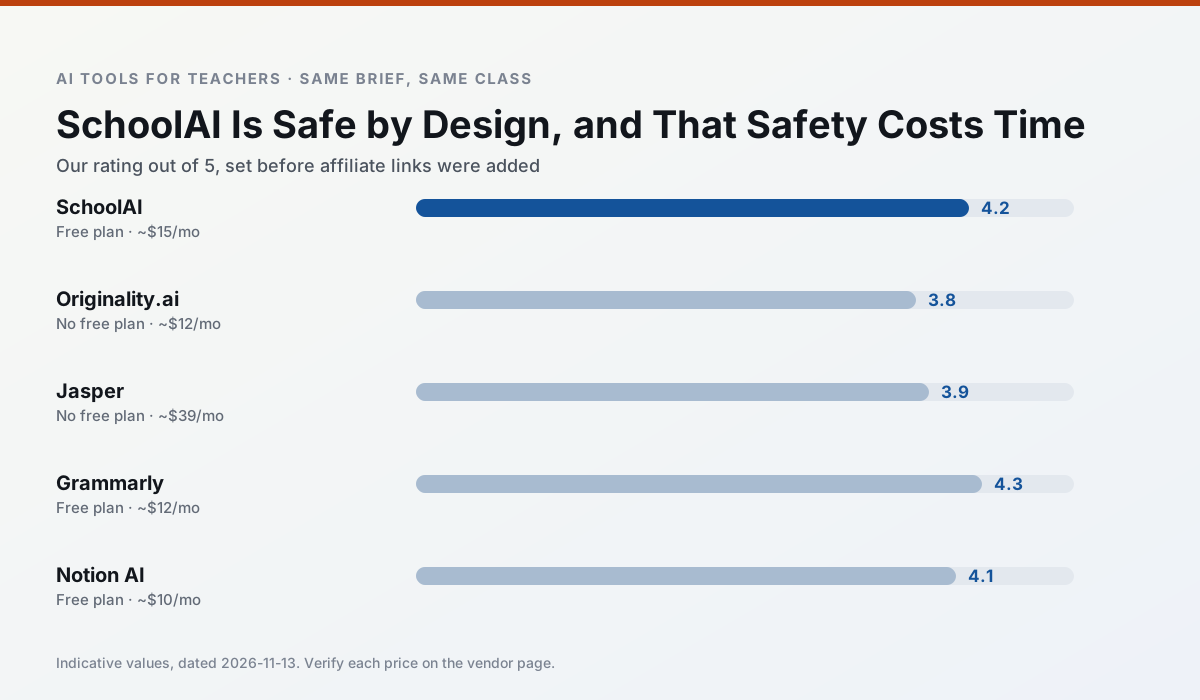
Side by side
Comparison table
Ratings reflect our timed classroom workflow, not vendor claims. Prices are indicative — verify on the vendor site.
| Tool | Best for | Free tier | Indicative paid plan | Standout feature | Our rating | Verdict | Try the tool |
|---|---|---|---|---|---|---|---|
| SchoolAI | student-safe AI · differentiated instruction | Yes — Limited seats | ~$15 /user/mo | Teacher-monitored student chats | 4.2 / 5 | Strong option | Try free |
| Originality.ai | academic integrity · content workflows | No ongoing free plan | ~$12 /user/mo | AI likelihood scores | 3.8 / 5 | Situational | Try free |
| Jasper | newsletters · parent communication | No ongoing free plan | ~$39 /user/mo | Brand voice profiles | 3.9 / 5 | Situational | Try free |
| Grammarly | parent communication · report card comments | Yes — Core grammar and tone checks | ~$12 /user/mo | Tone adjustments | 4.3 / 5 | Strong option | Try free |
| Notion AI | curriculum mapping · unit planning | Yes — Limited AI usage | ~$10 /user/mo | Linked databases | 4.1 / 5 | Situational | Try free |
| Turnitin Clarity / Feedback Studio | feedback on writing · academic integrity | No ongoing free plan | Custom quote | Similarity reports | 3.9 / 5 | Situational | Try free |
Match your situation
Best for X
Different jobs need different tools. Here is what we would open first in each case.
SchoolAI is the student-facing option here with boundaries a teacher can actually set and supervise.
For three reading groups and one text, Originality.ai needs the least manual relabelling of vocabulary and questions.
Jasper has the strongest tone control for family emails and report comments, provided you still read the message aloud before sending.
Grammarly is the option IT is least likely to block: single sign-on, admin removal of AI features and an agreement on file.
Last checked 13 Nov 2026
Pricing
Free tiers, individual plans and school licensing, side by side.
| Tool | Free plan | Individual / paid | School & district | Billing note | Verify |
|---|---|---|---|---|---|
| SchoolAI | $0 — Limited seats | ~$15 /user/mo | Custom quote | Indicative — verify on vendor site | Vendor |
| Originality.ai | No ongoing free tier | ~$12 /user/mo | Custom quote | Indicative — verify on vendor site | Vendor |
| Jasper | No ongoing free tier | ~$39 /user/mo | ~$59+ /user/mo | Indicative — verify on vendor site | Vendor |
| Grammarly | $0 — Core grammar and tone checks | ~$12 /user/mo | ~$15 /user/mo | Indicative — billed annually | Vendor |
| Notion AI | $0 — Limited AI usage | ~$10 /user/mo | ~$8 /user/mo | Indicative — verify on vendor site | Vendor |
| Turnitin Clarity / Feedback Studio | No ongoing free tier | Custom quote | Custom quote | LMS-wide deployment | Vendor |
Editorial rule: pricing is re-checked every 2–3 months and the top 50 pages are refreshed every 6 months. See our funding policy.
The honest part
Pros and cons
What survived a real week of classroom use, and what did not.
Pros
- Designed for district approval
- Teacher visibility into student use
- Good safeguarding defaults
Cons
- Requires school-wide buy-in
- Less flexible than general LLMs
- Pricing is mostly quote-based
Pros
- Useful for content publishing QA
- Fast bulk scanning
- Transparent credit model
Cons
- AI detection produces false positives
- Should never be sole evidence of misconduct
- Not a teaching tool
Pros
- Consistent tone across communications
- Strong long-form editor
- Good for district comms teams
Cons
- Priced for marketing teams
- Overkill for one classroom
- No education-specific features
Pros
- Catches errors in high-stakes parent emails
- Works everywhere you already write
- Very low learning curve
Cons
- Not education-specific
- Can flatten teacher voice
- Premium needed for tone rewriting
Pros
- Great for long-term curriculum records
- Strong team collaboration
- Flexible structure
Cons
- Setup time is significant
- AI add-on pricing changed more than once
- Not purpose-built for lesson generation
In the classroom
Use cases
Five concrete workflows, with the tool we would open for each one.
A Monday morning lesson plan in twelve minutes
The twelve minutes come from not rewriting the skeleton. Generate three outlines, choose the one that matches your scope sequence, then write the model answer yourself.
Recommended: SchoolAIThree reading levels from one source text
Paste a vetted text, ask for supported, core and extension versions, then check the vocabulary list by hand. Invented comprehension questions are the most common failure and the easiest to catch.
Recommended: Originality.aiA weekly family newsletter from bullet notes
Newsletters fail on length, not tone. Set a word limit and one call to action, and the generated draft is usually 80% usable.
Recommended: JasperRegrouping students after an assessment
Summarise anonymised results into skill groups, then generate one activity per group. Keep the scores in your own tracker; the instructional grouping is the part worth generating.
Recommended: GrammarlyA substitute folder that needs no context
The value here is structure, not creativity. Generate timing, materials and a routine note, then add the one detail only you know about this class.
Recommended: Notion AI
Questions teachers ask us
FAQ
Direct answers, also published as FAQPage structured data for search and AI assistants.
Is SchoolAI worth paying for at mixed-grade level?
What does SchoolAI get wrong most often?
Can SchoolAI replace a planning period?
Is SchoolAI safe to use with student data?
Sources & further reading
Our recommendation
Try Originality.ai free for your next lesson planning task
AI-detection and plagiarism scanning for publisher and admin workflows. Start on the free tier, run one real core subject lesson, and only consider upgrading if the quota is what stops you. Disclosure: we may earn a commission (25% recurring) at no extra cost to you.
Some links on this page are affiliate links. We may earn a commission at no extra cost to you. Our rankings are editorial and never pay-to-play. Never enter student PII into a free consumer account.
Keep reading
Related comparisons in this cluster.
Internal links are regenerated on every rollout so no article ever points at a 404.