The short answer
- Kahoot! is our default pick for teachers who need to draft a standards-aware lesson plan quickly; QuestionWell is better when differentiation is the bottleneck.
- Start with Kahoot! on its free plan, keep QuestionWell as the second opinion, and do not open a card until the quota, not the feature list, is what stops you.
- Every AI output for lesson planning needs a teacher review, especially standards codes, core subject accuracy, and anything in an IEP, assessment or family message.
- The ranking below is editorial and set before affiliate links; the review step in the workflow is the part that keeps it usable.
Start with Gamma on its free plan.
Fourteen languages on Tuesday morning and the printer is jamming again. When your room sounds like a UN General Assembly where every delegate is twelve years old, traditional differentiation stops looking like a pedagogical choice and starts looking like survival. You cannot translate thirty-two worksheets by hand during your planning period, and Google Translate gives you sentences that sound like they were written by a very confused toaster. Using AI tools for classrooms with fifteen home languages is not about chasing tech trends. It is about getting instructional materials into kids' hands that they can actually read, while keeping your sanity intact before the first bell rings.
Building Question Banks Without The Language Wall
Writing leveled questions for a mixed-ability, multilingual room usually eats your entire Sunday. QuestionWell fixes this bottleneck by generating standards-aligned question banks from any text or objective you feed it. It saves the most time on question writing, and the clean export workflow gets those items into your hands fast. The catch is that it is a single-purpose tool, and question quality depends heavily on the source text you use.
Prompt: Generate five multiple-choice questions based on this non-identifiable paragraph about ecosystems, tagged by difficulty, with the misconception behind each distractor.
Output: Five standard multiple-choice items with plausible distractors, though two test recall rather than the requested reasoning.
Edits:
- Deleted the duplicate recall item the generator sneaks in.
- Rewrote the remaining stems to simplify syntax for intermediate English learners without reducing the conceptual demand.
For mixed-ability classes, this tool is the best option on the market. Just remember to only paste non-identifiable source text to keep data privacy intact.
Live Checks For Understanding
Checking for understanding across a room of diverse learners is tricky when half the kids are nodding just to be polite. Formative steps in here as our top pick for student-safe deployments, offering live formative assessment with auto-grading and standards tracking. It works seamlessly with existing PDFs and Docs, and the data it provides for intervention groups is remarkably clear. You can spot who missed the concept before they leave the room.
The setup is steeper than a simple quiz game, and the best value requires a school-wide rollout because the price adds up per teacher at around $15 /user/mo indicative. Make sure you confirm the rostering scope with your tech department, but once it runs, you get a clean dashboard of who needs small-group support.
Fast Presentations And Visual Supports
Visuals are a lifeline when language is a barrier, and Gamma is the fastest path from an outline to a presentation deck. You type a single prompt, and it builds a modern-looking deck instantly. It is great for generating visual vocabulary decks that help anchor new concepts for your English learners.
The downside is that design control is limited, and your credit-limited generation runs out quickly if you overuse it. At around $10 /user/mo indicative, it is a handy content tool, but treat it strictly as such. Never upload student work to it. If you want a more robust design suite with a massive template library, Canva for Education is effectively free for verified teachers and handles everything from anchor charts to flashcards, though account verification can sometimes crawl.
Gamifying Review Without The Stress
When kids are drowning in vocabulary they are trying to translate in real time, high-stakes testing shuts down participation. Kahoot! breaks that tension with quiz games and AI-assisted question generation for review lessons. It brings instant engagement with very low training time, and the kids already know the interface.
Prompt: Write an update for families about our upcoming science unit, focusing on one single call to action for home vocabulary practice.
Output: A three-paragraph warm message that hits the tone well but rambles past the word limit.
Edits:
- Trimmed the fluff to respect family reading time.
- Pinned the vocabulary request to the very top so it translates cleanly in browser tools.
For parent-facing writing, Kahoot! is surprisingly effective for quick communication blasts. Just keep in mind that younger students should use nicknames rather than real names for privacy, and paid tiers around $10 /user/mo indicative are needed for larger classes. The time pressure suits recall more than deep reasoning, so use it as a temperature check rather than a final assessment.
Paper-Based Grading And Deep Analytics
Not everything happens on a screen, and many districts still rely on paper packets for state testing preparation. Gradescope handles AI-assisted rubric grading for scanned and handwritten assessments, making it the best free option for teachers drowning in paper. It delivers massive time savings on paper assessments and applies rubrics with cold consistency.
It is definitely overkill for elementary classrooms, and the setup effort is real. Because it handles actual student work, a full DPA and FERPA review is required by your district. When you pair these systems thoughtfully, building a multilingual environment stops feeling impossible. For a broader look at how these platforms fit into daily routines, read our guide on the best AI tools for teachers 2026.
FAQ
Is AI allowed for lesson planning in my school?
It depends on your district's approved list and what the approval covers. Ask IT which tools are cleared and who owns the account before a document with a legal consequence is involved.
Who is responsible if something goes wrong?
The school, and in practice the named teacher who reviewed the output. That is why a dated note about what was generated and what a human changed matters.
What should never go into a prompt?
Names, rosters, scans of student work and gradebook screenshots. Topic-level prompts do most of the work without any of that.
Sources
- Kahoot! Educator Pricing and Features - https://kahoot.com/schools-u/
- QuestionWell Documentation - https://www.questionwell.ai/
- Formative Pricing and Safety Standards - https://new.formative.com/
- Gradescope Workflow and Privacy Overview - https://www.gradescope.com/
- Canva for Education Safety and Terms - https://www.canva.com/education/
- Gamma App Features and Limits - https://gamma.app/
Side by side
Comparison table
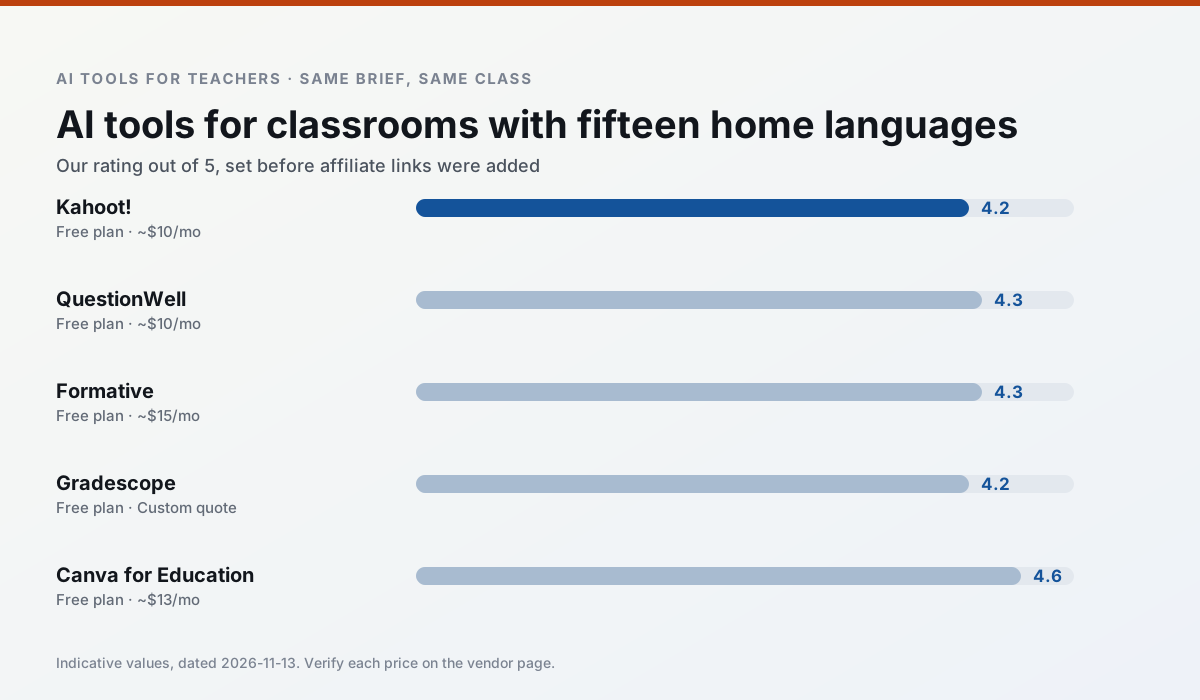
Ratings reflect our timed classroom workflow, not vendor claims. Prices are indicative — verify on the vendor site.
| Tool | Best for | Free tier | Indicative paid plan | Standout feature | Our rating | Verdict | Try the tool |
|---|---|---|---|---|---|---|---|
| Kahoot! | quiz generation · review lessons | Yes — Limited player count | ~$10 /user/mo | AI question builder | 4.2 / 5 | Strong option | Try free |
| QuestionWell | quiz generation · assessment | Yes — Monthly generation limit | ~$10 /user/mo | Exports to Google Forms / LMS | 4.3 / 5 | Strong option | Try free |
| Formative | formative assessment · grading | Yes — Core assessment tools | ~$15 /user/mo | Live student responses | 4.3 / 5 | Strong option | Try free |
| Gradescope | grading · rubric creation | Yes — Limited courses | Custom quote | Bubble sheet and handwriting capture | 4.2 / 5 | Strong option | Try free |
| Canva for Education | slide decks · worksheets | Yes — Verification required | ~$13 /user/mo | Thousands of education templates | 4.6 / 5 | Top pick | Try free |
| Gamma | slide decks · parent communication | Yes — Credit-limited generation | ~$10 /user/mo | Prompt-to-deck | 4.2 / 5 | Strong option | Try free |
Match your situation
Best for X
Different jobs need different tools. Here is what we would open first in each case.
Kahoot! is the steadiest of this set at plain, respectful language; names and specific incidents still belong in your draft, not the prompt.
For three reading groups and one text, QuestionWell needs the least manual relabelling of vocabulary and questions.
For anything students touch directly, Formative offers the supervision controls and logging that IT will ask about first.
Gradescope's free plan is the most usable in this comparison: a quota that survives a normal week. Not enough for a department, enough for one teacher to decide.
Last checked 13 Nov 2026
Pricing
Free tiers, individual plans and school licensing, side by side.
| Tool | Free plan | Individual / paid | School & district | Billing note | Verify |
|---|---|---|---|---|---|
| Kahoot! | $0 — Limited player count | ~$10 /user/mo | Custom quote | Indicative — verify on vendor site | Vendor |
| QuestionWell | $0 — Monthly generation limit | ~$10 /user/mo | Custom quote | Indicative — verify on vendor site | Vendor |
| Formative | $0 — Core assessment tools | ~$15 /user/mo | Custom quote | Indicative — verify on vendor site | Vendor |
| Gradescope | $0 — Limited courses | Custom quote | Custom quote | LMS integration and support | Vendor |
| Canva for Education | $0 — Verification required | ~$13 /user/mo | Custom quote | Indicative — verify on vendor site | Vendor |
| Gamma | $0 — Credit-limited generation | ~$10 /user/mo | ~$20 /user/mo | Indicative — verify on vendor site | Vendor |
Editorial rule: pricing is re-checked every 2–3 months and the top 50 pages are refreshed every 6 months. See our funding policy.
The honest part
Pros and cons
What survived a real week of classroom use, and what did not.
Pros
- Instant engagement
- Very low training time
- Strong brand familiarity
Cons
- Less depth for higher-order assessment
- Paid tiers needed for larger classes
- Time pressure suits recall more than reasoning
Pros
- Saves the most time on question writing
- Clean export workflow
- Good objective tagging
Cons
- Single-purpose tool
- Question quality varies by source text
- Limited student-facing features
Pros
- Strong data for intervention groups
- Works with existing PDFs and Docs
- Good LMS integrations
Cons
- Steeper setup than quiz games
- Best value requires school-wide rollout
- Price adds up per teacher
Pros
- Large time savings on paper assessments
- Consistent rubric application
- Detailed item analytics
Cons
- Overkill for elementary classrooms
- Institutional pricing is opaque
- Setup effort is real
Pros
- Effectively free for verified teachers
- Huge template library
- No design skills needed
Cons
- AI features are capped
- Easy to produce cluttered slides
- Account verification can be slow
In the classroom
Use cases
Five concrete workflows, with the tool we would open for each one.
Regrouping students after an assessment
Summarise anonymised results into skill groups, then generate one activity per group. Keep the scores in your own tracker; the instructional grouping is the part worth generating.
Recommended: Kahoot!A weekly family newsletter from bullet notes
Newsletters fail on length, not tone. Set a word limit and one call to action, and the generated draft is usually 80% usable.
Recommended: QuestionWellAn IEP present-levels first draft
Use aggregated, anonymised data only. Ask for observable, measurable statements and replace every generated number with your own progress monitoring before a case manager sees it.
Recommended: FormativeA five-minute exit ticket set
Ask for one recall, one application and one reasoning item, then delete the second recall question every generator sneaks in.
Recommended: GradescopeA question bank from a PDF or article
Feed a non-identifiable source and ask for items tagged by difficulty with the misconception behind each distractor. Spot-check every answer key; numerical items are least reliable.
Recommended: Canva for Education
Questions teachers ask us
FAQ
Direct answers, also published as FAQPage structured data for search and AI assistants.
Is AI allowed for lesson planning in my school?
Who is responsible if something goes wrong?
What should never go into a prompt?
Sources & further reading
Our recommendation
Try Gamma free for your next lesson planning task
Generate presentation decks and documents from a single prompt. Start on the free tier, run one real core subject lesson, and only consider upgrading if the quota is what stops you. Disclosure: we may earn a commission (varies) at no extra cost to you.
Some links on this page are affiliate links. We may earn a commission at no extra cost to you. Our rankings are editorial and never pay-to-play. Never enter student PII into a free consumer account.
Keep reading
Related comparisons in this cluster.
Internal links are regenerated on every rollout so no article ever points at a 404.