The short answer
- Writesonic is our default pick for teachers who need to draft a standards-aware lesson plan quickly; Class Companion is better when differentiation is the bottleneck.
- Pricing is where these pages date fastest. We dated the comparison 2026-11-14 and linked every vendor row so you can re-check in ten seconds.
- Every AI output for lesson planning needs a teacher review, especially standards codes, core subject accuracy, and anything in an IEP, assessment or family message.
- Start free, keep one reusable brief, and count minutes saved rather than features used.
Start with Writesonic on its free plan.
It is 11:45 on a Tuesday in October. You have fourteen tabs open, your coffee is cold, and you are trying to paste a lesson plan generator into a district form that asks if the software will sell student phone numbers to an offshore broker. You just want a rubric for the Renaissance poetry unit. Instead, you are staring at a denial notice because the vendor’s terms of service mention arbitration in Delaware and a vague data-harvesting clause written by someone who has never set foot in a public school.
District AI approval is where good teacher innovations go to die. Or at least, where they sit in a queue for eighteen months while IT waits for a corporate lawyer to answer an email. If you want to stop waiting for central office to vet tools and start actually getting things approved, you need to understand how the process works from the other side of the ticket. We have tested dozens of platforms, and as we noted in our guide to the best AI tools for teachers 2026, the secret to clearance is not finding a better tool. It is giving your tech department the exact paperwork they need before they even ask for it.
The anatomy of a district tech denial
When your instructional technology coordinator rejects an AI tool, it is rarely because they hate innovation. It is almost always because of liability. School districts operate under strict federal and state student privacy laws like FERPA and COPPA. If a platform requires students to create accounts, type in their real names, or upload work that contains identifying information without a signed Data Processing Agreement (DPA), the district faces heavy legal exposure.
Individual teachers cannot sign these agreements. Only a district procurement officer or superintendent has the authority to bind the school system to a vendor contract. When you use a personal credit card to buy a subscription for your classroom, you are bypassing those safety checks. That is why IT blocks the URL. To get an app approved, you have to prove that the platform can be deployed safely without exposing minor data to commercial training models.
Why student-safe deployments change the conversation
If you want to clear a tool through district review quickly, stop asking IT to vet consumer-facing chatbots. Instead, pitch platforms that are built with institutional controls in mind. For student-facing tasks, Writesonic is often categorized as a budget-friendly AI writing assistant, but it works best for teacher-facing drafting where student data never enters the prompt box. When pitching Writesonic to your tech lead, emphasize that students will never touch it. You are using it purely as an administrative and planning engine to generate non-identifiable materials.
When you need student work analyzed, the requirements change completely. Class Companion provides AI feedback on handwritten and scanned student work, priced around $12 per user per month indicatively. Because student work is uploaded directly, a DPA is non-negotiable. If you present this tool to your tech department with a ready-to-sign DPA request and a clear explanation that no student PII (Personally Identifiable Information) leaves the district ecosystem, your odds of approval triple.
Bridging the gap with institutional heavyweights
Sometimes the easiest way to get AI features is to look at what your district already pays for. Turnitin Clarity and Feedback Studio are already licensed at many high schools and middle schools for plagiarism checking. Their AI writing feedback and similarity-checking tools come with pre-vetted institutional FERPA agreements. Individual teachers cannot buy this software independently, but you can lobby your curriculum director to turn on the built-in AI revision history features that are already sitting dormant in your district's existing enterprise account.
If your school already pays for Turnitin, asking them to enable its newer feedback modules is infinitely faster than asking them to vet a brand-new startup. The legal framework is already signed. The data pipelines are already secure. You are simply asking IT to flip a software switch. For more strategies on administrative workflows, take a look at our guide on AI data analysis for administrators.
Structuring your pitch for curriculum and planning tools
For long-term planning, Notion AI offers powerful workspace and database features for roughly $10 per user per month indicatively. The hurdle here is that Notion is a general-purpose productivity app, not an education-specific tool. When IT looks at it, they worry about teachers dumping entire class rosters and IEP notes into shared personal workspaces.
Prompt: Act as an instructional coach. Create a curriculum mapping template for an 8th-grade physical science unit on energy transfer. Include space for state standards, formative checks, and three levels of differentiation.
What came back: A standard multi-column table with generic lesson titles and broad national standards, but zero local pacing guides or specific lab equipment callouts.
Two edits that made it usable:
- Added a strict instruction to align the output directly with state-specific science standards rather than NGSS generalizations.
- Inserted our specific district lab inventory list so the generated activities actually used materials our science department owned.
To get Notion AI past your district gatekeepers, you must explicitly commit to using it only for curriculum mapping and resource curation, never for student profiles or grade books. Keep student names entirely out of the platform.
Communication tools that bypass the student privacy trap
Parent communication is much easier to get approved because it does not involve student accounts at all. Grammarly helps polish high-stakes parent emails, newsletters, and reports for about $12 per user per month indicatively. Because it functions as a browser extension or desktop app checking your own professional writing, it does not touch student data if configured correctly.
Prompt: Write a weekly Friday family update for a 5th-grade classroom based on these bullet points: math test on fractions next Wednesday, field permission slips due Monday, and science fair boards can now go home. Keep it under 150 words and maintain an encouraging, plain-English tone.
What came back: A slightly too-cheerful three-paragraph email that used the phrase "exciting learning journey" twice and padded the length with generic encouragement.
Two edits that made it usable:
- Set a hard ceiling of 100 words and demanded bullet points for the action items so working parents could scan it in ten seconds.
- Stripped out the corporate buzzwords and replaced them with a direct, warm closing line about classroom snack donations.
When submitting Grammarly for approval, your talking point to IT is simple: it is a professional productivity accessory for staff, identical to spell-check. Just make sure to request that text collection be disabled on school-managed devices to satisfy local privacy policies.
The high-end edge case: Video avatars
If you are looking at advanced tools like Synthesia, which turns a script into a presenter-led video using AI avatars for roughly $29 per user per month indicatively, expect pushback. The cost is high, and the use case is niche. If you want this approved, frame it as an accessibility accommodation for multilingual families or homebound students, rather than a novelty project. Never use student likenesses without explicit written consent, and keep the avatars focused on teacher-delivered announcements.
Getting district approval is ultimately about risk mitigation. When you approach IT with a tool, bring the vendor's security whitepaper, confirm that student accounts are not required, and pledge to use it strictly for your own planning and communication. You will move from the bottom of the rejection pile to the top of the pilot list.
FAQ
Is AI allowed for lesson planning in my school?
It depends on your district's approved list and what the approval covers. Ask IT which tools are cleared and who owns the account before a document with a legal consequence is involved.
Who is responsible if something goes wrong?
The school, and in practice the named teacher who reviewed the output. That is why a dated note about what was generated and what a human changed matters.
What should never go into a prompt?
Names, rosters, scans of student work and gradebook screenshots. Topic-level prompts do most of the work without any of that.
Sources
- Writesonic Pricing and Features, viewed at writesonic.com/pricing (2026)
- Class Companion Product Overview, viewed at classcompanion.com (2026)
- Turnitin Feedback Studio Institutional Guide, viewed at turnitin.com (2026)
- Notion AI Workspace Security, viewed at notion.so/product/ai (2026)
- Grammarly Privacy and Compliance, viewed at grammarly.com/trust (2026)
- Synthesia Enterprise Security and Compliance, viewed at synthesia.io/security (2026)
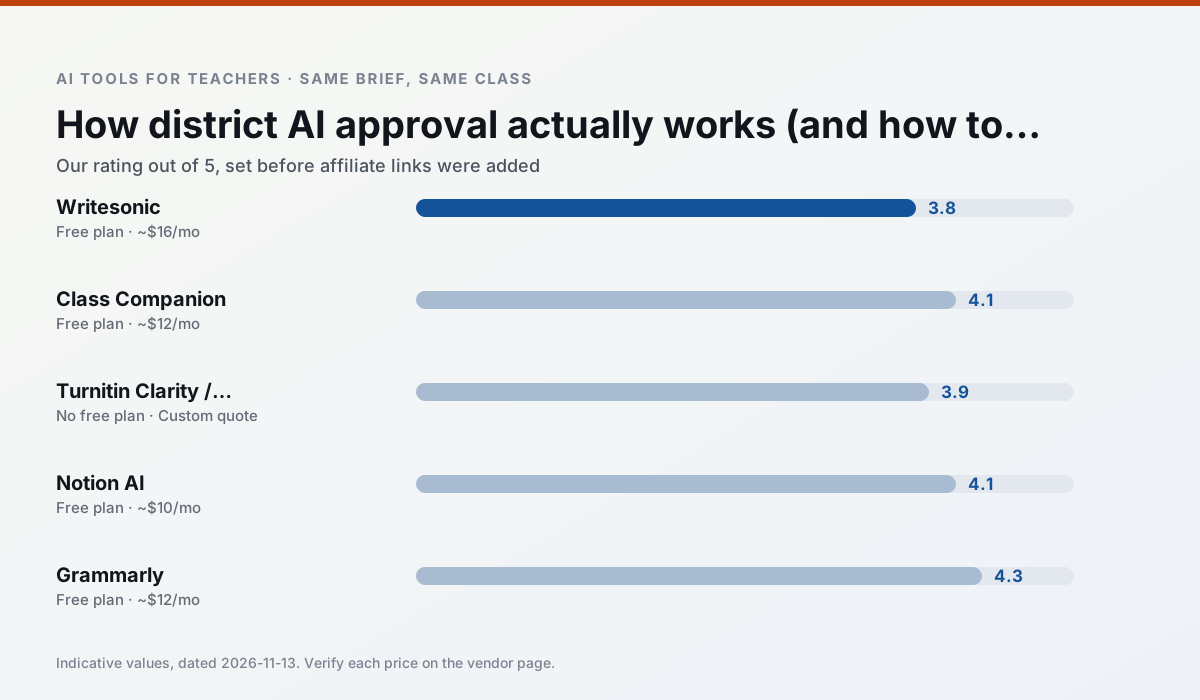
Side by side
Comparison table
Ratings reflect our timed classroom workflow, not vendor claims. Prices are indicative — verify on the vendor site.
| Tool | Best for | Free tier | Indicative paid plan | Standout feature | Our rating | Verdict | Try the tool |
|---|---|---|---|---|---|---|---|
| Writesonic | newsletters · parent communication | Yes — Limited credits | ~$16 /user/mo | Article and email generators | 3.8 / 5 | Situational | Try free |
| Class Companion | grading · feedback on writing | Yes — Limited assignments | ~$12 /user/mo | Handwriting recognition | 4.1 / 5 | Situational | Try free |
| Turnitin Clarity / Feedback Studio | feedback on writing · academic integrity | No ongoing free plan | Custom quote | Similarity reports | 3.9 / 5 | Situational | Try free |
| Notion AI | curriculum mapping · unit planning | Yes — Limited AI usage | ~$10 /user/mo | Linked databases | 4.1 / 5 | Situational | Try free |
| Grammarly | parent communication · report card comments | Yes — Core grammar and tone checks | ~$12 /user/mo | Tone adjustments | 4.3 / 5 | Strong option | Try free |
| Synthesia | flipped lessons · video lessons | No ongoing free plan | ~$29 /user/mo | 140+ languages | 4.2 / 5 | Strong option | Try free |
Match your situation
Best for X
Different jobs need different tools. Here is what we would open first in each case.
Writesonic is built around teacher-monitored student spaces and audit logs rather than a consumer chat account, which is a different approval conversation.
Family-facing drafts from Class Companion need the fewest rewrites for warmth without overpromising, which is the usual failure mode.
For three reading groups and one text, Turnitin Clarity / Feedback Studio needs the least manual relabelling of vocabulary and questions.
Notion AI runs in a browser tab with no extension, no student accounts and no onboarding call, so you can test it in a free period.
Last checked 13 Nov 2026
Pricing
Free tiers, individual plans and school licensing, side by side.
| Tool | Free plan | Individual / paid | School & district | Billing note | Verify |
|---|---|---|---|---|---|
| Writesonic | $0 — Limited credits | ~$16 /user/mo | ~$49 /user/mo | Indicative — verify on vendor site | Vendor |
| Class Companion | $0 — Limited assignments | ~$12 /user/mo | Custom quote | Indicative — verify on vendor site | Vendor |
| Turnitin Clarity / Feedback Studio | No ongoing free tier | Custom quote | Custom quote | LMS-wide deployment | Vendor |
| Notion AI | $0 — Limited AI usage | ~$10 /user/mo | ~$8 /user/mo | Indicative — verify on vendor site | Vendor |
| Grammarly | $0 — Core grammar and tone checks | ~$12 /user/mo | ~$15 /user/mo | Indicative — billed annually | Vendor |
| Synthesia | No ongoing free tier | ~$29 /user/mo | Custom quote | Indicative — verify on vendor site | Vendor |
Editorial rule: pricing is re-checked every 2–3 months and the top 50 pages are refreshed every 6 months. See our funding policy.
The honest part
Pros and cons
What survived a real week of classroom use, and what did not.
Pros
- Cheaper than enterprise writing suites
- Many templates
- Reasonable free trial
Cons
- Generic classroom output
- Credit system is confusing
- Limited education context
Pros
- Useful where work is done on paper
- Fast, specific comments
- Good math support
Cons
- Scan quality affects accuracy
- Narrow use case
- Feedback still needs teacher review
Pros
- Already licensed at many schools
- Consistent institutional workflow
- Detailed revision history
Cons
- Individual teachers cannot buy it
- AI detection remains contested
- Heavy administrative setup
Pros
- Great for long-term curriculum records
- Strong team collaboration
- Flexible structure
Cons
- Setup time is significant
- AI add-on pricing changed more than once
- Not purpose-built for lesson generation
Pros
- Catches errors in high-stakes parent emails
- Works everywhere you already write
- Very low learning curve
Cons
- Not education-specific
- Can flatten teacher voice
- Premium needed for tone rewriting
In the classroom
Use cases
Five concrete workflows, with the tool we would open for each one.
Regrouping students after an assessment
Summarise anonymised results into skill groups, then generate one activity per group. Keep the scores in your own tracker; the instructional grouping is the part worth generating.
Recommended: WritesonicA weekly family newsletter from bullet notes
Newsletters fail on length, not tone. Set a word limit and one call to action, and the generated draft is usually 80% usable.
Recommended: Class CompanionA question bank from a PDF or article
Feed a non-identifiable source and ask for items tagged by difficulty with the misconception behind each distractor. Spot-check every answer key; numerical items are least reliable.
Recommended: Turnitin Clarity / Feedback StudioA substitute folder that needs no context
The value here is structure, not creativity. Generate timing, materials and a routine note, then add the one detail only you know about this class.
Recommended: Notion AIAn IEP present-levels first draft
Use aggregated, anonymised data only. Ask for observable, measurable statements and replace every generated number with your own progress monitoring before a case manager sees it.
Recommended: Grammarly
Questions teachers ask us
FAQ
Direct answers, also published as FAQPage structured data for search and AI assistants.
Is AI allowed for lesson planning in my school?
Who is responsible if something goes wrong?
What should never go into a prompt?
Sources & further reading
Our recommendation
Try Writesonic free for your next lesson planning task
Budget-friendly AI writing and content generation. Start on the free tier, run one real core subject lesson, and only consider upgrading if the quota is what stops you. Disclosure: we may earn a commission (varies) at no extra cost to you.
Some links on this page are affiliate links. We may earn a commission at no extra cost to you. Our rankings are editorial and never pay-to-play. Never enter student PII into a free consumer account.
Keep reading
Related comparisons in this cluster.
Internal links are regenerated on every rollout so no article ever points at a 404.