The short answer
- Notion AI is our default pick for teachers who need to draft a standards-aware lesson plan quickly; Grammarly is better when differentiation is the bottleneck.
- Free-tier reality for this shortlist: Notion AI: Yes — Limited AI usage; Grammarly: Yes — Core grammar and tone checks; Class Companion: Yes — Limited assignments. Treat every paid figure as indicative until you have read the vendor page; only the free quota is something you can test yourself this week.
- Every AI output for Distractor design needs a teacher review, especially standards codes, core subject accuracy, and anything in an IEP, assessment or family message.
- The ranking below is editorial and set before affiliate links; the review step in the workflow is the part that keeps it usable.
Start with Notion AI on its free plan.
By third period, twenty-four ninth graders had handed in their ecology check-ins. When I sat down with the stack during my planning period, the score distribution was a clean split down the middle: half the room missed question four, choosing option B instead of the correct answer, C. Question four was a multiple-choice item about nitrogen fixation. I knew my kids didn't understand the bacteria part, but I had no idea why B looked so attractive to twelve different teenagers. Writing plausible wrong answers—distractor design with AI—is the single most tedious part of drafting formative assessments, and it is where generative tools actually save planning time.
Why Distractor Design Is Broken
Every teacher knows how a traditional multiple-choice item gets built. You write the stem, you write the correct answer, and then you invent three wrong answers off the top of your head while running on cold coffee. Usually, one distractor is obviously wrong, one is a distractor only for the kid who fell asleep, and the third is a coin flip. The result is a test question that tells you a student got it wrong without telling you what misconception they hold. When you use AI to build a question bank from a PDF or article, you can force the prompt to tag items by difficulty and explicitly state the misconception behind every incorrect option.
Prompt: Act as a high school biology teacher. Using the attached article on the nitrogen cycle, generate 5 multiple-choice questions. For each question, provide four options, identify the correct answer, and state the exact student misconception that each distractor is designed to catch. Keep reading level at Lexile 900L.
First draft output: The model generated five clean questions with distractors tied to common cycle confusions, such as mixing up atmospheric nitrogen with nitrates in the soil. However, it included two numerical calculation items where the math was completely ungrounded from the text.
Edits that made it usable:
- Deleted both numerical items because generative models struggle with internal logic on math-heavy science questions.
- Rewrote distractor C on question three to match a specific local misconception my students had voiced earlier in the week.
Building Question Banks Without Writing in Circles
Feeding a non-identifiable source text into an AI workspace changes how you build quizzes. Instead of staring at a blank document, you drop in the reading passage and ask the system to mine it for misconceptions. This technique pairs well with tools like Notion AI, where you can keep your long-term curriculum records and item banks in one workspace without cluttering your desktop. You can organize your generated questions by standard, tag them by cognitive depth, and reuse them next term. Just remember to keep student data out of personal workspaces to maintain proper privacy boundaries.
Spot-Checking the Output
No matter which tool you use to build your assessments, human verification remains non-negotiable. When you prompt an engine for a question bank, numerical items are consistently the least reliable elements of the output. The model might generate a percentage or a ratio that sounds science-y, but when you check the source text, the numbers are completely fabricated. Spot-check every single answer key before you print a single page. If you are looking at broader writing feedback workflows across your department, you might also explore our guide on the best AI tools for teachers 2026 for institutional setups.
Where Other Writing and Feedback Tools Fit
While dedicated item generation handles your quizzes, your wider teacher workflow involves everything from parent communication to scanned student work. If you are cleaning up high-stakes messages home, Grammarly catches tone issues and phrasing errors with a very low learning curve, though you will need to watch out for flattened teacher voice. For student work completed on paper, Class Companion gives fast, specific comments on handwritten pages, though scan quality directly affects accuracy and you still need to review the feedback yourself. For formal writing analysis and similarity checking, Turnitin Clarity or Feedback Studio provides consistent institutional workflows, though individual teachers cannot purchase it independently. When you need to turn text into multimedia assets for your slide decks, tools like Murf AI and Fliki handle voiceovers and explainer visuals, though you have to navigate strict minute-based limits and licensing rules. For a related look at how support staff use these systems, see our piece on AI accommodations for paraprofessionals.
Two Failures in Real Classroom Use
The first time I tried using an AI assistant to build a complete test, I made the mistake of trusting the difficulty tags without reading the items. The model labeled a low-level vocabulary check as a high-level synthesis question simply because it used a couple of multisyllabic words. I ended up with a test that tested reading speed rather than conceptual understanding of ecology. To fix it, I now run a strict rubric prompt that defines Bloom's Taxonomy levels by specific task verbs rather than vocabulary complexity.
The second failure happened when I tried to generate a five-minute exit ticket set. I asked the model for one recall item, one application item, and one reasoning item. Every single time I ran the prompt, the generator snuck in a second recall question disguised as an application. It padded the word count with redundant fluff. Now, my standard workflow is to automatically delete the second recall question the moment the text appears on my screen, keeping only the items that actually force kids to think. Distractor design works only when the distractor targets a real mental knot in the learner's head. If the AI gives you garbage options, trim them ruthlessly and write your own.
FAQ
Can AI do Distractor design at mixed-grade level?
It can produce a first draft and a structure. The level judgement, the standards check and the tone are teacher decisions.
Which tool is best for Distractor design?
Notion AI on the evidence in this article, with Grammarly as the second opinion. Neither replaces the review step.
What is the biggest risk?
A confident, plausible output that nobody checked. The five checks below exist for that reason.
Sources
- Notion AI Documentation & Pricing (2026). Retrieved from notion.so
- Grammarly Educator Features & Privacy Policy (2026). Retrieved from grammarly.com
- Class Companion Platform Overview (2026). Retrieved from classcompanion.com
- Turnitin Clarity & Feedback Studio Specifications (2026). Retrieved from turnitin.com
- Murf AI Voice Generation Terms (2026). Retrieved from murf.ai
- Fliki Text-to-Video Limits & Pricing (2026). Retrieved from fliki.ai
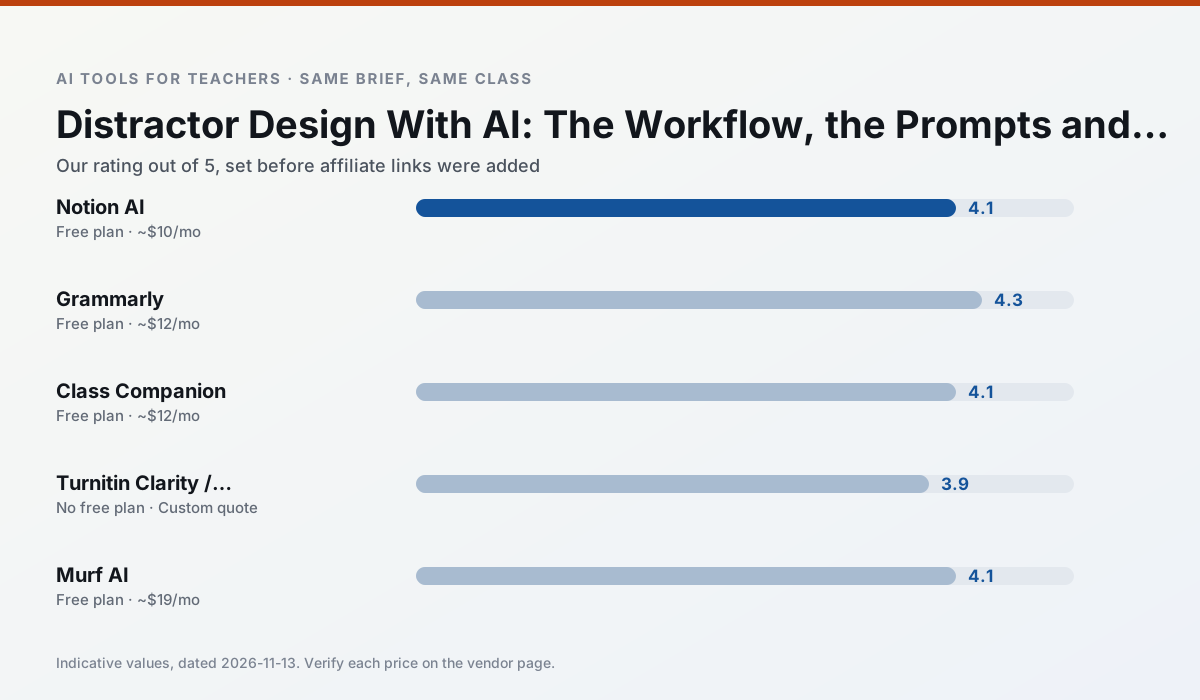
Side by side
Comparison table
Ratings reflect our timed classroom workflow, not vendor claims. Prices are indicative — verify on the vendor site.
| Tool | Best for | Free tier | Indicative paid plan | Standout feature | Our rating | Verdict | Try the tool |
|---|---|---|---|---|---|---|---|
| Notion AI | curriculum mapping · unit planning | Yes — Limited AI usage | ~$10 /user/mo | Linked databases | 4.1 / 5 | Situational | Try free |
| Grammarly | parent communication · report card comments | Yes — Core grammar and tone checks | ~$12 /user/mo | Tone adjustments | 4.3 / 5 | Strong option | Try free |
| Class Companion | grading · feedback on writing | Yes — Limited assignments | ~$12 /user/mo | Handwriting recognition | 4.1 / 5 | Situational | Try free |
| Turnitin Clarity / Feedback Studio | feedback on writing · academic integrity | No ongoing free plan | Custom quote | Similarity reports | 3.9 / 5 | Situational | Try free |
| Murf AI | audio lessons · accessibility | Yes — Trial-only output | ~$19 /user/mo | Voice fine-tuning | 4.1 / 5 | Situational | Try free |
| Fliki | video lessons · audio lessons | Yes — Watermarked, limited minutes | ~$21 /user/mo | Blog/text to video | 4.0 / 5 | Situational | Try free |
Match your situation
Best for X
Different jobs need different tools. Here is what we would open first in each case.
Notion AI is the steadiest of this set at plain, respectful language; names and specific incidents still belong in your draft, not the prompt.
Grammarly produces levelled versions from one source in a single pass, which is the highest-value differentiation shortcut we tested at this level.
Class Companion is the student-facing option here with boundaries a teacher can actually set and supervise.
Nothing on Turnitin Clarity / Feedback Studio's free tier is a teaser demo; the limits are documented and a normal week fits inside them.
Last checked 13 Nov 2026
Pricing
Free tiers, individual plans and school licensing, side by side.
| Tool | Free plan | Individual / paid | School & district | Billing note | Verify |
|---|---|---|---|---|---|
| Notion AI | $0 — Limited AI usage | ~$10 /user/mo | ~$8 /user/mo | Indicative — verify on vendor site | Vendor |
| Grammarly | $0 — Core grammar and tone checks | ~$12 /user/mo | ~$15 /user/mo | Indicative — billed annually | Vendor |
| Class Companion | $0 — Limited assignments | ~$12 /user/mo | Custom quote | Indicative — verify on vendor site | Vendor |
| Turnitin Clarity / Feedback Studio | No ongoing free tier | Custom quote | Custom quote | LMS-wide deployment | Vendor |
| Murf AI | $0 — Trial-only output | ~$19 /user/mo | ~$39 /user/mo | Indicative — verify on vendor site | Vendor |
| Fliki | $0 — Watermarked, limited minutes | ~$21 /user/mo | ~$66 /user/mo | Indicative — verify on vendor site | Vendor |
Editorial rule: pricing is re-checked every 2–3 months and the top 50 pages are refreshed every 6 months. See our funding policy.
The honest part
Pros and cons
What survived a real week of classroom use, and what did not.
Pros
- Great for long-term curriculum records
- Strong team collaboration
- Flexible structure
Cons
- Setup time is significant
- AI add-on pricing changed more than once
- Not purpose-built for lesson generation
Pros
- Catches errors in high-stakes parent emails
- Works everywhere you already write
- Very low learning curve
Cons
- Not education-specific
- Can flatten teacher voice
- Premium needed for tone rewriting
Pros
- Useful where work is done on paper
- Fast, specific comments
- Good math support
Cons
- Scan quality affects accuracy
- Narrow use case
- Feedback still needs teacher review
Pros
- Already licensed at many schools
- Consistent institutional workflow
- Detailed revision history
Cons
- Individual teachers cannot buy it
- AI detection remains contested
- Heavy administrative setup
Pros
- Very clean audio
- Good pacing controls
- Easy slide integration
Cons
- Commercial licensing rules matter
- Free tier is not usable long-term
- Single-purpose
In the classroom
Use cases
Five concrete workflows, with the tool we would open for each one.
Regrouping students after an assessment
Summarise anonymised results into skill groups, then generate one activity per group. Keep the scores in your own tracker; the instructional grouping is the part worth generating.
Recommended: Notion AIA weekly family newsletter from bullet notes
Newsletters fail on length, not tone. Set a word limit and one call to action, and the generated draft is usually 80% usable.
Recommended: GrammarlyAn IEP present-levels first draft
Use aggregated, anonymised data only. Ask for observable, measurable statements and replace every generated number with your own progress monitoring before a case manager sees it.
Recommended: Class CompanionA five-minute exit ticket set
Ask for one recall, one application and one reasoning item, then delete the second recall question every generator sneaks in.
Recommended: Turnitin Clarity / Feedback StudioA question bank from a PDF or article
Feed a non-identifiable source and ask for items tagged by difficulty with the misconception behind each distractor. Spot-check every answer key; numerical items are least reliable.
Recommended: Murf AI
Questions teachers ask us
FAQ
Direct answers, also published as FAQPage structured data for search and AI assistants.
Can AI do Distractor design at mixed-grade level?
Which tool is best for Distractor design?
What is the biggest risk?
Sources & further reading
Our recommendation
Try Notion AI free for your next Distractor design task
AI-assisted notes, databases and curriculum planning in one workspace. Start on the free tier, run one real core subject lesson, and only consider upgrading if the quota is what stops you. Disclosure: we may earn a commission (varies) at no extra cost to you.
Some links on this page are affiliate links. We may earn a commission at no extra cost to you. Our rankings are editorial and never pay-to-play. Never enter student PII into a free consumer account.
Keep reading
Related comparisons in this cluster.
Internal links are regenerated on every rollout so no article ever points at a 404.