The short answer
- QuestionWell is our default pick for Substitutes who need to prepare a no-context cover lesson quickly; Kahoot! is better when differentiation is the bottleneck.
- The cheapest honest test is a week of real work on the free plans: QuestionWell: Yes — Monthly generation limit; Kahoot!: Yes — Limited player count; Gradescope: Yes — Limited courses. If a tool is still open on Friday, it has earned a paid conversation.
- Every AI output for substitute plans needs a teacher review, especially standards codes, core subject accuracy, and anything in an IEP, assessment or family message.
- Trial one tool for a week of real substitute plans work before any purchase conversation; the quota is the honest test.
Start with Gamma on its free plan.
Walking into an unfamiliar classroom at 7:30 AM with a sparse sub folder and zero context is a special kind of dread. You have twenty-eight seventh graders staring at you, a sketchy set of instructions, and a lesson on cellular respiration you haven't taught since 2018. When you are a substitute, survival depends on rapid clarity. You do not have time to design a curriculum from scratch, nor do you know which kid will test your boundaries the second your back is turned. This is where AI substitute plans for substitutes actually earn their keep. We are not talking about replacing the art of teaching. We are talking about generating structured, foolproof resources that keep kids working and keep your day from collapsing into chaos.
The Zero-Context Sub Folder
The real value of an emergency sub folder is structure, not creativity. When you are building plans for a stranger to pick up, or if you are the sub trying to make sense of a teacher's messy notes, you need timing, materials, and a routine note that leaves nothing to chance. If you use a layout tool like Gamma, which generates presentation decks and documents from a single prompt, you can turn a vague paragraph into a clean, timed slide deck in about ninety seconds.
The trick is treating the AI like an assistant who needs strict guardrails. Do not ask it to teach the lesson. Ask it to format a timeline. The free tier gives you credit-limited generation, which is plenty for a few emergency templates, though you should remember to treat it strictly as a content tool and never upload student data. Once the generator spits out the slides, add the one detail only an experienced sub knows about this specific room: which student leader will actually help you hand out papers, and where the extra pencils are hidden.
Prompt: Create a 4-slide instructional sequence for an 8th-grade substitute leading a 45-minute independent reading block on Chapter 4 of The Outsiders. Include a 5-minute warm-up, 30 minutes of reading, and a 10-minute wrap-up question. Keep tone direct and instructional.
First output: The AI gave a lovely, overly enthusiastic deck with floating graphics and an icebreaker question about favorite sunsets that would have caused a riot.
Two edits that made it usable:
- Stripped out the sunset icebreaker and replaced it with a strict silent-reading directive.
- Added explicit minute markers to the corner of every slide so the sub and the class could track the countdown without guessing.
Generating a Question Bank From an Unfamiliar PDF
Subbing in a high school biology class when the regular teacher left behind a dense thirty-page PDF on genetics is a recipe for a sleeping classroom. Instead of trying to read ahead, feed a non-identifiable source text into QuestionWell. This tool generates standards-aligned question banks from any text or objective, and its strength lies in clean export workflows and good objective tagging. It operates on a monthly generation limit for the free tier, with paid plans running around $10 per user per month.
Because it is our top pick for student-safe deployments, you do not have to worry about complex compliance hoops as long as you keep your source text scrubbed of any real names. You can ask the platform to tag items by difficulty and require it to include the misconception behind each distractor. You must spot-check every single answer key before handing it out. Numerical items are notoriously least reliable when generated by large language models, and a sub cannot afford to spend twenty minutes arguing with a sophomore about an incorrect math key.
Building a Five-Minute Exit Ticket Set
When you need to know if the students actually did the work the regular teacher assigned, an exit ticket is your best defense against total apathy. You can use Canva for Education, which is free for verified teachers and offers a massive template library, or pivot to a quick formative assessment tool. Ask the generator for one recall item, one application item, and one reasoning item.
Every single AI generator will sneak in a second recall question because they love low-level multiple-choice prompts. You have to actively delete that extra recall question to force students into actual thinking. Pair this with Kahoot! if you want instant engagement with very low training time. Kahoot! handles quiz games and AI-assisted question generation nicely, though the free tier caps your player count. The paid tier sits around $10 per user per month. It is brilliant for mixed-ability classes because the game mechanics level the playing field, but keep in mind that time pressure suits recall far better than deep reasoning. Always use nicknames rather than real names for younger students to keep data privacy clean.
Streamlining Feedback and Rubric Grading
If you are a long-term substitute tasked with grading a stack of essays or short-answer responses, staring at a blank rubric at the end of the day is soul-crushing. While full platforms like Gradescope specialize in AI-assisted rubric grading for scanned and handwritten assessments—saving massive amounts of time on paper workloads—you have to approach the workflow with caution. Gradescope requires institutional pricing and a full FERPA review because it handles actual student work, making it massive overkill for a day-to-day gig.
When you do use AI to draft feedback comments, you must reorder the workflow completely. The rubric must be yours, and the comments can be generated. Moderation failures and hallucinations almost always trace back to a rubric that the model wrote itself. If the AI defines the grading criteria, it will invent standards the students were never taught. Write your own strict scale first, then let the tool generate descriptive feedback aligned directly to your criteria.
Managing Live Checks With Formative
Sometimes a sub needs to see what thirty kids are doing simultaneously without walking up to every single desk. Formative works well here as a live formative assessment tool with auto-grading and standards tracking. The free tier covers core assessment tools, while paid options run around $15 per user per month. It is our top pick for schools and districts because of its strong data handling and LMS integrations.
When setting up a live session as a sub, keep the tasks bite-sized. The platform shines when building intervention groups, but a substitute just needs to know who is lost and who is off-tab playing games. You can import existing PDFs and docs right into the workspace, which saves you from building questions from scratch when the teacher left an ancient digital worksheet. Just confirm your rostering scope with the front office so you do not accidentally lock yourself out of a teacher's specific class period.
For a broader look at how these systems fit into daily workflows, check our guide on AI tools for teachers 2026. If you are working alongside support staff to adapt these materials for diverse learners, read our companion piece on AI accommodations for paraprofessionals. Substitute teaching is unpredictable, but having a tight, AI-assisted toolkit makes the chaos manageable.
FAQ
Can AI do substitute plans at mixed-grade level?
It can produce a first draft and a structure. The level judgement, the standards check and the tone are teacher decisions.
Which tool is best for substitute plans?
QuestionWell on the evidence in this article, with Kahoot! as the second opinion. Neither replaces the review step.
What is the biggest risk?
A confident, plausible output that nobody checked. The five checks below exist for that reason.
Sources
- QuestionWell vendor documentation and feature limits (2026)
- Kahoot! educator tier pricing and data privacy guidelines (2026)
- Gradescope institutional workflow and FERPA compliance guides (2026)
- Formative assessment feature index and school deployment metrics (2026)
- Gamma presentation generation credits and user policies (2026)
- Canva for Education verification standards and privacy terms (2026)
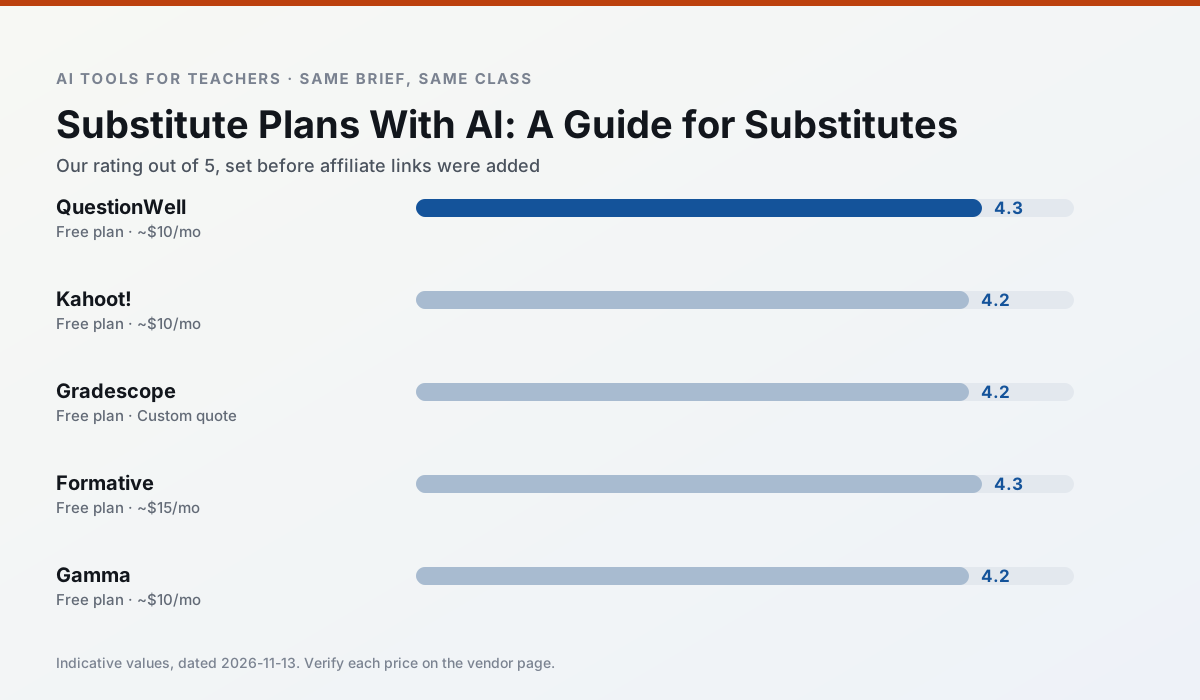
Side by side
Comparison table
Ratings reflect our timed classroom workflow, not vendor claims. Prices are indicative — verify on the vendor site.
| Tool | Best for | Free tier | Indicative paid plan | Standout feature | Our rating | Verdict | Try the tool |
|---|---|---|---|---|---|---|---|
| QuestionWell | quiz generation · assessment | Yes — Monthly generation limit | ~$10 /user/mo | Exports to Google Forms / LMS | 4.3 / 5 | Strong option | Try free |
| Kahoot! | quiz generation · review lessons | Yes — Limited player count | ~$10 /user/mo | AI question builder | 4.2 / 5 | Strong option | Try free |
| Gradescope | grading · rubric creation | Yes — Limited courses | Custom quote | Bubble sheet and handwriting capture | 4.2 / 5 | Strong option | Try free |
| Formative | formative assessment · grading | Yes — Core assessment tools | ~$15 /user/mo | Live student responses | 4.3 / 5 | Strong option | Try free |
| Gamma | slide decks · parent communication | Yes — Credit-limited generation | ~$10 /user/mo | Prompt-to-deck | 4.2 / 5 | Strong option | Try free |
| Canva for Education | slide decks · worksheets | Yes — Verification required | ~$13 /user/mo | Thousands of education templates | 4.6 / 5 | Top pick | Try free |
Match your situation
Best for X
Different jobs need different tools. Here is what we would open first in each case.
For anything students touch directly, QuestionWell offers the supervision controls and logging that IT will ask about first.
Kahoot! produces levelled versions from one source in a single pass, which is the highest-value differentiation shortcut we tested at this level.
Family-facing drafts from Gradescope need the fewest rewrites for warmth without overpromising, which is the usual failure mode.
Formative is the option IT is least likely to block: single sign-on, admin removal of AI features and an agreement on file.
Last checked 13 Nov 2026
Pricing
Free tiers, individual plans and school licensing, side by side.
| Tool | Free plan | Individual / paid | School & district | Billing note | Verify |
|---|---|---|---|---|---|
| QuestionWell | $0 — Monthly generation limit | ~$10 /user/mo | Custom quote | Indicative — verify on vendor site | Vendor |
| Kahoot! | $0 — Limited player count | ~$10 /user/mo | Custom quote | Indicative — verify on vendor site | Vendor |
| Gradescope | $0 — Limited courses | Custom quote | Custom quote | LMS integration and support | Vendor |
| Formative | $0 — Core assessment tools | ~$15 /user/mo | Custom quote | Indicative — verify on vendor site | Vendor |
| Gamma | $0 — Credit-limited generation | ~$10 /user/mo | ~$20 /user/mo | Indicative — verify on vendor site | Vendor |
| Canva for Education | $0 — Verification required | ~$13 /user/mo | Custom quote | Indicative — verify on vendor site | Vendor |
Editorial rule: pricing is re-checked every 2–3 months and the top 50 pages are refreshed every 6 months. See our funding policy.
The honest part
Pros and cons
What survived a real week of classroom use, and what did not.
Pros
- Saves the most time on question writing
- Clean export workflow
- Good objective tagging
Cons
- Single-purpose tool
- Question quality varies by source text
- Limited student-facing features
Pros
- Instant engagement
- Very low training time
- Strong brand familiarity
Cons
- Less depth for higher-order assessment
- Paid tiers needed for larger classes
- Time pressure suits recall more than reasoning
Pros
- Large time savings on paper assessments
- Consistent rubric application
- Detailed item analytics
Cons
- Overkill for elementary classrooms
- Institutional pricing is opaque
- Setup effort is real
Pros
- Strong data for intervention groups
- Works with existing PDFs and Docs
- Good LMS integrations
Cons
- Steeper setup than quiz games
- Best value requires school-wide rollout
- Price adds up per teacher
Pros
- Fastest path from outline to deck
- Modern-looking output by default
- Good export options
Cons
- Design control is limited
- Credits run out quickly
- Not built for student data
In the classroom
Use cases
Five concrete workflows, with the tool we would open for each one.
A substitute folder that needs no context
The value here is structure, not creativity. Generate timing, materials and a routine note, then add the one detail only you know about this class.
Recommended: QuestionWellA question bank from a PDF or article
Feed a non-identifiable source and ask for items tagged by difficulty with the misconception behind each distractor. Spot-check every answer key; numerical items are least reliable.
Recommended: Kahoot!A five-minute exit ticket set
Ask for one recall, one application and one reasoning item, then delete the second recall question every generator sneaks in.
Recommended: GradescopeAn IEP present-levels first draft
Use aggregated, anonymised data only. Ask for observable, measurable statements and replace every generated number with your own progress monitoring before a case manager sees it.
Recommended: FormativeRubric and feedback comments in one pass
Reorder the workflow so the rubric is yours and the comments are generated. Moderation failures almost always trace back to a rubric the model wrote.
Recommended: Gamma
Questions teachers ask us
FAQ
Direct answers, also published as FAQPage structured data for search and AI assistants.
Can AI do substitute plans at mixed-grade level?
Which tool is best for substitute plans?
What is the biggest risk?
Sources & further reading
Our recommendation
Try Gamma free for your next substitute plans task
Generate presentation decks and documents from a single prompt. Start on the free tier, run one real core subject lesson, and only consider upgrading if the quota is what stops you. Disclosure: we may earn a commission (varies) at no extra cost to you.
Some links on this page are affiliate links. We may earn a commission at no extra cost to you. Our rankings are editorial and never pay-to-play. Never enter student PII into a free consumer account.
Keep reading
Related comparisons in this cluster.
Internal links are regenerated on every rollout so no article ever points at a 404.