The short answer
- Formative is our default pick for Curriculum leads who need to summarise assessment results into groups quickly; Fliki is better when differentiation is the bottleneck.
- Formative handles the broad case; Fliki handles the narrow one. Anything beyond that pair should be justified by a recurring weekly job, not a feature demo.
- Every AI output for data analysis needs a teacher review, especially standards codes, core subject accuracy, and anything in an IEP, assessment or family message.
- Trial one tool for a week of real data analysis work before any purchase conversation; the quota is the honest test.
Start with Fliki on its free plan.
By October, my desk usually looks like a paper mill caught fire. Last term, I had one hundred forty-two unit diagnostics spread across my table, three different district spreadsheets that refused to export cleanly, and a department meeting in twenty minutes where I needed to prove our intervention groups were actually working. If you are a curriculum lead, you already know this panic. Spreadsheets do not tell you why period four missed every question on standard 7.NS.A.1, and standard district reports arrive three weeks too late to change instruction. That is why we started looking seriously at AI assessment data analysis for curriculum leads this year, testing what actually holds up under department-wide use and what collapses when twenty different teachers try to log in at 7:45 AM.
Why Department Data Needs More Than a Spreadsheet
When you are leading a department, raw percentages hide the real story. A class average of 72 percent might mean everyone mastered most of the content, or it might mean half the kids aced the procedural questions while the other half guessed on every word problem. Traditional LMS data tells you who got a C-minus, but it rarely groups student misconceptions by standard in a way you can hand to a grade-level team. We spent the first half of the term testing various platforms to see which ones could ingest our existing PDFs, map them to state standards, and spit out actionable intervention groups without requiring a degree in data science. The goal was simple: find tools that save hours of sorting so leads can spend that time coaching teachers on the remediation itself.
Formative as the Department Backbone
For raw assessment data analysis, Formative stood out as our top pick for schools and districts, priced at roughly $15 per user per month with a limited free tier. Its main strength is that it works directly with the PDFs and Docs you already use, meaning teachers do not have to rebuild their entire quiz library from scratch. It auto-grades, tracks standards in real time, and gives you clear data for intervention groups. The catch is that it requires a bit more setup than a quick quiz game, and the pricing adds up fast unless you push for a school-wide rollout. If you are managing a department, getting a school-grade DPA in place is non-negotiable here, so make sure your district tech office confirms the rostering scope before you launch.
Prompt: Analyze the attached 8th-grade math diagnostic for standard 8.EE.B.5. Group student error patterns into three distinct intervention buckets based on conceptual misunderstandings rather than arithmetic slips.
What came back: The model provided a generic breakdown of algebra errors, separating calculation mistakes from conceptual ones, but it missed our specific district rubric thresholds and lumped two different remediation tiers together.
Two edits that made it usable: First, I added our exact rubric bands to the prompt instead of letting the tool guess the threshold. Second, I restricted the analysis to specific question IDs from our test bank so the categorization matched our pacing guide.
Media and Presentation Tools for Data Presentations
Department meetings are notoriously dry, especially when you are reviewing data charts for the third time that month. To keep teachers engaged during professional development sessions, we tested a few content creation tools to turn cold spreadsheets into digestible visual briefings. Fliki handles text-to-video with stock media and AI voiceover for about $21 per user per month, giving you quick setup without needing an on-camera avatar. It is great for explainer visuals when you want to show a department how a new standard breaks down across grade levels, though the minute-based limits and generic output mean you have to curate the clips carefully.
For audio-only walk-throughs of data reports, Murf AI proved to be our best overall choice for daily use at roughly $19 per user per month. It offers very clean studio-quality audio with precise pacing controls, making it easy to drop voiceovers into slide decks for asynchronous staff meetings. The free trial only gives you output testing, and commercial licensing rules matter if you post these tutorials publicly, but the resulting audio is remarkably natural. When we needed to clip recorded department training sessions into short review highlights for teachers who missed the morning meeting, OpusClip handled the job. It is our best free option with a limited monthly tier, though it is optimized for social formats and the free plan is quite restrictive. Remember to never upload recordings containing identifiable students.
Polishing Communications and Publishing Resources
Once the data is analyzed and the intervention groups are set, you still have to communicate those shifts to parents, administration, and sometimes the wider educator community through published resources. For drafting polished parent emails, newsletters, and department reports, Grammarly remains a reliable standby at roughly $12 per user per month. It catches tone shifts and high-stakes errors in parent messages instantly, though you need to watch out that it does not flatten your authentic teacher voice. Make sure your district disables text collection on school devices and check the DPA first. If you are a curriculum lead who also publishes teacher resources online through shops like Teachers Pay Teachers, Surfer SEO provides best-in-class on-page guidance for about $79 a month. It is expensive for an individual teacher, but it scores content clarity effectively if you share department-created curricula broadly. As we outline in our guide on the best AI tools for teachers 2026, matching the right utility to the specific administrative task prevents subscription fatigue.
Two Things That Went Wrong and How We Fixed Them
Nothing goes smoothly on the first try when you introduce automated data analysis to a reluctant staff.
First, during our October benchmark cycle, a teacher uploaded a CSV file containing raw student names and IEP flags directly into an external web tool to generate custom remediation worksheets. That is a direct FERPA violation. We caught it because the privacy alert triggered on our network monitor. We immediately halted that workflow, pulled the tool access, and ran an emergency department refresher on scrubbing PII before using any AI interface. Now, our rule is absolute: student names are replaced with random ID numbers before any data touches an external system.
Second, we trusted an AI-generated standards breakdown without cross-checking the item analysis on a district science assessment. The tool misattributed a question about cellular respiration to a physical science standard because of a shared keyword in the prompt. Teachers spent an entire professional development morning planning reteaching strategies for the wrong concept. We fixed this by instituting a mandatory human-in-the-loop verification step for every data summary. A lead teacher now spot-checks three random student papers against the AI grouping before the department meeting begins. For more insights on supporting staff through these transitions, take a look at our related piece on AI data analysis for administrators.
Summary Recommendations for Curriculum Leads
AI assessment data analysis for curriculum leads is not about replacing professional judgment. It is about getting the raw data sorted fast enough that you can actually do something about it on a Tuesday morning. Start small. Pick one grade level or one recurring assessment, run it through a secure platform like Formative, and check the output against your own teacher intuition. If the tool tells you a class failed a standard they clearly mastered in class, trust your eyes, adjust your prompt, and keep your standards high.
FAQ
Can AI do data analysis at mixed-grade level?
It can produce a first draft and a structure. The level judgement, the standards check and the tone are teacher decisions.
Which tool is best for data analysis?
Formative on the evidence in this article, with Fliki as the second opinion. Neither replaces the review step.
What is the biggest risk?
A confident, plausible output that nobody checked. The five checks below exist for that reason.
Sources
- Formative Vendor Page & DPA Documentation: https://www.formative.com
- Fliki Pricing & Feature Specifications: https://fliki.ai
- Murf AI Licensing & Audio Studio Specs: https://murf.ai
- OpusClip Usage Limits & Captioning Specs: https://www.opus.pro
- Surfer SEO Content Guidelines: https://surferseo.com
- Grammarly Education Privacy & DPA Overview: https://www.grammarly.com
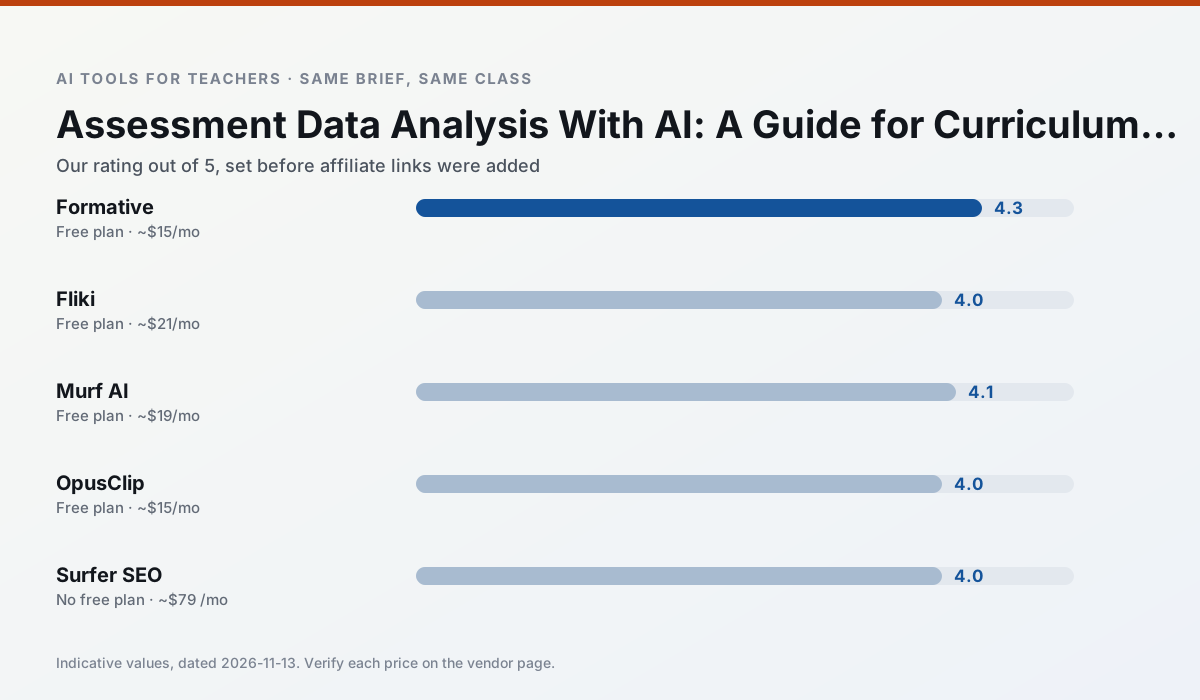
Side by side
Comparison table
Ratings reflect our timed classroom workflow, not vendor claims. Prices are indicative — verify on the vendor site.
| Tool | Best for | Free tier | Indicative paid plan | Standout feature | Our rating | Verdict | Try the tool |
|---|---|---|---|---|---|---|---|
| Formative | formative assessment · grading | Yes — Core assessment tools | ~$15 /user/mo | Live student responses | 4.3 / 5 | Strong option | Try free |
| Fliki | video lessons · audio lessons | Yes — Watermarked, limited minutes | ~$21 /user/mo | Blog/text to video | 4.0 / 5 | Situational | Try free |
| Murf AI | audio lessons · accessibility | Yes — Trial-only output | ~$19 /user/mo | Voice fine-tuning | 4.1 / 5 | Situational | Try free |
| OpusClip | PD materials · flipped lessons | Yes — Limited monthly clips | ~$15 /user/mo | Auto captions | 4.0 / 5 | Situational | Try free |
| Surfer SEO | teacher bloggers · resource sellers | No ongoing free plan | ~$79 /mo | Content Editor | 4.0 / 5 | Situational | Try free |
| Grammarly | parent communication · report card comments | Yes — Core grammar and tone checks | ~$12 /user/mo | Tone adjustments | 4.3 / 5 | Strong option | Try free |
Match your situation
Best for X
Different jobs need different tools. Here is what we would open first in each case.
Formative is the option IT is least likely to block: single sign-on, admin removal of AI features and an agreement on file.
Fliki runs in a browser tab with no extension, no student accounts and no onboarding call, so you can test it in a free period.
On the daily cycle, Murf AI saves the most edit time per task; the paid tier mostly buys more runs rather than better ones.
If there is no budget, start with OpusClip: free plan with clearest quota is the least punishing free tier here.
Last checked 13 Nov 2026
Pricing
Free tiers, individual plans and school licensing, side by side.
| Tool | Free plan | Individual / paid | School & district | Billing note | Verify |
|---|---|---|---|---|---|
| Formative | $0 — Core assessment tools | ~$15 /user/mo | Custom quote | Indicative — verify on vendor site | Vendor |
| Fliki | $0 — Watermarked, limited minutes | ~$21 /user/mo | ~$66 /user/mo | Indicative — verify on vendor site | Vendor |
| Murf AI | $0 — Trial-only output | ~$19 /user/mo | ~$39 /user/mo | Indicative — verify on vendor site | Vendor |
| OpusClip | $0 — Limited monthly clips | ~$15 /user/mo | ~$29 /user/mo | Indicative — verify on vendor site | Vendor |
| Surfer SEO | No ongoing free tier | ~$79 /mo | Custom quote | Indicative — verify on vendor site | Vendor |
| Grammarly | $0 — Core grammar and tone checks | ~$12 /user/mo | ~$15 /user/mo | Indicative — billed annually | Vendor |
Editorial rule: pricing is re-checked every 2–3 months and the top 50 pages are refreshed every 6 months. See our funding policy.
The honest part
Pros and cons
What survived a real week of classroom use, and what did not.
Pros
- Strong data for intervention groups
- Works with existing PDFs and Docs
- Good LMS integrations
Cons
- Steeper setup than quiz games
- Best value requires school-wide rollout
- Price adds up per teacher
Pros
- No avatar needed
- Good for explainer visuals
- Simple editor
Cons
- Minute-based limits
- Output can look generic
- Price jumps between tiers
Pros
- Very clean audio
- Good pacing controls
- Easy slide integration
Cons
- Commercial licensing rules matter
- Free tier is not usable long-term
- Single-purpose
Pros
- Turns a recorded lesson into review clips
- Excellent captions
- Fast
Cons
- Optimised for social formats
- Not a lesson design tool
- Free plan is restrictive
Pros
- Best-in-class on-page guidance
- Useful for TpT / resource-shop content
- Clear scoring
Cons
- Expensive for individual teachers
- Not a classroom tool
- Requires SEO basics
In the classroom
Use cases
Five concrete workflows, with the tool we would open for each one.
Rubric and feedback comments in one pass
Reorder the workflow so the rubric is yours and the comments are generated. Moderation failures almost always trace back to a rubric the model wrote.
Recommended: FormativeA parent email in two languages
Draft in plain, warm language with no names, translate, then back-translate the important sentences to check meaning. Keep specific incidents out of the prompt and add them yourself.
Recommended: FlikiA Monday morning lesson plan in twelve minutes
The twelve minutes come from not rewriting the skeleton. Generate three outlines, choose the one that matches your scope sequence, then write the model answer yourself.
Recommended: Murf AIThree reading levels from one source text
Paste a vetted text, ask for supported, core and extension versions, then check the vocabulary list by hand. Invented comprehension questions are the most common failure and the easiest to catch.
Recommended: OpusClipA substitute folder that needs no context
The value here is structure, not creativity. Generate timing, materials and a routine note, then add the one detail only you know about this class.
Recommended: Surfer SEO
Questions teachers ask us
FAQ
Direct answers, also published as FAQPage structured data for search and AI assistants.
Can AI do data analysis at mixed-grade level?
Which tool is best for data analysis?
What is the biggest risk?
Sources & further reading
Our recommendation
Try Fliki free for your next data analysis task
Text-to-video with stock media and AI voiceover. Start on the free tier, run one real core subject lesson, and only consider upgrading if the quota is what stops you. Disclosure: we may earn a commission (varies) at no extra cost to you.
Some links on this page are affiliate links. We may earn a commission at no extra cost to you. Our rankings are editorial and never pay-to-play. Never enter student PII into a free consumer account.
Keep reading
Related comparisons in this cluster.
Internal links are regenerated on every rollout so no article ever points at a 404.