
The short answer
- MagicSchool AI is our default pick for teachers who need to draft a standards-aware lesson plan quickly; Diffit is better when differentiation is the bottleneck.
- Start with MagicSchool AI on its free plan, keep Diffit as the second opinion, and do not open a card until the quota, not the feature list, is what stops you.
- Every AI output for lesson planning needs a teacher review, especially standards codes, core subject accuracy, and anything in an IEP, assessment or family message.
- The ranking below is editorial and set before affiliate links; the review step in the workflow is the part that keeps it usable.
Start with MagicSchool AI on its free plan.
At 3:45 on a Tuesday afternoon, my desk looked like a paper shredder had exploded over it. I had twenty-eight IEP accommodations to cross-reference, three modified lab sheets to write for students reading at a third-grade level, and an unanswered parent email about a missing assistive tech login. That is the reality of teaching special education in 2026. You are not just planning lessons; you are running an administrative printing press while managing a room full of human beings. When we talk about AI tools for special education teachers, we are not looking for futuristic chat companions or robot teaching assistants. We need pragmatic machinery that cuts prep time from hours to minutes without violating student privacy.
Over the last term, I tested the software options that claim to handle differentiation, IEP support, and daily classroom management. Some of them genuinely saved my sanity. Others added to the noise. Here is how they actually perform when the bell rings and you are drowning in paperwork.
MagicSchool AI for the Widest Free Library
If you want to test the waters without pulling out a credit card, MagicSchool AI is the starting point. It takes the crown as the best free option on the market. The platform hosts a massive library of teacher-specific generators inside a single dashboard. You do not need any prompt engineering skills to get a useful output. You click on a generator for IEP goal-setting, scaffolded questions, or social stories, fill in a few form fields, and hit generate.
Prompt: "Generate three measurable IEP goals for a fifth-grade student working on expressive language and turn-taking during small group instruction."
First pass: The tool produced three standard SMART goals with baseline criteria and evaluation methods. However, the tone was a bit generic and the criteria didn't quite match our district's specific data collection schedule.
Two edits to make it usable:
- Added a constraint specifying a percentage-based rubric tied to bi-weekly speech therapy logs.
- Adjusted the prompt parameters to focus specifically on peer-to-peer conflict resolution rather than general adult interaction.
The catch with MagicSchool is that while the free tier is strong for individual teachers, core features sit behind a paid subscription that runs around $12 per user per month. The templates are the widest available, but you still have to run every output through your own standards review. A generated modification might look brilliant on screen, but it still needs a human eye to ensure it actually aligns with a student's specific Least Restrictive Environment mandates. Vendor documentation states that no student personally identifiable information is required for the core generators, but you still need to confirm your district's Data Privacy Agreement before plugging in any sensitive details.
Diffit for Mixed-Ability Reading Groups
When you have a mixed-ability classroom and need to tackle three reading levels from one source text, Diffit is the engine you want. It stands out as our pick for the best overall for daily use. You paste a vetted text or drop in a YouTube link, and the platform levels the content into supported, core, and extension versions. You can export these as printouts or digital activities with minimal setup.
The biggest failure mode here is the auto-generated comprehension questions. They often miss the mark on nuance, so you have to check them by hand. Heavy use will also burn through your free quota fast, pushing you toward the paid tier at roughly $15 per user per month. It is narrower in scope than an all-in-one suite, but for differentiation, it saves hours of cutting and pasting text into multiple open documents. If you are building out foundational supports, you might also want to look at our guide on AI accommodations for special education to ensure your leveled texts match specific testing requirements.
SchoolAI for Safeguarded Student Spaces
If your district is nervous about students interacting with generative tech, SchoolAI provides a different approach. It earns our spot as best for quick setup because of its heavy focus on school-safe guardrails and teacher-controlled student workspaces. Instead of letting students roam free on an open LLM, you build or select guided spaces where the AI acts as a patient tutor or a structured discussion partner while you monitor the chat logs in real time.
The trade-off is that SchoolAI requires school-wide buy-in to unlock its full potential, and pricing is mostly quote-based, though individual tiers hover around $15 per user per month. It is less flexible than open-ended tools like Claude, but the safeguarding defaults and audit logs make it much easier to clear through a hesitant administration.
Claude for Heavy Document Planning
Sometimes you are not generating a quick worksheet; you are trying to make sense of a sprawling psychoeducational evaluation or drafting a multi-page support plan. Claude handles this better than any classroom-specific tool I tested. It is our top pick for schools and districts that need deep document processing, largely due to its massive context window.
While it lacks teacher-specific templates or built-in classroom integrations, Claude excels at nuanced, less generic prose. It will not write a worksheet for you with cute clip art, but it will help you parse complex student data or draft a parent email in two languages. When handling parent communication, the workflow that saved me the most time was drafting a message in plain, warm language with zero student names, translating it, and then back-translating the important sentences to verify the meaning stayed intact. Remember that consumer-tier accounts are not suitable for student data, so you must use an approved workspace tier to stay compliant. For more on navigating administrative plans, check out our insights on AI 504 plans for special education.
Eduaide.Ai and QuestionWell for Targeted Prep
Rounding out the toolkit are Eduaide.Ai and QuestionWell. Eduaide operates as a reliable lesson, rubric, and worksheet generator with a clean, uncluttered interface and a low entry price around $10 per user per month. It does not have the massive template library of MagicSchool, but its worksheet outputs are remarkably clean.
QuestionWell is a single-purpose tool designed entirely to generate standards-aligned question banks from any text or objective, costing about $10 per user per month on its paid tier. It saves the most time on question writing by sorting items by cognitive depth and objective tagging. Both tools require you to only paste non-identifiable source text, keeping your workflow safe while letting you build out Monday morning lesson plans in twelve minutes flat. Those twelve minutes happen because you do not rewrite the generated skeleton from scratch; you pick the outline that matches your scope and sequence, and you write the model answer yourself.
What Went Wrong in Real Use
No matter how polished the marketing looks, using these tools in a live classroom setting guarantees a few failures. During my third week testing Diffit, I trusted an auto-generated vocabulary list without checking the definitions against my students' specific cognitive profiles. The tool defined a tier-two academic word using abstract synonyms that completely derailed my reading intervention group, forcing me to pivot and re-teach the concept on a whiteboard mid-lesson. Now, I always scan the generated glossary before printing.
The second failure happened with a progress-monitoring prompt in MagicSchool. I tried to generate skill-grouping summaries after an anonymized math assessment. The tool lumped students together based on raw scores rather than error patterns, grouping a careless computation error in with a conceptual misunderstanding of fractions. I had to manually resort the instructional groups before printing the differentiated worksheets. The lesson here is simple: AI is a drafting assistant, not a special education coordinator. Use these platforms to accelerate your workflow, but keep your professional judgment firmly in the driver's seat.
FAQ
Does using AI for lesson planning violate academic integrity policies?
For teacher-side preparation, generally no — but check your school's acceptable-use policy. The line is crossed when AI output is presented as a student's own work, used to make a disciplinary decision via an AI-detection score, or includes student PII in a consumer account. Detector scores should never be the sole evidence of misconduct.
Are there genuinely free alternatives to MagicSchool AI?
Yes. Canva for Education is free for eligible K-12 teachers, several quiz tools have usable free tiers, and general assistants such as SchoolAI have free plans. The trade-off is quotas and fewer education-specific templates. Our free-tools guide lists which free tiers survive a real week of planning rather than just a demo.
Can I use AI to draft a standards-aware lesson plan without sharing student data?
Yes, if you keep the prompt at topic level: describe the mixed-grade core subject objective, the time available and the accommodation types, without names, work samples or scores. Avoid browser extensions that read documents until IT has approved them. For any tool that must process student work, require a signed data-processing agreement first.
How much does Diffit cost for a single teacher?
Indicative individual plans for tools in this category sit in the $0–$30 per user per month range, often billed annually. School and district pricing is normally quote-based. Our pricing table lists the plan names and a last-checked date, but these are editorial estimates, not live quotes — confirm on the vendor's pricing page before budgeting.
Sources
- MagicSchool AI feature overview and pricing. Magicschool.ai
- Diffit product documentation and leveling methodology. Diffit.me
- SchoolAI safety features and student workspace architecture. School.ai
- Anthropic Claude document processing capabilities and enterprise tiers. Anthropic.com
- Eduaide.Ai resource library and worksheet generator specifications. Eduaide.ai
- QuestionWell objective tagging and question bank export workflows. Questionwell.org
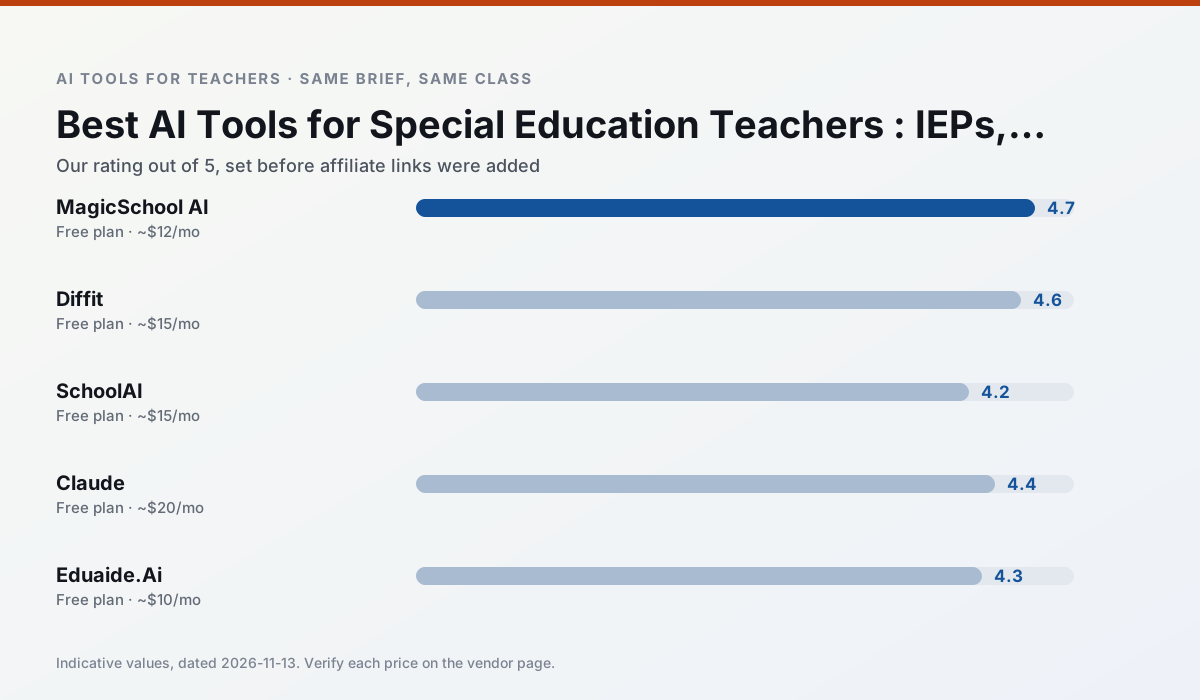
Side by side
Comparison table
Ratings reflect our timed classroom workflow, not vendor claims. Prices are indicative — verify on the vendor site.
| Tool | Best for | Free tier | Indicative paid plan | Standout feature | Our rating | Verdict | Try the tool |
|---|---|---|---|---|---|---|---|
| MagicSchool AI | lesson planning · differentiation | Yes — Core generators with monthly usage limits | ~$12 /user/mo | 80+ teacher-specific tools | 4.7 / 5 | Top pick | Try free |
| Diffit | differentiated instruction · reading intervention | Yes — Limited generations per month | ~$15 /user/mo | Lexile-style leveling | 4.6 / 5 | Top pick | Try free |
| SchoolAI | student-safe AI · differentiated instruction | Yes — Limited seats | ~$15 /user/mo | Teacher-monitored student chats | 4.2 / 5 | Strong option | Try free |
| Claude | rubric creation · feedback on writing | Yes — Usage-limited | ~$20 /user/mo | Very large context window | 4.4 / 5 | Strong option | Try free |
| Eduaide.Ai | lesson planning · rubric creation | Yes — Daily generation cap | ~$10 /user/mo | Resource library | 4.3 / 5 | Strong option | Try free |
| QuestionWell | quiz generation · assessment | Yes — Monthly generation limit | ~$10 /user/mo | Exports to Google Forms / LMS | 4.3 / 5 | Strong option | Try free |
Match your situation
Best for X
Different jobs need different tools. Here is what we would open first in each case.
MagicSchool AI's free plan is the most usable in this comparison: a quota that survives a normal week. Not enough for a department, enough for one teacher to decide.
Diffit is the one we would open on a normal planning day because the first output is editable rather than restructurable, and the free plan covers a single teacher's routine.
SchoolAI runs in a browser tab with no extension, no student accounts and no onboarding call, so you can test it in a free period.
Claude answers the three questions a district actually asks: rostering, admin controls and a data-processing agreement. That is usually what decides a school purchase.
Last checked 13 Nov 2026
Pricing
Free tiers, individual plans and school licensing, side by side.
| Tool | Free plan | Individual / paid | School & district | Billing note | Verify |
|---|---|---|---|---|---|
| MagicSchool AI | $0 — Core generators with monthly usage limits | ~$12 /user/mo | Custom quote | Indicative — verify on vendor site | Vendor |
| Diffit | $0 — Limited generations per month | ~$15 /user/mo | Custom quote | Indicative — verify on vendor site | Vendor |
| SchoolAI | $0 — Limited seats | ~$15 /user/mo | Custom quote | Indicative — verify on vendor site | Vendor |
| Claude | $0 — Usage-limited | ~$20 /user/mo | ~$25+ /user/mo | Indicative — verify on vendor site | Vendor |
| Eduaide.Ai | $0 — Daily generation cap | ~$10 /user/mo | Custom quote | Indicative — verify on vendor site | Vendor |
| QuestionWell | $0 — Monthly generation limit | ~$10 /user/mo | Custom quote | Indicative — verify on vendor site | Vendor |
Editorial rule: pricing is re-checked every 2–3 months and the top 50 pages are refreshed every 6 months. See our funding policy.
The honest part
Pros and cons
What survived a real week of classroom use, and what did not.
Pros
- Widest purpose-built template library
- Strong free tier for individual teachers
- Fast to learn with almost no prompting skill
Cons
- Outputs still need standards review
- Best features sit behind the paid tier
- District approval can be slow
Pros
- Excellent for mixed-ability classes
- Produces printable and digital versions
- Minimal setup
Cons
- Narrower scope than all-in-one suites
- Leveling is approximate, not a formal assessment
- Heavy use burns through the free quota
Pros
- Designed for district approval
- Teacher visibility into student use
- Good safeguarding defaults
Cons
- Requires school-wide buy-in
- Less flexible than general LLMs
- Pricing is mostly quote-based
Pros
- Handles full unit plans and long rubrics
- Nuanced, less generic prose
- Good at structured document output
Cons
- No teacher-specific templates
- Fewer classroom integrations
- Consumer plan not suitable for student data
Pros
- Very low entry price
- Good worksheet and rubric output
- Clean, uncluttered UI
Cons
- Smaller template set than MagicSchool
- Less polished export options
- Limited integrations
In the classroom
Use cases
Five concrete workflows, with the tool we would open for each one.
Regrouping students after an assessment
Summarise anonymised results into skill groups, then generate one activity per group. Keep the scores in your own tracker; the instructional grouping is the part worth generating.
Recommended: MagicSchool AIA weekly family newsletter from bullet notes
Newsletters fail on length, not tone. Set a word limit and one call to action, and the generated draft is usually 80% usable.
Recommended: DiffitThree reading levels from one source text
Paste a vetted text, ask for supported, core and extension versions, then check the vocabulary list by hand. Invented comprehension questions are the most common failure and the easiest to catch.
Recommended: SchoolAIA Monday morning lesson plan in twelve minutes
The twelve minutes come from not rewriting the skeleton. Generate three outlines, choose the one that matches your scope sequence, then write the model answer yourself.
Recommended: ClaudeA parent email in two languages
Draft in plain, warm language with no names, translate, then back-translate the important sentences to check meaning. Keep specific incidents out of the prompt and add them yourself.
Recommended: Eduaide.Ai
Questions teachers ask us
FAQ
Direct answers, also published as FAQPage structured data for search and AI assistants.
Does using AI for lesson planning violate academic integrity policies?
Are there genuinely free alternatives to MagicSchool AI?
Can I use AI to draft a standards-aware lesson plan without sharing student data?
How much does Diffit cost for a single teacher?
Sources & further reading
Our recommendation
Try MagicSchool AI free for your next lesson planning task
A large library of teacher-specific AI generators in one dashboard. Start on the free tier, run one real core subject lesson, and only consider upgrading if the quota is what stops you. Disclosure: we may earn a commission (30% recurring) at no extra cost to you.
Some links on this page are affiliate links. We may earn a commission at no extra cost to you. Our rankings are editorial and never pay-to-play. Never enter student PII into a free consumer account.
Keep reading
Related comparisons in this cluster.
Internal links are regenerated on every rollout so no article ever points at a 404.