The short answer
- Turnitin Clarity / Feedback Studio is our default pick for Special education who need to draft goals, accommodations and present levels quickly; Notion AI is better when differentiation is the bottleneck.
- Pricing is where these pages date fastest. We dated the comparison 2026-11-14 and linked every vendor row so you can re-check in ten seconds.
- Every AI output for IEP writing needs a teacher review, especially standards codes, core subject accuracy, and anything in an IEP, assessment or family message.
- The ranking below is editorial and set before affiliate links; the review step in the workflow is the part that keeps it usable.
Start with Notion AI on its free plan.
By 10:30 on a Tuesday during IEP season, my coffee is cold, my inbox has four parent emails about accommodations, and I still have three present-levels sections to write before my afternoon ARD meeting. Writing individualized education programs is the heaviest cognitive lift in special education, and the sheer volume of compliance paperwork leaves little room for actual instructional planning. AI iep writing for special education has become a survival tactic for many case managers drowning in documentation, but the tools require strict guardrails to protect student privacy and ensure legal compliance.
When you are drafting present levels of performance, the biggest trap is feeding student names, ID numbers, or specific diagnostic paperwork directly into an unsecured model. You have to scrub every prompt so that data remains entirely anonymous. We look at AI iep writing for special education not as a replacement for clinical judgment, but as a drafting engine that turns rough observational notes into professional prose. If you want a broader look at how assistive technology fits into the legal landscape, check out our guide on AI 504 plans for special education.
Managing Present Levels Drafts Securely
An IEP present-levels first draft is notoriously tedious to write from scratch, especially when you are synthesizing dozens of scattered assessment points, reading scores, and behavioral logs. The trick is feeding aggregated, anonymised data into your workspace and asking the model for observable, measurable statements. You must replace every single generated number with your own hard data from progress monitoring before a case manager or compliance officer ever reviews the document.
Prompt: "Act as a special education teacher. Using these anonymised math scores (fall benchmark 42nd percentile, winter progress probe 58th percentile, struggles with multi-step word problems involving fractions), write a present levels of academic achievement section. Keep the tone formal, objective, and focused on functional impact."
Output: The student demonstrates a developing understanding of fractions in isolated computation tasks but experiences significant cognitive fatigue when encountering multi-step word problems. Progress monitoring indicates steady growth from the fall benchmark to the winter probe, though independence remains a barrier.
Edits made:
- Swapped out the vague phrasing about "significant cognitive fatigue" for the actual observable error patterns noted during my small-group observations.
- Inserted the precise baseline percentages and dates from my progress monitoring tracker so the metrics matched our district's compliance standards.
Structuring Long-Term Accommodations and Notes
Keeping track of accommodations, modifications, and long-term goals across a caseload of twenty-some students requires a robust database system. Notion AI, priced at roughly $10 per user per month with limited AI usage on free tiers, functions best for mixed-ability classes where you need to track curriculum adjustments alongside IEP goals. It acts as an internal workspace where you can link student profiles to modified assignments without exposing personal identifiable information in personal workspaces. The platform's strength lies in long-term curriculum records and flexible team collaboration, though the initial setup time is substantial and pricing models have shifted more than once.
If you are looking for tools that integrate more broadly across a campus, institutional solutions change the workflow entirely. Turnitin Clarity and Feedback Studio, which carry custom quote pricing and no free tier, are often already licensed at many schools. They excel as the best option for parent-facing writing because they maintain a consistent institutional workflow and detailed revision history, though individual teachers cannot buy them independently and heavy administrative setup is required. For more ideas on tailoring daily tasks, read our collection on AI accommodations for special education.
Safeguarding Student Data in District Deployments
When districts mandate specific platforms for student-facing interactions, security becomes the absolute priority. SchoolAI, priced at roughly $15 per user per month with limited seats on its free tier, is designed specifically for school-safe AI workspaces with teacher-controlled student spaces. It ranks as our top pick for student-safe deployments because it offers district-approved data processing agreements, audit logs, and strong safeguarding defaults right out of the box. The limitation is that it requires school-wide buy-in and lacks the open-ended flexibility of general-purpose large language models.
For classrooms where students still complete a large portion of their work on paper, Class Companion offers a different kind of support. Priced at around $12 per user per month with a limited free tier, it provides AI feedback on handwritten and scanned student work, making it the best free option for teachers working with mixed media. It gives fast, specific comments and strong math support, but scan quality directly affects accuracy and every single piece of generated feedback still requires careful teacher review.
Creating Accessible Materials and Audio Support
Sometimes the barrier in special education is not writing the IEP itself, but creating accessible formats for students who struggle with standard text-based materials. Murf AI offers studio-quality AI voiceover for presentations and audio materials at roughly $19 per user per month, though its free tier is trial-only and cannot be used long-term. It provides very clean audio and reliable pacing controls, which helps when you are building listening centers for students with reading disabilities. Similarly, Fliki generates text-to-video content with stock media and AI voiceover for about $21 per user per month, though it operates on strict minute-based limits and outputs can occasionally look generic. Both tools require you to check local licensing terms before distributing audio or video publicly, and you must always keep student PII entirely off these content platforms.
What Went Wrong in Real Use
Using these platforms in a live classroom environment will inevitably surface friction points that vendors rarely mention in their sales pitches. Last term, I tried using Notion AI to auto-generate a comprehensive suite of accommodation checklists for a multi-grade caseload, but I failed to structure the database tags properly. The model pulled conflicting accommodation notes from different grade bands, resulting in a draft that suggested high school vocational accommodations for a third-grade student. I caught the error during my Friday audit, scrapped the messy view, and rebuilt the database with rigid single-select drop-downs for grade levels before generating anything new.
In another instance, I relied too heavily on Class Companion to grade scanned handwritten exit tickets for a struggling math intervention group. The scanning software misread a student's sloppy fraction notation as a zero, and the AI feedback engine generated an aggressive remediation prompt that left the student frustrated. I immediately pulled the paper copy, manually verified the student's actual work, and used the platform strictly for clean printouts from then on. AI tools are assistants, not case managers, and keeping a human eye on every output remains non-negotiable.
FAQ
Can AI do IEP writing at mixed-grade level?
It can produce a first draft and a structure. The level judgement, the standards check and the tone are teacher decisions.
Which tool is best for IEP writing?
Turnitin Clarity / Feedback Studio on the evidence in this article, with Notion AI as the second opinion. Neither replaces the review step.
What is the biggest risk?
A confident, plausible output that nobody checked. The five checks below exist for that reason.
Sources
- Turnitin Clarity and Feedback Studio institutional documentation and pricing data.
- Notion AI enterprise workspace feature sets and pricing tiers.
- SchoolAI district deployment and safety compliance guidelines.
- Class Companion feature lists for handwritten assignment analysis.
- Murf AI voiceover licensing and audio production specifications.
- Fliki text-to-video generation limits and media usage terms.
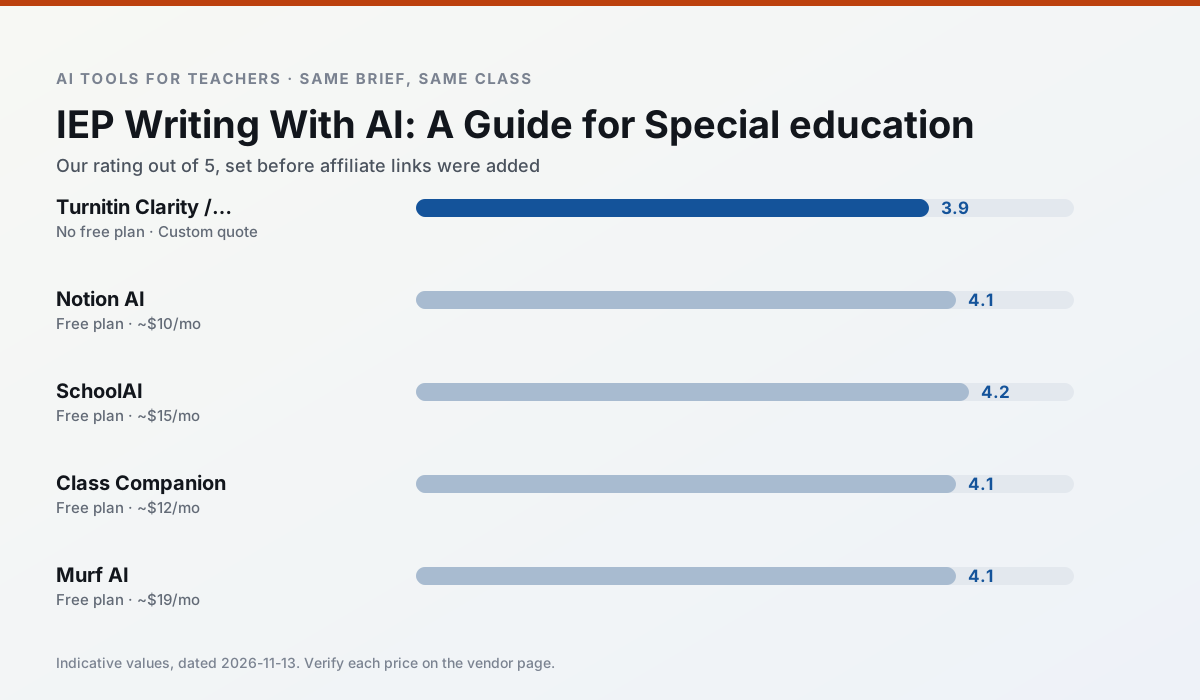
Side by side
Comparison table
Ratings reflect our timed classroom workflow, not vendor claims. Prices are indicative — verify on the vendor site.
| Tool | Best for | Free tier | Indicative paid plan | Standout feature | Our rating | Verdict | Try the tool |
|---|---|---|---|---|---|---|---|
| Turnitin Clarity / Feedback Studio | feedback on writing · academic integrity | No ongoing free plan | Custom quote | Similarity reports | 3.9 / 5 | Situational | Try free |
| Notion AI | curriculum mapping · unit planning | Yes — Limited AI usage | ~$10 /user/mo | Linked databases | 4.1 / 5 | Situational | Try free |
| SchoolAI | student-safe AI · differentiated instruction | Yes — Limited seats | ~$15 /user/mo | Teacher-monitored student chats | 4.2 / 5 | Strong option | Try free |
| Class Companion | grading · feedback on writing | Yes — Limited assignments | ~$12 /user/mo | Handwriting recognition | 4.1 / 5 | Situational | Try free |
| Murf AI | audio lessons · accessibility | Yes — Trial-only output | ~$19 /user/mo | Voice fine-tuning | 4.1 / 5 | Situational | Try free |
| Fliki | video lessons · audio lessons | Yes — Watermarked, limited minutes | ~$21 /user/mo | Blog/text to video | 4.0 / 5 | Situational | Try free |
Match your situation
Best for X
Different jobs need different tools. Here is what we would open first in each case.
Family-facing drafts from Turnitin Clarity / Feedback Studio need the fewest rewrites for warmth without overpromising, which is the usual failure mode.
For three reading groups and one text, Notion AI needs the least manual relabelling of vocabulary and questions.
For anything students touch directly, SchoolAI offers the supervision controls and logging that IT will ask about first.
Nothing on Class Companion's free tier is a teaser demo; the limits are documented and a normal week fits inside them.
Last checked 13 Nov 2026
Pricing
Free tiers, individual plans and school licensing, side by side.
| Tool | Free plan | Individual / paid | School & district | Billing note | Verify |
|---|---|---|---|---|---|
| Turnitin Clarity / Feedback Studio | No ongoing free tier | Custom quote | Custom quote | LMS-wide deployment | Vendor |
| Notion AI | $0 — Limited AI usage | ~$10 /user/mo | ~$8 /user/mo | Indicative — verify on vendor site | Vendor |
| SchoolAI | $0 — Limited seats | ~$15 /user/mo | Custom quote | Indicative — verify on vendor site | Vendor |
| Class Companion | $0 — Limited assignments | ~$12 /user/mo | Custom quote | Indicative — verify on vendor site | Vendor |
| Murf AI | $0 — Trial-only output | ~$19 /user/mo | ~$39 /user/mo | Indicative — verify on vendor site | Vendor |
| Fliki | $0 — Watermarked, limited minutes | ~$21 /user/mo | ~$66 /user/mo | Indicative — verify on vendor site | Vendor |
Editorial rule: pricing is re-checked every 2–3 months and the top 50 pages are refreshed every 6 months. See our funding policy.
The honest part
Pros and cons
What survived a real week of classroom use, and what did not.
Pros
- Already licensed at many schools
- Consistent institutional workflow
- Detailed revision history
Cons
- Individual teachers cannot buy it
- AI detection remains contested
- Heavy administrative setup
Pros
- Great for long-term curriculum records
- Strong team collaboration
- Flexible structure
Cons
- Setup time is significant
- AI add-on pricing changed more than once
- Not purpose-built for lesson generation
Pros
- Designed for district approval
- Teacher visibility into student use
- Good safeguarding defaults
Cons
- Requires school-wide buy-in
- Less flexible than general LLMs
- Pricing is mostly quote-based
Pros
- Useful where work is done on paper
- Fast, specific comments
- Good math support
Cons
- Scan quality affects accuracy
- Narrow use case
- Feedback still needs teacher review
Pros
- Very clean audio
- Good pacing controls
- Easy slide integration
Cons
- Commercial licensing rules matter
- Free tier is not usable long-term
- Single-purpose
In the classroom
Use cases
Five concrete workflows, with the tool we would open for each one.
Regrouping students after an assessment
Summarise anonymised results into skill groups, then generate one activity per group. Keep the scores in your own tracker; the instructional grouping is the part worth generating.
Recommended: Turnitin Clarity / Feedback StudioA weekly family newsletter from bullet notes
Newsletters fail on length, not tone. Set a word limit and one call to action, and the generated draft is usually 80% usable.
Recommended: Notion AIAn IEP present-levels first draft
Use aggregated, anonymised data only. Ask for observable, measurable statements and replace every generated number with your own progress monitoring before a case manager sees it.
Recommended: SchoolAIA five-minute exit ticket set
Ask for one recall, one application and one reasoning item, then delete the second recall question every generator sneaks in.
Recommended: Class CompanionA question bank from a PDF or article
Feed a non-identifiable source and ask for items tagged by difficulty with the misconception behind each distractor. Spot-check every answer key; numerical items are least reliable.
Recommended: Murf AI
Questions teachers ask us
FAQ
Direct answers, also published as FAQPage structured data for search and AI assistants.
Can AI do IEP writing at mixed-grade level?
Which tool is best for IEP writing?
What is the biggest risk?
Sources & further reading
Our recommendation
Try Notion AI free for your next IEP writing task
AI-assisted notes, databases and curriculum planning in one workspace. Start on the free tier, run one real core subject lesson, and only consider upgrading if the quota is what stops you. Disclosure: we may earn a commission (varies) at no extra cost to you.
Some links on this page are affiliate links. We may earn a commission at no extra cost to you. Our rankings are editorial and never pay-to-play. Never enter student PII into a free consumer account.
Keep reading
Related comparisons in this cluster.
Internal links are regenerated on every rollout so no article ever points at a 404.