The short answer
- Grammarly is our default pick for Special education who need to produce specific, evidence-based comments quickly; Gamma is better when differentiation is the bottleneck.
- Grammarly handles the broad case; Gamma handles the narrow one. Anything beyond that pair should be justified by a recurring weekly job, not a feature demo.
- Every AI output for report card comments needs a teacher review, especially standards codes, core subject accuracy, and anything in an IEP, assessment or family message.
- Trial one tool for a week of real report card comments work before any purchase conversation; the quota is the honest test.
Start with Grammarly on its free plan.
It is four days before grades close, I have twenty-four IEP progress reports to finish, and my coffee is cold for the third time today. Writing individual narratives for students with distinct, complex accommodation plans usually means staring at a blinking cursor while trying to sound professional, objective, and encouraging all at once. Special education reporting demands precision that generic templates simply cannot manage. If you are looking at the broader landscape of technology, our guide to the best AI tools for teachers 2026 covers general classroom workflows, but report card comments require a different approach entirely. Using AI for report card comments in special education does not mean letting a machine invent student progress. It means breaking the writer's block that happens after writing your twelfth paragraph about fine motor goals.
Why General AI Fails Special Education Progress Notes
Generic writing assistants often stumble when handed special education data because they do not know the difference between a modification and an accommodation. They lean heavily on corporate platitudes or overly clinical language that alienates parents. When you ask a generic model to summarize a student's quarter, it tends to flatten their voice into something unrecognizable. You end up spending more time editing out phrases like "demonstrated optimal stakeholder engagement" than it would have taken to write the comment from scratch. Furthermore, data privacy is non-negotiable when dealing with exceptional learners. You cannot paste identifying information into random web forms without risking compliance violations under FERPA and local district policies.
Polishing Parent-Facing Reports With Grammarly
When your drafts are finished but read like a list of deficits, Grammarly acts as a reliable safety net for tone and mechanics. It is best for schools and districts where licenses are centrally managed, sitting around $12 per user per month with a limited free tier. The main strength is how it works everywhere you already type, catching clumsy phrasing in high-stakes parent emails before you hit send. The interface has a very low learning curve, which matters when you are exhausted on a Thursday night. The limitation for special education is that it is not education-specific, meaning it can occasionally flatten a warm, nuanced teacher voice into something sterile if you rely too heavily on its automated rewrites. Always disable text collection on school devices where possible, and check your district's data processing agreement before plugging in sensitive narratives.
Prompt: Rewrite this IEP progress note to be warm, clear, and professional for a parent, avoiding jargon: "Student met goal on decoding CVC words with 80% accuracy over 3 trials but still struggles with self-regulation when frustrated."
Raw AI output: "The pupil has demonstrated successful mastery of consonant-vowel-consonant decoding objectives, achieving eighty percent proficiency across three separate evaluation periods. However, behavioral dysregulation continues to impede optimal task persistence during periods of heightened frustration."
Teacher Edit 1: Replace the clinical stiffness with plain English about reading and frustration. Teacher Edit 2: Add a specific, positive encouragement about the student's persistence during morning reading blocks.
Structuring Visual Updates and Newsletters With Gamma and Canva
Communicating progress to families often extends beyond text blocks, especially when you need to explain new support structures or classroom routines. Gamma offers quick setup for visual presentations and documents, costing about $10 per user per month with credit-limited free tiers. It provides the fastest path from a rough outline to a clean deck, making it useful when you need to present accommodation data at a parent night. However, design control is limited, and its credits run out quickly if you experiment too much. Canva for Education serves as our overall pick for daily use, remaining effectively free for verified educators with a rich template library that requires no prior design skills. While its AI features are capped and it is easy to produce cluttered slides if you lean on templates too hard, it handles day-to-day visual aids reliably. Treat both tools purely as content engines and never upload identifiable student work into their generation windows.
Creating Family Support Videos Using HeyGen and Synthesia
Sometimes text progress reports and newsletters fall flat for families who need oral communication in their home language. HeyGen stands out as the best free option through its trial credits, though its paid tiers run around $29 per user per month. It offers best-in-class lip-sync translation, which makes it remarkably useful for multilingual families who struggle to parse written English progress reports. The limitation is that credit-based pricing can be confusing, and voice cloning raises serious consent questions. Synthesia offers a similar presenter-led avatar video format at around $29 per user per month with no ongoing free tier, removing the need for a camera or editing skills when creating instructional videos. Both tools require strict adherence to privacy rules. Never use student likenesses or voices without documented, explicit parental consent, and use these platforms solely for general teacher-led guidance rather than individual student data reviews.
Generating Targeted Practice Materials With QuestionWell
Special education teachers spend hours adapting texts and assessments to match diverse reading levels and IEP objectives. QuestionWell generates standards-aligned question banks from any text or objective for about $10 per user per month, featuring a monthly generation limit on its free tier. It saves the most time on question writing by providing a clean export workflow and good objective tagging. The limitation is that it remains a single-purpose tool, and question quality depends heavily on the source text you feed it. For related guidance on managing specialized documentation, see our deep dives into AI 504 plans for special education and AI accommodations for special education. When using QuestionWell, ensure you only paste non-identifiable source text into the prompt window to maintain student privacy.
Two Real-World Failures and How to Fix Them
Using these tools in a real special education classroom exposes their friction points immediately. First, I tried using an AI writing assistant to generate twenty different accommodation summaries at once, and every single paragraph sounded like it was written by the same robot. Parents would have known instantly that I used a template. I fixed this by writing the first sentence of each paragraph myself—specifying the exact tool or sensory diet the child used that day—and letting the AI only polish the transition sentences. Second, I attempted to translate a complex behavior intervention update into Spanish using a standard model without checking the output. A colleague who is a native speaker pointed out that the translation used regional slang that sounded dismissive rather than supportive. Now, I always translate the draft back into English sentence by sentence to verify the meaning before sending anything home. AI tools can clear the administrative fog of reporting season, but your professional judgment remains the core component that keeps families trusting your classroom.
FAQ
Can AI do report card comments at mixed-grade level?
It can produce a first draft and a structure. The level judgement, the standards check and the tone are teacher decisions.
Which tool is best for report card comments?
Grammarly on the evidence in this article, with Gamma as the second opinion. Neither replaces the review step.
What is the biggest risk?
A confident, plausible output that nobody checked. The five checks below exist for that reason.
Sources
- Grammarly Education Overview. https://www.grammarly.com/edu
- Gamma App Pricing and Features. https://gamma.app/
- Canva for Education Terms and Verification. https://www.canva.com/education/
- HeyGen Pricing and Credit Structure. https://www.heygen.com/
- Synthesia Security and Compliance. https://www.synthesia.io/
- QuestionWell Documentation. https://www.questionwell.ai/
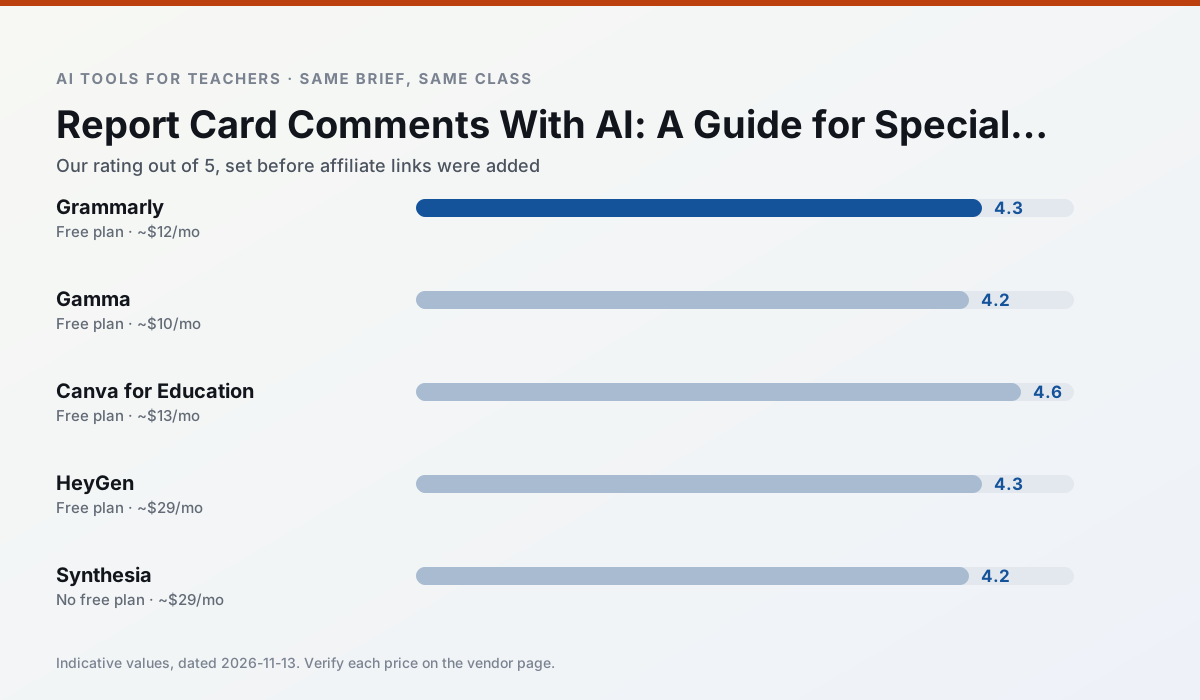
Side by side
Comparison table
Ratings reflect our timed classroom workflow, not vendor claims. Prices are indicative — verify on the vendor site.
| Tool | Best for | Free tier | Indicative paid plan | Standout feature | Our rating | Verdict | Try the tool |
|---|---|---|---|---|---|---|---|
| Grammarly | parent communication · report card comments | Yes — Core grammar and tone checks | ~$12 /user/mo | Tone adjustments | 4.3 / 5 | Strong option | Try free |
| Gamma | slide decks · parent communication | Yes — Credit-limited generation | ~$10 /user/mo | Prompt-to-deck | 4.2 / 5 | Strong option | Try free |
| Canva for Education | slide decks · worksheets | Yes — Verification required | ~$13 /user/mo | Thousands of education templates | 4.6 / 5 | Top pick | Try free |
| HeyGen | video lessons · translation | Yes — Limited credit plan | ~$29 /user/mo | Video translation | 4.3 / 5 | Strong option | Try free |
| Synthesia | flipped lessons · video lessons | No ongoing free plan | ~$29 /user/mo | 140+ languages | 4.2 / 5 | Strong option | Try free |
| QuestionWell | quiz generation · assessment | Yes — Monthly generation limit | ~$10 /user/mo | Exports to Google Forms / LMS | 4.3 / 5 | Strong option | Try free |
Match your situation
Best for X
Different jobs need different tools. Here is what we would open first in each case.
For a school rollout, Grammarly offers the paperwork and the admin console; the classroom features are standard by comparison.
Gamma runs in a browser tab with no extension, no student accounts and no onboarding call, so you can test it in a free period.
On the daily cycle, Canva for Education saves the most edit time per task; the paid tier mostly buys more runs rather than better ones.
Nothing on HeyGen's free tier is a teaser demo; the limits are documented and a normal week fits inside them.
Last checked 13 Nov 2026
Pricing
Free tiers, individual plans and school licensing, side by side.
| Tool | Free plan | Individual / paid | School & district | Billing note | Verify |
|---|---|---|---|---|---|
| Grammarly | $0 — Core grammar and tone checks | ~$12 /user/mo | ~$15 /user/mo | Indicative — billed annually | Vendor |
| Gamma | $0 — Credit-limited generation | ~$10 /user/mo | ~$20 /user/mo | Indicative — verify on vendor site | Vendor |
| Canva for Education | $0 — Verification required | ~$13 /user/mo | Custom quote | Indicative — verify on vendor site | Vendor |
| HeyGen | $0 — Limited credit plan | ~$29 /user/mo | Custom quote | Indicative — verify on vendor site | Vendor |
| Synthesia | No ongoing free tier | ~$29 /user/mo | Custom quote | Indicative — verify on vendor site | Vendor |
| QuestionWell | $0 — Monthly generation limit | ~$10 /user/mo | Custom quote | Indicative — verify on vendor site | Vendor |
Editorial rule: pricing is re-checked every 2–3 months and the top 50 pages are refreshed every 6 months. See our funding policy.
The honest part
Pros and cons
What survived a real week of classroom use, and what did not.
Pros
- Catches errors in high-stakes parent emails
- Works everywhere you already write
- Very low learning curve
Cons
- Not education-specific
- Can flatten teacher voice
- Premium needed for tone rewriting
Pros
- Fastest path from outline to deck
- Modern-looking output by default
- Good export options
Cons
- Design control is limited
- Credits run out quickly
- Not built for student data
Pros
- Effectively free for verified teachers
- Huge template library
- No design skills needed
Cons
- AI features are capped
- Easy to produce cluttered slides
- Account verification can be slow
Pros
- Best-in-class lip-sync translation
- Useful for multilingual families
- Generous trial credits
Cons
- Credit-based pricing is confusing
- Voice cloning raises consent questions
- Overkill for everyday lessons
Pros
- No camera or editing skills required
- Excellent multilingual voice output
- Easy updates to existing videos
Cons
- Cost is hard to justify for a single teacher
- Avatar video can feel impersonal
- No free ongoing tier
In the classroom
Use cases
Five concrete workflows, with the tool we would open for each one.
A weekly family newsletter from bullet notes
Newsletters fail on length, not tone. Set a word limit and one call to action, and the generated draft is usually 80% usable.
Recommended: GrammarlyRegrouping students after an assessment
Summarise anonymised results into skill groups, then generate one activity per group. Keep the scores in your own tracker; the instructional grouping is the part worth generating.
Recommended: GammaRubric and feedback comments in one pass
Reorder the workflow so the rubric is yours and the comments are generated. Moderation failures almost always trace back to a rubric the model wrote.
Recommended: Canva for EducationA parent email in two languages
Draft in plain, warm language with no names, translate, then back-translate the important sentences to check meaning. Keep specific incidents out of the prompt and add them yourself.
Recommended: HeyGenA Monday morning lesson plan in twelve minutes
The twelve minutes come from not rewriting the skeleton. Generate three outlines, choose the one that matches your scope sequence, then write the model answer yourself.
Recommended: Synthesia
Questions teachers ask us
FAQ
Direct answers, also published as FAQPage structured data for search and AI assistants.
Can AI do report card comments at mixed-grade level?
Which tool is best for report card comments?
What is the biggest risk?
Sources & further reading
Our recommendation
Try Grammarly free for your next report card comments task
Writing assistant for polished parent emails, newsletters and reports. Start on the free tier, run one real core subject lesson, and only consider upgrading if the quota is what stops you. Disclosure: we may earn a commission ($20 per paid upgrade + $0.20/signup) at no extra cost to you.
Some links on this page are affiliate links. We may earn a commission at no extra cost to you. Our rankings are editorial and never pay-to-play. Never enter student PII into a free consumer account.
Keep reading
Related comparisons in this cluster.
Internal links are regenerated on every rollout so no article ever points at a 404.