The short answer
- Curipod is our default pick for Special education who need to draft observable, measurable goals quickly; Eduaide.Ai is better when differentiation is the bottleneck.
- Free-tier reality for this shortlist: Curipod: Yes — Limited lessons per month; Eduaide.Ai: Yes — Daily generation cap; Diffit: Yes — Limited generations per month. Treat every paid figure as indicative until you have read the vendor page; only the free quota is something you can test yourself this week.
- Every AI output for behavior plans needs a teacher review, especially standards codes, core subject accuracy, and anything in an IEP, assessment or family message.
- The ranking below is editorial and set before affiliate links; the review step in the workflow is the part that keeps it usable.
Start with MagicSchool AI on its free plan.
By 10:45 AM on a Tuesday, my special education inclusion caseload had already generated three elopement threats, two flipped desks, and a Functional Behavior Assessment deadline that I had zero planning periods left to touch. Writing AI behavior plans for special education is not about replacing our professional judgment. It is about surviving the mountain of paperwork so we have the cognitive bandwidth left to actually teach the kids in front of us.
When you are drowning in BIP revisions and antecedents, you do not need generic motivational advice. You need structured, compliant text that you can hand to a case manager without cringing. Let us look at what works, what fails, and how to keep student privacy intact while using these systems.
Setting Up the Tools Without Violating Privacy
Before you type a single prompt about a student's dysregulation triggers, you need to check your district data privacy agreement. Never paste personally identifiable information into any general-purpose or educational AI tool. Strip out names, student ID numbers, specific medical diagnoses, and anything else that ties a behavior log back to a real child in your room.
When writing behavior plans, use pseudonyms or generic descriptors like "the student" or "third-period target learner." Tools like MagicSchool AI and Eduaide.Ai offer robust teacher dashboards, but district approval can be slow. Always confirm your data retention settings before you start generating BIP drafts or parent-facing communication logs.
Generating IEP Present Levels and Behavior Data
The most draining part of special education paperwork is turning raw frequency counts and ABC data into clinical, objective prose. We have all stared at a blank screen trying to describe a student's task avoidance without sounding punitive. This is where AI behavior plans for special education can speed up your workflow, provided you supply the raw ingredients.
Prompt:
Act as a special education compliance specialist. Using the following anonymized frequency data (student eloped from room 4 times in 2 weeks during independent math, usually after being handed a multi-step worksheet), draft an IEP present-levels statement. Focus on observable, measurable behavior, environmental triggers, and replacement behaviors. Keep the tone clinical, objective, and supportive.

First Output:
The student exhibits challenging behaviors during mathematics instruction. Specifically, the student elopes from the learning environment when presented with complex independent tasks. This behavior impedes academic progress and social-emotional development. Replacement behaviors should include asking for a break or requesting assistance from the teacher. Accommodations must involve reducing task complexity and providing frequent praise.

Two Edits That Made It Usable:
1. Replaced the generic phrase "challenging behaviors" with the exact operational definition from our district data sheet: "leaving the assigned instructional area without permission."
2. Added a specific measurable baseline extracted from my actual progress monitoring notes: "occurring in 4 out of 10 observed independent work sessions over a two-week reporting period."
Structuring Functional Behavior Assessment Workflows
A solid BIP rests on a clean Functional Behavior Assessment. When you are trying to map out the four functions of behavior—escape, access, sensory, or attention—organizing your scattered notes into a coherent hypothesis statement takes hours.
MagicSchool AI stands out for quick setup when you need a template structured correctly the first time. It provides a massive library of teacher-specific generators that require almost no prompt engineering. You select the behavior support generator, plug in your antecedent, behavior, and consequence notes, and let the tool organize the framework.
Eduaide.Ai is best for parent-facing writing when you need to explain these interventions to families without drowning them in educational jargon. Its clean UI lets you generate family-friendly explanations of positive behavior interventions and supports in minutes.
The limitation with all of these tools is that their outputs still need rigorous standards review. The AI does not know that your specific school lacks a sensory room, so it might suggest an intervention that is impossible to implement in your actual building.
Differentiating Sensory and Environmental Accommodations
Behavior and differentiation are two sides of the same coin. A student acting out during literacy block is often simply reacting to a text that is three grade levels above their instructional capacity. If you want to explore how to bridge this gap, read our guide on AI differentiated instruction for special education.
Diffit shines for mixed-ability classes because it takes any complex reading passage and levels it down instantly. If you have a student whose behavioral trigger is frustration during reading, generating an adapted version of the core text often eliminates the meltdown entirely.
Curipod works well for student-safe deployments when you need high engagement right out of the box without requiring student accounts for basic use. You can turn a tricky social-emotional learning topic into an interactive lesson in minutes, checking for understanding anonymously before frustration boils over.
For ongoing support across multiple apps, Brisk Teaching lets you generate inline feedback and reading adjustments directly inside Google Docs and Slides without endless copy-pasting between browser tabs.
Two Things That Went Wrong in Real Use
Every teacher testing these platforms hits a wall eventually. Here is what broke in my classroom and how I fixed it.
First, I used a free-tier quota on a generic prompt chain trying to build a massive tier-three intervention menu. I hit my daily generation cap by 9:00 AM on a Monday morning when a student crisis hit and I desperately needed to draft a quick behavior contract. I learned to keep my prompt inputs tight and batch my paperwork generation during planning periods rather than relying on live, ad-hoc generation during student hours.
Second, an AI-generated BIP draft suggested a reward system involving tangible items that violated our school-wide PBIS matrix and our specific student's IEP goals. The tool hallucinated a token economy that looked great on paper but contradicted our multi-tiered system of supports. I realized I could never treat the AI output as a finished document. It is a rough first draft that requires a special educator's eye to catch compliance and context errors before it ever crosses a case manager's desk. For more strategies on related documents, check out our piece on AI 504 plans for special education.
FAQ
Can AI do behavior plans at mixed-grade level?
It can produce a first draft and a structure. The level judgement, the standards check and the tone are teacher decisions.
Which tool is best for behavior plans?
Curipod on the evidence in this article, with Eduaide.Ai as the second opinion. Neither replaces the review step.
What is the biggest risk?
A confident, plausible output that nobody checked. The five checks below exist for that reason.
Sources
- Curipod. "Interactive Lessons and Student Engagement Platform." Curipod Vendor Site, 2026. curipod.com
- Eduaide.Ai. "AI-Powered Instructional Design and Teacher Resource Toolkit." Eduaide Vendor Site, 2026. eduaide.ai
- Diffit. "Differentiate Content and Create Accessible Materials for Every Student." Diffit Vendor Site, 2026. diffit.me
- MagicSchool AI. "AI Platform for Teachers to Save Time and Plan Instruction." MagicSchool Vendor Site, 2026. magicschool.ai
- Brisk Teaching. "AI Chrome Extension for Feedback, Lesson Planning, and Document Editing." Brisk Teaching Vendor Site, 2026. briskteaching.com
- Khan Academy. "Khanmigo: AI Tutor and Teacher Assistant." Khan Academy Educational Resources, 2026. khanacademy.org
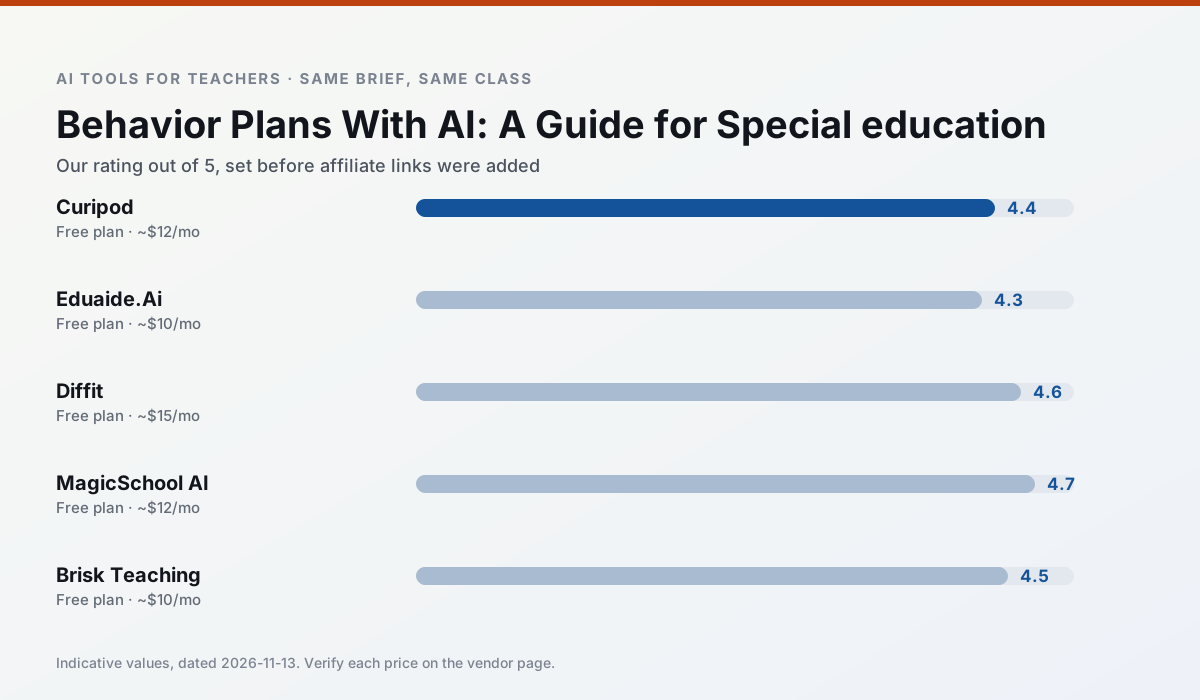
Side by side
Comparison table
Ratings reflect our timed classroom workflow, not vendor claims. Prices are indicative — verify on the vendor site.
| Tool | Best for | Free tier | Indicative paid plan | Standout feature | Our rating | Verdict | Try the tool |
|---|---|---|---|---|---|---|---|
| Curipod | formative assessment · exit tickets | Yes — Limited lessons per month | ~$12 /user/mo | Live polls and word clouds | 4.4 / 5 | Strong option | Try free |
| Eduaide.Ai | lesson planning · rubric creation | Yes — Daily generation cap | ~$10 /user/mo | Resource library | 4.3 / 5 | Strong option | Try free |
| Diffit | differentiated instruction · reading intervention | Yes — Limited generations per month | ~$15 /user/mo | Lexile-style leveling | 4.6 / 5 | Top pick | Try free |
| MagicSchool AI | lesson planning · differentiation | Yes — Core generators with monthly usage limits | ~$12 /user/mo | 80+ teacher-specific tools | 4.7 / 5 | Top pick | Try free |
| Brisk Teaching | feedback on writing · grading | Yes — Limited actions per month | ~$10 /user/mo | Works inside Google Docs | 4.5 / 5 | Top pick | Try free |
| Khanmigo | math practice · student tutoring | Yes — US teacher accounts, subject to eligibility | ~$4 /learner/mo | Socratic tutoring rather than answers | 4.3 / 5 | Strong option | Try free |
Match your situation
Best for X
Different jobs need different tools. Here is what we would open first in each case.
Curipod is built around teacher-monitored student spaces and audit logs rather than a consumer chat account, which is a different approval conversation.
Eduaide.Ai has the strongest tone control for family emails and report comments, provided you still read the message aloud before sending.
Diffit produces levelled versions from one source in a single pass, which is the highest-value differentiation shortcut we tested at this level.
MagicSchool AI has the shortest path from opening a tab to a usable draft, which matters more than the feature count on a Monday.
Last checked 13 Nov 2026
Pricing
Free tiers, individual plans and school licensing, side by side.
| Tool | Free plan | Individual / paid | School & district | Billing note | Verify |
|---|---|---|---|---|---|
| Curipod | $0 — Limited lessons per month | ~$12 /user/mo | Custom quote | Indicative — verify on vendor site | Vendor |
| Eduaide.Ai | $0 — Daily generation cap | ~$10 /user/mo | Custom quote | Indicative — verify on vendor site | Vendor |
| Diffit | $0 — Limited generations per month | ~$15 /user/mo | Custom quote | Indicative — verify on vendor site | Vendor |
| MagicSchool AI | $0 — Core generators with monthly usage limits | ~$12 /user/mo | Custom quote | Indicative — verify on vendor site | Vendor |
| Brisk Teaching | $0 — Limited actions per month | ~$10 /user/mo | Custom quote | Indicative — verify on vendor site | Vendor |
| Khanmigo | $0 — US teacher accounts, subject to eligibility | ~$4 /learner/mo | Custom quote | Indicative — verify on vendor site | Vendor |
Editorial rule: pricing is re-checked every 2–3 months and the top 50 pages are refreshed every 6 months. See our funding policy.
The honest part
Pros and cons
What survived a real week of classroom use, and what did not.
Pros
- High student engagement out of the box
- Great for quick checks for understanding
- No student accounts required for basic use
Cons
- Focused on delivery, not planning
- Requires reliable classroom devices
- Free tier is restrictive
Pros
- Very low entry price
- Good worksheet and rubric output
- Clean, uncluttered UI
Cons
- Smaller template set than MagicSchool
- Less polished export options
- Limited integrations
Pros
- Excellent for mixed-ability classes
- Produces printable and digital versions
- Minimal setup
Cons
- Narrower scope than all-in-one suites
- Leveling is approximate, not a formal assessment
- Heavy use burns through the free quota
Pros
- Widest purpose-built template library
- Strong free tier for individual teachers
- Fast to learn with almost no prompting skill
Cons
- Outputs still need standards review
- Best features sit behind the paid tier
- District approval can be slow
Pros
- No copy-paste between tools
- Fast inline feedback on student drafts
- Gentle learning curve
Cons
- Chrome-first workflow
- Extension permissions need IT approval
- Free quota is tight
In the classroom
Use cases
Five concrete workflows, with the tool we would open for each one.
Regrouping students after an assessment
Summarise anonymised results into skill groups, then generate one activity per group. Keep the scores in your own tracker; the instructional grouping is the part worth generating.
Recommended: CuripodA weekly family newsletter from bullet notes
Newsletters fail on length, not tone. Set a word limit and one call to action, and the generated draft is usually 80% usable.
Recommended: Eduaide.AiA question bank from a PDF or article
Feed a non-identifiable source and ask for items tagged by difficulty with the misconception behind each distractor. Spot-check every answer key; numerical items are least reliable.
Recommended: DiffitA substitute folder that needs no context
The value here is structure, not creativity. Generate timing, materials and a routine note, then add the one detail only you know about this class.
Recommended: MagicSchool AIAn IEP present-levels first draft
Use aggregated, anonymised data only. Ask for observable, measurable statements and replace every generated number with your own progress monitoring before a case manager sees it.
Recommended: Brisk Teaching
Questions teachers ask us
FAQ
Direct answers, also published as FAQPage structured data for search and AI assistants.
Can AI do behavior plans at mixed-grade level?
Which tool is best for behavior plans?
What is the biggest risk?
Sources & further reading
Our recommendation
Try MagicSchool AI free for your next behavior plans task
A large library of teacher-specific AI generators in one dashboard. Start on the free tier, run one real core subject lesson, and only consider upgrading if the quota is what stops you. Disclosure: we may earn a commission (30% recurring) at no extra cost to you.
Some links on this page are affiliate links. We may earn a commission at no extra cost to you. Our rankings are editorial and never pay-to-play. Never enter student PII into a free consumer account.
Keep reading
Related comparisons in this cluster.
Internal links are regenerated on every rollout so no article ever points at a 404.