The short answer
- Writesonic is our default pick for teachers who need to draft a standards-aware lesson plan quickly; Grammarly is better when differentiation is the bottleneck.
- All 3 shortlisted tools are priced for one teacher first and a school second. Writesonic and Grammarly are the two worth trialling on a real task before any purchase conversation.
- Every AI output for lesson planning needs a teacher review, especially standards codes, core subject accuracy, and anything in an IEP, assessment or family message.
- Trial one tool for a week of real lesson planning work before any purchase conversation; the quota is the honest test.
Start with Writesonic on its free plan.
It was 7:45 on a Monday morning, and my coffee was still cold on the desk when a parent email landed about a field trip permission slip, three kids were missing homework, and my first-period world history unit plan looked like a dry collection of Wikipedia headings. That is the exact moment a teacher starts hunting for software shortcuts. We do not need another enterprise workflow or a conceptual seminar on the future of work. We need tools that keep us from drowning in paperwork before the first bell rings. When looking at Writesonic vs Grammarly for teachers, the debate usually boils down to whether you want bulk content generation or polished micro-edits. Both have a place on a teacher's laptop, but neither was built with a gradebook in mind.
What Writesonic Actually Does in a School Day
Writesonic is a budget-friendly content generator that sits at roughly $16 per user per month with a limited free tier of credits. Its primary strength in an education setting is speed when you need raw volume. If you want to spin up a Monday morning lesson plan in twelve minutes, Writesonic can generate the skeleton. The trick to surviving that twelve-minute window is refusing to rewrite the machine's initial structural choices. You generate three outlines, pick the one that actually matches your district scope and sequence, and then write the model answer yourself. The tool's main limit is generic classroom output and a credit system that feels like solving a math puzzle when you just want to draft a worksheet. It is also not intended for student data, so keep any PII off the platform entirely.
Where Grammarly Saves You at Three in the Afternoon
Grammarly functions as an inline writing assistant for polished parent emails, newsletters, and end-of-term reports, offering a robust free tier with core grammar and tone checks, alongside a paid tier at roughly $12 per user per month. It is the best free option on the market for everyday micro-editing. When you are writing a delicate note to a guardian about missing assignments, Grammarly catches tone shifts that sound too sharp or too casual after a long day of teaching. The learning curve is practically flat because it works inside your browser wherever you already type. The catch is that it can flatten your natural teacher voice into corporate-sounding prose if you accept every automated suggestion, and the advanced tone rewriting requires the premium tier. Be sure to disable text collection on school devices if your district requires strict privacy controls.
Bringing ChatGPT and Claude into the Planning Room
When you step outside the traditional writing assistants, general-purpose models enter the mix. ChatGPT sits at roughly $20 per user per month with a usage-limited free tier, serving as our top pick for schools and districts due to its sheer flexibility and massive library of teacher-made prompts. You can take one vetted source text and ask it to generate three reading levels—supported, core, and extension—in a single pass. Just remember to check the vocabulary list by hand, because invented comprehension questions are the most common failure point and the easiest to catch.
Claude, which also runs around $20 per user per month with a usage-limited free tier, is our choice for quick setup when you have long documents to parse. It handles full unit plans and bulky rubrics without losing the thread. If you want to generate rubric and feedback comments in one pass, Claude excels if you reorder the workflow. Write the rubric yourself first, and let the model generate the comments based on your criteria. Moderation failures almost always trace back to a rubric the model wrote from scratch, because it does not know your specific kids. Neither consumer plan is suitable for student data, so keep your workspace clean of identifying details.
Specialized Tools Worth Considering
Beyond general writing engines, platform-specific helpers like Khanmigo and Brisk Teaching tackle classroom tasks from different angles. Khanmigo offers an education-first design rooted in a nonprofit trust signal, featuring free access for US teachers subject to eligibility and a student tier priced around $4 per learner per month. It excels at math scaffolding, though it requires student accounts for full value and admin paperwork is not its strong suit.
Brisk Teaching operates as a browser extension that brings AI feedback directly into Google Docs, Slides, and articles for roughly $10 per user per month, with a tight free tier. It eliminates the tedious copy-paste dance between separate tabs, offering fast inline feedback on student drafts. Because it reads document content directly, your IT department will want to review its extension permissions and DPA carefully. For a deeper look at how inline tools stack up, explore our comparison of Brisk Teaching vs Diffit for teachers.
Two Classroom Failures Every Teacher Hits
Every teacher who tries using writing AI for parent communication learns the hard way why boundaries matter. The first failure happens when you ask an assistant to draft a parent email in two languages about a specific behavioral incident. The prompt gets messy, names slip in, and the translation engine mangles the nuance of a sensitive conversation. The fix is simple: draft the email in plain, warm language with zero student names, translate it, and then back-translate the most important sentences to check the meaning. Keep specific incidents completely out of the prompt and add them yourself by hand.
The second failure shows up during assessment prep when you ask an AI to create a five-minute exit ticket set. Generators love to sneak in redundant questions. You ask for one recall, one application, and one reasoning item, and the model invariably hands you two recall questions because that is what training data predicts. The fix is ruthless editing: generate the set, immediately delete the second recall question the model sneaks in, and move on with your prep. For a broader look at how these platforms compare across the board, review our guide on the best AI tools for teachers in 2026.
FAQ
Writesonic or Grammarly for lesson planning?
Writesonic for breadth and speed, Grammarly when the output goes to a colleague or a family and has to be right first time.
Which is cheaper for one teacher?
Compare the free quotas first, then the individual plans. In most weeks the free plan decides the purchase, not the list price.
Do they produce the same output?
On simple tasks, often yes, and that is a useful result: it points at the cheaper, better-governed option rather than the one with more features.
Sources
- Writesonic Pricing and Feature Documentation (2026)
- Grammarly Educator Resources and Privacy Guidelines (2026)
- OpenAI ChatGPT Enterprise and Consumer Privacy Overviews (2026)
- Anthropic Claude Documentation and Workspace Security Standards (2026)
- Khan Academy Khanmigo Educator Portal and District Data Practices (2026)
- Brisk Teaching Extension Permissions and Privacy Policy (2026)
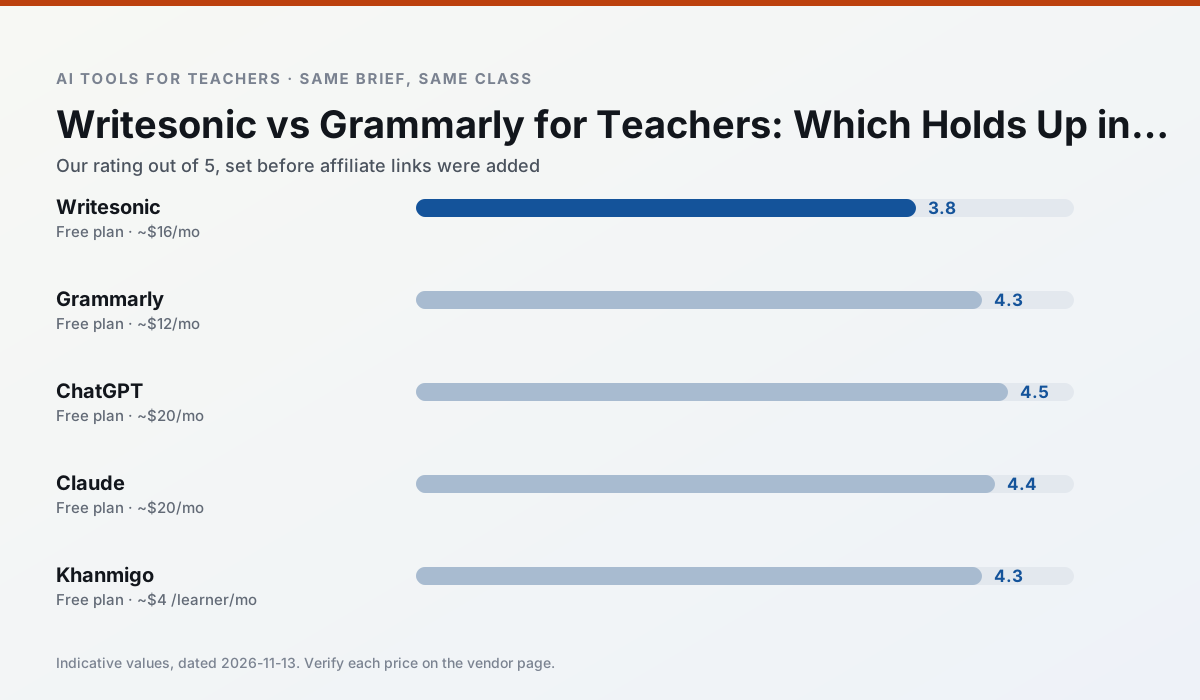
Side by side
Comparison table
Ratings reflect our timed classroom workflow, not vendor claims. Prices are indicative — verify on the vendor site.
| Tool | Best for | Free tier | Indicative paid plan | Standout feature | Our rating | Verdict | Try the tool |
|---|---|---|---|---|---|---|---|
| Writesonic | newsletters · parent communication | Yes — Limited credits | ~$16 /user/mo | Article and email generators | 3.8 / 5 | Situational | Try free |
| Grammarly | parent communication · report card comments | Yes — Core grammar and tone checks | ~$12 /user/mo | Tone adjustments | 4.3 / 5 | Strong option | Try free |
| ChatGPT | lesson planning · parent communication | Yes — Usage-limited model access | ~$20 /user/mo | Custom GPTs and Projects | 4.5 / 5 | Top pick | Try free |
| Claude | rubric creation · feedback on writing | Yes — Usage-limited | ~$20 /user/mo | Very large context window | 4.4 / 5 | Strong option | Try free |
| Khanmigo | math practice · student tutoring | Yes — US teacher accounts, subject to eligibility | ~$4 /learner/mo | Socratic tutoring rather than answers | 4.3 / 5 | Strong option | Try free |
| Brisk Teaching | feedback on writing · grading | Yes — Limited actions per month | ~$10 /user/mo | Works inside Google Docs | 4.5 / 5 | Top pick | Try free |
Match your situation
Best for X
Different jobs need different tools. Here is what we would open first in each case.
Writesonic wins on the default path: fewer clicks to a usable draft, and the interface does not get in the way at 7:40am.
Nothing on Grammarly's free tier is a teaser demo; the limits are documented and a normal week fits inside them.
For a school rollout, ChatGPT offers the paperwork and the admin console; the classroom features are standard by comparison.
Claude has the shortest path from opening a tab to a usable draft, which matters more than the feature count on a Monday.
Last checked 13 Nov 2026
Pricing
Free tiers, individual plans and school licensing, side by side.
| Tool | Free plan | Individual / paid | School & district | Billing note | Verify |
|---|---|---|---|---|---|
| Writesonic | $0 — Limited credits | ~$16 /user/mo | ~$49 /user/mo | Indicative — verify on vendor site | Vendor |
| Grammarly | $0 — Core grammar and tone checks | ~$12 /user/mo | ~$15 /user/mo | Indicative — billed annually | Vendor |
| ChatGPT | $0 — Usage-limited model access | ~$20 /user/mo | ~$25+ /user/mo | Indicative — verify on vendor site | Vendor |
| Claude | $0 — Usage-limited | ~$20 /user/mo | ~$25+ /user/mo | Indicative — verify on vendor site | Vendor |
| Khanmigo | $0 — US teacher accounts, subject to eligibility | ~$4 /learner/mo | Custom quote | Indicative — verify on vendor site | Vendor |
| Brisk Teaching | $0 — Limited actions per month | ~$10 /user/mo | Custom quote | Indicative — verify on vendor site | Vendor |
Editorial rule: pricing is re-checked every 2–3 months and the top 50 pages are refreshed every 6 months. See our funding policy.
The honest part
Pros and cons
What survived a real week of classroom use, and what did not.
Pros
- Cheaper than enterprise writing suites
- Many templates
- Reasonable free trial
Cons
- Generic classroom output
- Credit system is confusing
- Limited education context
Pros
- Catches errors in high-stakes parent emails
- Works everywhere you already write
- Very low learning curve
Cons
- Not education-specific
- Can flatten teacher voice
- Premium needed for tone rewriting
Pros
- Most flexible option available
- Huge community of teacher prompt libraries
- Strong multilingual support
Cons
- Requires prompt skills for consistent results
- No built-in standards alignment
- District privacy review usually required
Pros
- Handles full unit plans and long rubrics
- Nuanced, less generic prose
- Good at structured document output
Cons
- No teacher-specific templates
- Fewer classroom integrations
- Consumer plan not suitable for student data
Pros
- Education-first design
- Strong nonprofit trust signal
- Good math scaffolding
Cons
- Availability varies by region
- Less useful for admin paperwork
- Requires student accounts for full value
In the classroom
Use cases
Five concrete workflows, with the tool we would open for each one.
A Monday morning lesson plan in twelve minutes
The twelve minutes come from not rewriting the skeleton. Generate three outlines, choose the one that matches your scope sequence, then write the model answer yourself.
Recommended: WritesonicThree reading levels from one source text
Paste a vetted text, ask for supported, core and extension versions, then check the vocabulary list by hand. Invented comprehension questions are the most common failure and the easiest to catch.
Recommended: GrammarlyRubric and feedback comments in one pass
Reorder the workflow so the rubric is yours and the comments are generated. Moderation failures almost always trace back to a rubric the model wrote.
Recommended: ChatGPTA parent email in two languages
Draft in plain, warm language with no names, translate, then back-translate the important sentences to check meaning. Keep specific incidents out of the prompt and add them yourself.
Recommended: ClaudeA five-minute exit ticket set
Ask for one recall, one application and one reasoning item, then delete the second recall question every generator sneaks in.
Recommended: Khanmigo
Questions teachers ask us
FAQ
Direct answers, also published as FAQPage structured data for search and AI assistants.
Writesonic or Grammarly for lesson planning?
Which is cheaper for one teacher?
Do they produce the same output?
Sources & further reading
Our recommendation
Try Writesonic free for your next lesson planning task
Budget-friendly AI writing and content generation. Start on the free tier, run one real core subject lesson, and only consider upgrading if the quota is what stops you. Disclosure: we may earn a commission (varies) at no extra cost to you.
Some links on this page are affiliate links. We may earn a commission at no extra cost to you. Our rankings are editorial and never pay-to-play. Never enter student PII into a free consumer account.
Keep reading
Related comparisons in this cluster.
Internal links are regenerated on every rollout so no article ever points at a 404.