The short answer
- MagicSchool AI is our default pick for teachers who need to draft a standards-aware lesson plan quickly; SchoolAI is better when differentiation is the bottleneck.
- All 3 shortlisted tools are priced for one teacher first and a school second. MagicSchool AI and SchoolAI are the two worth trialling on a real task before any purchase conversation.
- Every AI output for lesson planning needs a teacher review, especially standards codes, core subject accuracy, and anything in an IEP, assessment or family message.
- Everything on this page dates from 2026-11-13; where a price could not be re-read, the row says so.
Start with MagicSchool AI on its free plan.
By October 2026, my desk was buried under four different district-approved tool logins, a stack of un-graded exit tickets from third period, and a looming deadline for a family newsletter that always takes twice as long as it should. If you are trying to figure out which platform deserves a spot on your bookmarks bar, the debate usually boils down to MagicSchool AI vs SchoolAI for teachers who want to save time without losing their minds. Both tools promise to lift the paperwork weight off your shoulders, but they approach the classroom from completely opposite directions.
MagicSchool AI acts like an oversized utility drawer filled with hundreds of purpose-built generators. You click on a specific tile—say, a rubric builder or a word problem generator—type in your topic and grade level, and watch the text drop onto your screen. It requires almost no prompting skill, which is a relief when your brain is fried at 4:00 PM.
SchoolAI, on the other hand, is built around student interaction and real-time monitoring. While MagicSchool is primarily designed to help teachers create materials behind the scenes, SchoolAI builds a controlled, AI-driven workspace where kids can chat with a digital tutor or complete a guided activity while you watch their progress from a dashboard.
The Generation Battle: Pre-Built Templates Versus Live Student Spaces
When you sit down to plan a lesson, the sheer volume of options in MagicSchool AI can feel overwhelming, but it is hard to beat the speed. Need a question bank from a PDF or article? Feed a non-identifiable source into MagicSchool and ask for items tagged by difficulty, making sure to request the misconception behind each distractor. You still have to spot-check every answer key because numerical items are notoriously unreliable, but the heavy lifting of drafting stems and choices is done.
SchoolAI shines when you need to differentiate instruction on the fly without handing kids an unmonitored chatbot. If you are regrouping students after an assessment, you can use SchoolAI spaces to run parallel activities matched to different skill tiers. The safeguarding defaults here are robust, which makes it a strong contender for district approval. Where MagicSchool hands you the lesson plan to print or copy into your LMS, SchoolAI puts the digital tool directly into the hands of the students under your watchful eye.
Prompt: Generate a 3-tier small group activity for 8th-grade ratios based on yesterday's formative check, focusing on proportional vs non-proportional relationships.

Initial Output: A 3-column table with generic remediation worksheets, standard practice problems, and an extension project involving recipe scaling.

Required Edits:
1. Replaced the generic remediation column with a concrete, hands-on manipulative task using counters.
2. Tightened the extension project so it fits into a strict 15-minute station rotation instead of taking two days.
Managing Mixed-Ability Classes and D differentiation
Mixed-ability classes test your patience every single day. When I tried to build a five-minute exit ticket set in MagicSchool, I asked for one recall, one application, and one reasoning item, and then promptly deleted the second recall question the generator snuck in. It takes practice to learn how to edit the outputs of these massive template libraries.
For running live, multi-level stations, SchoolAI takes the crown for mixed-ability classes because you can spin up distinct AI tutor personas for different reading levels in the same room. You can watch what children type in real time and step in before a misconception hardens into a mistake. If your students live on devices all day, SchoolAI fits that workflow naturally. If your kids need paper and pen, or if you just want to prep materials while drinking your coffee at your desk, MagicSchool stays out of your way and gets the job done faster.
Beyond Lesson Plans: Newsletters and Substitute Folders
Teachers do not just plan lessons; we manage public relations and emergency absences. A weekly family newsletter from bullet notes always fails on length, not tone. If you use Notion AI for long-term curriculum records and parent-facing writing, you can drop your raw bullet points into a structured database and set a strict word limit and one call to action. The generated draft is usually eighty percent usable because Notion treats it as an ongoing documentation task rather than a single lesson snapshot.
When you need to prep an emergency substitute folder that needs no context, MagicSchool's structured layout generators save the day. The value here is structure, not creativity. You generate the timing, materials, and a routine note, then add the one detail only you know about this class, like which student needs to sit near the door.
If you are looking at institutional writing feedback, Turnitin Clarity and Feedback Studio handle heavy administrative setup and detailed revision histories, making them the best choice for schools and districts that require standardized plagiarism and similarity checking. Meanwhile, specialized tools like Class Companion handle AI feedback on handwritten and scanned student work, which is a lifesaver for math teachers who refuse to grade entirely on screens. If you want to turn text into explainer videos with stock media and AI voiceovers without dealing with digital avatars, Fliki handles that workflow, though you have to watch out for minute-based limits and pricing jumps. For a broader look at how these platforms stack up against other apps like Brisk, check out our guide on the best AI tools for teachers in 2026, or read our breakdown of Brisk Teaching vs Diffit.
Pricing, Privacy, and District Realities
Choosing between these platforms usually comes down to budget and institutional paperwork. MagicSchool offers core generators with monthly usage limits on its free tier, with paid plans sitting around $12 per user per month indicatively. SchoolAI offers limited free seats, with full paid features running around $15 per user per month indicatively, and much of its enterprise pricing handled via custom quotes.
Privacy remains the hurdle that stops many teachers in their tracks. MagicSchool states that no student PII is required for core generators, but you still need to confirm your district data privacy agreement. SchoolAI is designed from the ground up for district approval, offering school-focused DPAs and audit logs, though it requires school-wide buy-in to unlock its full potential. Notion AI works well for personal curriculum databases at roughly $10 per user per month indicatively, but you must avoid storing student PII in personal workspaces. Turnitin Clarity and Class Companion both require strict institutional or teacher-managed DPAs because student work is actively uploaded into their systems.
If you are a solo teacher looking for immediate, frictionless planning help, MagicSchool AI is the easiest starting point. If your school is ready to invest in safe, monitored student-facing AI workspaces, SchoolAI holds up better in a live, chaotic classroom.
FAQ
MagicSchool AI or SchoolAI for lesson planning?
MagicSchool AI for breadth and speed, SchoolAI when the output goes to a colleague or a family and has to be right first time.
Which is cheaper for one teacher?
Compare the free quotas first, then the individual plans. In most weeks the free plan decides the purchase, not the list price.
Do they produce the same output?
On simple tasks, often yes, and that is a useful result: it points at the cheaper, better-governed option rather than the one with more features.
Sources
- MagicSchool AI Vendor Pricing and Feature Overview (magicschool.ai)
- SchoolAI Product Documentation and Safety Architecture (school.ai)
- Notion AI Workspace and Pricing Guidelines (notion.so)
- Turnitin Feedback Studio and Institutional Compliance (turnitin.com)
- Class Companion Platform Specifications (classcompanion.com)
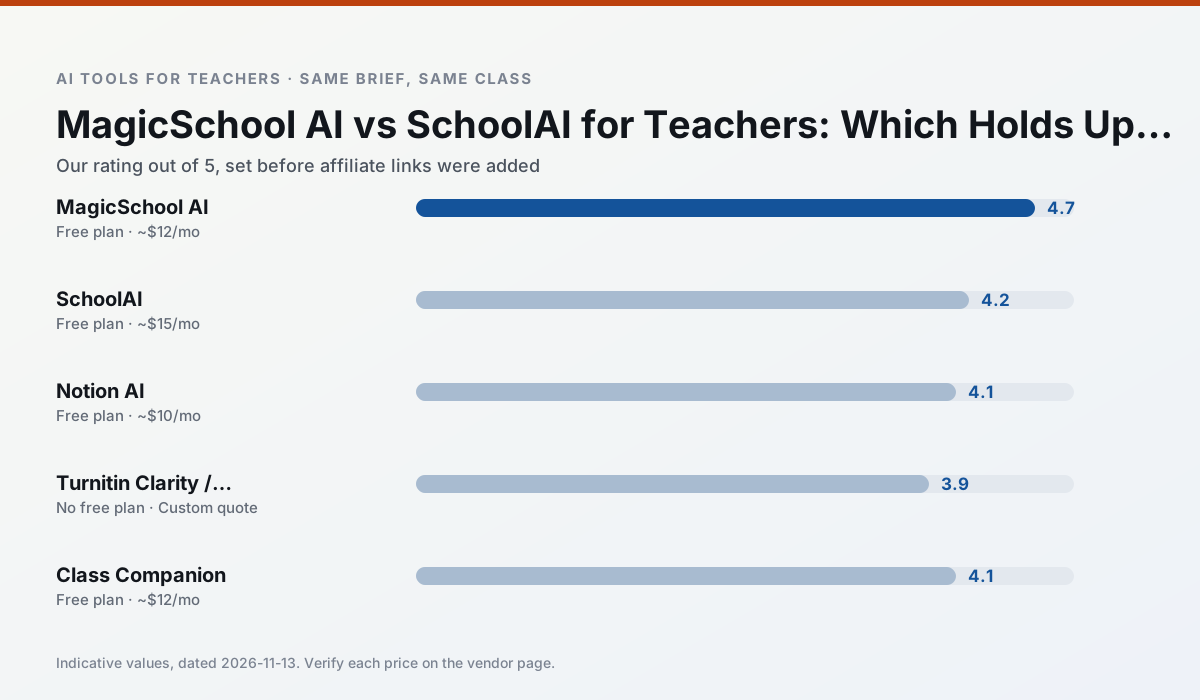
Side by side
Comparison table
Ratings reflect our timed classroom workflow, not vendor claims. Prices are indicative — verify on the vendor site.
| Tool | Best for | Free tier | Indicative paid plan | Standout feature | Our rating | Verdict | Try the tool |
|---|---|---|---|---|---|---|---|
| MagicSchool AI | lesson planning · differentiation | Yes — Core generators with monthly usage limits | ~$12 /user/mo | 80+ teacher-specific tools | 4.7 / 5 | Top pick | Try free |
| SchoolAI | student-safe AI · differentiated instruction | Yes — Limited seats | ~$15 /user/mo | Teacher-monitored student chats | 4.2 / 5 | Strong option | Try free |
| Notion AI | curriculum mapping · unit planning | Yes — Limited AI usage | ~$10 /user/mo | Linked databases | 4.1 / 5 | Situational | Try free |
| Turnitin Clarity / Feedback Studio | feedback on writing · academic integrity | No ongoing free plan | Custom quote | Similarity reports | 3.9 / 5 | Situational | Try free |
| Class Companion | grading · feedback on writing | Yes — Limited assignments | ~$12 /user/mo | Handwriting recognition | 4.1 / 5 | Situational | Try free |
| Fliki | video lessons · audio lessons | Yes — Watermarked, limited minutes | ~$21 /user/mo | Blog/text to video | 4.0 / 5 | Situational | Try free |
Match your situation
Best for X
Different jobs need different tools. Here is what we would open first in each case.
For anything students touch directly, MagicSchool AI offers the supervision controls and logging that IT will ask about first.
SchoolAI keeps the same task across levels, which is what makes a differentiated set defensible in moderation.
Notion AI has the strongest tone control for family emails and report comments, provided you still read the message aloud before sending.
For a school rollout, Turnitin Clarity / Feedback Studio offers the paperwork and the admin console; the classroom features are standard by comparison.
Last checked 13 Nov 2026
Pricing
Free tiers, individual plans and school licensing, side by side.
| Tool | Free plan | Individual / paid | School & district | Billing note | Verify |
|---|---|---|---|---|---|
| MagicSchool AI | $0 — Core generators with monthly usage limits | ~$12 /user/mo | Custom quote | Indicative — verify on vendor site | Vendor |
| SchoolAI | $0 — Limited seats | ~$15 /user/mo | Custom quote | Indicative — verify on vendor site | Vendor |
| Notion AI | $0 — Limited AI usage | ~$10 /user/mo | ~$8 /user/mo | Indicative — verify on vendor site | Vendor |
| Turnitin Clarity / Feedback Studio | No ongoing free tier | Custom quote | Custom quote | LMS-wide deployment | Vendor |
| Class Companion | $0 — Limited assignments | ~$12 /user/mo | Custom quote | Indicative — verify on vendor site | Vendor |
| Fliki | $0 — Watermarked, limited minutes | ~$21 /user/mo | ~$66 /user/mo | Indicative — verify on vendor site | Vendor |
Editorial rule: pricing is re-checked every 2–3 months and the top 50 pages are refreshed every 6 months. See our funding policy.
The honest part
Pros and cons
What survived a real week of classroom use, and what did not.
Pros
- Widest purpose-built template library
- Strong free tier for individual teachers
- Fast to learn with almost no prompting skill
Cons
- Outputs still need standards review
- Best features sit behind the paid tier
- District approval can be slow
Pros
- Designed for district approval
- Teacher visibility into student use
- Good safeguarding defaults
Cons
- Requires school-wide buy-in
- Less flexible than general LLMs
- Pricing is mostly quote-based
Pros
- Great for long-term curriculum records
- Strong team collaboration
- Flexible structure
Cons
- Setup time is significant
- AI add-on pricing changed more than once
- Not purpose-built for lesson generation
Pros
- Already licensed at many schools
- Consistent institutional workflow
- Detailed revision history
Cons
- Individual teachers cannot buy it
- AI detection remains contested
- Heavy administrative setup
Pros
- Useful where work is done on paper
- Fast, specific comments
- Good math support
Cons
- Scan quality affects accuracy
- Narrow use case
- Feedback still needs teacher review
In the classroom
Use cases
Five concrete workflows, with the tool we would open for each one.
A weekly family newsletter from bullet notes
Newsletters fail on length, not tone. Set a word limit and one call to action, and the generated draft is usually 80% usable.
Recommended: MagicSchool AIRegrouping students after an assessment
Summarise anonymised results into skill groups, then generate one activity per group. Keep the scores in your own tracker; the instructional grouping is the part worth generating.
Recommended: SchoolAIA substitute folder that needs no context
The value here is structure, not creativity. Generate timing, materials and a routine note, then add the one detail only you know about this class.
Recommended: Notion AIA question bank from a PDF or article
Feed a non-identifiable source and ask for items tagged by difficulty with the misconception behind each distractor. Spot-check every answer key; numerical items are least reliable.
Recommended: Turnitin Clarity / Feedback StudioA five-minute exit ticket set
Ask for one recall, one application and one reasoning item, then delete the second recall question every generator sneaks in.
Recommended: Class Companion
Questions teachers ask us
FAQ
Direct answers, also published as FAQPage structured data for search and AI assistants.
MagicSchool AI or SchoolAI for lesson planning?
Which is cheaper for one teacher?
Do they produce the same output?
Sources & further reading
Our recommendation
Try MagicSchool AI free for your next lesson planning task
A large library of teacher-specific AI generators in one dashboard. Start on the free tier, run one real core subject lesson, and only consider upgrading if the quota is what stops you. Disclosure: we may earn a commission (30% recurring) at no extra cost to you.
Some links on this page are affiliate links. We may earn a commission at no extra cost to you. Our rankings are editorial and never pay-to-play. Never enter student PII into a free consumer account.
Keep reading
Related comparisons in this cluster.
Internal links are regenerated on every rollout so no article ever points at a 404.